In Elementor, your login email is the primary address that establishes account ownership and grants access to My Elementor, while your billing email is used solely for receiving invoices and payment receipts. Changing your billing email does not alter your login credentials or give account management access to the billing contact.
What is the difference between an Elementor login email and a billing email?
Elementor keeps account logins and financial communications separate to protect account security and simplify team billing.
| Feature | Login Email | Billing Email |
| Primary Role | Used to sign into Elementor services and access the account | Used strictly to receive routine invoices, tax documents, and successful payment receipts |
| Account Ownership | Defines the legal owner of subscriptions, licenses, and connected sites | Grants no account ownership or administrative rights |
| Access Limits | Grants full management rights, security settings, password resets, and plan changes | Cannot be used to log in, reset passwords, or modify plans |
What permissions and capabilities are tied to your login email?
Your login email acts as the primary administrator key for your Elementor account:
- Dashboard & Account Access: Required to log into My Elementor, granting full access to dashboard details, active subscriptions, security settings, saved payment methods, and downloads.
- Support & Critical Alerts: Provides access to your support conversation history and receives all critical system alerts, including password reset links, verification codes, 2FA prompts, and failed renewal payment warnings.
- Subscription & Ownership Control: Gives sole authority to manage subscriptions, update master account details, purchase or cancel licenses, and control primary account ownership.
What is the billing email used for and who should receive it?
The billing email handles payment notices without granting access to site administration:
- Invoices and Receipts: Automatically receives successful purchase confirmations and routine PDF renewal receipts.
- Finance Team Routing: Allows you to send receipts directly to an accounting department (such as billing@yourcompany.com) or an external bookkeeper.
- Keeping Access Separate: Ensures financial staff receive invoices without giving them access to your My Elementor dashboard, support ticket history, or account settings.
Need to update the physical address used to generate your invoices? Note that each user can only have one billing address. Read our guide on How to Update Your Billing Address for full instructions.
Frequently Asked Questions
- Can I log in using my billing email? No. Elementor authentication requires your registered Login Email. Entering a billing email on the sign-in screen will result in an “Account Does Not Exist” or invalid credentials error.
- Why am I unable to log in after updating my billing email? Updating your billing email only changes where invoice PDFs and receipts are delivered. It does not alter your login username or password. You must continue signing in with your original Login Email.
- How do I change my primary Login Email?
- Click your profile icon in the upper-right corner of the My Elementor Dashboard and select My profile.
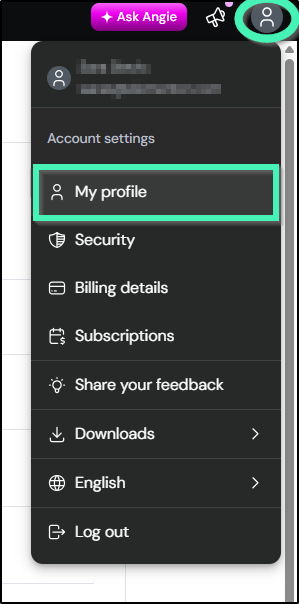
- Navigate to Personal details section and click Change email next to your current email.
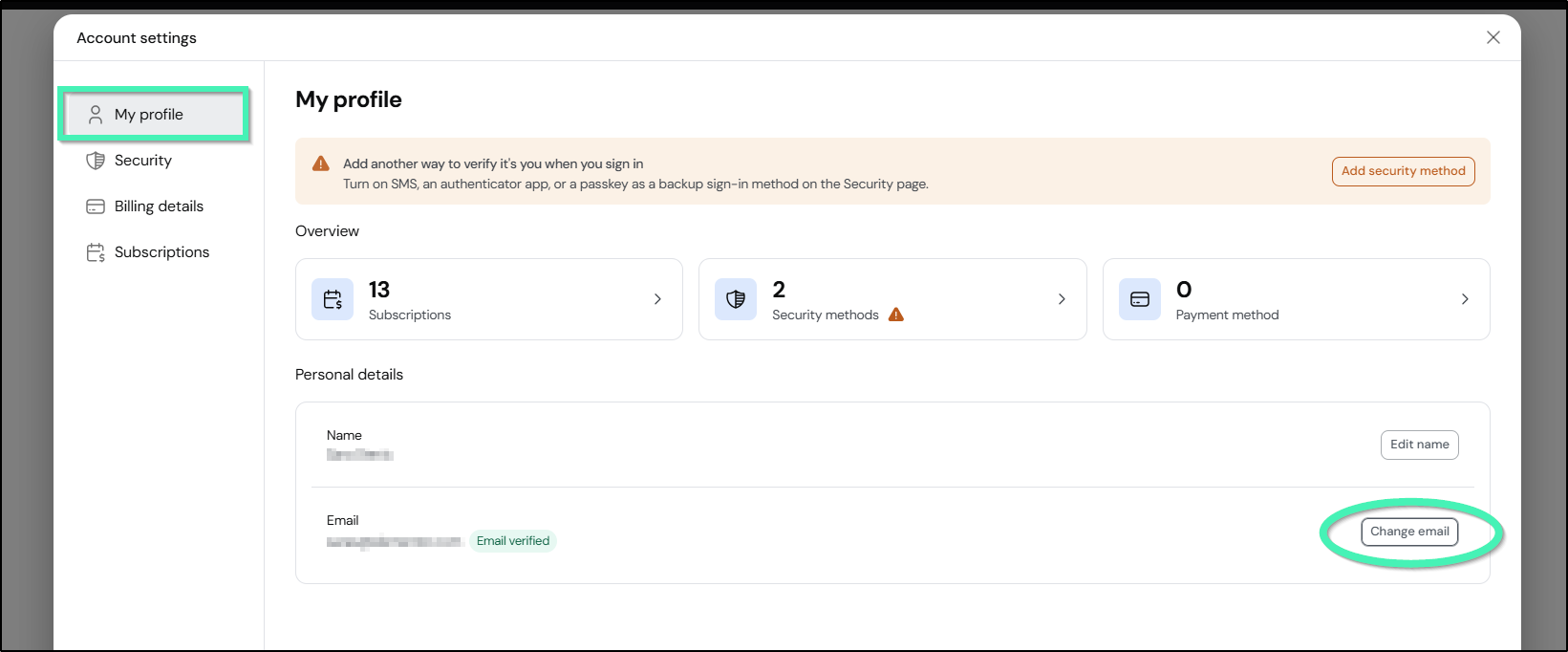
- Enter the new email address, check the required confirmation boxes, and submit the request.
- Confirm the validation email sent to your new address.
- Click your profile icon in the upper-right corner of the My Elementor Dashboard and select My profile.
Note
Changing your login email transfers full access to your My Elementor dashboard and support ticket history to the new address owner. Once validated, system notifications will route to the new email, and you will no longer be able to log in using the former email address.