
Running a multilingual WordPress site is a great way to reach a global audience, but it brings real privacy complexity with it. Visitors from different countries fall under different privacy laws, like the GDPR in Europe and the CCPA in California. How do you show the right banner, in the right language, to the right person, without slowing your pages down? Here’s the good news: it’s more manageable than it sounds. You can have a fully translated, geo-targeted consent system running in minutes with Cookie Consent, a native WordPress capability from Elementor that makes global compliance genuinely simple.
Key Takeaways
- Legal compliance is regional: different visitors need different legal disclosures depending on where they live.
- Native integration saves resources: a WordPress-native tool keeps your site fast and skips clunky external setups.
- Language matching is critical: your cookie banner has to match the visitor’s language to meet GDPR requirements.
- Google Consent Mode v2 is mandatory: if you target EU visitors and use Google services, you need to support this standard.
- Consent logs are your safety net: keeping clear records of visitor choices protects you during compliance audits.
Why Multilingual WordPress Sites Face Unique Cookie Consent Challenges
Running a site in multiple languages means working with a diverse audience. Each language represents visitors who likely fall under different legal jurisdictions, which complicates your privacy strategy in ways a single static banner can’t handle.
The Multi-Language Compliance Trap
Under the GDPR, consent has to be informed, specific, and freely given. If a visitor is browsing your site in Spanish but your banner only shows up in English, you’re not meeting that standard: the user needs to understand what they’re agreeing to before any scripts load. This trips a lot of site owners up, since they translate their posts and pages but leave their compliance tools stuck in one default language. To stay safe, your banner needs to adapt to whatever language the visitor is using.

Managing Regional Regulations Dynamically
A visitor from Germany needs opt-in consent, with cookies blocked by default. A visitor from California, under the CCPA, needs an opt-out model instead, one where they can easily stop the sale or sharing of their personal data. Apply one blanket policy to everyone and you’ll either risk non-compliance in strict regions or hurt your marketing in relaxed ones by blocking cookies unnecessarily. What you need is a system that detects where each visitor is and shows them the framework for their region.
The Shift Toward Privacy-First Browsing
Modern browsers make it harder to track users across the web. As third-party cookies phase out, platforms have shifted toward first-party data and stronger privacy frameworks. That’s where Global Privacy Control (GPC) and other browser-level signals come in, and your site needs to listen for them automatically. If a visitor sets their browser to reject tracking, your cookie consent tool has to respect that choice right away, no matter what language they speak.
To help you spot the gaps before a regulator does, here are the common failure points on multilingual sites:
- Failing to detect browser languages: some tools only check the site’s default language instead of the visitor’s preferred browser settings.
- Leaving cookies unblocked before consent: a serious gap where tracking scripts load while the banner still sits on screen.
- Using confusing legal language: banners full of complex legalese instead of clear, translated terms can invalidate the consent you collect.
- Slowing down mobile layouts: heavy external tracking scripts can make your mobile pages stutter and fail Core Web Vitals checks.
- Ignoring consent records: if a regulator ever asks for proof of consent, many sites have no localized logs to show.
Introducing Cookie Consent: The Native WordPress Solution
To solve these compliance challenges without adding clutter to your workflow, Elementor built a native solution right into WordPress. Cookie Consent lives directly in your WordPress dashboard, so you don’t need a third-party platform or a separate monthly subscription.
This capability suits site owners who want a clear, manageable way to handle visitor privacy. Since everything runs inside your WordPress admin, you cut out the risk of external script failures. It works well with popular translation tools, handles regional requirements without extra configuration, and comes included in Elementor One, with a genuinely capable free tier too.
Here are ten things Cookie Consent does to keep your site compliant:
- Manages cookie banners from your WordPress admin dashboard directly, no external accounts needed.
- Scans your site automatically, identifying and categorizing active cookies and tracking scripts.
- Customizes the appearance of your banners so they match your multilingual brand designs.
- Translates banner text into multiple languages to match your active site translations.
- Tracks visitor selections in secure, local consent logs for legal audit trails.
- Blocks tracking codes automatically until the user actively gives permission.
- Adapts to Google Consent Mode v2 requirements to keep your ad tracking compliant.
- Detects visitor location to serve geo-targeted consent banners.
- Honors Global Privacy Control (GPC) browser signals, respecting automatic opt-out requests.
- Generates customized privacy policy drafts using a built-in policy assistant.
Step-by-Step Guide to Setting Up Multilingual Cookie Consent
Setting up your compliance system doesn’t have to be an all-day project, it’s simpler than it sounds. You can have a fully translated, geo-targeted banner running in just a few minutes. Here’s how to configure the cookie consent capability properly.

- Activate the Cookie Consent capability: log into your WordPress dashboard, find the compliance settings, and turn on the feature to add the native consent dashboard to your admin menu.
- Run an automated cookie scan: start the built-in scanner. It crawls your site, detects active tracking scripts (Google Analytics, Facebook Pixel, custom cookies), and groups them into logical categories.
- Set up your language translations: head to the translation section, add your target languages, and add the localized text for banner titles, descriptions, button labels, and cookie categories.
- Configure geo-targeting rules: decide where your banners display. Set strict opt-in rules for European visitors, opt-out rules for California users, and hide the banner entirely in regions that don’t require legal disclosures.
- Design the consent banner: use the native visual editor to adjust colors, fonts, margins, and button shapes, so the notice feels like a natural part of your site rather than a distracting pop-up.
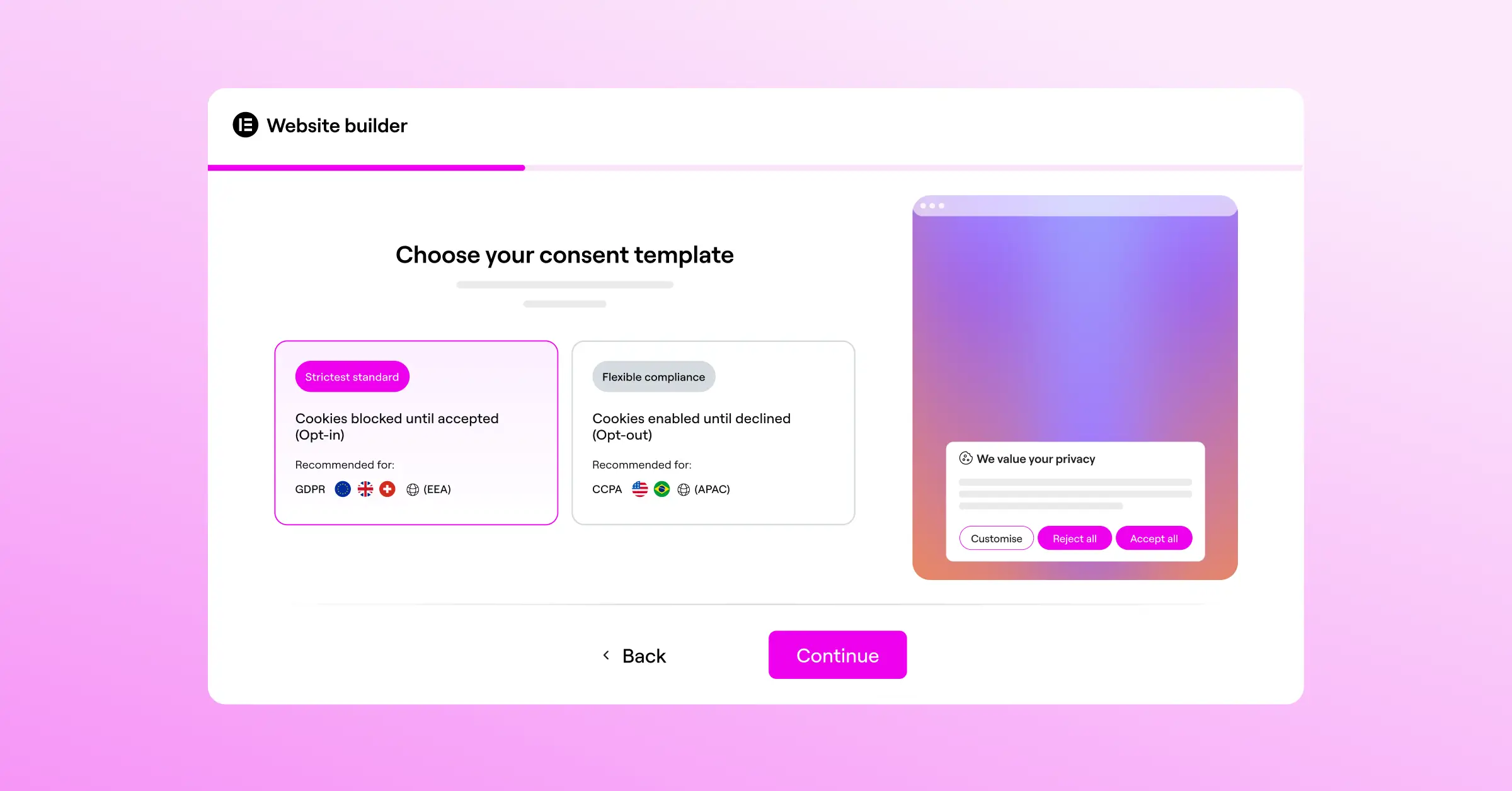
Work through these steps once and you’ll have every global visitor covered, a localized, legally compliant experience no matter where they’re browsing from.
Technical Configuration: Integrating with Translation Tools
For your cookie consent capability to work correctly on a multilingual site, it needs to connect with your translation setup. Whether you’re using WPML, Polylang, or TranslatePress, the integration follows a straightforward path: map your language codes (like en_US, fr_FR, or es_ES) to the corresponding cookie banners.
When a visitor switches languages, the translation tool updates the page’s HTML lang attribute. Cookie Consent picks up on the change and swaps the default English text for your pre-translated Spanish or French strings. Since this happens server-side, there’s no awkward flicker or delay, so the visitor gets a smooth experience from the first second.
“When managing privacy across borders, having your consent tools built directly into your WordPress dashboard is a huge advantage. It reduces external dependencies and keeps your page speed intact while ensuring you stay fully compliant with local laws.”
Itamar Haim, Web Compliance Specialist
To keep everything running cleanly behind the scenes, you’ll also need to classify your scripts properly. That’s what keeps cookies from loading before the visitor gives the green light.
Advanced Script Management and Google Consent Mode v2
One of the most important pieces of modern privacy compliance is Google Consent Mode v2. If you run Google Analytics or Ads and target traffic in the European Union, supporting this standard isn’t optional, it’s required. It transmits the user’s consent choice directly to Google’s servers, letting their systems adjust how they collect and process data.
When a user rejects analytical cookies, Google Consent Mode v2 sends anonymous pings instead of tracking personal identifiers, keeping your data models accurate while still respecting the user’s privacy choices. The cookie consent capability handles this automatically, so you won’t need to write custom JavaScript.
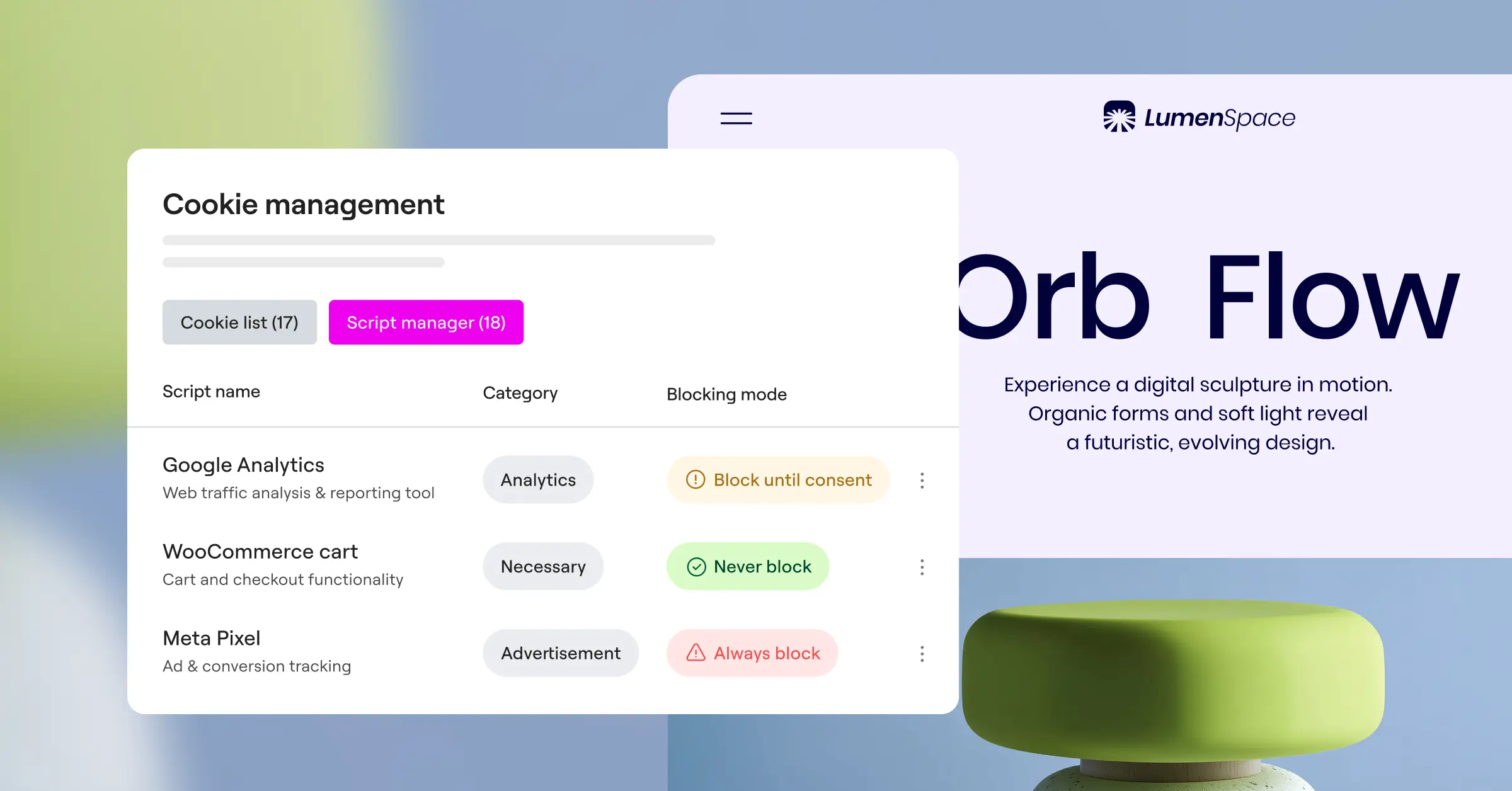
Scripts are organized into four standard groups:
- Necessary: these cookies are critical for basic site functions, like shopping carts or user logins, and don’t require user consent.
- Preferences: these files remember user choices, like language selections, layout options, or region settings.
- Statistics: these tools track how visitors move around your site, showing which pages are popular and where users struggle.
- Marketing: these trackers deliver targeted ads based on browsing history and user profiles across platforms.
Once configured, test your setup thoroughly. Confirm scripts stay blocked in every language before a visitor interacts with the banner. Here’s a straightforward testing routine:
- Open an incognito window: load your site in a private browser session with the developer console open.
- Inspect active cookies: check the Application or Storage tab in your browser’s dev tools to confirm no non-necessary cookies loaded before you click anything.
- Switch languages: change the site’s language setting and verify the banner text updates instantly to match it.
- Accept or decline cookies: click Accept or Decline and watch the console to confirm the right scripts load or stay blocked.
Once your tests check out, take a few minutes to tidy up your database and script configuration to keep your WordPress site running fast.
- Clean up old tracking codes: remove legacy tracking scripts hardcoded into your theme’s header files.
- Consolidate marketing scripts: run your external tracking codes through a single manager so extra connections don’t slow page speeds.
- Optimize compliance database tables: clean up old user consent logs periodically to keep your database lean.
- Set logical cache expirations: adjust cache settings for your cookie consent files so returning visitors don’t re-download the banner assets every time.
Comparing Multilingual Consent Solutions
There are several established options for managing cookie consent on WordPress sites. Here’s how the native Cookie Consent capability stacks up against other popular compliance solutions on the features that matter most for multilingual setups.
| Feature / Capability | Cookie Consent (Native) | Cookiebot | CookieYes | Complianz | iubenda |
|---|---|---|---|---|---|
| Dashboard Integration | WordPress-Native | External Portal | External Portal | WordPress-Native | External Portal |
| Google Consent Mode v2 | Fully Supported | Fully Supported | Fully Supported | Fully Supported | Fully Supported |
| Multilingual Setup | Direct Dashboard Sync | Cloud Configured | Cloud Configured | Plugin Integration | Cloud Configured |
| Geo-Targeting | Included natively | Tiered plans | Tiered plans | Available | Available |
| Consent Logs | Local WordPress DB | Cloud Storage | Cloud Storage | Local WordPress DB | Cloud Storage |
| Free Tier | Yes | Limited | Yes | Yes | Limited |
| Policy Generator | Built-in | External | Available | Built-in | Built-in |
Cookiebot, CookieYes, and iubenda are well-established tools that handle the compliance basics well. Where they differ from Cookie Consent is mostly in where they store data and how closely they connect to your WordPress workflow. External portal tools require managing settings in a separate dashboard, which can mean extra steps and added monthly costs. WordPress-native tools like Complianz and Cookie Consent keep configuration in one place, making updates and translation matching simpler.
Why a Native Dashboard Helps Your Page Speed
Every millisecond counts for page speed. Slow sites frustrate visitors and rank worse in search. Many cloud-based cookie systems make your site load external JavaScript from remote servers before the banner can render, which blocks pages from loading quickly and leads to poor layout-shift scores and lower Core Web Vitals marks.
A native solution keeps things fast because the styling, scripts, and translation files sit locally on your server. Your pages load the banner files alongside your site assets, cutting render-blocking issues. If you’re already building your site with Elementor, the cookie consent capability works cleanly alongside other Elementor tools, keeping your code organized and your site quick.
Here are the key ways a native consent tool keeps your performance strong:
- Loads compliance assets locally to avoid slow external server lookups.
- Minimizes database requests by caching user consent statuses.
- Defers non-essential scripts until the visitor interacts with your content.
- Compresses CSS files to keep banner styling lightweight.
- Prevents layout shifts by reserving standard banner sizes in your code.

Keep your code lean and load scripts locally, and you protect the user experience while staying compliant with international privacy rules. If you’re running an Elementor-built site, Elementor One includes Cookie Consent alongside Web Accessibility and other compliance tools, covering multiple bases from a single subscription.
Frequently Asked Questions
Does my multilingual site need a cookie banner in every language?
Yes. Under the GDPR, consent is only legally valid if it’s fully informed. If visitors can’t read your cookie policy in their language, their consent doesn’t count as informed, so show your banner in the active language of the page they’re viewing.
How does Cookie Consent handle translation tools like WPML or Polylang?
The cookie consent capability checks the active language code of the current page and shows the matching pre-loaded translation file. It’s built to work with popular WordPress translation tools, keeping the experience consistent without extra setup.
Is Google Consent Mode v2 required for all WordPress sites?
It’s required if you target visitors in the EU and use Google services like Google Analytics or Ads. Without Consent Mode v2, Google can’t track conversion data or deliver targeted ads for your European traffic.
Can I show different banners to visitors from different regions?
Yes. With geo-targeting, you can show an opt-in banner to EU visitors, an opt-out banner to California residents, and turn it off entirely for regions with less strict requirements.
Does using a native cookie consent tool slow down my site?
No, it’s actually the opposite. Native tools run directly from your server, so there are no slow requests to third-party databases, and local script loading keeps your page speed strong and protects your rankings.
What is Global Privacy Control (GPC)?
Global Privacy Control is a browser-level setting that lets users signal privacy preferences automatically. Modern cookie consent tools detect this signal and block marketing cookies right away, without the user clicking anything on your banner.
Where are consent logs stored?
The Cookie Consent capability saves consent records locally in your WordPress database, keeping visitor data private, cutting reliance on external servers, and giving you a secure audit trail if a regulator asks to review it.
Do I need an external privacy policy generator?
Not necessarily. The built-in policy assistant helps you create compliant legal text right in your dashboard, which you can customize to match your tracking tools and translate for your site’s other languages.
Does the entry-level plan of Cookie Consent support multilingual setups?
Yes, the entry-level plan includes the core translation settings to map your cookie banners to different language codes. For more advanced features, like automated geo-targeting and script scanning, you can upgrade to Elementor One.






