
Running an online store is rewarding, but the legal side can feel like a lot. If GDPR and CCPA have ever left you overwhelmed, you’re in good company. The good news: staying compliant doesn’t have to hurt your sales, slow down your site, or look out of place on your pages. Here’s a practical look at the best ways to handle visitor consent, whether you’re starting from scratch or leveling up a setup that’s been limping along for a while.

Key Takeaways
- Native tools reduce weight – Running your consent manager directly from your WordPress dashboard keeps your site fast and simple to manage.
- Consent Mode v2 is essential – If you use Google Ads or Analytics, supporting Google Consent Mode v2 keeps your data accurate and your campaigns running properly.
- Geo-targeting saves conversions – Show strict banners only to visitors in privacy-regulated regions and keep the path clear for everyone else.
- Brand consistency builds trust – Customizing your banner to match your shop’s design prevents visitors from feeling suspicious of your popups.
Why Privacy Strategies Matter for Online Stores in 2026
Modern ecommerce runs on data, but customers want to know their information is handled with care. Regulators have issued real fines for tracking users without consent, and browsers are phasing out third-party cookies too, so how you manage consent now shapes your marketing results. A smart consent setup isn’t just a legal checkbox anymore. It shows customers you respect their boundaries, and when people feel safe on your site, they’re more likely to buy and come back.
1. Native Dashboard Management with Cookie Consent
Keeping your privacy tools inside your WordPress dashboard is one of the biggest practical wins you can give yourself. The simplest way is Elementor‘s built-in Cookie Consent capability, which handles compliance right where you build your site, so you’re never pasting code snippets by hand or logging into a separate platform.
With the native Cookie Consent capability, you can have your banner live in under five minutes. It skips heavy external scripts, so your pages stay fast, and since it sits inside the Elementor One ecosystem, setup feels like a natural extension of what you’re already doing. You also get polished templates out of the box, so your banner looks as good as the rest of your store.

Core features of Cookie Consent:
- Integrates with your WordPress dashboard, so you manage everything from one place.
- Walks you through a three-step wizard that gets your banner live fast.
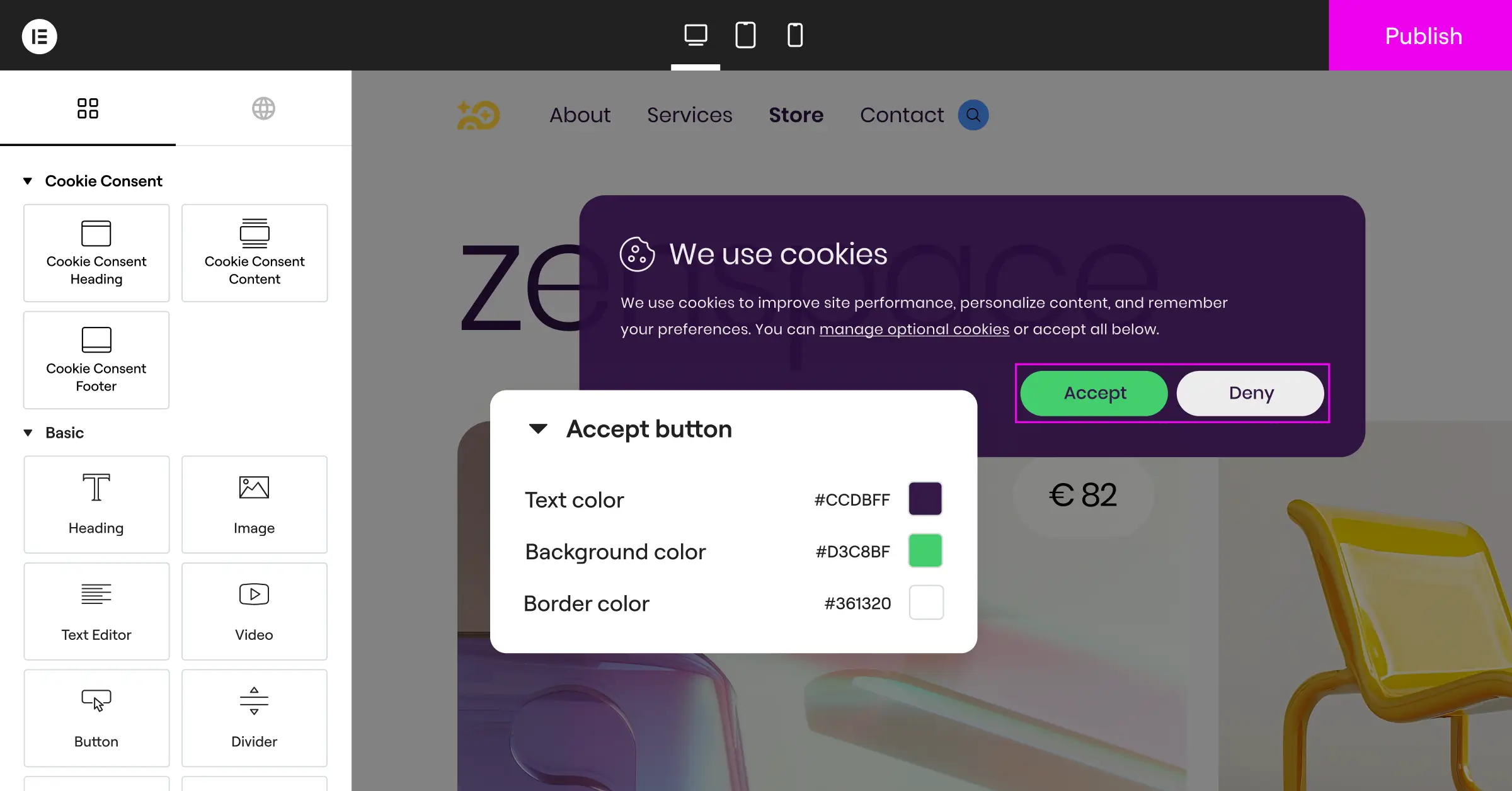
- Styles every element of your banner to match your store’s fonts, colors, and buttons.
- Translates your consent messages automatically to match visitors’ browser languages.
- Stores timestamped consent logs, so you have an audit trail ready if needed.
- Targets visitors by location, showing the right consent notice for each region.
2. Activate Google Consent Mode v2
If your store uses Google Analytics or runs Google Ads, this one isn’t optional. Google Consent Mode v2 is a current requirement for any store serving traffic in the European Economic Area. It lets your site pass visitors’ consent choices straight to Google, so your data collection and ad targeting stay accurate within legal boundaries.
Here’s what you need to do:
- Pick a compatible tool that explicitly supports Google Consent Mode v2.
- Map your banner buttons to the right Google variables:
ad_storageandanalytics_storage. - Choose between basic and advanced mode. Advanced mode lets Google model data gaps when users opt out, so you keep meaningful conversion data.
Get this set up right and your conversion tracking and retargeting keep working. Skip it, and your ad data for European shoppers gets unreliable fast.
3. Implement Geo-Targeted Banner Displays
Not every visitor needs the same consent experience. A shopper from Germany faces strict GDPR opt-in rules, while someone in a region with lighter privacy laws might only need a simple notice. Geo-targeting matches the right banner to the right person automatically, so you stay compliant without adding friction for visitors who don’t need it.
When only the visitors who legally require strict banners see them, everyone else gets a cleaner path to checkout, a direct win for conversion rates that adds up across a busy store.
Adopting a localized approach to privacy is the smartest move an online merchant can make. When you show the exact level of compliance required by local law, you balance legal safety with a smooth user experience.
– Itamar Haim, Web Compliance Specialist
4. Perform Automatic Cookie Scanning and Categorization
Your store is a living, changing thing. Every time you add a payment processor, a marketing tool, or an analytics service, there’s a good chance new tracking cookies land on your site without you noticing. An automated scanner takes the guesswork out of keeping up.
A good scanner finds your active cookies and sorts them into clear categories, typically like this for an ecommerce store:
- Essential cookies keep your shopping cart working, handle logins, and process payments. These need no consent because your store can’t function without them.
- Analytical cookies show you how visitors find your store, which pages they visit, and where they drop off.
- Marketing cookies track users across sites so you can run retargeting campaigns and relevant ads.
- Functional cookies remember settings like language, saved addresses, or currency.
Automatic scanning means you’re not manually tracking every script your store runs. Your cookie policy stays accurate, and you won’t get caught off guard by a new tracker.

5. Prioritize Brand Integration and Custom Design
A generic cookie banner that looks dropped in from another website can put shoppers off. If your consent notice looks like a suspicious pop-up, some visitors will just close the tab rather than interact with it. Your banner should feel like it belongs on your site, not like an afterthought.
Matching your banner to your store’s fonts, colors, and button style makes a real difference, since shoppers who recognize your brand in the compliance notice are far more comfortable accepting it. It’s also worth checking that the placement doesn’t cover your navigation or key product imagery.
6. Secure Verifiable Consent Logs
Under regulations like the GDPR, having a banner on your site is just the beginning. If a privacy regulator comes asking, you need to show that a specific visitor gave consent at a specific time, which means keeping secure, timestamped records of every consent decision.
Good consent logs need a few things to hold up as evidence:
- An anonymized user identifier, so you can reference a specific visitor without storing directly identifiable personal details.
- An exact date and time stamp for when they made their choice.
- A record of which cookie categories they agreed to, so you can show precisely what was granted.
Having this documentation in place protects your business if a complaint is ever filed. And honestly, it’s a relief to know you have a clean, organized record ready if someone questions your data practices.

7. Optimize Banners for Mobile Checkouts
A large share of your customers shop from their phones, and a cookie banner that takes over the screen or covers the checkout button will cost you sales. Mobile optimization isn’t a nice-to-have at this point, it’s essential for a store that takes conversions seriously.
Your mobile banner should be light and easy to tap on a small screen, with buttons large enough that visitors don’t hit the wrong one by accident. Once a customer makes their choice, it should clear right away and stay gone as they browse between product pages, since a banner that keeps reappearing is one of the fastest ways to frustrate a mobile shopper right before they buy.
8. Respect Global Privacy Control Signals
Global Privacy Control (GPC) is a browser-level setting that lets users signal their privacy preferences automatically, without clicking through banners on every site they visit. When a visitor has GPC turned on, your site should detect that signal and honor it by opting them out of non-essential cookies.
Supporting GPC matters to privacy-conscious shoppers, and it’s also a legal requirement under several US state privacy laws that have taken effect in recent years. Responding to these signals automatically shows you take visitor preferences seriously, without making them do extra work to protect themselves.
9. Deploy Multilingual Consent Banners
If you sell to a global audience, your customers speak a lot of different languages. Showing a compliance notice in English to someone browsing in French or Spanish creates confusion, and often leads them to leave rather than figure out what they’re being asked to agree to.
A good consent tool detects the visitor’s browser language and displays the banner in that language automatically. It’s a small thing operationally, but it makes a real difference to how your international customers feel about your store, and how much they trust you with their purchase.
10. Integrate a Dedicated Privacy Policy Generator
Your consent banner and your privacy policy page need to stay in sync. If your banner promises one level of data handling but your policy page says something different, that mismatch can attract legal scrutiny. A built-in policy generator closes that gap by creating a policy that reflects what’s actually running on your site.
When your cookie scanner finds a new script, a connected policy generator can prompt you to update your documentation to match, keeping your legal pages accurate without a manual review every time you add a new marketing tool.
Comparing the Top Consent Management Solutions
To help you choose the right tool for your store, here’s a straightforward look at the most widely used consent management options. These are all established platforms; the differences come down to where your settings live and how they integrate with your site.
| Solution Name | Integration Style | Google Consent Mode v2 | Pricing | Best For |
|---|---|---|---|---|
| Cookie Consent (Elementor) | WordPress-native | Fully Supported | Free tier available; included in Elementor One | WordPress and Elementor store owners who want a fast, dashboard-native setup |
| Cookiebot | External Script | Fully Supported | Entry-level and premium plans | Sites that prefer a cloud-managed external service |
| CookieYes | External Script and WordPress tool | Fully Supported | Entry-level and premium plans | Multi-platform stores needing flexible cloud tracking |
| Complianz | WordPress tool | Supported | Entry-level and premium plans | Sites that want detailed local configuration options |
| iubenda | External Script | Supported | Premium plans | Businesses needing a broader set of legal document generators |
| OneTrust | External Cloud Platform | Fully Supported | Enterprise pricing | Larger organizations with complex, multi-jurisdiction compliance needs |
External cloud platforms are capable solutions, though they do require managing settings in a separate dashboard and pasting code into your site. For WordPress store owners, a native setup tends to be simpler to maintain and quicker to launch.
How to Set Up Your Consent Strategy in Five Minutes
Getting your compliance setup in place doesn’t have to take long. With the Cookie Consent capability inside Elementor, you can have everything running in just a few steps.
Here’s how the process looks:
- Open your compliance dashboard by going to your Elementor settings and selecting Cookie Consent.
- Run an automatic scan so the built-in scanner can find all the active scripts and cookies on your store.
- Customize your banner by picking a template, adjusting the colors to match your brand, and writing your consent message.
- Turn on advanced options like Google Consent Mode v2 and geo-targeting if you serve international shoppers.
- Publish your banner and it goes live across your store right away.
Once those steps are done, your store is set up to handle visitors safely and in line with current privacy requirements. It’s one of those things that feels like a big project until you actually do it, and then it’s just done.
Frequently Asked Questions
What happens if my ecommerce store doesn’t use a cookie banner?
Without a proper consent mechanism, you risk fines from regulators and lose the ability to track your marketing campaigns accurately, since modern ad networks need verified consent to run tracking codes.
Does a cookie banner slow down my online store?
Some third-party cloud banners add load time because they fetch scripts from external servers. A native capability like Cookie Consent avoids that since everything runs directly on your own WordPress host, keeping your pages fast for both users and search rankings.
What’s the difference between GDPR and CCPA compliance?
GDPR is a European regulation that requires users to actively opt in before you run tracking cookies. CCPA is a California law focused on letting users opt out of the sale or sharing of their personal data. A well-designed consent strategy handles both, adjusting the experience based on where your visitor is located.
Do I need a cookie banner if I only sell in the United States?
Yes, quite a few US states have passed their own privacy laws that require meaningful consent mechanisms. California, Colorado, Connecticut, and Virginia all give users opt-out rights, so a solid consent strategy is worth having even if you’re purely focused on domestic shoppers.
Can I write my own text for the cookie banner?
Absolutely, and it’s worth doing. Custom text in a warm, friendly tone works much better than generic legal language, as long as it clearly explains why you use cookies and makes it easy for visitors to understand their options.
Is Google Consent Mode v2 actually mandatory?
If you’re running Google Ads and serving customers in Europe, yes. Without it, Google can’t measure your conversions or build retargeting audiences for those visitors, so your European ad campaigns depend on it.
What are essential cookies?
Essential cookies are the ones your site needs just to function. They keep items in shopping carts, handle secure logins, and process payments. You don’t need to ask for consent to use these, since they’re necessary for the site to work, not for tracking or marketing.
Can I show different banners to visitors in different countries?
Yes, that’s exactly what geo-targeting does. With a tool like Cookie Consent, you can show a strict opt-in banner to visitors from Europe, a standard opt-out notice to visitors from California, and a simpler informational message to users in other regions, with the right banner reaching the right person automatically.
How often should I scan my store for new cookies?
Once a month is a good baseline, and you should also run a scan whenever you install a new marketing tool or analytics service. That keeps your cookie categories current and your privacy policy accurate without requiring you to track every script change manually.

