Planning a website budget can feel like chasing a moving target. If you’re wondering how much a site costs in 2026, you’re in good company, and it’s simpler than it looks once you break it down.
Key Takeaways
- Budget flexibility: Website costs range from small monthly fees for DIY builds to thousands of dollars for custom agency projects.
- Platform choices: Picking the right platform early saves money on migrations and redesigns later.
- Hidden expenses: Always budget for ongoing costs like hosting, domain renewals, security, and updates.
- Value options: You can build professional-grade business sites visually using WordPress combined with modern design tools.
- Scale gradually: Start with a solid core website and layer in advanced features as your revenue grows.
Why Website Cost Estimates Vary So Much
You’ve probably noticed how scattered website quotes are: one agency quotes five thousand dollars, another fifty thousand, a freelancer one thousand, and a DIY platform the price of a coffee. That range exists because a website isn’t one product, it’s a custom space built around your goals.
Think of it like a building: a one-page portfolio is a small rental booth, a multi-page site is a standard office, and a fully custom store with inventory and client portals is a department store. Labor and scale differ completely, which is why prices swing so much. Who builds it has the biggest impact on cost.
Three Main Paths to Build a Website
Each path balances cost, your time, and the design freedom you get. Here’s how they compare.
1. The Pure DIY Website Builder Path
This suits people who want a simple setup and don’t mind a few evenings on it. Hosted platforms like Wix and Squarespace bundle the editor, hosting, and security updates into one monthly bill. The trade-off is long-term flexibility: these platforms are proprietary, so moving elsewhere later isn’t easy, and you’re limited to their templates.
2. The Flexible WordPress Path
This is the most popular path for growing businesses, pairing creative control with manageable costs. WordPress is open-source, so you own your content and can move hosts anytime. To build visually without touching code, millions turn to the Elementor website builder.
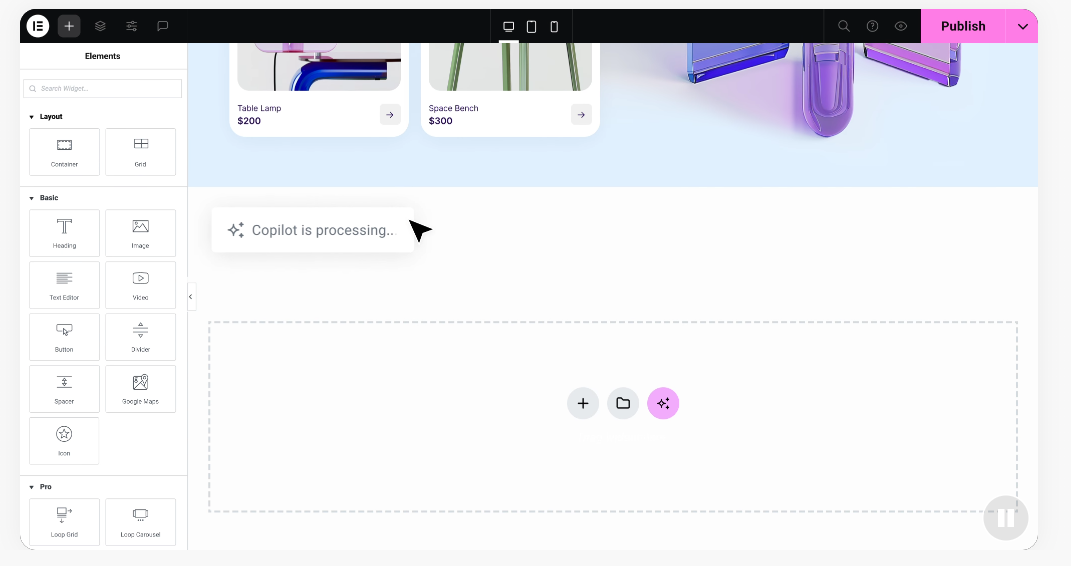
You pay only for hosting, your domain, and any premium templates or tools you add, agency-level design freedom without the agency price tag.
3. The Custom Agency or Freelancer Path
If you’ve got a healthy budget and little free time, hiring a professional designer or agency is the traditional route. They handle everything, planning, copywriting, layouts, and databases, the best fit for businesses that need specialized tools like customer portals or complex search systems. It saves time, but means a real upfront investment plus hourly costs for updates later.
Comparison of Website Costs by Development Method
Here’s how typical upfront and recurring costs break down across the three paths, for a standard site of about five to ten pages.
| Cost Category | Pure DIY Builder (Wix/Squarespace) | Flexible WordPress (with Elementor) | Custom Agency / Freelancer |
|---|---|---|---|
| Upfront Setup Cost | Minimal (mostly your personal time) | Low to moderate (hosting and design tools) | High (professional labor fees) |
| Domain Name | Often free for year one, then standard annual fee | Standard annual fee from your choice of registrar | Usually included in setup, then standard annual fee |
| Web Hosting | Included in your monthly subscription price | Affordable monthly or annual hosting plans | Premium hosting recommended by your developer |
| Design & Layout | Limited to platform-provided templates | Highly custom options using Elementor features | Fully custom layouts designed from scratch |
| Ongoing Maintenance | Handled automatically by the host platform | Easy manual updates or managed hosting options | Usually requires a monthly developer maintenance plan |
| Total Estimated Year 1 | – | – | – + |
Essential Website Components and Their Costs
Whether you build it yourself or hire a pro, these core pieces are part of the equation.
Domain Names (Your Digital Street Address)
Your domain name is the address people type to find you, like yourbusinessname.com, a recurring yearly fee paid to a registrar. Standard dot-com domains are affordable, though prices rise for a sought-after name someone already owns. Set up auto-renewal right away, a lapsed registration means someone else can claim it.
Web Hosting (Your Digital Plot of Land)
Web hosting stores your files, images, and databases on a secure server so people can reach your site around the clock. Prices vary by speed, security, and traffic.
- Shared Hosting: The most budget-friendly option, where your site shares server resources with others. Works well for new blogs or local businesses with moderate traffic.
- Managed WordPress Hosting: Tuned to keep WordPress sites fast and secure, often with automatic backups and updates included.
- Cloud and VPS Hosting: A strong fit for fast-growing businesses and stores that need dedicated resources for high daily traffic.
Visual Design and Layouts
How your site looks shapes whether first-time visitors stay or leave. On the DIY route, you’ll style pages with templates, basic ones free, premium ones bringing better layouts and faster loading. If you want a polished look without agency rates, the Elementor website builder is a genuinely strong option, with an extensive library of templates and blocks you can customize to your brand.
“Building a website in 2026 is no longer about just writing lines of code; it’s about creating a visual experience that speaks to your customers. Small businesses can now achieve professional designs that used to cost tens of thousands of dollars by choosing the right smart design tools.”
– Itamar Haim, Web Development Specialist
Dynamic Capabilities and Add-ons
A basic website displays static information, but most modern businesses need theirs to do more, like a booking system, a client portal, or a checkout, all powered by software extensions or add-ons. Many essential add-ons are free, but advanced tools (like membership portals or shipping calculators) usually require premium licenses. Write down your must-have features early so you can budget for those fees.
Hidden Costs Most Business Owners Forget to Budget For
A few expenses can catch you off guard if you don’t plan for them, so keep them in mind.
1. Professional Copywriting
A beautiful website is only half the picture, you also need persuasive words to turn visitors into customers. Writing copy is specialized work you can do yourself to save money, though a professional copywriter can meaningfully improve conversion rates. Expect to pay per page or a flat rate, or draft it yourself and hire an editor to polish key pages later.
2. Security and SSL Certificates
Keeping customer data safe isn’t optional. An SSL certificate encrypts the connection between your site and visitors, showing the padlock icon in the browser bar. Most hosts include a basic certificate free, though advanced e-commerce sites may need premium certificates with stronger guarantees. Budget too for security scans, spam protection, and malware removal.
3. Regular Site Maintenance and Backups
A website, like a car, needs regular maintenance: software updates, compatibility checks, and database cleaning. Managed platforms often handle this for you, but a self-hosted WordPress site needs some monthly attention, yours or a hired hand’s. A reliable backup system matters just as much, so a bad update costs only minutes to fix.
Step-by-Step Guide to Planning Your Website Budget
These steps will help you map out a realistic budget without overspending.
- Identify your primary goal: a simple business card, a lead generator through contact forms, or a direct sales channel.
- Choose your building path: More time than money? A DIY build is your best bet. More capital and less time? Hiring a professional makes sense.
- List your non-negotiable features: the minimum your site needs to open for business, like an email signup form, a booking calendar, or a service gallery.
- Calculate your upfront costs: Add up your domain registration, your first year of hosting, and any premium tools like Elementor you plan to use.
- Calculate your recurring yearly expenses: Estimate domain renewals, monthly hosting fees, software licenses, and security tools.
- Set aside an emergency fund: Keep about ten to twenty percent of your budget in reserve for troubleshooting or a tool you didn’t plan for.
Common Mistakes to Avoid When Budgeting
These common mistakes trip up business owners again and again, but they’re easy to avoid.
- Buying too many premium tools at the start: Start with the basics and only buy premium upgrades once you’re confident they’ll help you earn more.
- Underestimating your own time: Spend forty hours building a DIY site instead of serving paying clients, and that’s a real cost too.
- Forgetting mobile optimization: Most web traffic comes from phones, so make sure your tool lets you preview how the site looks on phones and tablets.
- Choosing hosting based purely on the lowest price: Very cheap hosting often leads to slow loading and frequent downtime, which frustrates visitors and hurts your search rankings.
- Neglecting post-launch marketing: A website isn’t useful if nobody can find it, so save a portion of your budget for SEO, local advertising, or content marketing.
How to Get the Best Value for Your Money
Getting a high-quality website doesn’t mean spending a fortune. The smartest approach is a hybrid one: do what you can yourself, and use visual tools for a professional result without high coding fees, agency-level work for a fraction of the cost. You’re also not locked into one developer or platform, any web professional can jump in later, keeping your long-term costs low and letting your website grow alongside your business.
Frequently Asked Questions
How much does a basic business website cost in 2026?
A basic business website with five to ten pages typically costs between a few hundred and a few thousand dollars if you build it yourself with a visual builder and quality hosting. A freelance designer or agency will cost more, depending on the detail required.
Are there ongoing monthly costs to keep a website online?
Yes, every website has recurring costs. At minimum, you’ll pay for hosting and domain registration, plus more for premium tools, add-ons, or security services.
Can I build a professional website myself without coding?
Absolutely. Modern visual builders make it entirely possible to design a professional website without writing code. Combine WordPress with visual design software, and you can drag, drop, customize layouts, and preview changes in real time.
Is WordPress really free to use?
The core WordPress software is open-source and completely free to use. To make your website live, though, you’ll pay for web hosting and a domain name, and you may buy premium themes or add-ons for extra features.
How long does it take to build a website from scratch?
With a DIY builder and pre-made templates, you can get a simple site running within a few days. A custom WordPress site with personalized layouts typically takes two to six weeks. Large agency projects can run three to six months.
Should I pay for a custom website design or use a template?
For most new or small businesses, a high-quality template is the most cost-effective choice. Modern templates are highly customizable, so you can change colors, images, and fonts to match your branding, then invest in a custom redesign as your brand grows.
What happens if I want to move my website to a different host later?
If your website runs on an open platform like WordPress, you can package your files and move them to any host you choose. On a closed, proprietary DIY builder, though, you can’t export your design elsewhere, meaning a rebuild from scratch if you switch.

