
Running a website in the UK opens up real possibilities, but keeping on top of user privacy can feel like navigating a maze without a map. If you manage a WordPress site, you’ve probably run into the Information Commissioner’s Office (ICO) and its rules on tracking visitor data. The good news: it’s more manageable than it looks, and you’ve got what you need. In 2026, compliance isn’t just about avoiding fines. It’s about building genuine trust with your visitors. Here are the UK GDPR cookie requirements you need to meet to keep your site compliant and secure this year.
Key Takeaways
- Active Opt-In is Mandatory – Pre-ticked boxes are completely banned; users must actively choose to accept cookies.
- Easy Withdrawal – Withdrawing consent must be just as easy as giving it, requiring a visible “Reject All” option on the first layer.
- Prior Consent – Non-essential cookies, including analytics and marketing scripts, can’t load before a user clicks accept.
- Detailed Logging – You must maintain secure, unalterable consent logs to prove compliance during an audit.
- WordPress-Native Tools Help – Using built-in capabilities like Cookie Consent within Elementor lets you manage compliance directly from your dashboard.
The Evolution of UK GDPR Cookie Requirements in 2026
The UK GDPR, alongside the Data Protection Act 2018, governs how businesses collect, store, and process personal data. Over the past few years, the ICO has moved from gentle guidance to active enforcement. If your site serves visitors in England, Scotland, Wales, or Northern Ireland, you’re legally required to respect their privacy choices from the moment their browser connects to your server.
For WordPress site owners, this means the old style of cookie banner no longer holds up. A notice that says “By using this site, you accept cookies” is a clear path to non-compliance. Visitors today expect real transparency: they want to know which trackers are running, what data gets collected, and where it goes. You don’t need a law degree to get this right. With the right tools, compliance becomes a natural part of running your site.
One of the most practical ways to handle this on WordPress is through a native capability. Rather than adding complex external setups, Elementor‘s built-in Cookie Consent feature lets you manage banners, cookie scanning, and consent logs directly inside your WordPress dashboard. Your workflow stays clean, your visitors’ data stays protected, and you’re not juggling a separate platform on top of everything else.
“In 2026, web compliance is no longer a legal afterthought. It’s a core pillar of user experience. Site owners who prioritize clear, native consent mechanisms build deeper trust with their audience while keeping their business safe from regulatory action.”
– Itamar Haim, Web Compliance Specialist
10 Essential UK GDPR Cookie Requirements
To help you check where your site stands, here are the ten most important requirements to meet in 2026. Each one matters for staying on the right side of the ICO while keeping the experience great for visitors.
1. Prior Consent (The Zero-Cookie Load Rule)
This one catches a lot of site owners off guard. Under UK GDPR, you can’t drop non-essential cookies onto a visitor’s browser before they’ve given explicit consent. When someone first lands on your homepage, your analytics scripts, ad pixels, and social widgets need to stay paused.
Only strictly necessary cookies, like the ones that keep items in a shopping cart or handle login sessions, are allowed to load automatically. Your consent tool needs to hold back marketing and tracking scripts until the visitor clicks “Accept” on your banner.

2. Easy Withdrawal of Consent
The law is clear here: withdrawing consent has to be just as easy as giving it. If a visitor clicks a button to accept cookies, they need an equally simple way to change their mind later. You can’t bury the opt-out settings inside your privacy policy or ask for an email request.
Most compliant sites solve this with a small, persistent privacy icon in the corner of the screen. Clicking it should bring back the cookie preferences panel right away, letting the visitor revoke consent with a single click. (This one trips up a lot of people, so it’s worth double-checking during setup.)
3. No Pre-Ticked Consent Boxes
Active consent means an affirmative action. When a visitor opens your cookie settings panel, every checkbox for non-essential categories needs to be unchecked by default.
You can’t pre-tick boxes for “Analytics” or “Targeting” and hope nobody notices. Each visitor has to manually check the categories they’re happy to allow. Pre-ticked boxes count as passive consent, a real UK GDPR violation.
4. Clear and Granular Consent Options
Your visitors should never face an all-or-nothing choice. A compliant banner needs to offer granular consent, letting people accept certain cookies while rejecting others. Cookies typically get grouped into clear categories like these:
- Strictly Necessary – Needed for the site to function properly.
- Functional – Remembers user preferences, like language settings.
- Analytics – Tracks anonymous site performance data.
- Marketing/Targeting – Delivers personalized ads and tracks user behavior across platforms.
Giving visitors these specific choices respects their preferences, while still letting you gather useful data from people happy to opt in.

5. Equal Weight for “Accept All” and “Reject All”
For a long time, websites used dark patterns to nudge users into accepting cookies: a big, bright green “Accept All” button, with “Reject All” tucked away as a tiny grey link.
The ICO has been clear that “Accept All” and “Reject All” need equal prominence on your banner. Matching sizes, colors, and font weights make turning down tracking just as easy as accepting it.
6. An Up-to-Date Cookie Audit and Classification
To explain what cookies your site uses, you first need to know what’s actually running. Sites change constantly. You might install a new WordPress addition, embed a YouTube video, or add a script that quietly introduces new cookies (it happens more often than you’d think).
A compliant site needs regular automated cookie scans to catch every active tracker. Once you’ve found them, classify each cookie correctly so visitors get accurate information about their devices.
7. Clear, Plain-Language Cookie Policy
Your privacy and cookie policies need to be written in plain, easy-to-understand language. Dense legal wording won’t satisfy regulatory requirements. A solid cookie policy should clearly cover:
- What types of cookies you use.
- Why you use them (the specific purpose of each cookie).
- How long cookies will remain on the user’s browser.
- Who controls the cookies (first-party or third-party services).
- How users can manage or delete their data.
A built-in policy generator is a smart move here. It keeps your documentation current as regulations shift, so you’re not scrambling to update things by hand every time the rules change.
8. Detailed and Secure Consent Logging
If the ICO ever reviews your site, you need to show visitors gave valid consent before you tracked their data. That takes a solid consent logging system.
Each time a visitor makes a choice on your banner, your system should record the date, time, anonymized IP address, and the cookie categories approved. Store these logs securely, and make sure they’re tamper-proof.

9. No “Cookie Walls” Allowed
A “cookie wall” is when a site blocks access to its content unless a visitor agrees to marketing or tracking cookies. Under UK GDPR, consent has to be freely given. Denying access just because someone won’t agree to be tracked isn’t really free consent.
Your site needs to stay fully functional and accessible even when a visitor rejects all non-essential cookies. You can explain the benefits of personalized content to encourage opt-ins, but you can’t lock people out of your services.
10. Full Support for Google Consent Mode v2
If you use Google tools like Google Analytics 4 or Google Ads, Google Consent Mode v2 is no longer optional. Google now requires this protocol for any site targeting users in the UK and the European Economic Area (EEA).
Google Consent Mode v2 works by passing your visitor’s consent choices straight to Google’s servers. When a user rejects cookies, Google’s tags adjust, sending anonymous, cookieless signals instead of storing personal identifiers, keeping you compliant while still useful for marketing reports.
Comparing Popular Consent Management Solutions
Choosing the right tool to handle these ten requirements makes a real difference to your workflow. Here’s a factual look at some widely used consent management options in the WordPress space.
| Feature / Capability | Cookie Consent (Elementor Native) | Cookiebot | CookieYes | Complianz | iubenda |
|---|---|---|---|---|---|
| Dashboard Location | WordPress-Native (No external login) | External Dashboard | External Dashboard | WordPress-Native | External Dashboard |
| Setup Time | Under 5 minutes (3-step setup) | Variable (External setup) | Variable (External setup) | Variable | Variable (Requires script integration) |
| Google Consent Mode v2 | Supported natively | Supported via integration | Supported via integration | Supported | Supported |
| Consent Logs Included | Yes (Stored in WordPress) | Yes (Cloud-based) | Yes (Cloud-based) | Yes (Local database) | Yes (Cloud-based) |
| Geo-Targeting | Yes | Yes (Paid tiers) | Yes (Paid tiers) | Yes (Paid tiers) | Yes (Paid tiers) |
As you weigh these options, think about how much time you want to spend managing compliance. Tools with external dashboards mean logging into a separate platform and checking connections regularly. A WordPress-native capability like Cookie Consent within Elementor keeps everything in one place, easier to keep consistent and under control.
Step-by-Step Compliance Checklist for UK WordPress Sites
Ready to confirm your WordPress site is fully aligned with UK GDPR? Here’s a clear checklist to walk you through it. It’s simpler than it sounds, and handling these steps now saves stress later.
Step 1: Run a Full Cookie Audit
Before you build a banner, get a clear picture of your current setup. Use your consent tool to scan your site and find every cookie currently in use. The scan shows which third-party tools are dropping trackers, and helps you group cookies into logical categories.
Step 2: Install and Configure Your Consent Banner
Choose a reliable consent tool that covers UK GDPR’s specific requirements. Make sure your banner uses matching styling for the accept and reject buttons, and clearly explains why you’re using cookies. If you’re using Elementor, the native Cookie Consent capability lets you design a banner that fits your brand in just a few clicks.
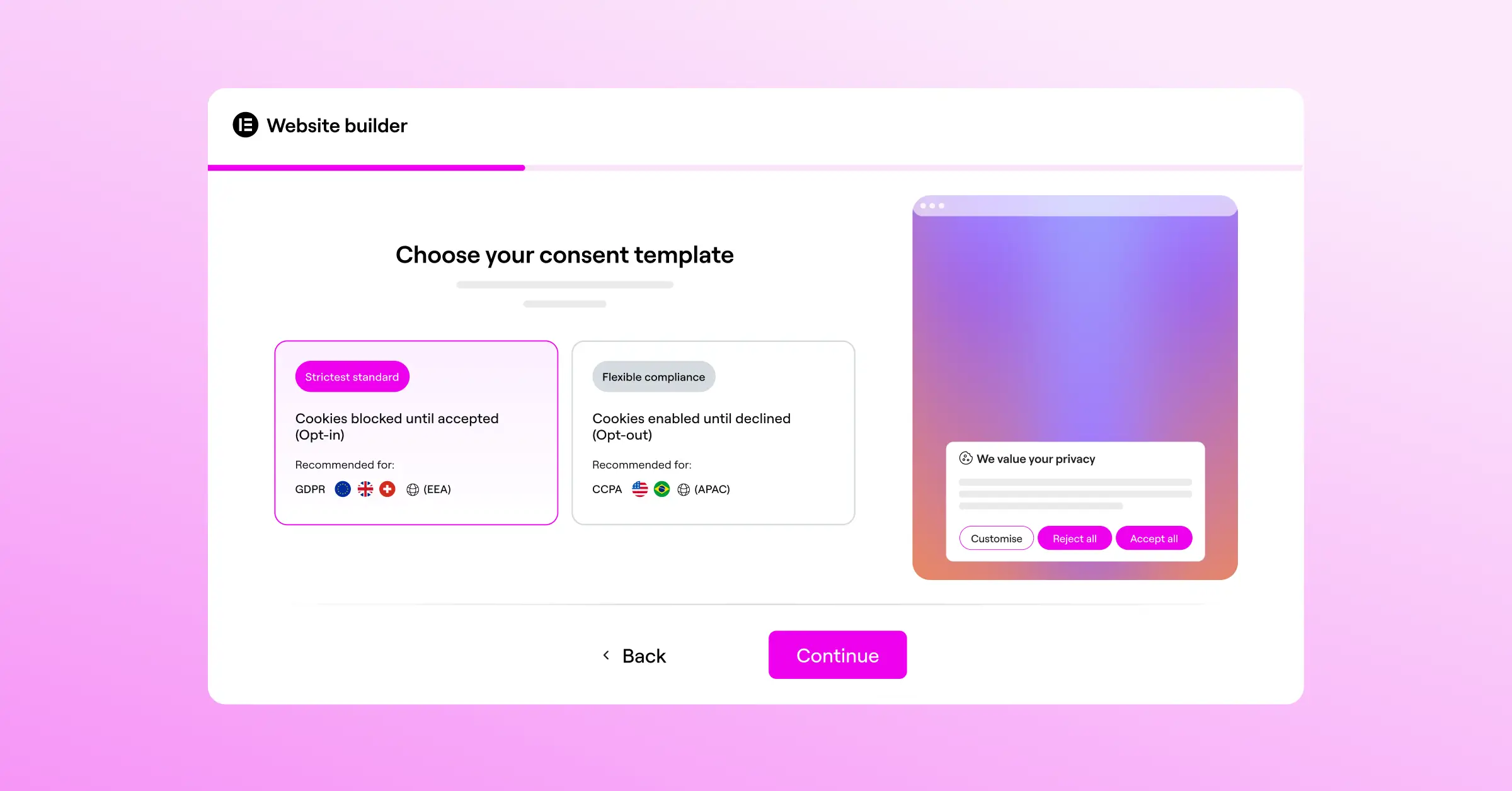
Step 3: Block Non-Essential Scripts by Default
Set your consent tool to hold back non-essential scripts. If you use Google Analytics, Meta Pixel, or affiliate tracking codes, they should load only after the visitor clicks “Accept.” Test this in an incognito window, checking with developer tools that nothing fires before the banner’s used.
Step 4: Enable Consent Logging
Make sure your system is actively writing consent events to a secure log, your proof of compliance if the ICO ever inquires. It should store minimal, non-identifiable information while capturing what choices were made, and when.
Step 5: Publish Your Cookie Policy
Create a dedicated page on your WordPress site for your Cookie Policy. Link to it from your cookie banner and footer. Use clear headings and tables so visitors can quickly find what they need.
Why a Native WordPress Capability is Often the Best Choice
Many site owners start their compliance journey with third-party SaaS platforms. Those tools do the job, but they can add complexity and ongoing cost. Every external script you add can slow down page load speed, affecting both your SEO and your visitors’ experience.
Choosing a WordPress-native approach brings some real advantages:
- Skips the extra dashboard – Manage everything directly from your WordPress admin panel, without extra logins or unfamiliar interfaces.
- Loads faster – Native capabilities load directly from your server, so there’s no waiting on third-party assets before your banner appears.
- Blends with your design – Matching your banner to your site’s typography, colors, and layout is simple when everything lives in the same environment.
- Saves you money – Many native capabilities come included in your existing subscription, with no separate fee for cookie compliance.
For WordPress site owners who want a clean, practical approach, Elementor’s Cookie Consent capability covers the essentials, from automatic scanning and consent logging to Google Consent Mode v2 support and geo-targeting, without the overhead of managing a separate platform (one less thing to worry about).
Frequently Asked Questions
Do small UK blogs really need to comply with UK GDPR?
Yes. UK GDPR applies to any site that collects or processes personal data from users in the UK. Even a small blog or hobby project using Google Analytics, Jetpack, or social sharing buttons is placing cookies on visitors’ devices, so the rules apply to you too.
What happens if my website does not comply with the ICO rules?
The ICO can take action against non-compliant sites. It often starts with warnings and requests for changes, but it has increasingly targeted sites that ignore compliance requirements, particularly sites with non-compliant banners or hidden “Reject All” options.
Can I just use a free cookie banner tool?
There are plenty of free options, but you need to make sure the one you pick covers all UK GDPR requirements. Many free banners display a notice without actually blocking scripts before consent. Always test your tool to confirm it really holds cookies back until a visitor opts in.
Is Google Consent Mode v2 required for all UK websites?
If you use Google Ads or Analytics to track users in the UK or EEA, Google Consent Mode v2 is required. Without it, you’ll lose the ability to measure ad conversions and build personalized audiences, hurting your marketing performance.
How often should I scan my website for new cookies?
Scanning at least once a month is good practice. Third-party tools and integrations update often, so new cookies can appear without input from you. Regular scanning keeps your cookie policy and banner categories accurate.
Can I block access to my content if a user rejects cookies?
No. Under UK GDPR, you can’t use “cookie walls” to restrict access to your site’s content. Access to your services needs to stay free and open, whether or not a visitor accepts tracking cookies.
Do I need consent for strictly necessary cookies?
No, you don’t need consent for cookies that are strictly necessary for your site to work. That includes cookies that store shopping cart items, handle secure login sessions, or remember a visitor’s compliance preferences.
How long do I need to keep my consent logs?
There’s no specific timeframe set by the ICO, but keeping consent logs for at least five years is generally recommended, giving you a reliable audit trail if retroactive questions come up.
What is the difference between EU GDPR and UK GDPR?
UK GDPR is the British version of the EU’s GDPR, written into UK law after Brexit. The two are currently similar in user rights and cookie requirements, but the UK government can make future changes, so it’s worth watching the latest ICO guidance.

