
Running a WordPress site means welcoming visitors from everywhere, which comes with a responsibility to respect their privacy. If you get traffic from California, meeting the California Consumer Privacy Act (CCPA) and its CPRA amendments is a real requirement. Don’t worry, it’s more manageable than it sounds, and we’ve rounded up the best options to help you stay compliant without slowing your business down.
Key Takeaways
- California laws require clear opt-out links that let users refuse data selling and sharing.
- Global Privacy Control (GPC) signal detection is a key requirement for modern compliance.
- Using a WordPress-native tool keeps your database clean and saves you from juggling external dashboards.
- Consent logging is essential for proving compliance when a regulatory audit comes knocking.
- Geo-targeting features keep your site fast by showing compliance banners only to the visitors who actually need them.
Understanding California Privacy Laws in 2026
California set the pace for digital privacy in the US, and it’s worth knowing what’s required. The core framework is the California Consumer Privacy Act (CCPA), later broadened by the CPRA, giving residents real control over their data, and you can’t quietly track visitors without their knowledge.
You need a clear way for visitors to say no to data sales and sharing. That’s where Global Privacy Control (GPC) comes in: a browser signal telling your site the visitor wants to opt out.
A solid compliance approach usually comes down to three steps:
- Identify all the cookies, scripts, and tracking pixels currently running on your website.
- Display a clear, customizable consent banner that adapts to the visitor’s geographic location.
- Provide a dedicated link or toggle that reads “Do Not Sell or Share My Personal Information.”

Take those steps and you’re protecting your business from penalties while showing visitors you care about their privacy.
What Makes a Compliance Tool Fit for California Laws?
Not all cookie banners are equal. A banner built for European rules might miss California’s specifics. Here’s what matters most:
- Automatic cookie scanning to find and categorize tracking scripts.
- Global Privacy Control detection for browser-level signals the moment they arrive.
- Geo-targeting to show California-specific banners only where needed.
- Consent logging to keep records of user choices for audits.
- Customizable layouts so your site still looks like your site.
A tool that works inside your existing setup is usually smartest.
The 10 Best California Privacy Law Compliance Tools
Finding the right balance of design and compliance is easier once you know what each tool does well.
1. Cookie Consent
If you’re on WordPress, staying compliant shouldn’t mean switching platforms. Cookie Consent is a native capability built for WordPress by Elementor, working right from your existing dashboard. Its three-step setup gets a fully functioning banner live in under five minutes (it’s simpler than it sounds).
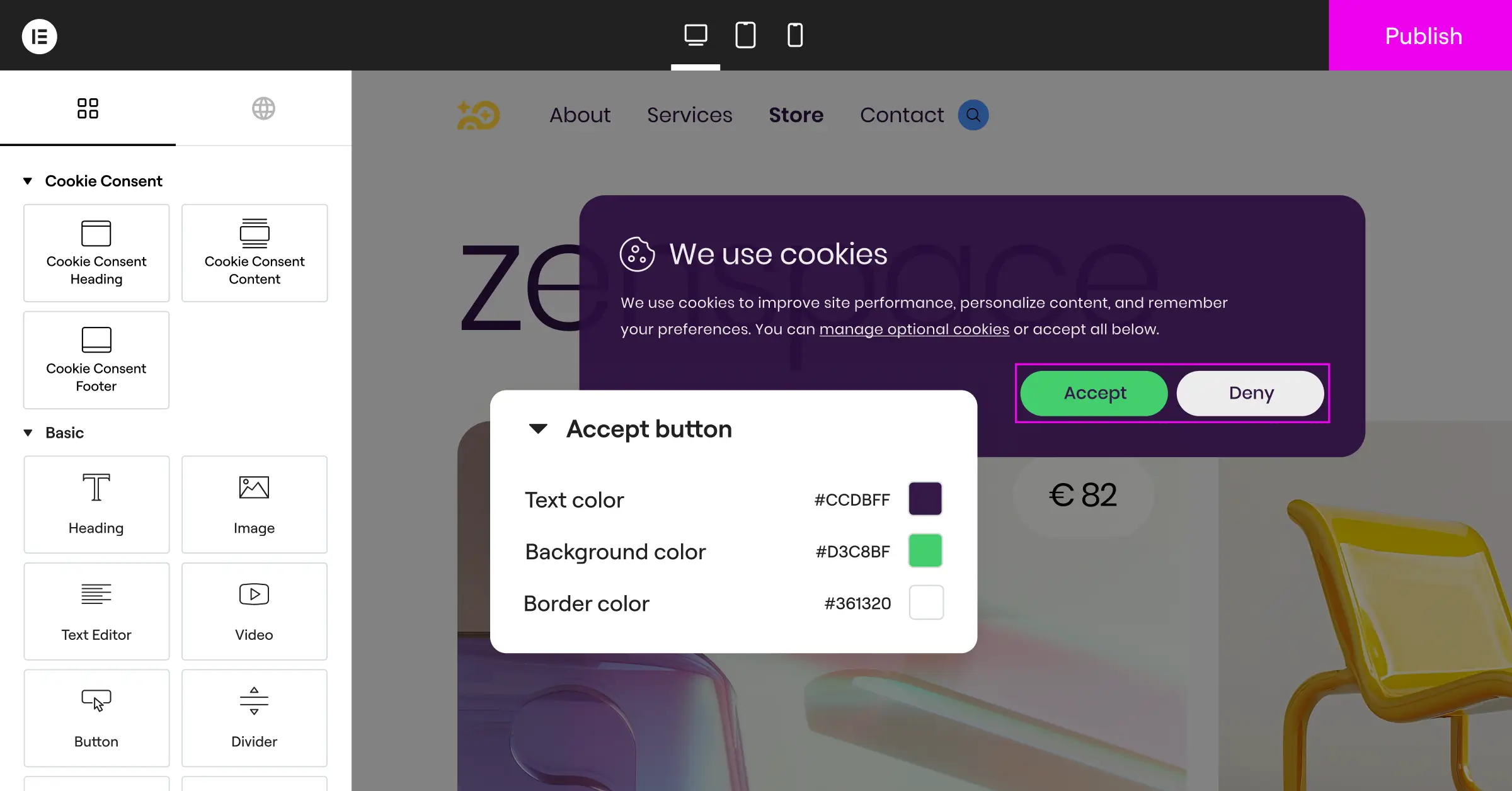
Key Features:
- Builds custom banners matching your site design.
- Scans your site to find and categorize cookies.
- Logs consent choices for reliable audit trails.
- Detects Global Privacy Control signals automatically.
- Targets specific regions to reach the right visitors.
- Generates privacy policy text through a built-in generator.
- Adds multilingual banner support for global audiences.
- Integrates with Google Consent Mode v2.
How It Helps with California Compliance:
Cookie Consent recognizes GPC signals out of the box, adds “Do Not Sell or Share” links to your banners, and its policy generator drafts the privacy language you need.

Pros:
- No external dashboards to manage.
- Live banner in under five minutes.
- Free tier, plus included in Elementor One.
Cons:
- Requires WordPress, so static HTML sites won’t fit.
- Advanced templates need an active subscription.
Our Verdict:
For WordPress users, Cookie Consent is the natural choice: it cuts third-party script friction, keeps your database clean, and gives full design control. If you’re already building with Elementor’s tools, it fits right in.
2. Cookiebot

Cookiebot is a well-established cloud-based platform for automated consent management, connecting to your site through an external script. Its monthly scan checks for new trackers from third-party integrations.
Key Features:
- Scans your site monthly for new tracking tech.
- Categorizes cookies into four functional groups.
- Generates a dynamic cookie policy widget.
- Stores consent records in a secure cloud repository.
How It Helps with California Compliance:
Cookiebot identifies California visitors, adjusts the banner for the required opt-out options, and supports GPC signals.
Pros:
- Works across platforms like Shopify, Webflow, and custom HTML.
- Automated scanning catches new cookies without manual review.
Cons:
- Requires managing an external dashboard separate from your site.
Our Verdict:
Cookiebot suits multi-platform businesses or larger sites that want hands-off, automated scanning.
3. CookieYes

CookieYes is a straightforward, accessible tool offering a cloud-based app plus integrations for popular platforms, known for its clean interface and workable free tier.
Key Features:
- Blocks tracking scripts until the visitor consents.
- Saves consent logs in an exportable CSV format.
- Translates banners into dozens of languages.
- Displays layouts built for US state privacy laws.
How It Helps with California Compliance:
CookieYes includes a dedicated CCPA toggle adding the required opt-out mechanisms and privacy notices for California consumers.
Pros:
- Easy-to-navigate interface, approachable for first-timers.
- Cost-effective plans for small to medium businesses.
Cons:
- Free tier has page-view limits some high-traffic sites outgrow.
- Script blocking can occasionally interfere with complex analytics setups.
Our Verdict:
CookieYes is a solid middle-ground pick for small businesses wanting a simple, easily customized dashboard.
4. Complianz

Complianz is a privacy suite built for the WordPress ecosystem. Its wizard asks about your business practices, then generates Cookie Policies, Privacy Policies, and Disclaimers linked to your banner.
Key Features:
- Generates legal documents through a configuration wizard.
- Integrates with popular WordPress translation tools.
- Blocks social media embeds until consent is given.
- Connects with your site’s tag management systems.
How It Helps with California Compliance:
Complianz creates a dedicated “Do Not Sell” page and produces the legal text California requires, linked to your banner settings.
Pros:
- Tailored specifically for WordPress sites.
- Combines policy generation with the banner tool.
Cons:
- The setup wizard can run long for simple sites.
- Can accumulate database entries over time.
Our Verdict:
If you want an all-in-one document generator and consent tool for WordPress, Complianz is worth exploring, though it takes a bit longer to configure.
5. iubenda

iubenda is a full compliance platform for agencies and developers managing multiple sites, covering cookie policies, consent banners, terms, and privacy records in one panel. It’s modular, though the interface leans technical.
Key Features:
- Updates privacy policies automatically as regulations change.
- Builds consent banners with multi-language support.
- Tracks consent preferences across subdomains.
- Stores details on your internal data processing activities.
How It Helps with California Compliance:
iubenda offers a CCPA configuration with legal document templates and opt-out controls built for California requirements.
Pros:
- Strong agency features for managing many client sites.
- Legal documents maintained by an in-house legal team.
Cons:
- Steeper learning curve than simpler consent-only tools.
Our Verdict:
iubenda fits digital agencies and developer teams managing complex, multilingual legal documents across many sites.
6. OneTrust

OneTrust is a major enterprise-level privacy platform for large corporations, financial institutions, and e-commerce operations managing privacy across many properties, covering data mapping, vendor risk, and trust portals.
Key Features:
- Maps data flows across your corporate infrastructure.
- Manages vendor compliance and third-party risk assessments.
- Deploys scalable consent banners across global domains.
- Logs consent records with enterprise-grade security.
How It Helps with California Compliance:
OneTrust offers a full CCPA/CPRA framework, including consumer rights request management (DSAR) for formal data deletion and access requests.
Pros:
- Detailed compliance features built for large-scale needs.
- Handles millions of page views without performance issues.
Cons:
- Priced and scaled for enterprise budgets, beyond most small sites.
- Needs a dedicated specialist to configure and maintain.
Our Verdict:
OneTrust is a recognized standard among enterprise organizations, built for a scale most WordPress site owners won’t need.
7. Osano

Osano positions itself around simplicity and trust, aimed at fast-growing startups and mid-market companies, with a compliance guarantee for added confidence. It monitors your vendors and alerts you if a script changes its privacy practices (this one trips a lot of people up).
Key Features:
- Monitors vendors for sudden privacy policy changes.
- Blocks unauthorized trackers before they load.
- Translates banners into dozens of languages.
- Manages data subject access requests through a portal.
How It Helps with California Compliance:
Osano honors GPC signals and lets you set up geo-targeted opt-out banners for California visitors.
Pros:
- Clean, modern dashboard that’s genuinely easy to navigate.
- Vendor monitoring gives visibility into who’s tracking your users.
Cons:
- Free tier is limited and requires an Osano logo on your banner.
Our Verdict:
Osano suits venture-backed startups and growing businesses wanting a clean interface with vendor-tracking visibility built in.
8. Termly

Termly is built for small businesses, freelancers, and independent creators who need quick compliance without a steep price tag, pairing a policy generator with a basic banner.
Key Features:
- Generates custom legal policies through a simple questionnaire.
- Scans your site for cookies and builds a report.
- Updates policy pages automatically as laws change.
- Displays basic, configurable cookie consent banners.
How It Helps with California Compliance:
Termly includes CCPA-specific toggles that add the required disclosures and “Do Not Sell” links to your policies and banners.
Pros:
- Affordable pricing suited to small budgets.
- Zero legal background needed for the policy generators.
Cons:
- Banner customization is more limited than design-focused tools.
- May not scale well for complex, dynamic web apps.
Our Verdict:
Termly is a practical starter option for freelancers and small businesses needing simple legal pages without breaking the budget.
9. Securiti
Securiti is an AI-driven data privacy platform that helps businesses automate complex compliance tasks, built for cloud-native environments handling large volumes of consumer data. It scans repositories and matches personal information against active consent choices.
Key Features:
- Discovers sensitive data assets across cloud systems.
- Builds automated consent collection for multi-channel brands.
- Manages data subject rights requests through automated workflows.
- Tracks compliance scores across regional jurisdictions.
How It Helps with California Compliance:
Securiti provides automated tools to match California opt-out choices with your internal marketing databases and email lists.
Pros:
- Advanced automation that meaningfully cuts manual compliance work.
- Well-suited to sites tied to complex backend databases.
Cons:
- Setup requires deep technical integration and database access.
Our Verdict:
Securiti suits tech companies and platforms needing to connect consent banners directly to backend data systems.
10. Ketch
Ketch is a modern data permission platform for programmatic advertising and data-heavy sites, treating consent as part of your data infrastructure rather than a simple overlay.
Key Features:
- Coordinates consent choices across your marketing tech stack.
- Deploys lightweight, high-performance consent banners.
- Manages data governance policies from a single screen.
- Adjusts banner display using real-time user metrics.
How It Helps with California Compliance:
Ketch has strong CPRA support, including controls for sensitive personal information (SPI) and automated GPC handling.
Pros:
- Fast-loading scripts that keep page speed healthy.
- Developer-friendly tools with well-documented APIs.
Cons:
- Requires real technical expertise to configure properly.
- Built for complex data flows, more than a basic banner needs.
Our Verdict:
Ketch is worth exploring for web publishers and tech startups relying on complex data flows and programmatic marketing.
Feature Comparison Table
Here’s how the top tools compare on what matters most for California compliance.
| Tool Name | WordPress Native? | GPC Support? | Geo-Targeting? | Primary Audience |
|---|---|---|---|---|
| Cookie Consent | Yes | Yes | Yes | WordPress Sites & Creators |
| Cookiebot | No (SaaS script) | Yes | Yes | Mid-Market Businesses |
| CookieYes | No (SaaS script) | Yes | Yes | Small to Medium Businesses |
| Complianz | Yes | Yes | Yes | WordPress Users |
| iubenda | No (SaaS script) | Yes | Yes | Agencies & Developers |
| OneTrust | No (SaaS script) | Yes | Yes | Enterprise Corporations |
| Osano | No (SaaS script) | Yes | Yes | Fast-Growing Startups |
| Termly | No (SaaS script) | Yes | Yes | Freelancers & Small Sites |
| Securiti | No (SaaS script) | Yes | Yes | Data-Heavy Tech Brands |
| Ketch | No (SaaS script) | Yes | Yes | Publishers & Developers |

California privacy rules call for clear, actionable controls. Don’t just copy a generic banner, and make sure your system respects modern browser signals like GPC with a genuine way to opt out.
– Itamar Haim, Web Compliance Specialist
How to Choose the Best Solution for Your WordPress Site
With so many options, the best path depends on how your site is built. On WordPress, keep your third-party script count low, since external code can slow your page and add risk if a service changes its terms.
That’s why a tool built for your platform matters. A native capability like Cookie Consent lives entirely inside your WordPress dashboard, using your own server and keeping your design unified. See how it fits into Elementor’s WordPress toolkit.
With an external cloud service, check its pricing structure, since many SaaS platforms charge by pages scanned or monthly traffic, and costs can climb as your site grows.
And don’t overlook geo-targeting: there’s no reason to show a detailed California banner to a visitor from elsewhere.
Frequently Asked Questions
Does my small business website really need to comply with California privacy laws?
Yes, if you collect personal information from California residents. Certain CCPA obligations only apply above specific size or revenue thresholds, but basic compliance measures are worth having regardless.
What is Global Privacy Control and why does it matter?
Global Privacy Control is a browser setting that tells sites not to track a visitor. California requires sites to honor these signals automatically, without a banner click.
Can I use a free cookie consent tool to stay compliant?
Yes. Cookie Consent, for example, has a free tier for banners and basic compliance. Just make sure any free tool still honors GPC signals and shows clear opt-out options.
Will a cookie banner slow down my website load times?
It can, especially with a heavy cloud-based service relying on external redirects. A native WordPress capability loads code from your own server, keeping things fast.
What is the difference between CCPA and GDPR requirements?
GDPR generally requires opt-in consent before non-essential cookies run. California takes a different approach: cookies can load first, but you must offer a clear, immediate way to opt out.
How often should my website scan for cookies?
Once a month is a good baseline, especially if you add integrations or embed third-party services that can drop tracking pixels without you realizing it (it happens more than you’d think).
What happens if my website does not comply with California laws?
Non-compliance can bring warnings, audits, and penalties from the California Privacy Protection Agency (CPPA), plus reputational cost with privacy-conscious visitors.
Do I need a separate privacy policy document if I have a consent banner?
Yes, they serve different purposes. Your privacy policy explains your data practices in detail, while the banner is where visitors make their choices, and it should link to both.

