In my last post, I looked at WebMCP, which lets a site offer actions to AI agents that are accessing a site alongside a visitor in the browser. That post, like the two before it, was about one angle of agent readiness: getting your site ready for agents that visit it on someone else’s behalf. But there’s also a second kind of agent readiness related to the agents that do work for you on your site. The two often get mixed up since they’re both referred to as related to “agent readiness,” and they both often involve something called MCP. In this post I’ll look at how the two are different, and where they overlap.
By the way, if you’re new to this series, the first post covers what agent-ready means.
Two types of agents, working on one site
Let’s look at a small bakery that sells cakes through its WordPress site: on Monday morning, the owner asks Claude to write descriptions for three new cakes and add them to the shop as drafts. That afternoon, a customer asks the AI assistant in their browser to find a chocolate cake that serves 12 and can be picked up on Friday, and the assistant searches the bakery’s site and adds one to the cart.
Both of these are AI agents using the same “agent-ready” site, but they’re coming from different directions, working for different people, and they have different abilities. The owner’s agent works for, and on, the site. It was purposefully connected, and signs in as the owner, which gives it the ability to change things. The customer’s agent works for the visitor: it doesn’t have a pre-configured connection, it probably isn’t signed in at all, and it can only do whatever the site allows all public visitors to do.
Agents that work on your site for you
This is the kind of agent readiness many WordPress site owners have already run into, even if they didn’t call it that. You, someone on your team, or an agency you work with connects an AI assistant like Claude, ChatGPT, or Cursor to your site, and then uses it for real work, like writing and editing posts, building pages, changing settings, or pulling reports.
The connection usually goes through MCP, which I covered in my post on what agents actually use. In WordPress, the MCP Adapter plugin turns what the site can do into MCP tools, served from the site itself, so the assistant can connect directly to your site. The Elementor MCP does this for Elementor sites: an admin picks their preferred AI tool in the Elementor area of the WordPress dashboard, and follows the steps to connect it to their site. Once that’s done, the assistant can build pages in Elementor’s own structure, saving each one as a draft for you to review before it goes live. (To avoid confusion, Angie is an AI agent that works from within your site, so you don’t have to connect an outside assistant when using it.)
Because this kind of agent can change things, it has to sign in to get the relevant permissions. Since WordPress 5.6, Application Passwords let you give an app its own password, tied to a user account, which you can revoke later without touching your main login. The Elementor MCP creates one for you in the background when you connect. Once it’s signed in, the agent can do whatever that user’s role allows.
Setting up an MCP server like this is a one-time job, and then you can use the connection whenever you like. Connecting a server is a big ask for a random visitor, but it can add a lot of value for trusted site owners and managers.
Agents that visit your site for someone else
The other kind of agent is the one this series has been about so far: agents that arrive at your site on behalf of a person. Let’s say someone asked an agent a question or gave it a task – at that point the agent may decide your site could help and give it a visit.
The first post covered what sites can offer agents to help them find their way around. The second went through the approaches that help them read a site, like llms.txt, markdown versions of pages, and structured data, and the third looked at WebMCP, which lets them act on a page from inside the visitor’s browser.
These agents are mostly not signing in or authenticating, so they only see what’s public. An agent working in the visitor’s own browser is different, because it’s in the same tab as the visitor and can act as the visitor: if the visitor is logged in to your site, the agent is too.
Where the agent readiness line gets blurry
Agents that are co-browsing alongside logged-in visitors are where the two kinds of agent readiness start to overlap. Let’s say the bakery has a customer account area where regular customers can see past orders and order the same cake again. If a logged-in customer asks their browser’s assistant to reorder last week’s cake, the agent is acting as that customer, with that customer’s permissions. It’s a visiting agent, but it’s signed in.
It works the other way too. The bakery owner can open their own site in Chrome and ask the browser’s assistant to check that the order form works, which makes them a visitor to their own site for a few minutes.
What separates the two kinds is how the agent got access, and whose permissions it’s using. An agent that works on your site was given access on purpose, and it carries the permissions of the account it was connected with. A visiting agent gets the same permissions the visitor has, which for most visitors is limited to whatever is public.
WordPress offers one structure for both agents
In WordPress, both kinds of agent can be served by the same structure. As I mentioned in the WebMCP post, the Abilities API in WordPress 6.9 gives WordPress, plugins, and themes one place to declare what they can do. Each ability has a name, a description, a schema for its inputs and outputs, and a permission check tied to WordPress’s user roles. Each ability is private unless the plugin that registered it chooses to make it available.
Once an ability is declared, an agent can reach it in two ways. The MCP Adapter offers it as an MCP tool to the assistants you’ve connected, and a site could also offer the same ability as a WebMCP tool to the agent in a visitor’s browser. The same permission check happens in both cases. If the bakery’s shop plugin had a “view an order” ability, the owner’s assistant could look at all orders made on the site, while a customer’s agent could only see that customer’s own orders, all powered by one set of abilities.
The second route is still being built for WordPress. The MCP Adapter is available today, but WordPress doesn’t offer abilities as WebMCP tools on its own yet. However, with WordPress being open source and very extensible, it’s not complicated to add WebMCP tools yourself, and a few plugins have already added WebMCP tools to the sites they run on – including Elementor, which added WebMCP support for actions for Atomic Forms.
Making your site ready for all the agents
You can prepare your site for agents that work for you, and agents that visit on behalf of users. With an AI assistant, you can get a lot done on your site: if you want help running it, connect the Elementor MCP and use it with the assistant you already have. If you want to start slowly, go with tasks that only read, like listing the posts that haven’t been updated in a year, before you let the agent publish anything.
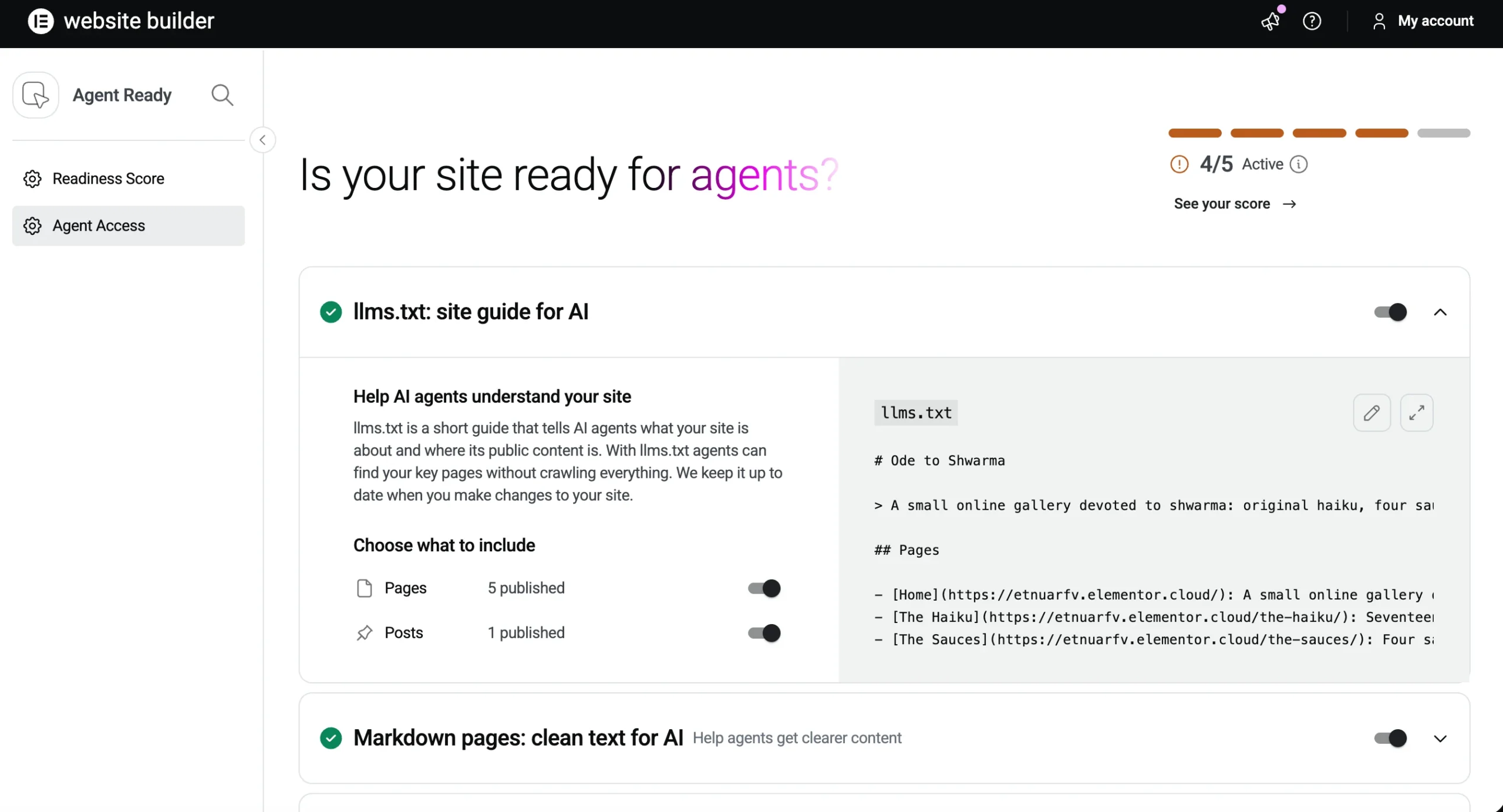
The next stage of the web is preparing our sites for the agents that are visiting them so they get the best experience for their needs. To get started, you want visitors’ agents to at least succeed with the “read” part. The basics from the second post, like clean HTML, structured data, and markdown versions of your pages, help every agent that visits today. Once those are in place, try WebMCP on one form. On an Elementor site, the new Agent Ready menu in Elementor 4.4 covers much of this: scan your site to see how agent-ready it is (you can also scan on our site: elementor.com/agent-ready), and then remediate any issues that appear by activating llms.txt, markdown versions of pages, and read-only WebMCP tools in your WP Admin under Elementor > Agent Ready > Agent Access.
Most sites will end up serving both kinds of agent, and getting your site ready for both now means it’s ready for whichever kind shows up next.

