
If you run a WordPress site, you’ve probably noticed privacy law keeps shifting. The ePrivacy Regulation, a proposed EU rule moving through the legislative process for several years, is expected to tighten cookie, tracking, and electronic communications rules once it passes. GDPR and the national cookie laws built on the 2002 ePrivacy Directive already apply, and getting ready for the coming Regulation is just smart planning.
None of this has to feel overwhelming, whether you run one site or several for clients. Here are the ten most effective steps for staying covered today and ready for what’s ahead.
Key Takeaways
- Current GDPR and national cookie-law rules apply now; the proposed ePrivacy Regulation adds future-proofing motivation to act today.
- Using a WordPress-native capability like Cookie Consent keeps your compliance setup simple and fast.
- Google Consent Mode v2 is now vital for sites running Google services to maintain accurate ad reporting.
- Regular automated scans are necessary to identify newly added scripts and third-party trackers.
- Keeping compliance local to your dashboard avoids heavy external systems and keeps page speeds high.
1. Conduct a Complete Audit of Your Current Cookies and Scripts
Before you write a privacy policy or design a consent banner, you need a clear picture of what’s running on your site. Most WordPress sites carry more active tools than their owners realize, analytics, marketing pixels, social buttons, and some drop tracking files on visitors’ browsers without you noticing. That’s normal, but you still need to find them.
A thorough sweep turns up old marketing tags and forgotten integrations you’d otherwise miss. Here’s how to run a manual audit or check a built-in scanner:
- Open your browser in an incognito or private window so your admin cookies don’t skew the results.
- Right-click anywhere on the page and choose Inspect to open your browser’s developer tools.
- Head to the Application or Storage tab and find the Cookies section in the sidebar.
- Note every cookie’s name, its originating domain, and how long it stays active.

Keeping a running list lets you tell visitors exactly what your site does with their data, and it makes your policy, banner, and audit trail much easier to put together.
- Scans your website files for hidden tracking scripts.
- Identifies database entries that store user identifiers.
- Categorizes trackers based on their functional necessity.
- Documents every active script for future privacy reviews.
2. Set Up a Dedicated, Native Cookie Consent Feature
Once you know what’s running, it’s time for a proper management system. An external compliance service usually means a separate dashboard, jumping between platforms just to tweak a button or update a link. A native WordPress solution keeps everything in one place.
The Cookie Consent capability built into Elementor runs right inside your WordPress backend, letting you handle GDPR and CCPA compliance without opening another tab. It’s part of Elementor’s broader compliance toolkit, alongside Web Accessibility.
With a native setup, you can have a fully styled, compliant banner live in under five minutes:
- Go to your native dashboard and open the compliance settings area.
- Set up your consent banner with the visual editor to match your brand.
- Turn on automatic scanning to categorize your active tracking scripts.
- Save your changes and publish the banner to your live site.

- Runs directly inside your familiar WordPress editor.
- Displays clear choices to your visitors right when they land.
- Saves your server resources by skipping external compliance API calls.
- Customizes easily to match your site’s exact visual style.
3. Implement Google Consent Mode v2
If you use Google Ads or Analytics and serve EU visitors, Google Consent Mode v2 isn’t optional. Google now requires it for accurate ad tracking, and without it your campaigns lose effectiveness fast as conversion signals stop arriving.
Consent Mode v2 bridges your visitor’s privacy choice and Google’s tags. When a user rejects cookies, the system sends anonymous signals instead of cutting Google Analytics off entirely, keeping basic conversion modeling alive while respecting the visitor’s choice.
“Setting up Google Consent Mode v2 is no longer just a technical recommendation; it’s the baseline for running any modern digital marketing campaign in Europe. Without these signals, your tracking will be blind.”
– Itamar Haim, Web Compliance Specialist
You want a consent setup that integrates with Consent Mode v2 out of the box, no custom JavaScript or Tag Manager wrestling required. A native compliance capability makes it as simple as checking a box.
- Adjusts Google Tag Manager fires based on user choices.
- Preserves basic conversion modeling when cookies are rejected.
- Integrates with your existing cookie consent banner.
- Satisfies requirements for European ad networks.
4. Configure Geo-Targeting for Dynamic User Experiences
Not every visitor needs a detailed consent banner. A large opt-in popup for someone in an unregulated region can hurt the experience and nudge conversions down for no reason. Geo-targeting shows the right banner to the right person.
Your site checks a visitor’s location by IP, then shows the matching compliance notice, a CCPA footer for California, a strict GDPR opt-in for Germany, nothing at all for unregulated regions.
This balances legal safety with good design. You’re not bothering visitors who don’t need a notice, and you’re fully covered for those who do.
- Detects user locations using server-side IP lookups.
- Displays specific banners designed for GDPR or CCPA requirements.
- Suppresses compliance notices for users in unregulated areas.
- Speeds up page load times for non-regulated audiences.
5. Establish Clear Consent Logs for Audit Readiness
If a regulator reviews your site, they’ll ask for your consent logs, not just your banner. You need proof that visitors gave active, informed consent before tracking started, or even a well-designed banner won’t protect you.
Your consent tool should record when someone consented, which categories they accepted, and an anonymized version of their IP. Storing raw IP addresses can itself violate privacy rules, so anonymizing isn’t optional.

Look for a tool that logs this automatically without cluttering your database, working quietly in the background every time a visitor chooses.
- Logs consent choices securely in your local database.
- Records anonymized IP addresses and timestamps for proof.
- Exports audit logs easily during official inquiries.
- Keeps data stored in a tidy format to prevent database bloat.
6. Offer an Easy Opt-Out and Global Privacy Control (GPC) Support
Opting out needs to be as easy as opting in. If visitors have to dig through five settings pages to change their mind, your site isn’t compliant, and it’s not a good experience either. You need a clear, accessible way for users to withdraw consent at any point.
You also need to honor browser-level signals like Global Privacy Control (GPC), which tells sites not to sell or share personal data. Many browsers and privacy extensions send it automatically, and laws increasingly require you to respect it without the user doing anything extra.
When your site detects a GPC signal, it should automatically treat it as a refusal of marketing tracking, a respectful way to meet advanced privacy rules.
- Respects browser-level privacy signals automatically.
- Places a persistent opt-out button on every page footer.
- Stops script execution instantly when a user withdraws consent.
- Explains user rights clearly in a simple layout.
7. Update Your Privacy Policy with a Built-In Generator
Your privacy policy is the legal backbone of your compliance setup. If you haven’t updated it recently, it probably doesn’t reflect your current cookie use, and a copy-pasted policy from a few years back won’t protect you. It needs to describe what your site actually does right now.
A solid policy lists every cookie, what it does, how long it persists, and who receives the data. A built-in generator can pull this straight from your script scanner and create accurate, customized legal text, instead of a lawyer redraft.
The best consent tools update this text as your cookie inventory changes, so you stay accurate over time without remembering to revise your policy by hand.
- Generates custom legal text based on your active tracking scripts.
- Updates compliance terms as privacy laws continue to evolve.
- Embeds easily into your dedicated policy page.
- Keeps language plain and easy for average users to read.
8. Categorize Third-Party Scripts and Block Them Before Consent
A common mistake is loading marketing scripts before a visitor makes any choice. If your analytics tracker or ad pixel loads the moment a page starts rendering, you’re already out of compliance, this is called “prior consent,” and it’s non-negotiable under current privacy rules.
You need a tool that intercepts these scripts and holds them in a queue until the visitor gives the green light, releasing them only after they accept your consent banner.
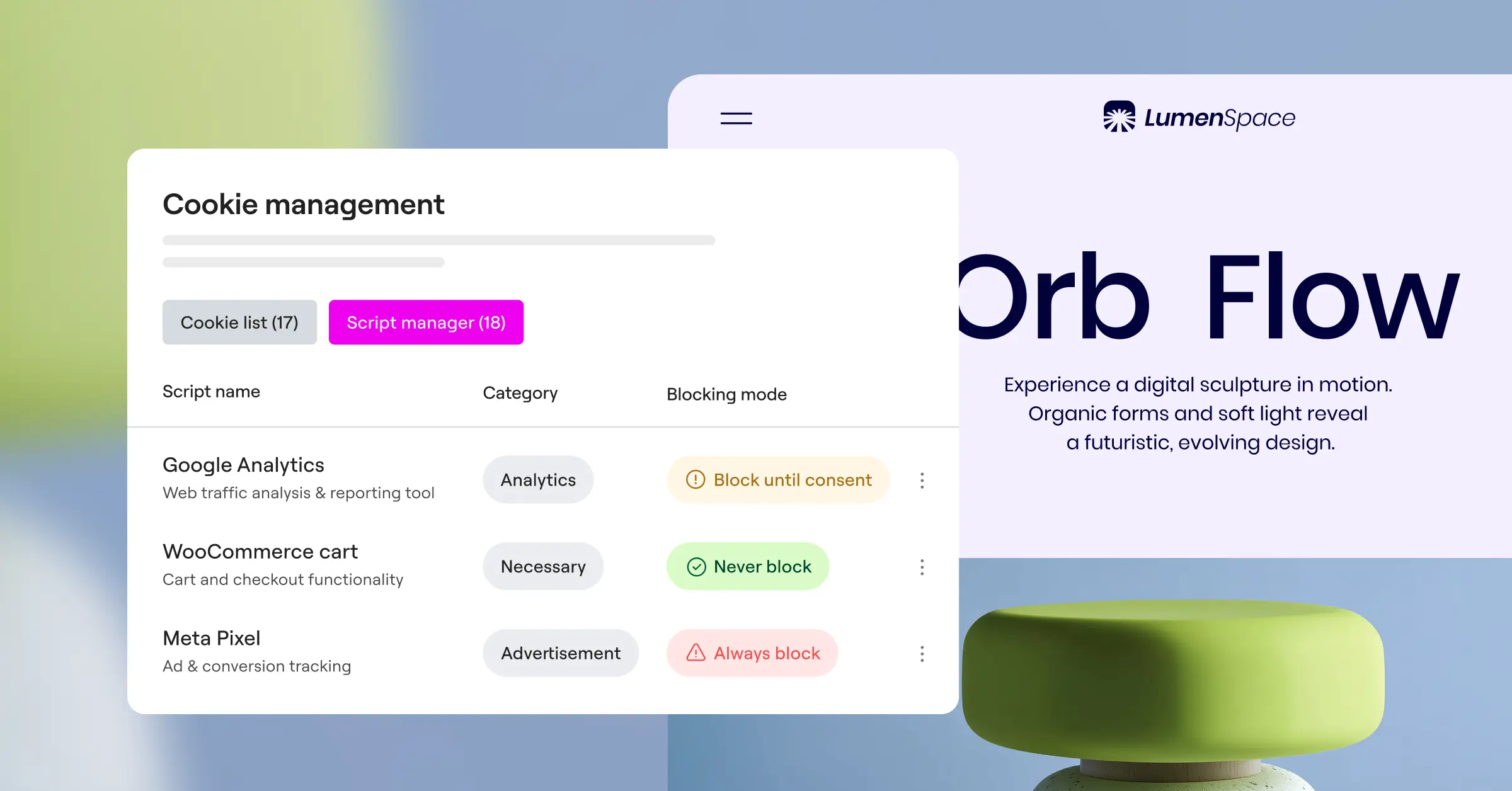
Organizing scripts into essential, analytics, and marketing categories lets your system hold back the non-essential ones while core site elements keep running. Your site keeps working, and no rules get bent.
- Prevents tracking codes from loading during initial page render.
- Classifies scripts into categories like marketing, analytics, and functional.
- Unblocks scripts only after the visitor clicks the affirmative button.
- Maintains site layout integrity while scripts are on hold.
9. Ensure Accessibility Compliance Across Your Banners
Accessibility and privacy compliance go hand in hand, and it’s easy to overlook this when you’re focused on consent mechanics. A visitor using a screen reader needs to understand and interact with your consent banner just as easily as anyone else, or your site risks accessibility issues on top of any privacy concerns.
Your banners need proper contrast ratios, clear font sizes, and full keyboard navigation, so users can move through every option without getting stuck.
Elementor’s Web Accessibility capability works well alongside cookie consent tools, so your privacy banners and accessibility settings reinforce each other rather than conflicting. Set up together, your site becomes a welcoming place for genuinely everyone.
- Focuses keyboard navigation on banner buttons naturally.
- Uses high-contrast colors to aid visually impaired readers.
- Includes screen-reader-friendly labels on all interactive elements.
- Respects user zoom preferences without breaking the banner design.
10. Regularly Test and Monitor Your Compliance Setup
Compliance isn’t something you configure once and forget. Every new tool, theme update, or tracking pixel can quietly shift your status, and a setup that worked last month might have gaps today.
Testing confirms that scripts stay blocked before consent, that choices save correctly, and that your geo-targeting rules work as expected. A quick monthly review gives you real confidence that nothing has slipped through.
Here’s a solid testing routine you can run to keep your site compliant year-round:
- Clear your browser cookies entirely or use a clean guest profile to simulate a brand-new visitor.
- Load your site and confirm no marketing cookies appear before you interact with the banner.
- Click Reject All and make sure your analytics tags stay inactive.
- Reload the page and verify your choice was remembered without the banner reappearing.
- Use a VPN to check whether geo-targeted banners load correctly for different regions.
- Simulates visits from different geographical regions using proxies.
- Checks browser developer consoles for leaked tracking cookies.
- Validates that consent logs are updating correctly in real-time.
- Verifies that tag manager setups listen to consent changes.
Comparing the Best Cookie Consent Tools for 2026
To help you choose the right approach, here’s how the leading tools compare on the factors that matter most for WordPress owners.
| Consent Tool | Native WordPress Dashboard? | Google Consent Mode v2? | Setup Time | Best For |
|---|---|---|---|---|
| Cookie Consent (Elementor) | Yes (Fully Integrated) | Yes (Out of the Box) | Under 5 Minutes | WordPress owners wanting simple, fast, native design control. |
| Cookiebot | No (External Dashboard) | Yes (Requires Setup) | Moderate Setup | Large websites needing multi-platform tracking. |
| CookieYes | No (External Bridge) | Yes (Supported) | Moderate Setup | Publishers using several different content management platforms. |
| Complianz | Yes (Local Settings) | Yes (Supported) | Longer Wizard | Sites needing complex, multi-region legal variations. |
| iubenda | No (External Console) | Yes (Supported) | Moderate Setup | Businesses requiring complete legal document generation. |
| OneTrust | No (Enterprise Cloud) | Yes (Supported) | Complex Setup | Large enterprise teams with dedicated compliance officers. |
Choosing a native option like the Cookie Consent capability keeps your whole workflow inside WordPress, no external accounts or API keys to juggle. It’s included with the Elementor One subscription, a practical, cost-effective choice for growing sites.
Frequently Asked Questions
What is the ePrivacy Regulation?
The ePrivacy Regulation is a proposed EU rule meant to strengthen online privacy protections. It builds on GDPR but focuses specifically on electronic communications, tracking codes, and cookies. As of 2026, it’s still working through the EU legislative process and hasn’t come into force, though it aims to make consent rules clearer and more consistent once it does.
How does the proposed ePrivacy Regulation differ from GDPR?
GDPR is a broad framework covering all personal data. The proposed ePrivacy rules would target browser information, cookie tracking, and marketing communications, with stricter provisions around opt-out mechanisms and metadata tracking, making user consent even more central than it already is.
Why should I use a native WordPress cookie consent feature?
A native WordPress feature keeps your setup inside your own dashboard. You skip loading heavy external scripts from third-party servers, which can slow your site, and you design your banners with tools you already know, saving time and keeping things simple.
What happens if I do not implement Google Consent Mode v2?
Without Google Consent Mode v2, Google blocks your ability to measure ad conversions for European visitors. Your campaigns become far less efficient, since Google’s algorithms won’t have the data to optimize your ads or reach the right people.
Do I need a cookie banner for visitors outside the EU?
It depends on where visitors live and what local laws apply. California users fall under the CCPA, with its own consent and opt-out rules. Geo-targeting lets you show the right notices to regulated visitors while keeping things clean for everyone else.
Can I build my own cookie consent banner without a dedicated tool?
You can design a simple pop-up yourself, but the background logic is genuinely hard to get right. A proper setup must block scripts before consent, handle opt-outs, keep secure records, and support Google Consent Mode v2. A dedicated capability handles all of that automatically.
How often should I scan my website for new cookies?
At least once a month, or whenever you install a new tool or integration. Plugins often add cookies or trackers quietly, with no notification. Regular automated scans keep your lists current so your policy and consent options stay accurate.
Does Global Privacy Control (GPC) affect my analytics data?
Yes. If a user has GPC active, your site must treat that signal as an opt-out request. Your system should automatically disable marketing and tracking cookies for that visitor, just as if they’d clicked “Reject All” on your banner.

