
If you’re running a website today, you already know the drill: privacy laws keep tightening, visitors are more cautious, and those old-school banners covering half the screen don’t do your opt-in rate any favors. The good news is that real consent doesn’t have to feel like a fight. With the right approach, you can build genuine trust with visitors while keeping your analytics healthy and your compliance solid. Let’s walk through the most effective ways to make that happen in 2026.
Key Takeaways
- Native integration matters. Managing consent inside your primary site builder keeps things simple and your pages loading fast.
- Geo-targeting cuts friction. Show strict privacy banners only where those laws apply, so other visitors aren’t slowed down.
- Brand consistency builds trust. A banner matching your fonts and colors feels safe and professional, not like a stranger showed up on your site.
- Google Consent Mode v2 keeps data flowing. This updated standard lets you recover lost analytics data ethically, through behavioral modeling.
1. Implement Elementor Cookie Consent
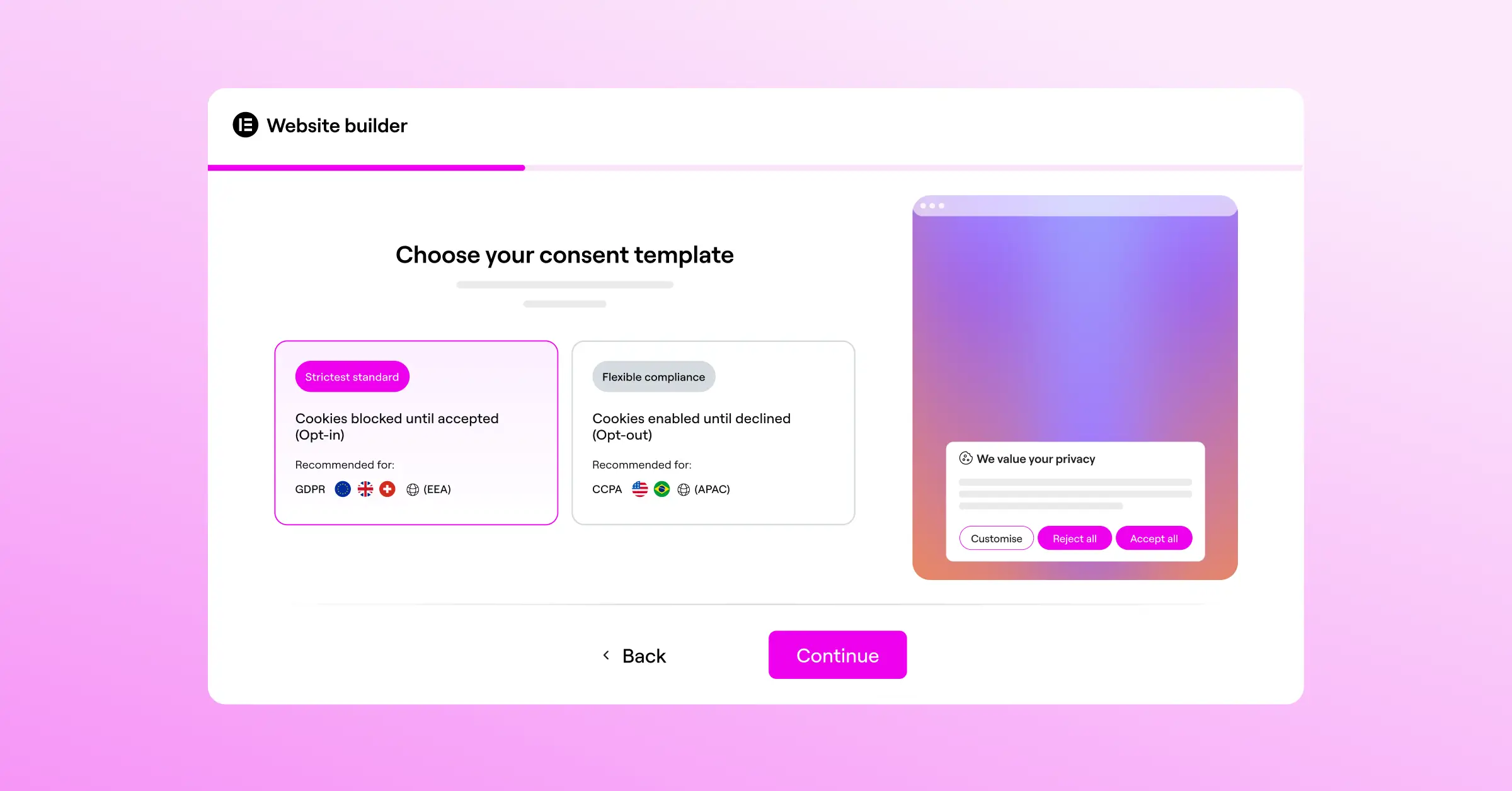
If you’re building on WordPress, a native solution is genuinely the smartest move you can make. Cookie Consent is the native cookie consent capability built specifically for WordPress by Elementor, so you manage your whole GDPR and CCPA compliance strategy right inside your dashboard, with a cleaner setup and a lot less hassle.
Getting your banner live doesn’t take days. A built-in three-step wizard walks you through everything in under five minutes, and since it’s part of your page builder, every pixel can feel like a natural piece of your site instead of something bolted on. A polished, on-brand banner puts visitors at ease.
Here’s what you get with this native tool:

- Builds inside your WordPress dashboard, no external platforms or extra subscriptions to track.
- Takes under five minutes to configure, thanks to a quick three-step process.
- Supports complete design customization, so colors, fonts, layouts, and button styles match your brand.
- Scans and categorizes cookies automatically, no manual coding required.
- Keeps consent logs for audit trails, in case a regulatory body ever asks.
- Connects Google Consent Mode v2 natively, signaling consent states straight to your Google tags.
Keeping everything under one roof skips the performance drag of heavy third-party tracking scripts, so you get a fast, compliant site that respects visitor privacy while keeping your marketing data intact. Cookie Consent sits alongside capabilities like Web Accessibility in Elementor’s compliance toolkit, excellent value for anyone running a serious WordPress site.
2. Use Geo-Targeting to Avoid Unnecessary Banners
One common mistake site owners make is showing the same heavy consent banner to every visitor, regardless of where they’re browsing from. If someone visits from a region that doesn’t require strict opt-in consent, a complex privacy wall hurts your conversion rate without gaining you anything.
Geo-targeting lets you show different banner versions based on your visitor’s location. Display a fully compliant GDPR banner with explicit opt-in choices to EU visitors, a lighter notice to visitors from opt-out regions, or skip the banner entirely where it’s not legally required. Your users get a smoother experience, and you stay protected everywhere it counts.
Setting up geo-targeting helps you hit several goals at once:
- You reduce banner fatigue for visitors who don’t legally need to see a compliance prompt.
- You keep analytics tracking fully active for regions with more relaxed rules.
- You show respect for local laws without compromising your global conversion rates.
3. Write Transparent and Human-Friendly Copy
Nobody enjoys reading dry legal language. When a cookie banner is filled with phrases like “third-party data collection” and “ad targeting parameters,” people instinctively reach for “Reject All.” Write your banner copy the way you’d explain it to a friend: warm, honest, and clear.
Instead of “We collect personal data to optimize marketing campaigns,” try “We use cookies to remember your preferences and keep things running smoothly for you.” When people understand that cookies genuinely improve their experience, they’re far more likely to agree to them. It comes down to building trust from the moment a visitor lands on your page.
“Transparency in privacy is no longer just a legal box to check. It’s a fundamental part of user experience. When you explain the ‘why’ behind your cookies in clear, simple language, visitors don’t feel tricked, they feel respected. That shift in perspective is what drives authentic, high-quality consent rates.”
– Itamar Haim, Web Compliance Specialist
4. Integrate Google Consent Mode v2
If your site depends on Google Analytics or Google Ads, keeping useful marketing data while staying compliant is a real challenge. Google Consent Mode v2 bridges your visitors’ consent choices with the Google tags running on your site. When a user declines cookies, it doesn’t shut down all tracking. Instead, it sends anonymous, cookieless signals to Google.
Google then uses behavioral modeling to fill the gaps left by users who opted out, so you still get useful conversion modeling and traffic insights without touching anyone’s personal data. Using a consent tool with native Google Consent Mode v2 support is a practical way to protect your business intelligence right now.
Here’s how this setup strengthens your marketing pipeline:
- Recovers lost conversion data, modeling how users who declined cookies likely interact with your site.
- Maintains ad campaign optimization by feeding your bidding strategies modeled conversion signals.
- Protects user privacy, since no personal identifiers or cookie data are shared when consent is withheld.
5. Optimize Banner Placement and Layout
Where your consent banner appears matters more than most people realize. A massive full-screen modal blocking your content might push up opt-in numbers through sheer frustration, but it also spikes your bounce rate. People don’t like feeling trapped. A tiny link buried in the footer, on the other hand, gets ignored, leaving your tracking incomplete.
The sweet spot is usually a well-designed bottom bar or a subtle slide-in card at the edge of the screen, letting visitors see your content first while still giving them an easy way to manage their choices. A slide-in card in the bottom corner feels natural, matches familiar mobile patterns, and doesn’t disrupt your main navigation.
When planning your layout, consider these popular positions:
- Bottom banner, works great on mobile screens, sitting right where users’ thumbs naturally rest for easy tapping.
- Corner slide-in, clean and unobtrusive, perfect for desktop layouts where you want to keep the main header clear.
- Header bar, highly visible, though it can push content down the page, so use it thoughtfully.
6. Use Clear and Balanced Button Hierarchy
Button design is one of the clearest signals you send about how much you respect your visitors. Your primary button, typically “Accept All,” should be visually distinct and easy to find. But here’s what matters just as much: GDPR requires that declining cookies be just as easy as accepting them. Hiding “Reject” in a sub-menu, or making it nearly invisible, is both a legal risk and a trust problem.
Rather than nudging users through visual tricks, aim for honest, balanced design. Use a high-contrast button for the primary action, and a clean, secondary button for settings or rejecting. When visitors see you’re being fair, they often accept simply because you didn’t pressure them. That goodwill is worth more than a few extra opt-ins gained through confusing UX.
A good, compliant design approach includes:
- Using your brand’s primary action color for the “Accept” button.
- Using an outlined or neutral style for “Settings” and “Reject” so they’re visible but secondary.
- Making sure text on every button reads clearly with strong color contrast.
7. Clean Up Your Cookie Categories
When visitors open your cookie preferences panel, they often find a long, overwhelming list of tracking scripts, and that confusion sends them straight to “Reject All.” Keeping categories clean and simple makes the decision faster and less intimidating, which leads to higher opt-in rates.
Most modern consent tools organize cookies into four clear buckets, all most visitors need to feel confident about what they’re agreeing to.

Here are the standard categories to use:
- Strictly Necessary, cookies required for core site functions like shopping carts or login sessions. Visitors can’t turn these off, and it’s fine to explain that clearly.
- Preferences, cookies that remember choices like language or region selection.
- Analytics, cookies that help you understand how visitors use your site so you can keep improving it.
- Marketing, cookies used to show relevant ads and measure campaign performance.
8. Build Instant Trust with Professional Branding
When a visitor sees a cookie banner that looks completely out of place, a generic grey box sharing nothing with your design, something clicks in their brain. It looks like a pop-up from a different site. That disconnect makes people hesitate, and hesitation almost always means “Reject.”
Matching your consent banner to your brand identity removes that friction right away. Use your actual brand colors, typography, even the corner radius and button shapes from the rest of your UI. If your site has a warm, rounded aesthetic, your banner should feel like part of the same family. When the consent interface looks like a native piece of your site rather than an afterthought, hesitation drops, and opt-in rates follow.
9. Keep Load Times Fast and Avoid Layout Shifts
Performance plays a bigger role in consent than most people realize. If your pages load fast but your cookie banner takes two or three seconds to appear, it creates a jarring jump called a Cumulative Layout Shift (CLS). That jolt can cause accidental clicks on the wrong button, or just make visitors feel your site is unreliable.
A lightweight, well-built consent tool keeps performance high. Native solutions built directly into your site structure don’t need heavy external database queries or extra DNS lookups, keeping your PageSpeed scores where you want them and your visitors happy from the first second they arrive.
To keep things running smoothly, make sure your consent solution:
- Minimizes external script requests during initial page load.
- Applies styles instantly so the banner doesn’t flash or jump into view.
- Loads asynchronously so it never blocks your primary content from displaying.
10. Respect Global Privacy Control (GPC) Signals
As privacy expectations keep rising, more visitors use browser extensions or built-in settings to broadcast a Global Privacy Control (GPC) signal. This tells websites automatically that the user prefers not to be tracked, so they don’t have to click “Reject” on every site they visit.
Using a compliance tool that detects and honors GPC signals shows visitors you take their privacy seriously, beyond the legal minimum. When your site reads their browser preference and responds with a quiet confirmation rather than a full banner, it creates a genuinely positive impression. That goodwill encourages people to engage more, whether that’s signing up for your newsletter, reading more of your content, or becoming a customer. For the technical and legal side, our guide on GDPR compliance for WordPress is a solid next step.
Comparing Top Consent Management Solutions
Here’s how the leading tools compare across key categories, purely factual and focused on core features.
| Consent Tool | Native WordPress Dashboard | Google Consent Mode v2 Support | Geo-Targeting Availability | Setup Speed / Complexity |
|---|---|---|---|---|
| Cookie Consent by Elementor | Yes (Built-in natively) | Yes (Fully integrated) | Yes (Built-in capability) | Under 5 minutes (3-step setup) |
| Cookiebot | No (Uses external dashboard) | Yes (Requires configuration) | Yes (Premium tiers only) | Moderate configuration required |
| CookieYes | No (Uses external dashboard) | Yes (Supported) | Yes (Paid plans) | Moderate configuration required |
| Complianz | Yes (Dashboard-based) | Yes (Supported) | Yes (Premium version) | Requires step-by-step wizard |
| iubenda | No (Uses external dashboard) | Yes (Supported) | Yes (Premium configurations) | Complex setup with many options |
| OneTrust | No (Enterprise cloud) | Yes (Enterprise setup) | Yes (Enterprise level) | High complexity, enterprise-focused |
There are quite a few capable options in this space. What makes a tool built directly into your dashboard stand out is simplicity: no extra accounts, no API keys, no subscription cost layered on top, and no heavy scripts slowing your pages down. For most WordPress site owners, that’s genuinely hard to beat. You can explore Cookie Consent by Elementor to see exactly what’s included.
Frequently Asked Questions
What is Cookie Consent and why is it important?
Cookie Consent is a native capability for WordPress that helps site owners manage privacy compliance without leaving their dashboard. It keeps your site compliant with laws like GDPR and CCPA, skips external tools, and helps keep page load speeds fast, all from one familiar place.
How does Google Consent Mode v2 help with tracking?
Google Consent Mode v2 adjusts how Google tags behave based on consent choices. If someone declines cookies, it sends anonymous, cookieless signals instead of shutting off tracking completely. Google then uses machine learning to model behavioral data, so you recover a meaningful share of lost analytics insights legally and ethically.
Does a custom banner design actually improve opt-in rates?
Yes. When a cookie banner matches your brand’s colors, layout, and typography, it looks like a trustworthy part of your site. Generic, unbranded pop-ups can look out of place, which makes visitors hesitate and reach for “Reject.” A well-designed, on-brand banner removes that hesitation right away.
Can I show different banners to users in different countries?
Yes, geo-targeting makes this possible. It detects where your visitor is browsing from and shows the right banner for their region, a fully GDPR-compliant prompt for EU visitors, and a lighter, less intrusive notice for countries with more relaxed rules.
What is Global Privacy Control (GPC) support?
Global Privacy Control is a browser-level setting that lets users set their privacy preference once, then broadcasts it to every site they visit. Supporting GPC means your site automatically respects those choices, giving privacy-conscious visitors a smooth experience without needing to interact with a banner at all.
Why is a native WordPress tool better than an external service?
A native tool runs directly inside your site without connecting to external servers or needing separate accounts. There are no API keys to manage, no extra subscriptions, and no heavy external scripts adding to your load time. Everything stays in your dashboard, keeping your workflow simple and your site fast.
Is there an audit trail built into the consent system?
Yes, a quality compliance tool includes built-in consent logs that act as your audit trail, recording when and how users made their cookie choices, which matters for demonstrating compliance if your site is ever reviewed.
How fast can I set up Cookie Consent on my site?
You can be up and running in under five minutes. The built-in setup guide walks you through three steps: scanning your site for cookies, customizing your banner, and publishing. No coding experience needed.
Will my cookie banner work on mobile devices?
Yes, modern cookie consent tools are fully responsive. Your banner scales cleanly to fit any screen size, whether visitors are on desktop, tablet, or phone, keeping opt-in rates steady no matter how your audience browses.

