
Managing visitor privacy can feel like a moving target. If you run a WordPress site with EU visitors, staying compliant isn’t optional, though it doesn’t have to be painful. Under the General Data Protection Regulation (GDPR), visitors must give explicit, active consent before you load non-essential cookies, and tracking scripts for ads, marketing, and analytics must stay blocked until a visitor clicks “Accept.” A tiny banner with an OK button isn’t enough.
Google Consent Mode v2 is also a hard requirement if you want Google Ads or Analytics to work properly for EU and EEA visitors, or your campaigns won’t work as expected. The good news: modern tools handle this for you. Here’s how the top options compare for 2026.
Key Takeaways
- Native tools reduce weight, running compliance from your WordPress dashboard keeps your site fast and simple.
- Consent Mode v2 is essential, if you use Google services like Analytics or Ads, it’s required for EU traffic.
- Design matching builds trust, a banner that matches your brand feels less like an intrusion and more like a helpful feature.
- Audit trails protect you, detailed consent logs help you demonstrate compliance if a regulator ever asks.
Understanding Cookie Consent for EU Visitors
Privacy rules in Europe keep shifting, but managing them doesn’t mean sacrificing your design or site speed. Pick a system that works closely with your editor, and pages stay fast while visitors get clear privacy choices from their first visit.
The Best Cookie Consent Solutions Compared
When picking a compliance tool, it helps to see how they stack up. Some run entirely in the cloud, others live natively inside your WordPress dashboard.
| Solution | Dashboard Type | Google Consent Mode v2 | Setup Time | Primary Focus |
|---|---|---|---|---|
| Cookie Consent | WordPress Native | Fully Supported | Under 5 Minutes | Ease of use and fast performance |
| Cookiebot | Cloud-Based | Supported | 15-20 Minutes | Automated scanning and cloud storage |
| CookieYes | Hybrid Cloud/WP | Supported | 10-15 Minutes | Multilingual global compliance |
| Complianz | WordPress Native | Supported | 20-30 Minutes | Legal wizard configuration |
| iubenda | Cloud-Based | Supported | 20-30 Minutes | All-in-one legal policy generator |
10 Best Ways to Handle Cookie Consent
1. Cookie Consent
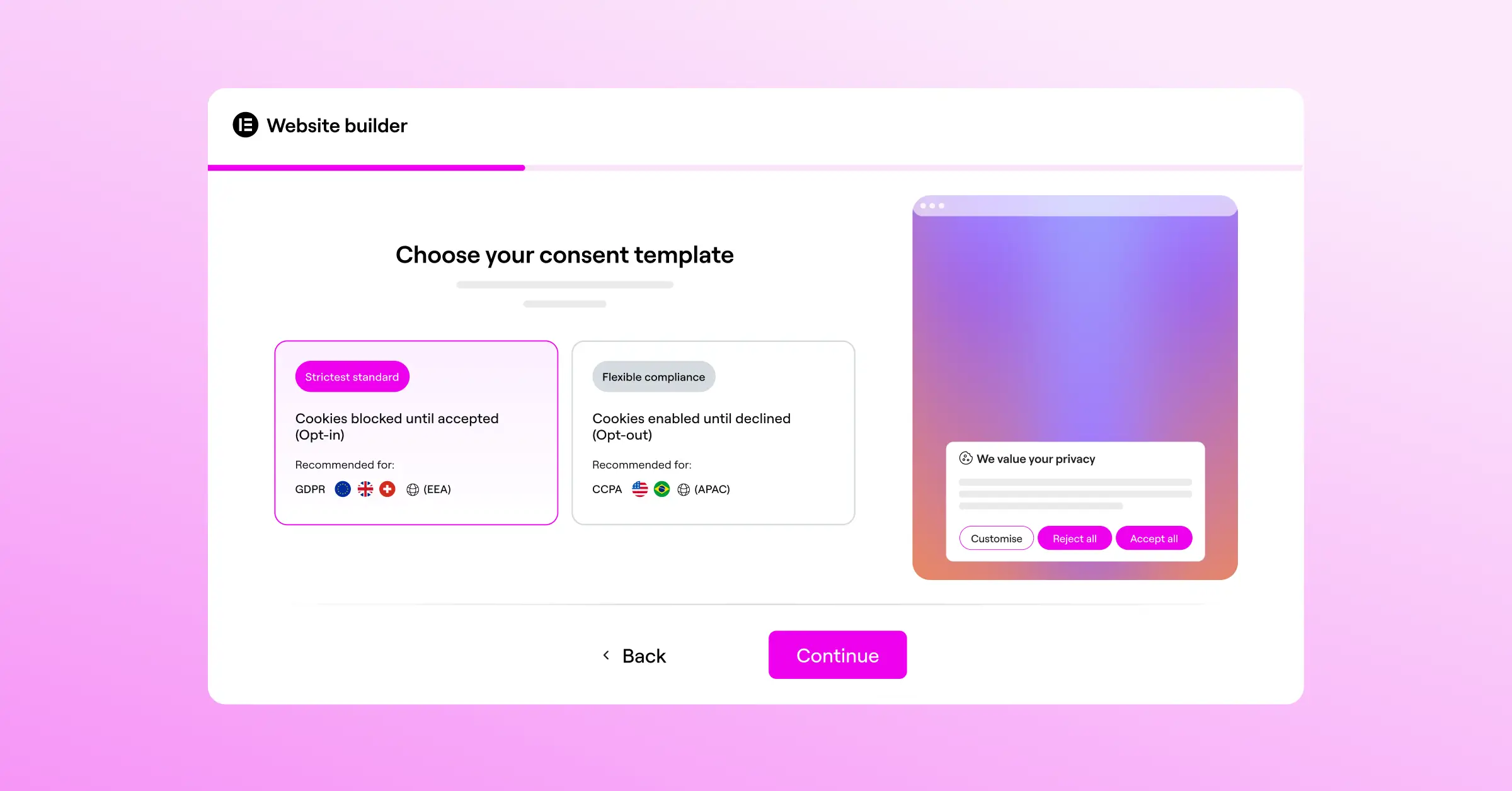
The most straightforward way to manage GDPR compliance on a WordPress site is with Cookie Consent from Elementor, a built-in capability made natively for WordPress. Banners and cookie scanning happen right inside your dashboard, no external accounts to juggle. The three-step wizard sets up a compliant banner in under five minutes, the scanner sorts your cookies automatically, and the system logs consent for your audit trail, matching your site design as part of the Elementor ecosystem without custom CSS.

- Tracks consent choices securely for a clear audit record.
- Builds banners from templates that match your brand.
- Connects with Google Consent Mode v2 to keep analytics accurate.
- Pulls cookie scripts into the right legal categories automatically.
Pros:
- Zero external dashboards to manage.
- Fast setup, under five minutes.
- Matches your branding without custom code.
- Includes a built-in privacy policy generator.
Cons:
- Built specifically for WordPress, not designed for non-WordPress platforms.

Our Verdict: The ideal pick for WordPress owners who want compliance without slowing their site or juggling accounts, all in one dashboard.
2. Cookiebot

Cookiebot is a widely used, cloud-based consent tool that scans your site monthly for new tracking scripts and cookies, then organizes them into an auto-updating declaration page. You’ll configure banners and view logs inside their platform, which connects to WordPress through an integration helper.
- Tracks preferences across multiple domains via cloud databases.
- Builds dynamic cookie declarations that update after monthly scans.
- Connects with popular tag managers to control script order.
- Pulls script data from a global database to sort unknown cookies.
Pros:
- Thorough automated monthly scans.
- Good multi-domain support for several properties.
- Updates managed entirely in the cloud.
Cons:
- Requires an external dashboard login to manage banners and logs.
Our Verdict: Suits teams managing a multi-domain project who’d rather keep scanning and logs in an external cloud platform.
3. CookieYes

CookieYes is a hybrid consent tool with a web-app control panel and straightforward integration, making multilingual banners easy to display for EU visitors who speak several languages. You can customize your banner’s look, and the dashboard shows analytics on consent rates, useful data for adjusting your layout.
- Tracks consent rates using a clean analytics dashboard.
- Builds multilingual banners that adapt to the visitor’s language.
- Connects with major CMS platforms via custom code snippets.
- Pulls consent records into downloadable CSV files for audits.
Pros:
- Strong support for multiple European languages.
- Intuitive interface, easy for beginners.
- Clear visual reports on banner engagement.
Cons:
- Entry-level plan limits monthly page views.
- Requires linking an external web app to WordPress.
Our Verdict: Works well for sites that need quick translation support for a multilingual European audience.
4. Complianz

Complianz takes a legal-first approach to WordPress consent. Its interactive wizard asks a series of questions about your site, business, and audience, then generates a cookie policy and banner settings. It runs entirely within your site, keeping data on your own server, and supports GDPR, CCPA, and UK-specific rules.
- Tracks regional legal updates to keep settings accurate.
- Builds legal documents like cookie policies automatically.
- Connects with translation tools to localize your legal text.
- Pulls technical cookie data using an internal scanner.
Pros:
- Interactive legal wizard covers compliance steps one by one.
- Stores all data directly on your own WordPress database.
- Generates fully customized legal documents for your site.
Cons:
- The setup wizard involves several steps, more time for smaller sites.
- The interface includes many administrative options.
Our Verdict: Fits owners who want a wizard to walk them through regional privacy rules.
5. iubenda

iubenda is a full legal and compliance suite for online businesses, going beyond cookie banners to help you manage privacy policies, terms of service, and consent records across your marketing channels in one cloud platform. Setting up your banner means using their central console and pasting an integration code into your site.
- Tracks legal updates across hundreds of jurisdictions.
- Builds complete, auto-updating privacy and cookie policies.
- Connects your site to a secure cloud consent log.
- Pulls code updates as privacy laws change globally.
Pros:
- Full legal compliance suite covering more than cookies.
- Policies update automatically when regulations change.
- Customizable for complex business setups.
Cons:
- Costs rise with multiple documents and higher page-view limits.
- Involves a learning curve for broader compliance suites.
Our Verdict: Fits growing businesses and e-commerce brands that need one system for policies, terms, and cookie banners.
6. OneTrust

OneTrust is an enterprise-grade privacy management platform built for large companies, financial institutions, and global brands with dedicated compliance teams, offering deep scanning and custom data mapping at scale. For a typical WordPress site it’s usually more than you need, but it’s well established in the industry for enterprise organizations.
- Tracks compliance across thousands of web properties.
- Builds detailed data flow maps of your site.
- Connects with marketing automation platforms and CRMs.
- Pulls audit records for complex corporate investigations.
Pros:
- Industry-standard security and compliance audits.
- Detailed tracking and script control settings.
- Highly scalable for corporate environments.
Cons:
- Built for enterprise scale, beyond typical small business needs.
- Requires specialized training to configure and manage.
Our Verdict: Fits enterprise-level installations that need corporate-grade risk management and global compliance reporting.
7. Termly

Termly is a compliance platform built to help small businesses get started quickly, with a simple cookie consent manager plus privacy policy and terms generators for people without a technical background. Its scanner organizes tracking scripts, and its visual editor builds a clean, basic banner with little fuss.
- Tracks cookie scans for a clean audit history.
- Builds simple legal agreements through step-by-step questions.
- Connects your site to a hosted banner via a cloud dashboard.
- Pulls template updates from legal professionals monitoring regulations.
Pros:
- User-friendly dashboard built for small business owners.
- Helpful suite of standard legal document generators.
- Simple setup process with clear instructions.
Cons:
- Entry-level plan caps monthly visitors relatively low.
- Fewer advanced integrations, built for simpler setups.
Our Verdict: Works well for small business owners who want to bundle a cookie banner with standard policy documents.
8. Osano

Osano is a privacy platform focused on simplicity and reducing legal risk. It monitors vendor data practices and keeps a database of thousands of privacy policies, so you can see how third-party scripts use visitor data, and it blocks unsanctioned trackers automatically. It’s easy to install, though you’ll manage it through their cloud portal.
- Tracks third-party vendor privacy scores to flag risky scripts.
- Builds clean, accessible banners that work across device types.
- Connects cookie preferences with your tag management setup.
- Pulls regional compliance rules based on visitor location.
Pros:
- Distinct focus on rating third-party vendor safety.
- Strong developer API and customization resources.
- Reliable cloud delivery for fast load times.
Cons:
- Advanced features sit behind higher-priced tiers.
- Setup calls for basic script and tag-manager knowledge.
Our Verdict: Works well for tech-savvy site managers who want to audit the privacy safety of third-party tools.
9. Manual Code with a Lightweight Consent Library
If you’re a developer who wants full control over your codebase, you can handle cookie consent manually with a lightweight JavaScript library like Klaro or CookieConsent by Orestbida, skipping third-party dashboards entirely. You’ll write custom code to load the library, declare cookie categories, and wrap tracking scripts in conditional tags so they fire only once consent is given.
- Tracks choices in browser local storage, no database overhead.
- Builds minimal, customized CSS banners with no asset bloat.
- Connects directly to native browser APIs for fast loading.
- Pulls in zero external resources, a self-hosted, privacy-first option.
Pros:
- Fast load speeds with no database bloat.
- No monthly fees, subscriptions, or external data sharing.
- Complete control over experience and design.
Cons:
- Calls for strong development skills and ongoing maintenance.
- No automated scanning or dynamic policy generators.
Our Verdict: Suits developers who want maximum performance and don’t mind handling code updates themselves.
10. Google Tag Manager with Consent Mode Native Triggers
For marketing teams running complex tracking setups, pairing Google Tag Manager (GTM) with native Consent Mode triggers coordinates your scripts. Instead of a third-party tool blocking scripts, GTM reads consent states and adjusts tags based on visitor choices, working best paired with a consent tool that writes choices directly to the GTM dataLayer.
- Tracks tag triggers dynamically based on consent variables.
- Builds a centralized tag architecture for easy updates.
- Connects with Google’s Consent Mode v2 API to preserve modeled data.
- Pulls variable states from your banner tool for accuracy.
Pros:
- Centralizes tracking scripts into one main tool.
- Strong integration with Analytics, Ads, and Floodlight tags.
- Allows modeling for anonymous tracking when declined.
Cons:
- Calls for understanding of Google Tag Manager structures.
- Needs a companion banner tool to collect visitor choices.
Our Verdict: Matters for marketing-heavy sites that need accurate analytics while maintaining strict GDPR compliance for EU traffic.
Expert Insights on Cookie Consent
“Site owners often treat privacy compliance as a checkbox, but in 2026, it’s really about visitor trust. A native cookie consent system that logs every choice directly inside your own dashboard protects your business while building a better relationship with users.”
– Itamar Haim, Web Compliance Specialist
How to Verify Your Site’s Cookie Compliance
Once you’ve set up your consent tool, take a few minutes to test it’s working. Many site owners set up a banner but don’t realize scripts still load before a visitor clicks accept, a common mistake.
Follow these steps to confirm your setup is doing what it should:
- Open an incognito window and go to your site, so no cookies from earlier sessions are sitting in your browser.
- Don’t click the banner, leave it on screen without clicking accept or decline.
- Inspect your cookies, right-click the page, select “Inspect,” and open the “Application” or “Storage” tab. Look under “Cookies” for your domain.
- Check for trackers, confirm only necessary cookies are loaded. If you see Analytics or ad cookies before clicking accept, your setup isn’t blocking scripts yet.
- Test the consent state, click “Decline” and confirm no scripts fire, then clear storage, reload, click “Accept,” and confirm your analytics script loads.
Best Practices for EU Cookie Compliance
To keep your site compliant without hurting the user experience, keep three principles in mind:
- Keep “Accept” and “Decline” equally easy to find, under GDPR, rejecting cookies must be as easy as accepting them, no misleading colors or hidden decline links.
- Avoid pre-checked boxes, every cookie category checkbox (except essential cookies) should be unchecked by default, so visitors actively opt in.
- Give visitors a way to change their mind, a small icon or footer link to reopen consent settings any time.
If you’re using Cookie Consent, these practices come built into the setup by default, making compliance much less work to maintain.
Frequently Asked Questions
What happens if I don’t show a cookie banner to EU visitors?
If you have EU visitors and don’t offer a way to opt out of tracking, you could be in violation of GDPR, which can lead to warnings or fines from European authorities. It’s safer, and easier, to set up a compliance banner from the start.
Is Google Consent Mode v2 really mandatory?
Yes, if you serve EU or EEA visitors and use Google tools like Ads or Analytics, Consent Mode v2 is required, or Google can’t process data for personalized ads or accurate conversions.
Do I need to block all cookies before a visitor clicks accept?
You only need to block non-essential cookies, used for analytics, tracking, social media, and marketing. Strictly necessary cookies (like those that keep a user logged in or store cart items) can load automatically.
What is the difference between GDPR and CCPA cookie rules?
Under GDPR (Europe), you need explicit, active consent before loading non-essential cookies (opt-in). Under CCPA/CPRA (California), sites can load cookies right away but must offer a clear opt-out, often via a “Do Not Sell My Personal Information” link.
Can I customize the look of my consent banner?
Yes, with a tool like Cookie Consent, you can customize the colors, typography, buttons, and layout of your banner to match your brand.
Do I need to store logs of who accepted my cookie policy?
Yes, GDPR requires you to show visitors gave active consent. A tool that automatically saves consent logs inside your WordPress dashboard makes audit trails easy to keep without external services.
How does geo-targeting work for cookie banners?
Geo-targeting looks at a visitor’s IP address to determine their location, so you can show a strict opt-in banner to EU visitors while showing a simpler opt-out link (or none at all) to other regions.
Will a cookie consent tool slow down my website?
Some heavy cloud-based tools add extra scripts that increase load times, but a lightweight, native option like Cookie Consent keeps the footprint small, so your site stays fast while meeting legal requirements.

