
Running a WooCommerce store is exciting, but privacy law can feel like a lot at first. If you sell to customers in the European Union, GDPR isn’t something to ignore. One misstep could mean real fines, and worse, lost trust with the shoppers you’ve worked hard to earn.
Here’s the good news: it’s more manageable than it looks. We tested the most reliable privacy tools out there, so here are the best options for keeping your shop compliant in 2026.
First, a quick cheat sheet of what matters most when you’re choosing one.
Key Takeaways
- GDPR compliance is essential for any WooCommerce store selling to European customers, regardless of where your business is physically based.
- Google Consent Mode v2 is now a critical requirement for stores running Google ads and analytics in the EU.
- WordPress-native solutions keep your site fast and prevent you from having to juggle multiple external dashboards.
- Geo-targeting banners ensure that only visitors from specific regions see compliance popups, keeping the checkout experience clean for everyone else.
Why GDPR Compliance Matters for Your WooCommerce Store in 2026
Running an online shop means your site gathers data constantly, tracking pixels, cookies remembering what’s in a cart. Under GDPR, European visitors need explicit consent before you load any non-essential cookies.
Ignoring these rules carries real risk. Regulators are more active now, and small stores get notices too, not just big tech. Shoppers in 2026 know their privacy rights, and respecting their data builds trust.
The landscape has shifted fast: browsers are phasing out third-party cookies, and Google now requires Consent Mode v2 for EU ad targeting, so you need a setup that doesn’t slow your page down.
What to Look for in a Great Privacy Tool
Not all tools are equal, some slow your site down, others take hours to configure. Here’s what to prioritize:
- Ease of Setup, gets you running quickly with a guided process.
- Design Flexibility, matches your brand colors and typography, not an ugly grey popup.
- Automatic Scanning, finds and categorizes new cookies as you add extensions.
- Consent Logging, a secure, organized log of when and how visitors gave consent.
- Lightweight Code, stays lean so checkout, and conversions, stay fast.
10 Best GDPR Compliance Tools for WooCommerce
Here’s our list of top options for keeping your store compliant, starting with our top pick for WordPress creators.
1. Cookie Consent (by Elementor)
Elementor built the Cookie Consent tool right into your WordPress dashboard, no external panel needed. You get custom banners in minutes, while scanning, script management, and consent logging happen behind the scenes.

Key Features:
- Runs a fast, three-step setup that gets your banner live in minutes.
- Manages cookie scanning and categorization inside your dashboard.
- Supports Google Consent Mode v2 and Global Privacy Control (GPC).
- Saves detailed consent logs for a clear audit trail.
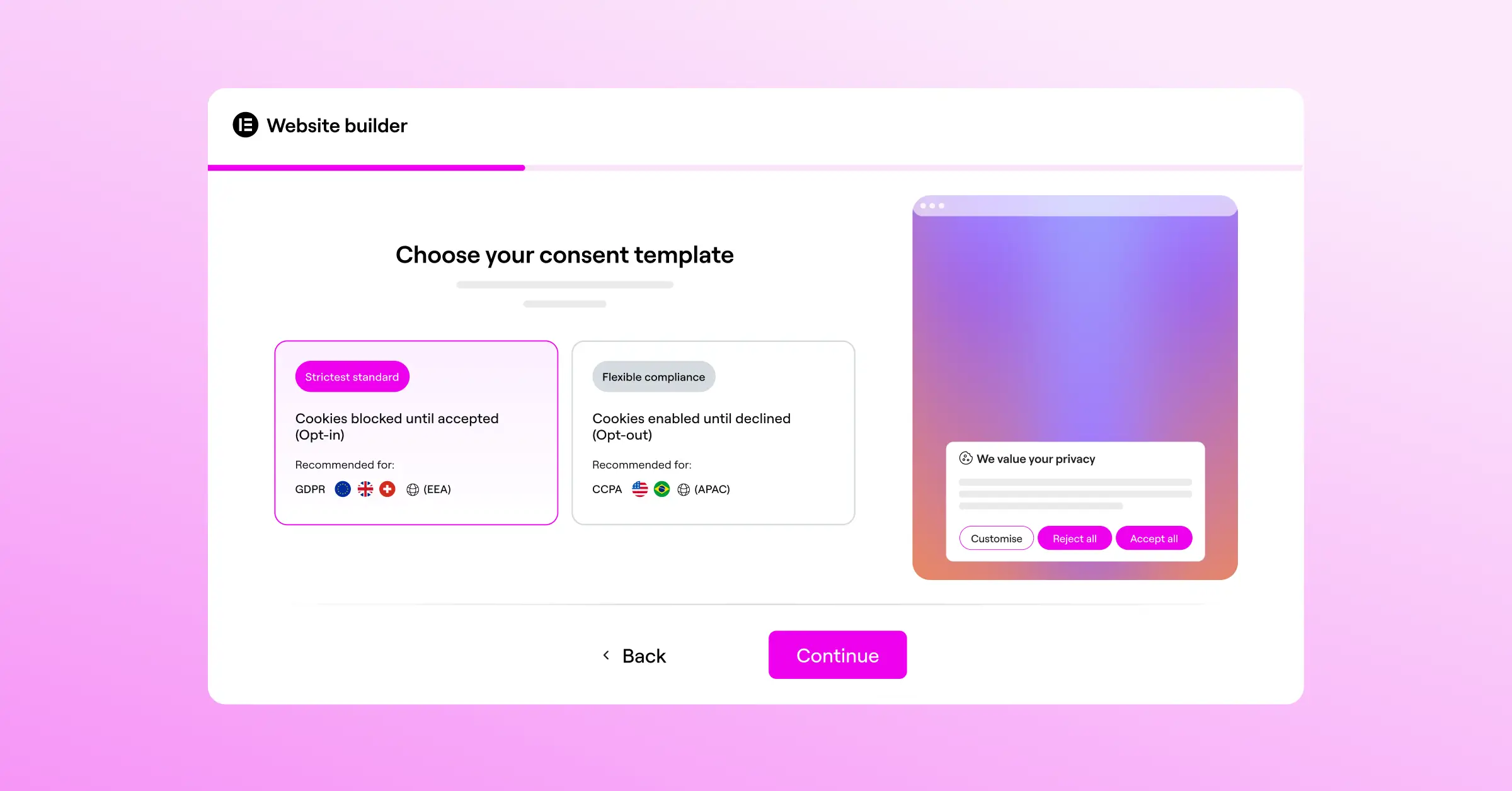
- Targets banners by country so non-EU visitors get a clean checkout.
- Generates compliant privacy policies with a built-in generator.
Pros:
- No external dashboards to manage.
- Customizable designs that fit your brand.
- Keeps performance fast.
Cons:
- Works best within the Elementor ecosystem for full design control.
Our Verdict: The best pick for owners who care about design control and want everything managed in one place.
“Managing cookie compliance shouldn’t mean sacrificing your website’s speed or design. By keeping everything native to the platform, store owners can build trust with their customers while maintaining full control over their brand experience.”
– Itamar Haim, Web Compliance Specialist
2. Cookiebot

Cookiebot is an established cloud-based service, connected through a connector, known for an accurate scanner that finds even deeply embedded tracking scripts, though setup happens on its own dashboard rather than in WordPress.
Key Features:
- Scans your website monthly to detect and categorize new cookies.
- Controls scripts to stop tracking before the visitor clicks “Accept.”
- Displays a multi-language banner based on visitor location.
- Stores consent data securely in a cloud repository for reporting.
Pros:
- Accurate automated cookie scanner.
- Good multi-language support.
Cons:
- Settings managed on an external platform outside WordPress.
Our Verdict: Dependable for large catalogs where off-site management isn’t a concern.
3. CookieYes

CookieYes bridges WordPress and a cloud dashboard, with fast setup and an intuitive interface for customizing consent screens without code. Geo-targeting works well too, showing strict banners to European shoppers and simpler notices elsewhere.
Key Features:
- Connects your site to a cloud platform for quick banner deployment.
- Blocks third-party scripts until the visitor gives explicit approval.
- Builds custom layouts and colors to match your store’s style.
- Records consent values in real time to keep you audit-ready.
Pros:
- Approachable, non-technical interface.
- Supports GDPR, CCPA, and LGPD.
Cons:
- Entry-level plans can hit page view limits during high-traffic sales.
- Requires a connection to an external database.
Our Verdict: A solid, modern choice for balanced, cloud-managed consent.
4. Complianz

Complianz runs almost entirely on your own server, walking you through a wizard that maps your business’s exact legal setup and detects common WooCommerce integrations automatically.
Key Features:
- Guides you through a wizard that builds a personalized cookie policy.
- Detects integrations with WooCommerce, PayPal, Stripe, and other tools.
- Blocks tracking codes and stylesheets until the visitor consents.
- Supports regional settings that adjust your banner’s legal text.
Pros:
- Thorough legal configuration wizard.
- No page view limits since it runs on your server.
Cons:
- Interface can feel dense for beginners.
- Database tables can grow large on high-traffic sites.
Our Verdict: A professional, self-hosted option that handles the complex legal details for you.
5. iubenda

iubenda is a full legal suite, not just a cookie tool, generating privacy policies, terms, and banners that update automatically as laws change.
Key Features:
- Generates detailed, legally reviewed privacy and cookie policies.
- Updates your legal documents automatically as standards change.
- Integrates a customizable cookie banner into your WooCommerce frontend.
- Logs consent decisions securely to meet regulatory requirements.
Pros:
- Good fit for stores needing complex terms alongside a cookie banner.
- Attorney-drafted policy clauses.
Cons:
- The credit system can take some getting used to.
- Setting up custom styling requires a bit of technical patience.
Our Verdict: A good fit for international stores wanting a hands-off approach to all their legal documents.
6. Termly

Termly brings a cookie consent banner, a privacy policy generator, and a terms of service builder into one simple dashboard, approachable for founders without a web development background.
Key Features:
- Scans your e-commerce site to build an accurate cookie policy list.
- Produces custom-branded banners that sit at the top or bottom of your pages.
- Saves consent preferences to comply with GDPR and CCPA rules.
- Bundles easy-to-use policy templates you can embed on your pages.
Pros:
- Simple, clean interface.
- Good templates for standard legal documents.
Cons:
- Fewer deep technical integrations compared to WordPress-native tools.
- Entry-level plan includes visible Termly branding on your site.
Our Verdict: An accessible starting point for new shops on a tight budget.
7. OneTrust

OneTrust is an enterprise-grade platform built for large companies that need precise compliance across many domains, apps, and databases, a well-established name for stores with dedicated legal teams.
Key Features:
- Coordinates compliance rules across multiple digital properties.
- Tracks customer consent history across sites, emails, and apps.
- Performs deep scans of database integrations and marketing pixels.
- Customizes consent preferences at a granular level per visitor.
Pros:
- Feature-rich privacy management suite.
- Detailed reporting and security.
Cons:
- Complex to configure and manage.
- Priced for enterprise budgets, not standard WooCommerce stores.
Our Verdict: Best for a high-revenue storefront with a dedicated IT department; most WooCommerce stores won’t need it.
8. Osano

Osano is a more approachable alternative to enterprise platforms, with a consent manager that loads fast on mobile and stays current as privacy laws change.
Key Features:
- Blocks non-compliant scripts before they load on the visitor’s browser.
- Translates consent banners into multiple languages by visitor location.
- Keeps data storage compliant with privacy laws beyond just the EU.
- Delivers fast script performance so your load speeds hold steady.
Pros:
- Modern, clean design.
- Legal support and monitoring.
Cons:
- Paid plans represent a notable monthly cost for bootstrapped sellers.
- Requires inserting custom scripts into your theme header.
Our Verdict: Polished legal protection for growing brands, without enterprise-level complexity.
9. WP DSGVO Tools (GDPR)
This dedicated tool serves German and European store owners sticking close to local privacy law, particularly DSGVO. It integrates with your dashboard, handling IP anonymization and blocking external resources, like Google Fonts, without permission.
Key Features:
- Blocks external scripts, including Google Analytics and Facebook Pixels, until consent is granted.
- Anonymizes user IP addresses across your database.
- Integrates a compliant cookie banner with standard WordPress themes.
- Manages customer data deletion requests (Right to be Forgotten).
Pros:
- Built with strict European legal standards in mind.
- Helpful tools for customer data requests.
Cons:
- Banner customization is quite basic compared to visual builders.
- Interface is utilitarian rather than modern.
Our Verdict: Well-suited for stores operating mainly in German-speaking countries.
10. GDPR Cookie Consent (by WebToffee)
One of the most widely used community options for WordPress, kept current with Google Consent Mode v2, with practical controls for your banner, cookie categories, and policy pages.

Key Features:
- Classifies cookies into categories like Necessary, Functional, and Analytical.
- Generates a customizable banner placed as a header or footer.
- Logs consent records on your local database for compliance proof.
- Renders custom shortcodes to display your cookie list anywhere on your site.
Pros:
- Works well with standard caching setups.
- Active user base and helpful docs.
Cons:
- Design can look dated unless you invest time in custom CSS.
- Managing cookies manually takes time on sites with many integrations.
Our Verdict: A reliable, predictable, well-tested choice for any WooCommerce store.
GDPR Compliance Tools Comparison
Here’s a quick reference table comparing the main features side by side:
| Tool Name | WordPress Native? | Google Consent Mode v2? | Geo-Targeting? | Best Suited For |
|---|---|---|---|---|
| Cookie Consent (Elementor) | Yes | Yes | Yes | WordPress creators wanting dashboard integration and design control |
| Cookiebot | No (via connector) | Yes | Yes | Large sites needing deep automated cloud scanning |
| CookieYes | No (via connector) | Yes | Yes | Sellers wanting a simple external cloud dashboard |
| Complianz | Yes | Yes | Yes | Users who want step-by-step legal wizards run on-server |
| iubenda | No (via integration) | Yes | Yes | Stores needing a complete auto-updating legal document suite |
| Termly | No (via script) | Yes | Yes | Beginners looking for quick legal policy templates |
| OneTrust | No (via script) | Yes | Yes | Enterprise brands with dedicated legal teams |
| Osano | No (via script) | Yes | Yes | Growing brands wanting solid legal protection |
| WP DSGVO Tools | Yes | Yes (premium) | No | German and DACH-region store compliance |
| GDPR Cookie Consent | Yes | Yes (premium) | Yes (premium) | Store owners wanting a traditional, well-tested WordPress option |
How to Configure GDPR Settings on Your WooCommerce Store
Once you’ve picked the right solution, setup doesn’t have to be painful. Here are the key steps, in order.
Step 1: Run an Initial Cookie Scan
Before asking for consent, you need to know exactly what cookies your store sets. Most tools, including Elementor’s Cookie Consent capability, scan your shop and sort cookies into categories like “Necessary,” “Analytical,” and “Marketing.”
Step 2: Customize Your Banner Design
Your banner should feel like part of your site, not an alarming popup. Match your site’s style, keep the buttons readable, and offer clear “Accept All,” “Reject All,” and “Preferences” options.
Step 3: Enable Geo-Targeting
If you sell globally but you’re based outside Europe, geo-targeting detects visitor location, showing the GDPR banner to shoppers in France or Germany while your local customers get an uncluttered checkout. Worth setting up early.
Step 4: Turn on Google Consent Mode v2
If you use Google Analytics 4 or Google Ads, this step matters. Consent Mode v2 tells Google what the visitor chose, so your campaigns stay accurate and compliant even when someone declines.
Here’s the standard order of operations:
- Install and activate your chosen cookie consent solution.
- Run the automated scanner to categorize your cookies.
- Draft and link your privacy policy using a modern policy generator.
- Enable the cookie consent toggle to push the banner live.
- Test the checkout flow in an incognito window to verify that scripts don’t load before approval.
If you use Elementor, Web Accessibility works alongside cookie consent, and Elementor One bundles it with the full toolset.
Frequently Asked Questions
Is GDPR compliance required if my store is based outside the EU?
Yes. GDPR applies to any business, anywhere in the world, that offers goods or services to people in the European Union. If a customer in Spain can buy from your store, you need to comply with GDPR for that visitor.
What happens if I don’t use Google Consent Mode v2 on my WooCommerce store?
Without Google Consent Mode v2, Google won’t let you track new users or measure ad conversion performance accurately for EEA visitors. It’s effectively required if you want your Google marketing to work in Europe.
Can I just use a simple footer text link instead of a popup banner?
Under GDPR rules, you can’t. It requires explicit, affirmative consent, so your site must block non-essential cookies until the visitor has actively clicked “Accept” on a clear banner or settings screen. A passive footer link doesn’t satisfy that.
How do I know if my cookie banner is actually working?
Open your store in an incognito window and open Developer Tools (right-click and select “Inspect”). Check the “Application” or “Storage” tab under “Cookies” and confirm no non-essential cookies, like Google Analytics or Facebook Pixel, appear before you click “Accept.”
Do necessary cookies (like the WooCommerce shopping cart cookie) require consent?
No. Cookies strictly necessary for your store to function, cart items, logins, checkout security, are exempt from consent requirements. List them in your cookie policy, but you don’t need to block them.
Will using a cookie consent tool slow down my WooCommerce store?
Some heavy cloud-based scripts can add a small delay, but native solutions like Elementor’s cookie consent capability load quickly and keep the code lean, so your page speeds stay unaffected.
Can I write my own privacy policy or should I use a generator?
You can, but a professional generator or legally reviewed template is strongly recommended, since privacy laws are complex and change often. A quality tool keeps your text current with what regulators expect.
What is the difference between GDPR and CCPA?
GDPR is a European regulation with an “opt-in” model, cookies must be blocked by default until the visitor agrees. CCPA is a California law with an “opt-out” model, cookies can load by default, but visitors need a clear way to opt out of data sale, typically a “Do Not Sell My Info” link.

