To resolve Elementor style conflicts, navigate to Elementor Settings and check the options to disable default fonts and colors, ensuring Elementor Site Settings take precedence. Additionally, clear files and data to ensure your latest container designs appear correctly on the live site.
How do I disable theme inheritance in Elementor?
A primary cause of style conflicts is a WordPress theme overriding your specific design choices. To force Elementor to use your custom global styles instead of the theme’s defaults, you need to disable the default colors and fonts. For details, see Disable Elementor’s default fonts and colors.
How do I regenerate Elementor CSS files?
If the Elementor Editor looks different from your live website, the CSS files may be outdated. You can manually refresh these files by clearing the site’s cache. For details, see Clear files and cache.
How can I clear the cache on Elementor Hosting?
Stale cached data can prevent new styles from loading. If you are using Elementor Hosting, you can clear the cache directly from your management dashboard. For details, see How do I clear my Elementor Host website cache?
How do I troubleshoot Flexbox and Grid Container layout issues?
Elementor Containers use Flexbox and Grid logic, which can sometimes lead to alignment conflicts between parent and child elements. To resolve layout discrepancies:
- Launch the Elementor Editor on the affected page.
- Click the Parent Container that is causing the layout issue.
- Navigate to the Layout tab in the widget panel.
- Verify that the Align Items and Justify Content settings are not overriding the positioning of child elements.
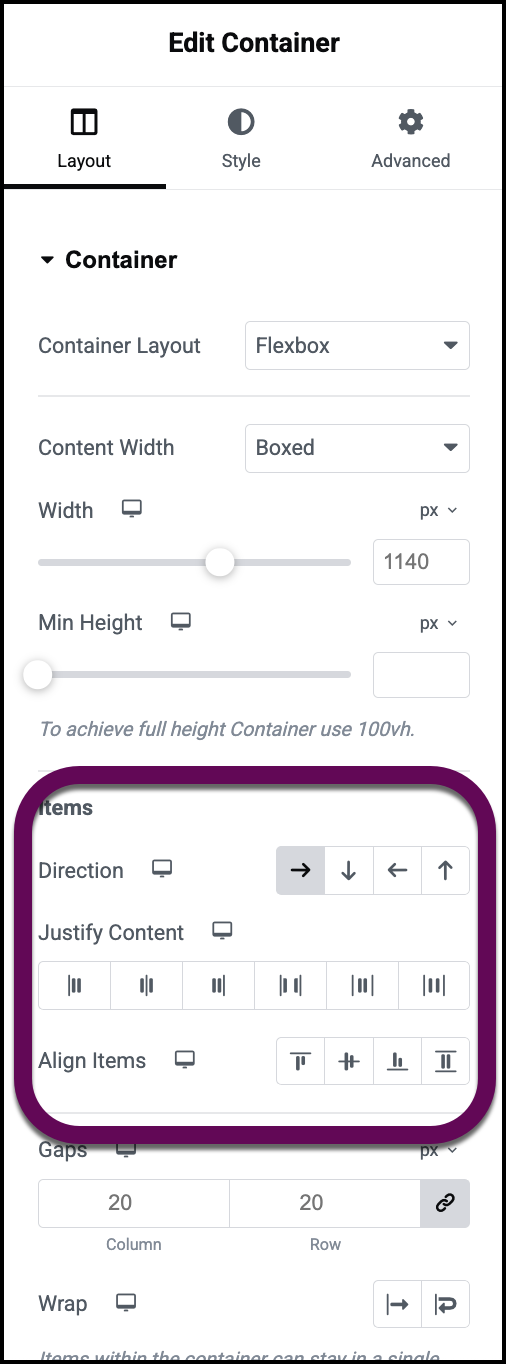
- For Grid Containers, ensure that specific grid gaps do not conflict with individual widget margins.
How do I identify plugin conflicts affecting Elementor styles?
Third-party plugins may inject CSS that interferes with Elementor’s styling classes. To isolate the problematic plugin, use the following process:
- Navigate to the Plugins menu in WordPress.
- Deactivate every plugin except for Elementor and Elementor Pro.
- Refresh your live site to see if the style conflict is resolved.
- Reactivate your plugins one by one, checking the site after each activation to identify which specific plugin causes the conflict.

