
Setting up your website to respect user privacy can feel like a lot at first, with shifting laws and unfamiliar terms. But it doesn’t have to be a chore. Pick the right tool, and the process gets a lot simpler. Here’s a look at the top tools and setup guides that’ll keep your site safe, legal, and friendly to visitors. You’ve got this.
Key Takeaways
- Compliance matters – Privacy laws require clear consent before tracking runs.
- WordPress-native is simpler – Dashboard-built tools skip external logins.
- Consent Mode v2 is standard – Most setups need it for EU ad campaigns.
- Automation saves time – Script scanning keeps your cookie list current.
- Design still matters – A friendly, on-brand banner keeps bounce rates low.
Why Privacy Setup Guides Matter in 2026
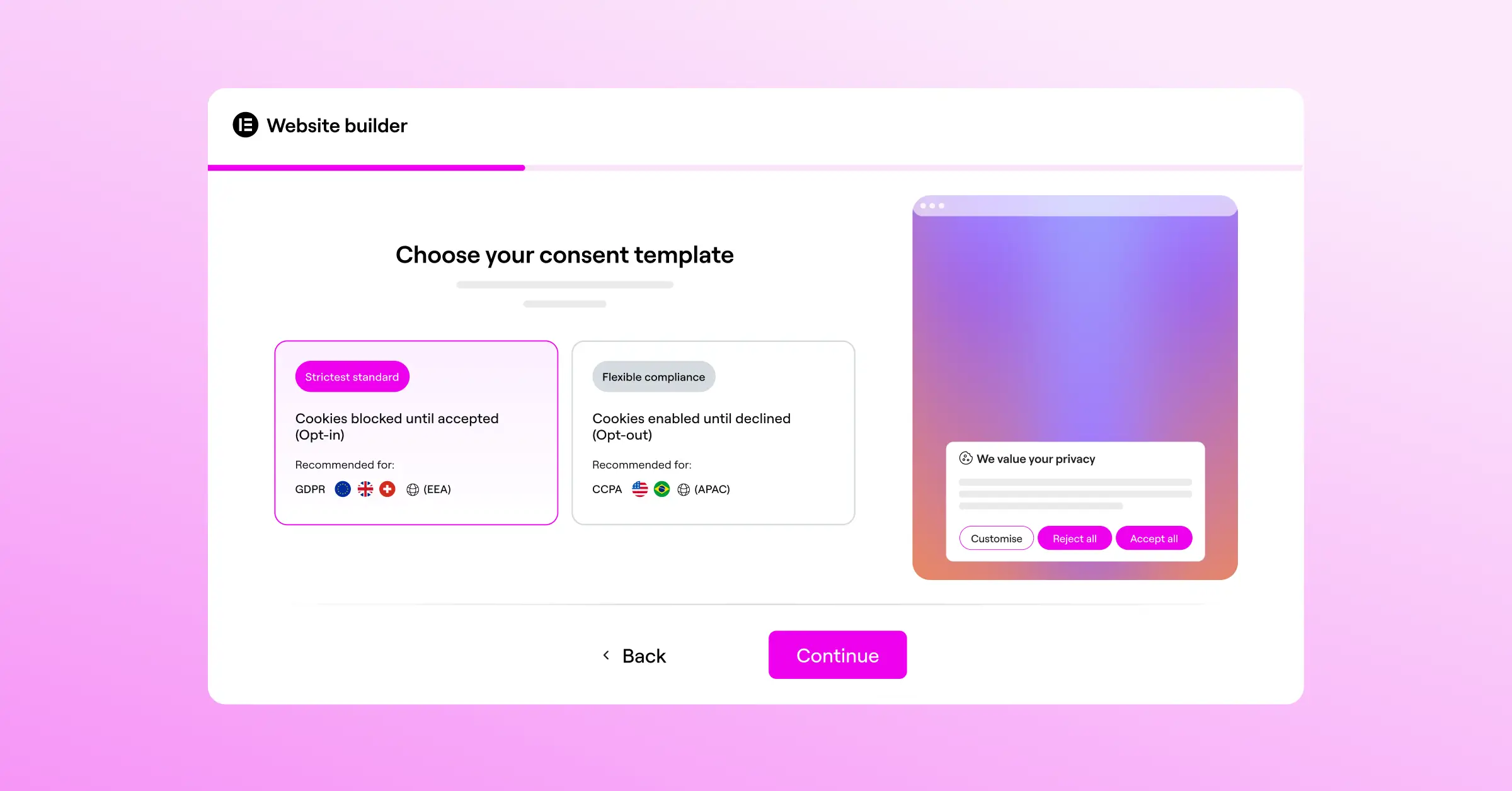
The rules of the web have changed. You can’t just drop a tiny “we use cookies” notice at the bottom of the page anymore. Laws like GDPR and CCPA now require real control over what data visitors share, so you need to let people opt in or out before any tracking loads.
This isn’t just about avoiding headaches with regulators, it’s about earning trust. A clean, professional banner makes visitors feel respected. Plus, ad platforms now require systems like Google Consent Mode v2 to track conversions, so without proper setup your analytics could stop working. Good news: getting it right is simpler than you’d think.

Comparison of the Best WordPress Cookie Consent Solutions
Here’s a quick summary of the top options and how each handles your platform, consent rules, and geo-targeting.
| Solution Name | WordPress-Native Dashboard | Google Consent Mode v2 | Geo-Targeting Support | Setup Difficulty |
|---|---|---|---|---|
| Cookie Consent | Yes | Yes | Yes | Very Easy (Under 5 minutes) |
| Cookiebot | No (External Cloud) | Yes | Yes | Moderate |
| CookieYes | No (External Cloud) | Yes | Yes | Easy |
| Complianz | Yes | Yes | Yes | Moderate |
| iubenda | No (External Cloud) | Yes | Yes | Advanced |
| Termly | No (External Cloud) | Yes | Yes | Easy |
| OneTrust | No (External Cloud) | Yes | Yes | Enterprise-level Complex |
| Osano | No (External Cloud) | Yes | Yes | Moderate |
| GDPR Cookie Consent | Yes | Yes | No (In entry-level plan) | Easy |
| Real Cookie Banner | Yes | Yes | Yes | Moderate |
1. Cookie Consent (By Elementor)
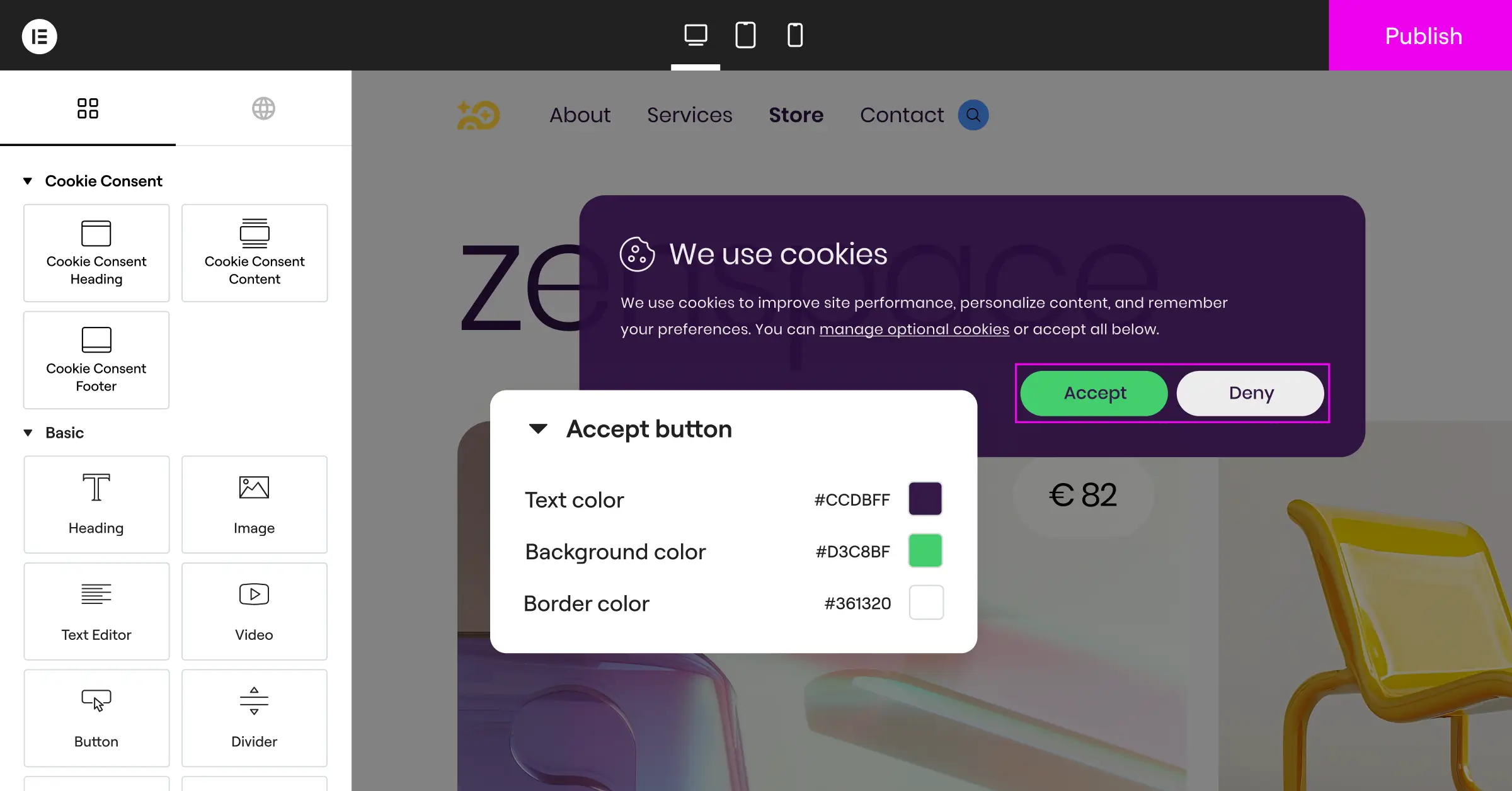
If you run a WordPress site and want to keep things simple, Cookie Consent is a great place to start. Built natively for WordPress, it lets you manage your whole privacy setup from your dashboard, no external site, no separate subscription. It works closely with Elementor, giving you full visual control over your banners.
Setup takes most people under five minutes. It lives right inside WordPress, fits naturally into your site’s design, and runs efficiently. It’s included in the Elementor One bundle, plus there’s a functional entry-level plan.

Core Features
- Scans your site automatically to categorize cookies and scripts.
- Logs visitor consent securely for clear audit trails.
- Saves styling time with controls built into your editor.
- Targets banners by visitor location, showing notices only where required.
- Supports Google Consent Mode v2 and Global Privacy Control natively.
Expanded features come bundled with the official Elementor One package.
Pros & Cons
- Pro – No external dashboards to deal with.
- Pro – Full styling customization to match your brand.
- Pro – Built-in privacy policy generator.
- Con – Best suited for sites already on WordPress.
Verdict: For sheer simplicity and native design control, this is the most logical choice for WordPress owners who’d rather skip separate SaaS platforms.
2. Cookiebot
Cookiebot is a well-known cloud-based compliance tool for sites worldwide. Instead of running inside WordPress, it uses an external cloud platform to manage cookie scans, useful if you manage compliance across several platforms.
Setup means linking WordPress to Cookiebot’s cloud controller with an API key. The scanner then sweeps your site regularly, sorting tracking scripts into compliance categories.

Core Features
- Scans your site monthly to detect new tracking scripts.
- Categorizes cookies into necessary, preference, statistical, or marketing buckets.
- Displays a clean multi-language banner for visitor preferences.
- Controls cookie blocking automatically before consent is given.
Paid tiers scale with your site’s total page count.
Pros & Cons
- Pro – Accurate cloud scanner keeps your cookie list current.
- Pro – Automatic translation for dozens of languages.
- Con – Custom styling needs CSS work in their dashboard.
- Con – Settings and data live outside WordPress.
Verdict: Cookiebot is a reliable cloud service, a solid pick if you don’t mind stepping outside WordPress to configure things.
3. CookieYes
CookieYes is another major cloud-based cookie consent player, with a modern interface that walks you step-by-step through building your banner. It works across several platforms, with a dedicated integration for WordPress users.
You design your banner in CookieYes’s cloud editor and push changes straight to your site, well-regarded for visual simplicity and a friendly onboarding flow.

Core Features
- Builds banner layouts using an intuitive visual preview tool.
- Generates a custom privacy policy from your active scripts.
- Tracks visitor consent choices in an easy-to-read dashboard.
- Blocks third-party scripts automatically before consent is given.
Professional plans run monthly for advanced geolocation targeting.
Pros & Cons
- Pro – Excellent visual builder, easy custom colors.
- Pro – Supports CCPA and GDPR in one setup.
- Con – Requires an external login to check analytics or settings.
- Con – Entry-level plan has a prominent brand watermark.
Verdict: A solid, user-friendly cloud option balancing easy design with strong regulatory support.
4. Complianz
Complianz is a privacy suite built for WordPress, a wizard-driven tool that walks you through legal questions about your business, then generates custom cookie policies and configures your banner.
Because it’s self-contained, your data stays inside your own database, which developers who care about ownership and page speed tend to like.

Core Features
- Guides you through a legal questionnaire to customize policies.
- Configures targeted banners for regional rules (GDPR, CCPA, DSGVO).
- Integrates with popular analytics tools to manage script tracking.
- Generates legally structured policy pages for your footer menu.
A free version is on WordPress.org, with annual premium licenses for advanced integrations and multi-site support.
Pros & Cons
- Pro – All processing stays on your own server.
- Pro – Integrates well with popular contact forms and social feeds.
- Con – The setup wizard can feel like a lot at first.
- Con – Interface can look busy for beginners.
Verdict: A thorough WordPress tool, excellent for technical users managing complex legal frameworks locally.
5. iubenda
If you need cookie banners, privacy policies, terms of service, and consent management in one place, iubenda is worth a look, a broader platform for legal text generation beyond blocking cookies.
Setup means building a legal document stack in iubenda’s cloud dashboard, which feeds into your WordPress site through their integration script.

Core Features
- Connects dynamically generated legal documents to your site pages.
- Updates cookie policies automatically whenever privacy laws shift.
- Records consent preferences with timestamped proof for legal use.
- Supports extensive custom branding across all banner types.
A limited entry-level plan is available, with paid tiers for advanced features.
Pros & Cons
- Pro – Complete legal coverage beyond cookie consent.
- Pro – Auto-updates documents when regulations change.
- Con – Modular pricing can add up over time.
- Con – Steeper learning curve than single-purpose tools.
Verdict: Best for businesses wanting a centralized, legally-backed service for documentation and cookie compliance together.
6. Termly
Termly is built with small business owners in mind, people who need a quick, clean compliance setup. Their suite pairs policy builders with a cookie banner, and short forms help identify your tracking tools.
No coding skills needed to make it look polished.

Core Features
- Builds compliance policies using intuitive question-based generators.
- Detects trackers through an automated monthly scanning utility.
- Maintains clear audit trails for compliance regulators.
- Adapts your banner design to fit mobile screens.
Premium tiers unlock unlimited page views and advanced policy templates.
Pros & Cons
- Pro – Clean, modern setup wizard.
- Pro – Simple visual controls for non-technical users.
- Con – Page-view caps on the entry plan limit growing sites.
- Con – Settings live outside your WordPress database.
Verdict: A great option for smaller blogs and boutique sites wanting an easy setup wizard and modern design.
7. OneTrust
For large organizations, OneTrust is often considered the gold standard of data privacy management, going well beyond cookie consent to handle governance, risk assessment, and preference centers at heavy traffic scale.
Integrating OneTrust with WordPress usually means configuring rules in their cloud console, then deploying code through a Tag Manager.

Core Features
- Manages enterprise compliance across hundreds of domains from one console.
- Applies geo-location rules based on state and national jurisdictions.
- Interfaces with CRM systems to coordinate marketing preferences.
- Displays analytics dashboards showing opt-in rates across regions.
Contact their sales team or purchase specialized plans for full access.
Pros & Cons
- Pro – Unmatched depth of features for large-scale needs.
- Pro – Built to handle complex global privacy audits.
- Con – Overkill for simple blogs or local business pages.
- Con – Significant cost and setup time required.
Verdict: Built for corporate platforms needing heavy-duty compliance infrastructure and the budget to support it.
8. Osano
Osano positions itself as a secure, low-maintenance compliance tool, with a compliance guarantee as its standout feature. It routes scripts through proxy servers, so trackers stay blocked until the visitor chooses.
Setup means inserting a script tag into your header. Osano’s cloud engine handles the rest.

Core Features
- Blocks unknown tracking scripts automatically before user review.
- Guarantees compliance up to specific financial limits.
- Translates your consent banners into 30-plus languages.
- Saves regional consent history logs for audit readiness.
Commercial plans are billed monthly based on traffic and domain numbers.
Pros & Cons
- Pro – Clean, minimalist banner style.
- Pro – Reliable cloud infrastructure keeps load times fast.
- Con – Higher pricing than some alternatives.
- Con – Granular CSS needs professional-tier access.
Verdict: A premium, low-maintenance tool for growing companies wanting legal security and minimal upkeep.
9. GDPR Cookie Consent (By WebToffee)
GDPR Cookie Consent is a widely used consent banner plugin in the official WordPress repository, giving direct control of cookie records from your admin panel, straightforward and functional, without complex cloud connections.
Setup is easy: install the plugin, scan your site, and use the standard settings page to configure banner styles.
Core Features
- Categorizes scripts manually or automatically through built-in scanners.
- Generates clean cookie policy tables you insert with shortcodes.
- Adjusts banner behavior based on user actions like scrolling.
- Resets user consent automatically after a set number of days.
Premium add-ons cover multi-lingual translation and advanced geo-targeting.
Pros & Cons
- Pro – Fully operational within your WordPress panel.
- Pro – Simple shortcode system for cookie list tables.
- Con – Styling in the entry-level plan looks dated.
- Con – Advanced blocking needs careful manual setup.
Verdict: A reliable, classic local tool, great for simple setups wanting full tracking control.
10. Real Cookie Banner
Real Cookie Banner is a modern WordPress tool with a strong focus on European rules like GDPR and ePrivacy. It works inside your admin panel with clear explanations, plus configurations for hundreds of third-party services.
The configuration wizard sets up block rules for things like YouTube videos, Google Maps, and social pixels.
Core Features
- Blocks specific script elements like videos and maps with local placeholders.
- Pre-configures compliance rules for over 150 tracking scripts.
- Checks your system settings for compliance issues through an active scanner.
- Saves design customizer changes with real-time previews.
A free version is available on WordPress.org. The Pro version is sold annually for extended script profiles.
Pros & Cons
- Pro – Local placeholder system for external media like maps or videos.
- Pro – Modern dashboard design matching native WordPress style.
- Con – The entry-level plan is limited compared to Pro.
- Con – Heavy focus on European law may feel detailed for US-only sites.
Verdict: An outstanding choice for European sites needing to block embedded media with deep local control.
Step-by-Step Selection Guide
Ask yourself a few questions about how you work, and this checklist will point you in the right direction:
- Want to stay in your WordPress dashboard? Choose a native tool like the Cookie Consent capability in Elementor or Complianz.
- Running multiple sites on different platforms? A cloud service like Cookiebot or CookieYes manages a Shopify store, a Webflow page, and a WordPress blog from one place.
- Strict ad tracking requirements? Make sure your tool supports Google Consent Mode v2 natively.
- Need custom designs? Look for a tool that works with your page builder or theme customizer.

“Modern privacy compliance is no longer just about showing a banner on your homepage. It’s about respecting user data preferences reliably behind the scenes. Using a native cookie consent tool lets WordPress creators maintain a fast, compliant, and beautifully designed user experience without leaving their core editor environment.”
– Itamar Haim, Web Compliance Specialist
Frequently Asked Questions
Do I really need a cookie consent banner on my WordPress site?
Yes, if you get visitors from the EU, UK, California, or other regulated regions. They need notice about tracking scripts and a clear way to choose which cookies to allow.
Will a cookie banner slow down my website performance?
It depends on the tool. Native tools running light scripts inside WordPress have almost no impact. Cloud tools can cause slight layout shifts, but a well-built solution stays fast.
What is Google Consent Mode v2, and do I need it?
It tells Google’s ad and analytics services how to behave based on a visitor’s consent choice. Run Google Ads or Analytics for EU or UK audiences? You’ll need it for accurate tracking.
Can I make my own cookie banner using basic HTML?
You can design the banner yourself, but the tricky part is script blocking, stopping cookies like Facebook Pixel or Google Analytics until someone clicks “Accept.” That’s why pre-built tools are popular.
What happens if I don’t comply with GDPR or CCPA?
Regulators can issue financial penalties. Small sites rarely face major fines right away, but you still risk ad account suspensions or warning letters. Staying compliant from day one is safer.
What is the difference between a privacy policy and a cookie consent banner?
A privacy policy explains what data you collect, how you use it, and who you share it with. A cookie banner lets visitors accept or reject tracking in real time. You need both.
How do I know if my cookie consent setup is working correctly?
Open your site in a private browsing window, launch your browser’s developer tools, and check the cookie storage panel. No tracking cookies should appear until you click “Accept.” That’s your quick smoke test.
Is there a completely free option to remain compliant?
Yes. Many tools, including the native Cookie Consent capability, offer functional entry-level plans with automatic scanning, banner display, and basic settings, great for small sites just starting out.

