Planning a new website can feel like a big undertaking, especially once you start figuring out your budget. Costs range from a few dollars a month to tens of thousands, depending on the path you choose. Here’s a real breakdown of website costs in 2026.
Key Takeaways
- DIY setups using visual builders keep upfront costs low, from about to annually.
- Professional agency designs run between and or more, depending on complexity.
- Ongoing maintenance is a hidden but real cost, needing at least to for updates and domain renewals.
- Your platform choice shapes your long-term budget and design flexibility.
- E-commerce features and custom integrations always push costs higher.
Understanding Web Design Costs in 2026
Research web design costs and prices are all over the place: one ad promises a free website, while an agency quotes thousands for similar pages. That gap exists because you’re paying for time, skill, strategy, and tools, not just pixels on a screen.
Think of website creation as three paths: full DIY, where you build everything yourself; collaborative, hiring a freelance designer on an accessible builder; or full agency, where a team builds a custom system from scratch. Freelancers weighing these paths need to price fairly too, since underpricing burns you out and overpricing without explaining the value loses clients.
The Core Components of Web Creation Costs
Every website needs a few essentials: even a beautiful layout is invisible without a domain name and hosting, your digital plot of land and address online (it’s a helpful way to picture it). Here’s what these basics cost.
Domain Names: Your address on the internet, like yourbusiness.com. Domains bill annually, and a standard address runs about to . A sought-after domain someone already owns can jump into the thousands, so pick something simple and memorable.
Web Hosting: Where your website files live. Cheap shared hosting costs as little as to , though it may slow your site as traffic grows. Managed WordPress hosting, fast and secure, usually runs to . Large businesses might pay hundreds monthly for dedicated or cloud hosting, and speed affects both rankings and visitor retention.
CMS and Visual Builders: The software you use to manage content and design pages. WordPress is free, but you’ll want a visual tool to design without touching code. The Elementor website builder is a top choice, a full visual editor in real time, no developer needed for custom CSS or PHP. The Elementor features, like the theme builder and built-in AI, let you build a fully custom site on a budget.
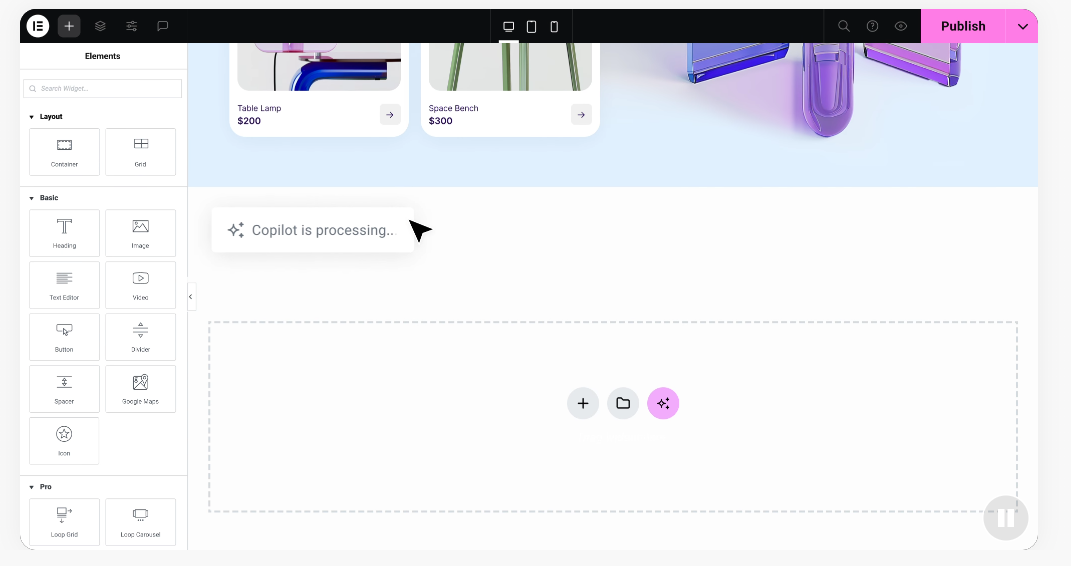
Here’s a quick rundown of the core setup steps:
- Domain Registration, establishes your brand’s unique online address.
- Web Hosting, powers your site and stores your images, text, and database files.
- Design Software, helps you lay out pages visually without writing code.
- Security Certificates (SSL), protects visitor data and builds instant trust.
Cost Breakdown by Website Type in 2026
Total cost ties to what the site needs to do: a single-page portfolio takes far less work than a massive online store.
Simple Portfolio and Personal Sites
Photographers, writers, and freelancers usually need just a home page, about page, gallery, and contact form, no complex databases or payment systems, keeping the price manageable. Build it yourself with a visual builder for a modest budget (check the Elementor pricing page), or hire a freelancer and expect to , including custom styling and setup.
A solid portfolio site should:
- Builds clean galleries to showcase past work.
- Displays contact forms so clients can reach you directly.
- Connects your social accounts for an integrated presence.
- Presents your resume or CV in a clean layout.
Small Business and Service Provider Sites
A local business like a plumber, dentist, or consulting firm needs a site that works harder: local search traffic, service details, and lead capture. These sites typically run 5 to 15 pages, often with booking calendars, CRM tools, and maps. A freelance designer typically charges to for one; an agency charges to , including full branding and marketing strategy.
A solid small business site should:
- Collects user inquiries through customized forms.
- Integrates third-party booking tools for your appointments.
- Displays localized map directions to your office.
- Generates custom landing pages for your marketing campaigns.
E-Commerce and Online Stores
Selling online adds complexity: payment processors, inventory, shipping calculators, tax automation, and secure accounts, needing more development time and stronger hosting. A small store with up to 50 products can cost to from a freelancer; a massive store with custom database integrations can push agency costs past . Budget too for transaction fees from gateways like Stripe or PayPal (this trips up a lot of first-time store owners).
A high-performing store should:
- Manages secure payment gateways for instant transactions.
- Tracks real-time inventory to prevent overselling.
- Calculates shipping rates dynamically by address.
- Simplifies checkout to reduce cart abandonment.
Website Builder Platforms Comparison for 2026
Your platform choice shapes your creative freedom, ease of updates, and ongoing costs.
| Platform | Best For | Hosting Model | Design Flexibility |
|---|---|---|---|
| Elementor | WordPress creators, freelancers, and business owners looking for deep design freedom and high customizability. | Self-hosted WordPress (maximum control over your files). | High (complete visual drag-and-drop editor with full theme control). |
| Wix | Users looking for a fully hosted, all-in-one simple site creator. | Fully hosted on proprietary servers. | Medium to High (pixel-exact positioning but locked to the platform). |
| Squarespace | Creatives and small shops looking for structured templates out of the box. | Fully hosted on proprietary servers. | Medium (structured grid-based system). |
| Webflow | Web designers who want to control raw HTML and CSS visually. | Fully hosted with integrated CMS features. | High (requires some understanding of code structures). |
Here’s how each platform works in practice. Elementor: Works on top of WordPress, pairing open-source flexibility with a visual, live editing experience, including custom CSS transforms, global styles, motion effects, and built-in AI. It’s ideal if you want to scale over time without being locked into one host’s system.
Wix: A hosted builder bundling hosting, templates, and support into one subscription, with a drag-and-drop interface for placing elements anywhere. Moving to another platform later can be tricky, since your data is tied to their system.
Squarespace: A hosted platform known for minimalist, design-focused templates, with a structured editor, built-in styling, email marketing, and light e-commerce, a common pick for artists, bloggers, and boutique businesses.
Webflow: A hosted platform for designers who want precise visual control over CSS, translating visual actions into clean code. The learning curve is steeper, but it rewards a solid grasp of web design box models.
Hidden Costs You Should Plan For
A website isn’t a one-time fee. Ongoing costs keep it safe, fast, and functional, and skipping them risks a broken or insecure site down the road.
Themes, builders, and tools update constantly to patch security holes and boost performance. Skip updates and your site can become vulnerable, or your layout can break. A developer can run a monthly maintenance plan if you’d rather not handle it (worth setting up from the start).
A beautiful site means little if no one finds it on Google. You might hire a writer for blog posts, or a specialist to optimize for search terms (the Elementor blog has practical tips if you’d rather DIY it). These services are usually billed monthly or per project.
Budget for these essential maintenance steps:
- Domain and Hosting Renewals, your promotional rate rises at renewal, so budget for the regular rate going forward.
- Security and Backups, some hosts offer free backups, but premium malware scanning and daily backups can cost to annually.
- Premium Tools and Extensions, advanced booking, membership areas, or high-end forms usually need yearly licenses.
- Content Updates and SEO, hiring a professional to write copy or optimize images can cost to per hour.
Quality software keeps your site running smoothly. It:
- Protects your site from brute-force login attacks.
- Connects your leads straight to your CRM system.
- Compresses large media files to boost page speed.
- Sends personalized emails to customers after purchase.
How Freelancers and Small Businesses Can Save Money
You don’t need a fortune for a top-tier site. Plan carefully and you’ll keep your budget manageable while still landing a beautiful, professional design.
The easiest way to save is using a visual builder instead of paying a developer thousands for custom code, cutting development hours and lowering your bill even with a hired designer. Starting from a professional template instead of a ground-up design helps too: a pre-made kit, customized with your own colors, fonts, and images, gives you a stunning site at a fraction of the cost, and launches faster.
Follow this plan to keep your budget on track:
- Define your must-have features, skip advanced extras like memberships or forums unless you truly need them now.
- Choose a scalable platform, an open system like WordPress with a visual builder grows with you, so you won’t rebuild from scratch later.
- Learn the basics, spend a few hours on minor text and image edits yourself, so you’re not paying a designer for every tweak.
Keep these cost-saving tips in mind:
- Start with a visual builder to skip the expensive custom coding phase entirely.
- Use designer-made templates instead of paying for a custom mockup.
- Write your own copy to save on professional writing fees at launch.
- Optimize your own images with free compression tools to keep your site fast.
“Many business owners underestimate the value of starting with a visual, scalable framework. By using a visual builder, you drastically reduce the initial development hours. This lets you shift your budget toward what really drives growth: high-quality content and targeted marketing. It’s a smarter, much more sustainable way to build a web presence today.”
– Itamar Haim, Web Development Specialist
Frequently Asked Questions
How much does a basic business website cost to build?
A basic business site with 5 to 10 pages typically costs to with a freelancer, or about to DIY with a visual builder and shared hosting, depending on design needs and integrations.
Can I build a professional website completely for free?
Free builders and hosting come with real limits: your site shows the platform’s branding, and you’re stuck with something like yourname.wixsite.com instead of a custom domain. Basic hosting and a custom domain cost just a few dollars a month and build real trust.
What is the difference between custom web design and templates?
Custom design means a designer builds your site from a blank canvas, tailored to your brand, unique but slower and pricier. Template-based design uses a pre-made layout you customize yourself, faster and cheaper, and still looks unique with modern visual builders.
Why are web design prices so different from one agency to another?
You’re paying for different levels of expertise. A solo freelancer has lower overhead and focuses on design; a full-service agency adds project managers, copywriters, SEO experts, and developers, treating your site as a full business strategy, meaning more hours and a higher price.
How much should I expect to pay for website maintenance?
For a basic site, expect to if you manage updates yourself, covering domain, hosting, and tool renewals. Hiring a professional or agency for monthly updates, backups, security monitoring, and small edits usually runs to .
Are e-commerce websites significantly more expensive?
Yes. E-commerce needs secure payment processing, inventory tracking, shipping setups, and user accounts, meaning more development, security, and hosting power. A simple store starts around , while larger stores can cost over .
Is WordPress really free to use?
Yes, core WordPress is open-source and free. You’ll still pay for hosting and a domain to go live, and may invest in premium tools like a visual builder, keeping full control of your files and budget.
Should I hire a freelancer or a full-service agency?
A limited budget and a straightforward site call for a freelancer, with a personal touch and lower rates. A larger budget, deep marketing strategy, or complex custom databases call for an agency, with a full team covering every angle of your digital presence.

