
Picking the right way to manage cookies on your WordPress site can feel like a lot, especially with privacy rules that keep shifting. If you’re weighing Cookie Consent against Complianz, both handle user privacy in very different ways. Let’s compare them so you can pick what fits.
Key Takeaways
- Cookie Consent is a native WordPress capability you manage right from your dashboard, no external platform needed.
- Complianz is a dedicated privacy suite with a legal wizard for regional policy generation.
- Both tools fully support Google Consent Mode v2, keeping your analytics and ads compliant with Google’s requirements.
- If you build with Elementor, Cookie Consent gives you a matching design experience in minutes (it’s simpler than it sounds).
- Setting up a compliant cookie banner doesn’t take long. Both options offer straightforward setups that align with global privacy rules.
Understanding Privacy Compliance in 2026
Running a website means thinking about the rules that protect your visitors. Laws like the GDPR in Europe and the CCPA in the US require clear permission before tracking anyone, and tools like Google Analytics or Facebook Pixel drop cookies on visitor devices. A proper cookie consent system isn’t optional. Here’s why it matters:
- Builds trust with visitors who notice when you respect their data choices.
- Protects your business from fines and warnings tied to global privacy rules.
- Maintains clean marketing data, since modern tracking needs explicit consent to work.
- Adapts to browser changes as third-party cookies fade out and first-party consent matters more.
- Meets partner requirements, since platforms like Google require specific consent setups.
Many creators use Elementor and look for privacy tools that fit that setup naturally, a native capability or a dedicated platform.
Introducing the Contenders: Cookie Consent and Complianz
Let’s meet both options, since each takes a different approach to privacy management.
What is Cookie Consent?
Cookie Consent is a built-in privacy capability for WordPress. It handles GDPR and CCPA requirements right from your dashboard, no separate platform needed. A three-step setup scans your site, organizes your cookies, and launches a banner in five minutes, right inside the Elementor workspace, and connects easily with Web Accessibility.

What is Complianz?
Complianz is a dedicated privacy suite built for WordPress, centered on a detailed legal wizard that walks you through your privacy obligations based on where you and your visitors are located.

Think of it as a digital legal assistant: it generates legal documents, scans your site for cookies, and configures a consent banner matching your legal requirements, and supports many global regulations.
Feature Comparison Table for 2026
Here’s how the two systems stack up, from setup time to standards like Google Consent Mode v2.
| Feature | Cookie Consent | Complianz |
|---|---|---|
| Dashboard Location | 100% Native WordPress | 100% Native WordPress |
| Setup Time | Under 5 minutes | Standard wizard setup (15-20 minutes) |
| External Services Required | None | None |
| Google Consent Mode v2 | Fully Supported | Fully Supported |
| Design Interface | WordPress editor and styling tools | Internal settings panel |
| Global Privacy Control | Fully Supported | Fully Supported |
| Geo-Targeting Features | Included in premium setups | Included in premium setups |
| Consent Logs | Included natively | Included natively |
| Ecosystem Integration | Part of the Elementor compliance suite | Standalone privacy tool |
Setting Up Your Privacy Banner: Ease of Use Compared
Setting up a compliance banner shouldn’t take a law degree. You want it running fast so you can get back to building your brand.
How Cookie Consent simplifies setup
Cookie Consent focuses on speed, built to get you running without options you don’t need, all from your WordPress backend:
- Run a quick scan: the tool finds and categorizes the cookies and tracking scripts already on your pages.
- Choose your template: pick one from the built-in library that fits your brand and layout.
- Publish and log: turn on the banner, and the system starts logging visitor choices for audit readiness.
The whole process takes under five minutes, and since it’s WordPress-native, you never copy code from an outside platform.
How Complianz handles the onboarding process
Complianz uses a detailed legal wizard instead, asking legal and functional questions about your business to figure out what you need:
- Answer the questionnaire: fill out pages of questions about your business location, audience, and data practices.
- Run the cookie scan: the system scans your site for active cookies and syncs them with its legal database.
- Generate legal documents: the wizard builds privacy policies and cookie disclosures from your answers.
- Configure the banner: choose your style and layout before switching it on.
This process is thorough, though it takes longer, and suits owners who’d rather work through a guided legal interview first.
Consent Management and Technical Capabilities
A cookie banner does more than show a message under the hood. It manages tracking scripts, reads browser signals, and keeps audit records.
Script and cookie scanning features
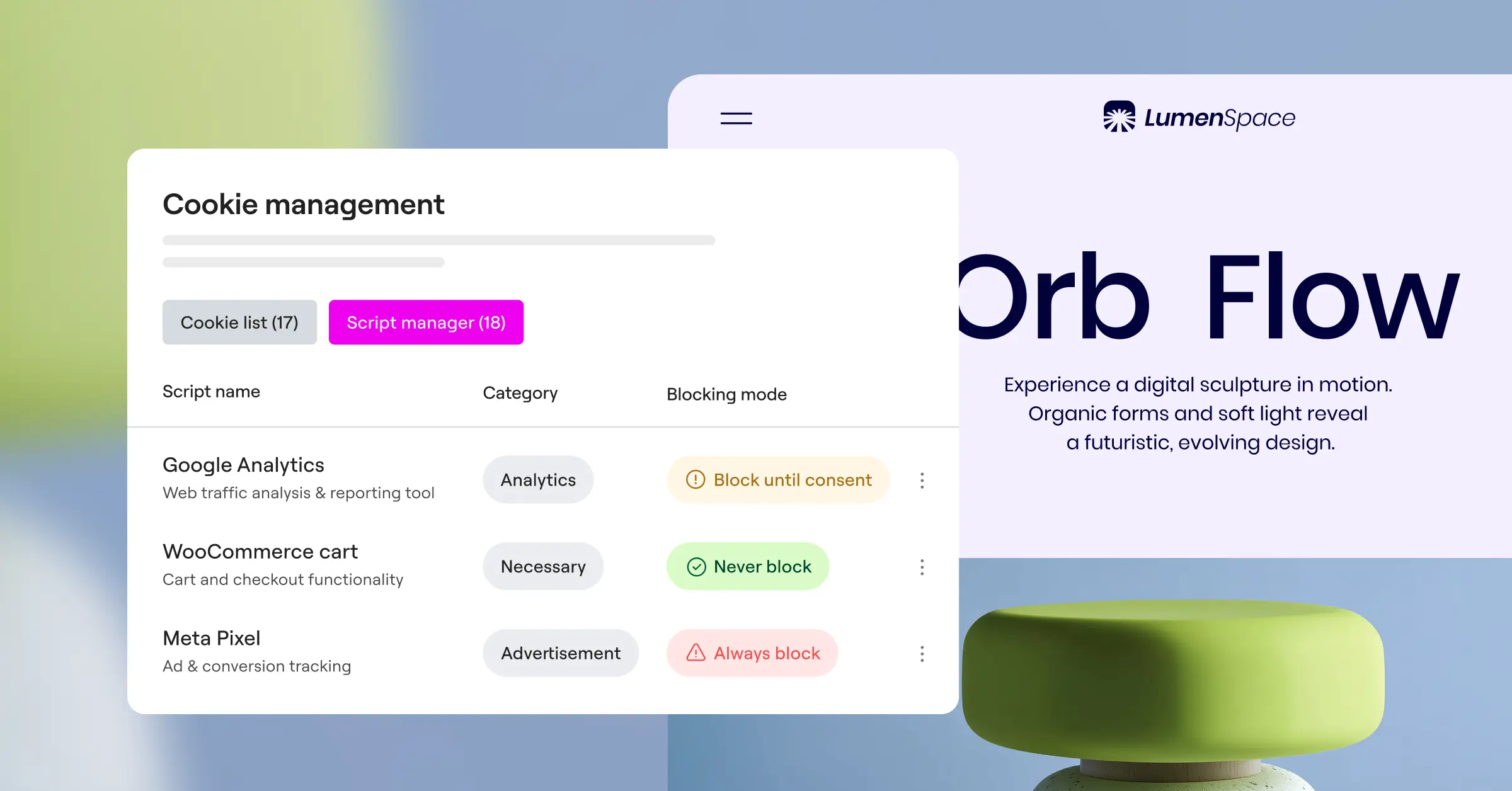
Both systems scan your website code for cookies, then block tracking scripts until a visitor gives permission. They spot services like Google Tag Manager, Meta Pixel, and Hotjar, then sort them into categories like Necessary, Preferences, Statistics, and Marketing.
Consent logs and audit trails
If a regulator ever asks for proof of compliance, you’ll need to show visitors gave consent. That’s where consent logs come in: a good log records each visitor’s decision without storing personal details:
- Records anonymous entries showing the date, time, and choice made by the visitor.
- Stores anonymized IP addresses to keep records compliant with GDPR, without identifiable data.
- Supports audit readiness so you can export logs if a regulator asks for proof.
- Keeps data stored securely in your own database, giving you full ownership.

Both Cookie Consent and Complianz provide secure consent logs, built right into your WordPress setup, so you skip an outside service for proof of compliance.
Support for Google Consent Mode v2
If you run ads or track analytics in Europe, Google Consent Mode v2 matters a lot. Google requires sites to signal consent choices before tags can track, or ads and analytics data stops working correctly for European traffic. Both tools support it out of the box, and if a visitor says no, Google collects anonymous data only.
Customization, Branding, and Design Flexibility in 2026
Your cookie banner is often the first thing a new visitor sees. If it looks out of place, it can hurt conversions, so you want it feeling like a natural part of your site.
Styling options in Cookie Consent
The design tools in Cookie Consent give you complete creative control, no code needed:
- Matches your banner colors to your site style sheet so it looks natural and on-brand.
- Applies the exact fonts your site already uses to keep things consistent.
- Positions the banner as a bottom bar, a corner box, or a full-screen overlay.
- Customizes the accept, decline, and settings buttons to match your calls to action.
- Pulls from a collection of cloud templates to save styling time.
Because the styling tools work natively with Elementor, you skip custom CSS and confusing settings pages.
Styling options in Complianz
Complianz offers a layout customizer in its settings panel for colors, button styles, and banner position. The interface sits apart from your page design tools, so styling can take extra time. It suits standard layouts, though highly unique styles may need custom CSS.
Privacy Regulations and Geo-Targeting Features
Different regions have different rules. Europe requires an opt-in model where cookies stay blocked until the user agrees. California uses an opt-out model, where tracking can start immediately but users need a clear way to stop it.
Managing regional compliance needs
Showing a European opt-in banner to a California visitor could hurt the experience. Both systems offer geo-targeting, detecting a visitor’s location and showing the right banner for local law:
- European visitors see a strict opt-in banner that blocks all non-essential cookies until they click Accept.
- US visitors see an informational banner with a quick way to opt out of data sharing.
- Other regions see a simplified banner or no banner at all, depending on local rules.
Here’s a quick look at the major privacy regulations these tools help you address:
- GDPR (Europe): Requires strict, prior opt-in consent before setting any non-essential cookies.
- UK GDPR (United Kingdom): Follows the same strict standards as the European Union.
- CCPA / CPRA (California): Requires a Do Not Sell My Personal Information option.
- PIPEDA (Canada): Requires clear consent and disclosure of how data is used.
- LGPD (Brazil): Requires clear consent rules similar to the European model.
Global Privacy Control support
Many privacy-focused browsers now send a Global Privacy Control (GPC) signal to opt visitors out automatically. Both Cookie Consent and Complianz respect it out of the box, blocking tracking scripts the moment a browser sends it.
Pricing and Value: What You’re Actually Getting
Juggling subscriptions for different tools adds up fast, so it’s worth knowing what each option includes before you commit.
Cookie Consent offers strong value: a free tier covers essential features at no cost. It’s included in Elementor One for teams and agencies, bundling compliance and design capabilities under one subscription.
Complianz also offers a free tier on WordPress.org for basic GDPR compliance. Advanced features, like geo-targeting or multi-region support, need a premium plan, sold as yearly subscriptions tiered by site count.
Here’s what a compliance expert had to say about making this choice:
“Choosing between a dedicated privacy suite and a native dashboard capability comes down to how you manage your workflow. A native solution like Cookie Consent saves you from dashboard fatigue and keeps your site light, while still giving you the full technical power of Google Consent Mode v2 and secure audit logs.”– Itamar Haim, Web Compliance Specialist
Summary of Recommendations: Which Tool is Best for Your WordPress Site?
Making this call doesn’t have to be hard. Both tools keep your site compliant in 2026, they just fit slightly different needs.
If you’re building with Elementor, Cookie Consent is a natural fit: it lives in your dashboard, sets up in minutes, and matches your brand. If you’d rather work through legal questionnaires to build policies from scratch, Complianz is a solid alternative.
Whichever path you choose, the real goal is getting your cookie consent banner live. Your visitors will appreciate the transparency, and you’ll rest easier knowing your site meets today’s rules.
Frequently Asked Questions
Do I really need a cookie consent banner on my WordPress site?
Yes. If your site gets visitors from the EU, UK, California, or other regions with active privacy laws, you need a way for users to manage consent, even if your business is based elsewhere.
Does Cookie Consent support Google Consent Mode v2?
Yes, Cookie Consent fully supports Google Consent Mode v2, keeping your analytics and marketing tags compliant with Google’s requirements for European traffic.
How does geo-targeting work for cookie banners?
Geo-targeting checks your visitor’s IP address to find their location, then shows the banner style required by that region’s laws.
Can I customize the look of my consent banner?
Yes. Both tools let you customize colors and layouts, but Cookie Consent makes this smoother by using your existing brand design options right inside WordPress.
What are consent logs and why do I need them?
Consent logs are secure records of when and how your visitors set their privacy preferences, your proof of compliance if a regulator ever audits your site.
Will these cookie banner tools slow down my website?
No, both are built for speed. But a native capability like Cookie Consent keeps your site lighter, since it runs within WordPress without loading external scripts.
Is there a free version of Cookie Consent available?
Yes, Cookie Consent includes a free tier for basic compliance needs. Advanced capabilities like geo-targeting and cloud templates come with premium options and Elementor One.
Do these tools respect Global Privacy Control signals?
Yes, both systems detect and respect Global Privacy Control signals from privacy-focused browsers, automatically applying the visitor’s choice to opt out.

