
Managing privacy compliance on your website is simpler than it sounds. Privacy rules keep tightening worldwide, and browsers are phasing out third-party cookies, so staying compliant matters more than ever in 2026. Good news: you don’t need a law degree to get this right.
If you run a WordPress site, you need a simple, reliable way to manage cookies without slowing pages down or creating friction for visitors. We’ve pulled together the top privacy compliance tools for 2026 to compare.
Whether you run a personal blog, an online store, or sites for multiple clients, there’s a solid option here for you.
Key Takeaways
- Native Integration Matters – Tools built into WordPress save setup time and skip external dashboard clutter.
- Google Consent Mode v2 is Crucial – If you run Google ads or analytics in Europe, your tool needs to support it.
- Speed and Performance – Heavy external scripts slow page loading and hurt SEO.
- Geotargeting Saves Conversions – Show banners only where legally required, keeping things clean elsewhere.
- Audit-Ready Logs – Your tool should store secure consent logs to prove compliance if audited.
The Changing Face of Web Privacy in 2026
The rules of the web have shifted lately. Major regulations like the General Data Protection Regulation (GDPR) in Europe and the California Consumer Privacy Act (CCPA) aren’t new, but enforcement has grown stricter, and regulators now check that visitors get clear data choices.
At the same time, browsers are phasing out third-party cookies, making first-party data, information you collect directly with consent, valuable. A reliable consent banner is your first line of defense for collecting it ethically.
Another major shift is the widespread requirement for Google Consent Mode v2. If your site serves visitors in the European Economic Area (EEA) and you use Google Analytics or Ads, failing to pass consent signals to Google will break your tracking and campaign optimization. Modern consent tools need to support this to keep your marketing running properly.
What is Cookie Consent?
The Cookie Consent capability offers a native, simple solution to these challenges. Built right into the WordPress dashboard, it manages GDPR and CCPA compliance without a separate platform, letting you configure banners, scan for cookies, manage tracking scripts, and keep consent logs from one familiar place.
Because it integrates naturally with Elementor, it skips the visual mismatch generic external tools often bring. No custom CSS, no developer, just layout, typography, and color controls that keep your brand’s look. (It’s simpler than it sounds, honestly.)
How the WordPress-Native Dashboard Simplifies Your Workflow
Many traditional compliance tools make you register for an external account, copy a JavaScript snippet into your header, then jump between two sites to manage settings. If something breaks, troubleshooting turns into a puzzle.
With a WordPress-native setup, everything lives under one roof, the same place you write posts and update pages. That saves time and keeps your settings from conflicting with other tools.

The 3-Step Setup Process
Setting up your privacy banner shouldn’t eat your afternoon. The native cookie consent feature uses an intuitive three-step process that takes under five minutes:
- Scan – The tool scans your site to find all active cookies and scripts.
- Categorize – It automatically sorts your cookies into clear categories, like necessary, analytical, and marketing.
- Publish – You customize the design and turn the banner on for your visitors.
The Best Cookie Consent Solutions for 2026
Here are the leading cookie consent options for WordPress owners this year, covered factually.
1. Cookie Consent
As Elementor’s native compliance capability, Cookie Consent stays simple and fast, living entirely inside your WordPress dashboard, a great fit for creators, businesses, and agencies wanting to skip external SaaS subscriptions. It’s included in the Elementor One subscription, with an entry-level plan too.
- Scans your site to find and categorize cookies.
- Builds banners that match your brand with native controls.
- Connects with Google Consent Mode v2 to protect marketing data.
- Pulls visitor location data to show the banner only where required.
- Stores secure consent logs for compliance audits.
- Generates draft privacy policies to save legal drafting time.
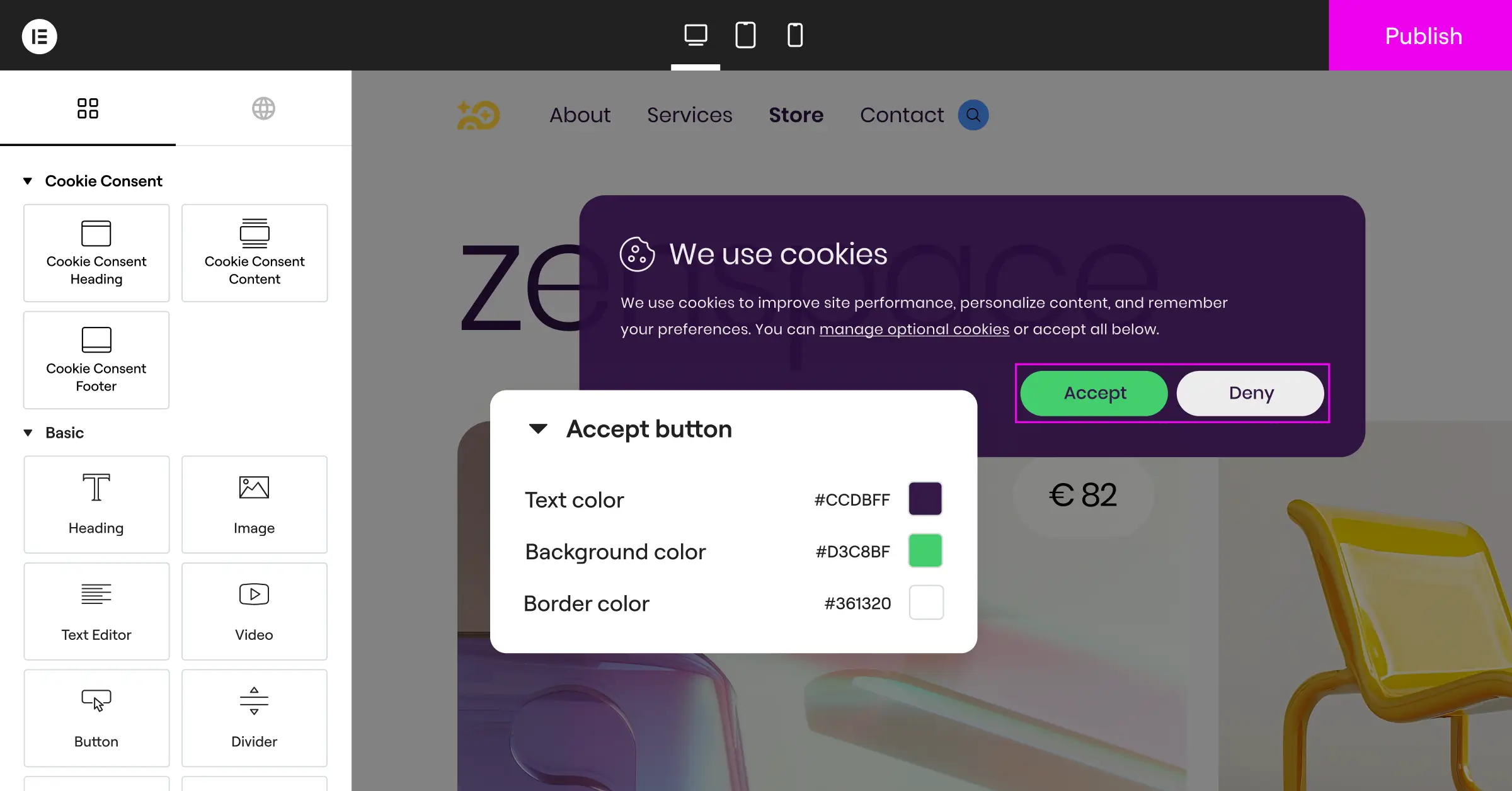
Pros: Fully native, matches your site design easily, includes a policy generator.
Cons: Best suited for WordPress sites, not non-WordPress platforms.
Verdict: A great choice for WordPress owners wanting fast, native compliance without extra SaaS costs.
2. Cookiebot
Cookiebot is a widely recognized, cloud-based consent platform. It runs externally: you manage banners and settings from the Cookiebot site, and the banner is injected into WordPress via a script.

- Scans your site monthly to keep your cookie declaration current.
- Builds standardized banners for global regulations.
- Connects with Google Tag Manager for script control.
- Pulls consent data into a cloud repository for reporting.
- Supports multiple languages for global visitors.
- Saves regional consent settings by visitor location.
Pros: Thorough automated scanning; trusted by many large enterprises.
Cons: Premium tiers can get pricey; managing settings means leaving WordPress.
Verdict: A reliable, cloud-based option for multi-platform sites with larger budgets.
3. CookieYes
CookieYes offers both a cloud app and a dedicated WordPress integration, built to support GDPR, CCPA, and LGPD.

- Tracks consent history as compliance evidence.
- Builds custom layouts with simple styling controls.
- Connects to popular frameworks, including IAB TCF v2.2.
- Pulls analytic reports on accept and reject rates.
- Supports geo-targeting for regional banners.
- Manages script blocking before user consent.
Pros: Clean interface, straightforward script blocking.
Cons: Entry-level limits are easy to exceed; advanced analytics need an external account.
Verdict: A solid, feature-rich choice for detailed consent-rate analytics.
4. Complianz
Complianz is a privacy suite built for WordPress. Unlike Cookiebot or CookieYes, it runs inside your dashboard, with a step-by-step wizard for legal documents and consent banners.

- Guides you through a legal questionnaire to customize policies.
- Builds region-specific banners from your legal answers.
- Connects to local WordPress script configurations.
- Pulls cookie data from a built-in database for classification.
- Blocks third-party frames like YouTube and Google Maps until consent.
- Saves settings to your WordPress database.
Pros: Deep WordPress integration; strong legal wizard.
Cons: The setup wizard can feel long.
Verdict: A detailed tool for owners who like a thorough, step-by-step questionnaire.
5. iubenda
iubenda offers cookie banners, privacy policy generators, and terms and conditions documents, built for complex legal requirements across countries.

- Generates auto-updating privacy and cookie policies.
- Builds banners that comply with European guidelines.
- Connects cookie settings to their hosted legal documents.
- Pulls legally reviewed updates when laws change.
- Supports advanced frameworks for ad-heavy websites.
- Manages consent preferences across multiple sites.
Pros: Legally backed policy generator; covers more than cookie consent.
Cons: Can feel complex for a basic banner.
Verdict: A strong option for sites needing auto-updating legal documents with their banner.
6. OneTrust
OneTrust is a large, enterprise-grade privacy platform, built for corporations, financial institutions, and complex organizations managing privacy across many digital properties.

- Tracks privacy metrics across websites, apps, and internal systems.
- Builds customized, region-specific banners for global enterprises.
- Connects with internal data inventory and mapping systems.
- Pulls risk assessment reports for compliance officers.
- Manages vendor risk assessments alongside consent settings.
- Logs millions of consent interactions for regulatory audits.
Pros: Powerful enterprise-grade security and reporting.
Cons: Complex to configure; built for large organizations.
Verdict: The industry standard for enterprise corporations, but usually more than most WordPress sites need.
Side-by-Side Comparison
Here’s a clear comparison covering key performance and usability factors.
| Solution | Dashboard Location | Setup Difficulty | Google Consent Mode v2 | Best Fit For |
|---|---|---|---|---|
| Cookie Consent | Native WordPress | Very Easy (Under 5 mins) | Supported (Built-In) | Simple, fast compliance |
| Cookiebot | External Cloud App | Moderate | Supported | Multi-platform sites, healthy budgets |
| CookieYes | External Cloud App | Easy | Supported | Detailed consent analytics |
| Complianz | Native WordPress | Moderate (Long wizard) | Supported | Detailed legal questionnaire |
| iubenda | External Cloud App | Moderate to High | Supported | Auto-updating legal documents |
| OneTrust | External Cloud App | High | Supported | Enterprise corporations, dedicated privacy teams |
Key Privacy Features to Look For
It’s easy to get pulled toward flashy features you’ll never use. A few core capabilities matter.
Automatic Scanning and Categorization
A compliance tool is only as good as its scanner. Miss a script, and it keeps dropping cookies on visitors’ browsers without permission. A solid solution scans your site and sorts every cookie into the right category, necessary, statistics, preferences, or marketing.

Google Consent Mode v2 Integration
Google Consent Mode v2 is no longer optional for sites relying on Google traffic and ads in Europe. It bridges your banner and Google’s services: when a visitor chooses, Consent Mode v2 passes that choice straight to Google. If they decline, Google’s tags adjust so they don’t store cookies but still send safe, anonymous signals, keeping conversion tracking alive. (This trips people up, but the setup is straightforward.)
The goal of compliance isn’t to stop tracking completely, but to give your visitors clear, transparent control over their own data. A native, well-designed tool makes this choice easy for the user and simple for the website owner.
– Itamar Haim, Web Compliance Specialist
Geotargeting Banners
Not every visitor needs to see a cookie banner. Show one to someone from a region with relaxed privacy laws, and you might hurt conversions needlessly. Geotargeting fixes this by detecting your visitor’s location and showing the banner only where it’s legally required.
Consent Logging and Auditing
If a regulator contacts you about your privacy practices, a banner on your homepage isn’t enough. You need proof. A professional tool keeps secure consent logs recording when consent was given and what was chosen, stored safely with no personal data.

Step-by-Step Compliance Guide
Ready to get your WordPress site compliant? Follow this process using the native cookie consent feature, the easiest to set up right from your dashboard.
Step 1: Activate the Cookie Consent Feature
Access your WordPress admin panel. If you use Elementor, make sure your subscription is active, then head to your compliance settings and click the toggle on, which sets up the database tables and readies your site for scanning.
Step 2: Run Your Automatic Cookie Scan
Trigger the automatic scanner. It walks your pages, finding cookies and tracking scripts from tools like Google Analytics, Facebook Pixel, or local WordPress utilities, then categorizes the common ones for you.
Step 3: Design Your Banner to Match Your Brand
Now for the fun part. Open the design settings to style your banner. Skip the generic gray box, pick your brand’s colors and fonts, and choose where the banner appears:
- Bottom Bar – A clean, full-width banner at the bottom of the screen (works especially well on mobile).
- Floating Box – A small card in the corner of the page that stays out of the way of your content.
- Center Modal – A block that requires action before continuing (best for stricter compliance situations).
Step 4: Configure Your Regional and Google Integration
Turn on Google Consent Mode v2 with a simple toggle to keep marketing tags aligned with user choices, then turn on geo-targeting to hide the banner where warnings aren’t legally required.
Step 5: Generate and Link Your Privacy Policy
Every banner needs to link to a clear policy page. Use the built-in generator if you don’t have one, link it in your banner’s text, and test on phone and desktop before calling it done.
Why Native Tools Save Time and Resources
Every external script you add is another point of failure. If a service goes offline or slows down, your site can hang while loading its banner, frustrating visitors and hurting your Core Web Vitals scores.
A native tool avoids that, running from your server with local database tables that log consent and load the banner alongside your theme files, keeping load times fast even on slower connections.
Native tools also don’t send visitors’ IP addresses or browsing data to third-party systems just to decide whether to show a banner, keeping your setup more private, exactly what privacy regulations aim to encourage.
Frequently Asked Questions
Is a cookie consent banner required for my small business website?
Yes. If your site gets visitors from the EU, California, or other regions with active privacy laws, you need a banner, even if your business is based elsewhere. Using tools like Google Analytics or a Facebook Pixel means you need consent first.
How does Google Consent Mode v2 affect my Google Analytics data?
It adjusts how Google tags behave based on your visitor’s choice. Accept, and tracking works normally. Decline, and it blocks cookie storage but still sends anonymous signals, so reports don’t end up with gaps.
Can I use a free cookie consent tool on my WordPress site?
Absolutely. There are good free options, including the entry-level plan of the native Cookie Consent capability, plenty for many small businesses and personal blogs to reach full compliance without extra costs.
Will a cookie consent banner slow down my website’s loading speed?
Some external cloud-based banners slow your site down, since they force your browser to download third-party files first. A native tool stays fast, since the code runs directly on your server.
What is the difference between GDPR and CCPA about cookie consent?
GDPR (Europe) requires “prior consent”: you must block non-essential cookies before the user clicks “accept.” CCPA (California) uses an “opt-out” model: you can load cookies right away but must offer a clear opt-out, often via a “Do Not Sell My Personal Information” link.
How often should I scan my website for new cookies?
At least once a month, or whenever you add a new feature, widget, or tracking script. New tools often bring new cookies your banner needs to categorize.
What are consent logs, and do I really need them?
Consent logs are secure records showing a visitor gave permission to be tracked: a randomized ID, the date and time, and the categories accepted. If a regulator audits your site, these logs are your proof of compliance.
Do I still need a privacy policy page if I have a cookie banner?
Yes, they work together. The banner is the immediate notice and choice selector, while your privacy policy page gives the detailed legal explanation of what data you collect, why, and how users can request its removal.
Choosing the Right Tool for Your Website
The best compliance tool is one you don’t have to worry about: it sits quietly on your site, looks like it belongs, loads instantly, and keeps you protected from legal issues. If you’re already on WordPress, a native solution like Cookie Consent is a practical, low-maintenance choice that keeps your control panel clean and works naturally with Elementor design features.
No matter which option you choose, protecting your visitors’ privacy is a step toward building trust and securing your business. You’ve got this.

