
If you run a WordPress site, you already know privacy laws feel like a moving target. Between GDPR, CCPA, and Google’s rules around Consent Mode v2, a proper consent banner isn’t optional anymore. So how do you pick the right tool? We’ll compare Complianz, a well established privacy tool, with Cookie Consent, the native consent capability built into Elementor, looking at setup, design, and compliance so you can choose what fits your site.
Key Takeaways
- Native Dashboard: Cookie Consent works directly inside your WordPress dashboard, with no external setup needed.
- Setup Speed: Cookie Consent’s three-step setup takes under five minutes.
- Complete Compliance: Both tools cover major standards, including GDPR, CCPA, and Google Consent Mode v2.
- Design Freedom: Cookie Consent gives you full visual customization, no CSS required.
- Unified Tooling: In the Elementor ecosystem, Cookie Consent is part of a broader compliance package that includes Web Accessibility tools.
Understanding Cookie Compliance on WordPress
Every time a visitor lands on your site, scripts start running quietly in the background. Some are harmless, like the ones that remember what’s in a shopping cart. Others, like tracking pixels and analytics scripts, collect personal data, and privacy rules now require explicit permission before placing tracking files on a visitor’s device, no matter where your business is based.
A banner that just says “we use cookies” doesn’t cut it anymore. Visitors need to accept some cookies while rejecting others, and Google requires Consent Mode v2 for sites serving European traffic that use Google Ads or Analytics. Without those signals, your tracking and ad campaigns start losing accuracy fast.
The good news? A solid consent tool does the heavy lifting: scanning your site, spotting which scripts are running, and blocking them until a visitor gives consent. Let’s look at how these two tackle that.
An Overview of Complianz
Complianz is a well known privacy tool with a strong presence in the WordPress community. It takes a legal-first approach, with features that go well beyond a basic banner. You work through a questionnaire about your business, audience, and data collected, and the system generates the legal documents you need and configures your banner to match.
It adapts to regional laws, so a visitor from the UK sees a different banner than one in California. Having been around for years, Complianz has also built up integrations for popular WordPress plugins and third-party tools.
Key Features of Complianz
- Scans your site regularly to spot newly added cookies and tracking scripts automatically.
- Generates customized legal documents, including privacy policies, cookie policies, and disclaimer pages.
- Blocks third-party cookies and scripts before the user grants explicit permission.
- Detects a visitor’s location to show the correct regional privacy banner automatically.
- Integrates with major translation tools to display banners in multiple languages.
- Supports a wide range of external tag managers and analytics suites.
It’s a reliable, structured option for anyone who wants a thorough, legal-first approach to compliance, and the depth of its integrations is genuinely useful on a complex stack of third-party tools.

An Overview of Cookie Consent
Cookie Consent is a WordPress-native consent capability built by Elementor. Instead of a separate SaaS dashboard, it keeps everything right where you already work, built for creators, agencies, and site owners who want a clean, compliant solution without the overhead.
Getting set up takes under five minutes. Cookie Consent scans for cookies, sorts them into categories, and keeps detailed logs for audit purposes, and it gives you complete design control over how your banners look and behave. (That’s more satisfying than it sounds.)
“Managing cookie compliance on your website shouldn’t feel like a chore that pulls you away from building your brand. Keeping your consent settings native to the WordPress dashboard is a practical approach that simplifies the legal requirements without sacrificing your site’s speed.”
Itamar Haim, Web Compliance Specialist
Key Features of Cookie Consent
- Manages all compliance requirements directly from your WordPress dashboard, with zero external logins.
- Builds on-brand consent banners using intuitive design controls that match your site’s style.
- Scans your site to sort tracking scripts into necessary, functional, analytical, and marketing buckets.
- Supports Google Consent Mode v2 to keep your analytics and ad campaigns running accurately.
- Logs visitor consent actions securely, giving you a reliable audit trail for compliance inspectors.
- Translates banner text to greet international visitors in their own language.
If you like a clean workflow and would rather not juggle multiple dashboards, this is a refreshing option. It’s included in Elementor One, and also has an entry-level plan, so it’s accessible at any stage.
Feature-by-Feature Comparison
Here’s how these two stack up side by side. Both keep your site legal, but they approach the user experience from different angles.
| Feature | Complianz | Cookie Consent |
|---|---|---|
| Dashboard Location | WordPress Dashboard | WordPress Dashboard (Native) |
| Setup Time | 15-30 minutes (detailed wizard) | Under 5 minutes (3-step setup) |
| Google Consent Mode v2 | Supported (Premium & Free) | Supported natively |
| Design Customization | Customizer controls and CSS | Full theme-style customizer controls |
| Legal Document Generation | Yes (built-in policy generator) | Yes (built-in policy generator) |
| Consent Logging | Supported in Premium | Supported natively |
| Geo-Targeting | Yes (Premium) | Yes (Natively supported) |
Both tools cover the essentials for staying compliant. The real difference comes down to how they present those features and how quickly you get them working.
Setup and Ease of Use
Nobody wants to spend hours reading legal definitions just to get a banner live. Both tools make onboarding fairly painless, though they take different paths there.
The Complianz Setup Flow
Complianz uses a detailed wizard, a bit like a guided legal consultation, covering your audience, the data you collect, and whether you sell products online. It’s thorough, which is reassuring, but can feel like a lot if you just need a quick setup.
To get Complianz running, you’ll typically work through these steps:
- Launch the configuration wizard and specify your target geographic regions.
- Enter your company details, address, and link your existing privacy policy pages.
- Run the automatic cookie scan to identify which third-party scripts are active.
- Generate the cookie policy document and connect it to your configured banner.
The full process takes about fifteen to thirty minutes. It’s detailed, which gives real peace of mind, but plan to set aside some focused time.
The Cookie Consent Setup Flow
Cookie Consent by Elementor is built for speed, compressing onboarding into three steps that take you from install to active compliance in under five minutes, a great fit if you’d rather skip dozens of configuration screens.

Getting up and running looks like this:
- Activate the capability in your dashboard to trigger the automatic script scanner.
- Pick a pre-designed banner template from the cloud library that fits your layout.
- Customize the colors, fonts, and button styles to match your brand, then publish.
That direct path keeps the focus on design and compliance. No long questionnaires, just a clean setup done before your coffee gets cold.
Design and Customization Capabilities
Your cookie banner is often the first thing a visitor sees on your site. If it looks jarring or out of place, it can undermine trust before they’ve read a word, so you want something that fits your design, and ideally something you’re proud of.
Designing with Complianz
Complianz gives you standard customizer settings for your banner’s appearance: primary colors, button shapes, and your own text. These tools are functional, but a highly specific look often means writing custom CSS, fine if you’re comfortable with code, but a friction point if you prefer visual design tools.
The visual adjustments available in Complianz include:
- Modify the banner position (bottom right, top bar, or centered modal).
- Adjust button border radius to match your theme’s style.
- Choose dark or light color schemes to fit your overall aesthetic.
- Add custom CSS rules to fine-tune spacing and typography.
- Show or hide the close icon based on regional requirements.
Designing with Cookie Consent
Because Cookie Consent is built directly into Elementor, design is where it shines. You don’t need a line of CSS to get a banner that matches your brand, with control over every visual detail, from typography and margins to entry animations.
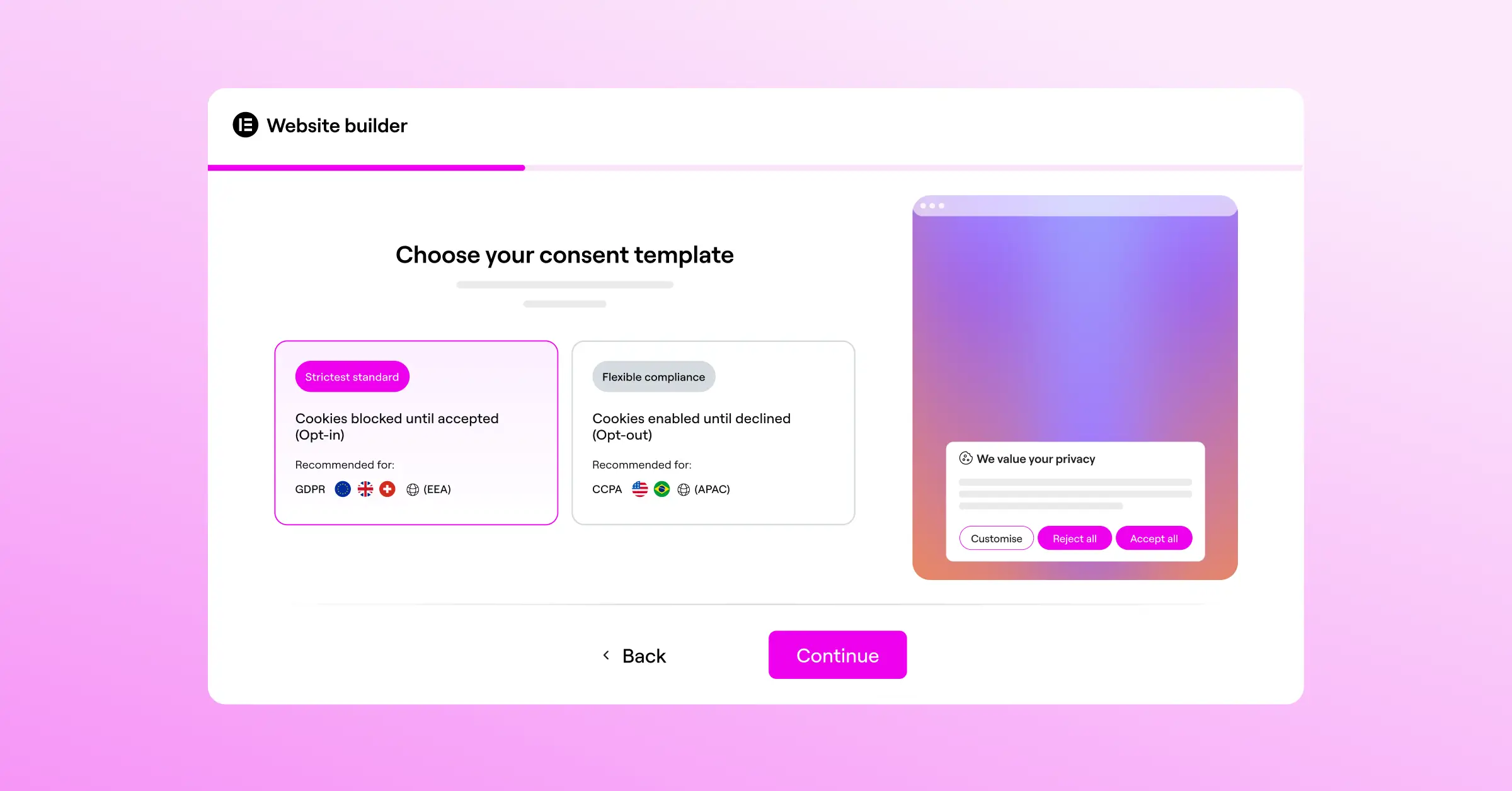
The design system lets you:
- Apply your global site fonts and color palettes automatically.
- Choose from professionally designed cloud templates as a starting point.
- Adjust padding, margins, and borders visually using simple slider controls.
- Configure responsive behavior to keep banners looking great on mobile screens.
- Create interactive hover states for buttons that match your site’s standard button designs.
That level of control makes it easy to build a banner that feels like a natural part of your site, not something pasted on top of it.
Compliance Standards and Technical Features
Design matters, but the core job of a consent tool is keeping you on the right side of the law. Both are capable here, though they handle script management a little differently. Here’s what modern compliance requires:
- Google Consent Mode v2: Sends automated signals to Google services showing whether a user accepted tracking, keeping your marketing campaigns safe.
- Global Privacy Control (GPC): A browser standard that lets users set privacy preferences once. A good consent tool reads and respects that signal automatically.
- Geo-Targeting: Visitors from different countries face different legal requirements. Both tools can show a GDPR banner to European visitors and a lighter CCPA banner to US visitors.
- Script Blocking: Both systems keep marketing tags and tracking cookies from running until the visitor clicks Accept.
- Multilingual Support: Both tools let you translate banner text for a global audience.
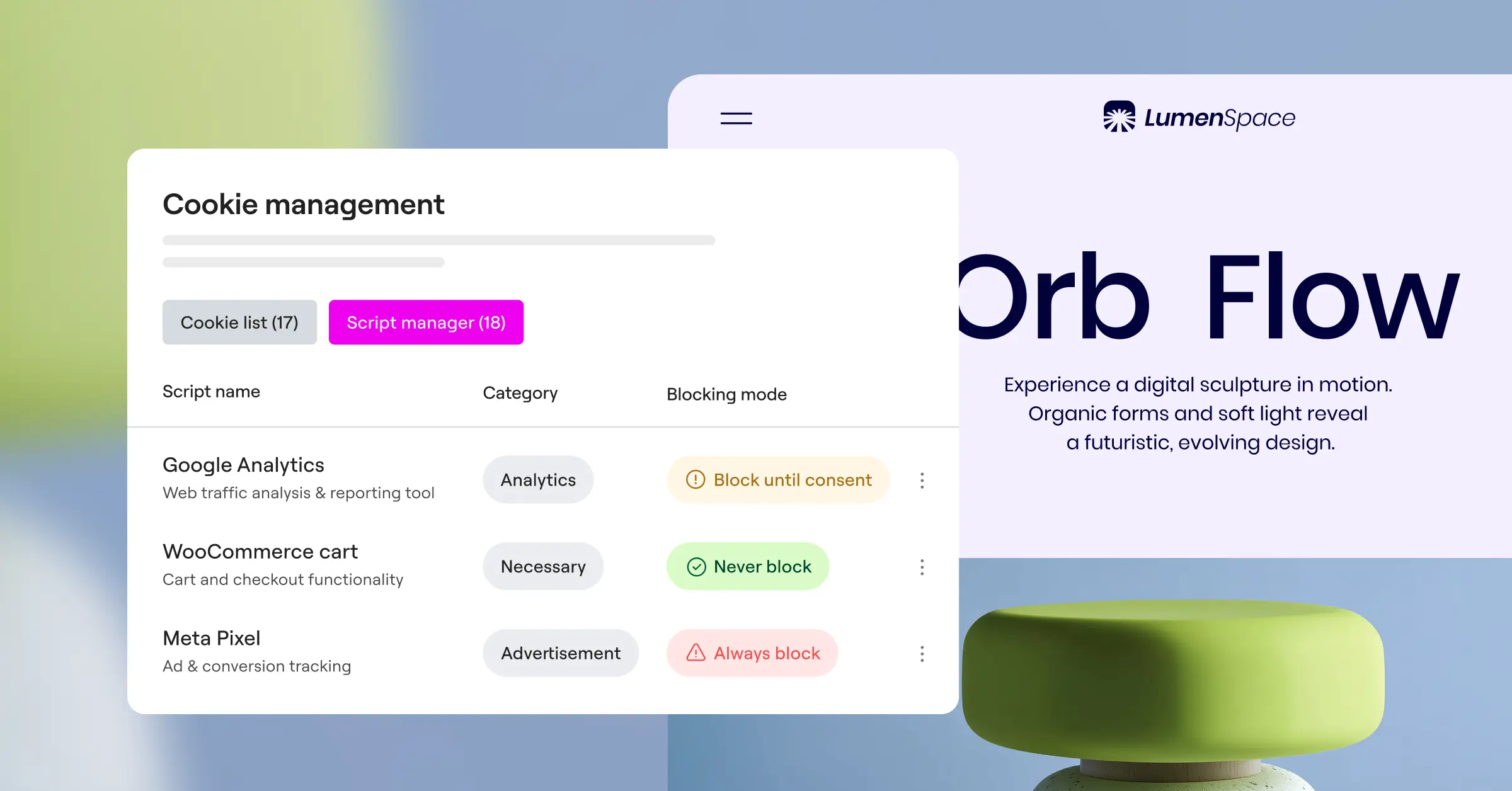
Complianz has a slight edge in pre-built integrations for niche third-party add-ons, built up over years of code blocks for specific plugins. Cookie Consent handles all mainstream tracking scripts, Google services, and standard marketing pixels without fuss, covering what most sites actually need.
Audit Trails and Consent Logging
Under GDPR and similar rules, a banner isn’t enough on its own. If a regulator audits your business, you need to prove visitors gave consent before you tracked them, which means a secure, timestamped log of every consent action.
A legally defensible consent log needs to capture:
- Anonymized IP: A masked version of the visitor’s IP address to protect their identity.
- Timestamp: The exact date and time the visitor made their consent choice.
- Consent Type: Whether the user accepted all cookies, rejected all, or selected specific categories.
- Consent ID: A unique, randomized identifier for each individual consent action.
- Banner Version: Which version of your privacy terms was active at the time of consent.

With Complianz, consent logging is primarily a premium feature, so on the entry-level plan you may lack the documented proof needed to survive a formal audit. Cookie Consent, by contrast, includes detailed consent logging natively at no extra cost, a meaningful perk for budget-conscious site owners.
Pricing and Value
Both solutions offer free options, but their premium structures look quite different. Complianz uses a subscription model. Its entry-level plan handles basic cookie blocking and banner displays, but advanced features like geo-targeting, multilingual support, consent logging, and the premium legal document generator need an annual subscription per site, which can add up across multiple client sites.
Cookie Consent takes a different approach, with a capable entry-level plan for sites that just need the basics. The real value comes if you’re already in the Elementor ecosystem: since it’s included in the broader compliance toolkit inside Elementor One, there’s no separate subscription to worry about, a genuinely cost-effective setup for agencies running multiple client sites.
Which Consent Solution Should You Choose?
Choosing between these two comes down to your workflow and site setup. Neither is a bad choice, but one will probably fit your day-to-day routine better. Here’s a simple way to think about it:
- Choose Cookie Consent if: You already use Elementor to build your pages, you want a banner that matches your brand without writing code, and you want to be compliant in under five minutes from your WordPress dashboard.
- Choose Complianz if: You’re looking for a dedicated privacy suite that generates full legal documents for complex, high-stakes sites, and you’re comfortable working through a detailed configuration process.
- Choose Cookie Consent if: You’re an agency managing multiple client websites and would rather not pay separate recurring fees for consent logging and geo-targeting on each one.
Both tools will keep your site compliant. If you value design, speed, and dashboard simplicity, the native cookie consent capability is hard to beat. If you want a deep, legal-first assistant that walks you through document generation step by step, Complianz is a solid, time-tested choice. Either way, you’re in good hands.
Frequently Asked Questions
Is a cookie consent banner required for all WordPress sites?
If your site gets visitors from the EU, the UK, or states like California, you generally need a cookie consent banner, even if your business is based elsewhere. And if you use tools like Google Analytics, Facebook pixels, or email marketing scripts, you need explicit consent before they load.
What is Google Consent Mode v2 and do I need it?
Google Consent Mode v2 communicates your visitors’ privacy choices to Google services. If you serve visitors in the European Economic Area and use Google Ads or Analytics, you need it. Both Complianz and Cookie Consent support it natively.
Does Cookie Consent work with other page builders?
Cookie Consent is designed by Elementor to work smoothly within its ecosystem, but works well on any standard WordPress site too, with banners, scans, and logs managed from your WordPress dashboard whatever tools you use elsewhere.
Can I customize the look of my banner to match my brand?
Yes, though the two differ here. Cookie Consent offers full visual control through design panels inside WordPress, matching fonts, colors, and margins without code. Complianz allows basic styling through its customizer but often needs custom CSS for advanced changes.
Where are consent logs stored for audit purposes?
Cookie Consent keeps your logs securely within your WordPress database, so you have immediate access to timestamped proof if an inspector asks. Complianz also offers logging, mainly in its premium tiers.
Will using a cookie consent banner slow down my website?
A poorly coded banner can hurt performance, but both tools are built with speed in mind. Cookie Consent is native to WordPress, so it loads without leaning on heavy external scripts, helping you maintain solid core web vitals.
Can I show different banners to visitors from different countries?
Yes, that’s what geo-targeting does. It shows a strict opt-in banner to European visitors under GDPR rules, and a simpler opt-out banner elsewhere, so you stay compliant without making the experience feel heavy-handed for anyone.

