
Handling privacy compliance on your website can feel like a lot to juggle. You want to keep visitors safe, stay on the right side of the law, and keep your site running smoothly, without turning it into a part-time job. It’s simpler than it looks, and we’ve tested the top tools to help you pick the best fit for your site.
Key Takeaways
- Compliance is essential. Keeping your site aligned with GDPR and CCPA builds trust with your audience and protects your business.
- Native tools save time. A tool that lives inside your WordPress dashboard keeps your daily workflow simple.
- Consent Mode v2 is a must. To use Google tools for European audiences, your chosen solution needs to support modern consent protocols.
- Design matters. Customizable banners that match your brand help maintain a professional user experience.
- Cookie Consent leads the pack. Elementor’s native capability delivers an easy, code-free way to manage compliance directly from WordPress.
Understanding Cookie Consent for WordPress Sites in 2026
If you run a website, you’re almost certainly using tools to track visitors, analyze traffic, or show targeted ads. Those tools collect personal data through small files called cookies, and privacy laws like the General Data Protection Regulation (GDPR) in Europe and the California Consumer Privacy Act (CCPA) require explicit permission from visitors before loading any tracking scripts.
Regulators have issued substantial fines to sites that skip this step, and a proper system also shows your audience you respect their data. Tracking technology keeps changing too: Google now requires sites serving European traffic to use Google Consent Mode v2, which passes visitors’ privacy choices to tools like Google Analytics and Ads, keeping that data accurate.

What to Look For in a Cookie Consent Solution
Before you pick a tool, it helps to know which features actually matter day to day. You don’t want something that slows your site down or forces custom code every time a regulation changes. A native WordPress solution keeps everything in one place, and a good tool scans and categorizes your trackers automatically, without manual input every time you add something new.
Here are three practical steps to start with:
- Identify your audience locations. Figure out if you serve visitors in Europe, California, or other regions with strict privacy laws.
- Audit your current tracking tools. List every active service collecting visitor data, from Google Analytics to Facebook Pixels to email forms.
- Choose a customizable solution. Pick a tool that matches the banner design to your brand colors and typography.
The 10 Best Cookie Consent Tools for WordPress Compared
We’ve researched and tested the top solutions on the market. Here they are, starting with our top recommendation, the one that fits most naturally with WordPress.
1. Cookie Consent (by Elementor)
The newly released Cookie Consent capability by Elementor is a WordPress-native solution built into your site management flow. Cloud-based templates and a three-step wizard get you compliant in under five minutes, no external accounts needed. It pairs with Web Accessibility, and its visual editor matches every button, color, and font to your brand, with full support for Consent Mode v2, geo-targeting, and automatic script blocking.

Here’s what makes this capability stand out:
- Builds beautiful, custom consent banners inside your familiar WordPress editor.
- Tracks user permissions with a local, secure consent log for audit readiness.
- Connects with Google Consent Mode v2 to keep your analytics running smoothly.
- Pulls designer-made cloud templates to match your site’s look instantly.
- Scans your website to discover and categorize trackers automatically.
- Controls banner visibility by visitor location with smart geo-targeting.

Pros:
- Requires no external account or third-party dashboard.
- Includes a built-in policy generator.
- Free tier, bundled in the Elementor One suite.
- Supports Global Privacy Control (GPC) signals.
Cons: Works best inside the Elementor ecosystem.
Verdict: The standout choice for a simple, customizable, dashboard-native compliance experience.
“Managing privacy isn’t just about avoiding a legal penalty; it’s about building an honest, transparent relationship with your visitors. The best consent systems are those that stay out of the way of your design while giving users absolute control over their data.”
Itamar Haim, Web Compliance Specialist
2. Cookiebot
Cookiebot is an established cloud-based solution that reaches compliance through automated monthly scans, with a dedicated WordPress connector. It suits larger businesses that want scanning handled externally, though you’ll manage settings outside WordPress.

- Scans your site monthly to catalog active trackers.
- Stores consent data on secure external cloud servers.
- Blocks unrecognized scripts until a user clicks accept.
- Generates an automated cookie declaration page for your records.
Pros: Performs thorough automated scans. Supports many languages.
Cons: External login needed to adjust banners. Pricing rises with page count.
Verdict: A solid pick for larger sites wanting a hands-off, cloud-managed approach.
3. CookieYes
CookieYes is a widely used hybrid consent platform: a WordPress connector pairs with settings held in an external cloud app, built for GDPR, CCPA, and other frameworks. It’s popular with developers managing multiple sites, though design changes happen in their cloud portal.

- Builds responsive layouts that look great on mobile and desktop.
- Connects with major privacy frameworks including GDPR, CCPA, and LGPD.
- Logs every user decision in a cloud registry for audits.
- Supports automatic language display based on visitor location.
Pros: Clean, friendly dashboard. Free tier for lower-traffic sites.
Cons: API key needed to link WordPress to the cloud. Free-tier limits can drop the banner during spikes.
Verdict: Reliable if you want a dedicated external dashboard across multiple sites.
4. Complianz
Complianz is a privacy tool built specifically for WordPress. Its setup wizard asks about your business practices and configures your banner accordingly, well regarded for its privacy-first approach, though the process takes longer than most.

- Generates customized legal documents through a localized setup wizard.
- Detects local cookies and plugins active on your WordPress server.
- Configures regional banners that adapt to your visitor’s IP address.
- Blocks integration scripts like YouTube embeds before consent.
Pros: Keeps data in your local WordPress database. Integrates well with common contact forms and plugins.
Cons: The questionnaire takes time and feels repetitive. A unique style may need custom CSS.
Verdict: Great for wizard-guided help with the legal rules in your jurisdiction.
5. iubenda
iubenda is a complete legal compliance suite covering privacy policies, terms and conditions, and consent management, maintained by legal professionals. It suits sites needing complex terms of service, and the interface leans toward compliance professionals over casual site creators.

- Generates professional privacy and cookie policies that update automatically.
- Updates legal texts in real time as regulations change.
- Syncs your preferences across platforms through a central dashboard.
- Tracks cookie choices and consent history through a professional dashboard.
Pros: High-quality legal documents from compliance lawyers. Suited for complex, multi-policy sites.
Cons: Setup involves legal terminology and takes time.
Verdict: Solid for sites needing automated legal documents alongside a consent banner.
6. Termly
Termly is a compliance platform for small businesses and creators, offering policy generators for privacy policies, terms and conditions, and a cookie consent manager. It’s a cloud service: design your banner on their site and copy a snippet into WordPress.

- Builds professional consent banners using a simple visual configurator.
- Scans your website weekly to categorize newly added tracking pixels.
- Generates legally compliant disclosures that display clearly on your site.
- Logs consent events securely to meet GDPR requirements.
Pros: Clean, modern interface, easy for beginners. Policy generator built into setup.
Cons: Needs external JavaScript to load the banner. Free tier limits monthly consent logs.
Verdict: Polished, beginner-friendly option for basic legal policies and a simple banner.
7. OneTrust
OneTrust is a widely recognized enterprise privacy and risk management platform, built for large corporations and global websites needing deep compliance capabilities. It’s feature-rich but more complex and costly than most WordPress blogs or small sites need.

- Manages enterprise-wide privacy settings across thousands of pages.
- Tracks individual user permissions across multiple devices and apps.
- Scans complex, custom-built web applications for hidden trackers.
- Controls user preferences using a structured preference center.
Pros: Extensive customization for large enterprises. Trusted by major global brands.
Cons: Complex to deploy without dedicated technical staff.
Verdict: Go-to option for enterprises needing advanced data mapping and support resources.
8. Osano
Osano is a privacy platform focused on simplicity, data management, and risk reduction. Its vendor monitoring alerts you when a third-party script changes its privacy practices, useful if you rely on many external services, and it runs through a cloud setup that blocks scripts fairly aggressively until consent is given.

- Manages global consent rules automatically using pre-vetted legal databases.
- Blocks non-compliant trackers before they load in user browsers.
- Tracks third-party vendors to keep your supply chain compliant.
- Displays localized banners based on visitor location.
Pros: Compliance guarantee for peace of mind. Effective at blocking rogue scripts.
Cons: Entry-level plans can be pricey for solo creators. No native WordPress integration.
Verdict: Worthwhile premium pick for businesses prioritizing security and vendor monitoring.
9. GDPR Cookie Consent (by WebToffee)
This popular, dedicated WordPress plugin has been around for years, focused on creating a cookie notice bar. It’s simple, reliable, and keeps settings within your WordPress dashboard, though it lacks the design polish of more modern visual builders.
- Builds simple, customizable cookie notice bars at the top or bottom of your page.
- Categorizes your cookies manually or through their online lookup service.
- Controls which scripts run based on the categories a visitor selects.
- Exports visitor consent histories into CSV files for records.
Pros: Local configuration, no external login. Compatible with translation plugins like WPML.
Cons: Free tier requires manual cookie entry. Styling feels rigid next to modern builders.
Verdict: Dependable, traditional pick for a basic banner with no subscription costs.
10. WP GDPR Compliance
WP GDPR Compliance is a lightweight, open-source tool that adds consent checkboxes to existing forms. It’s not a banner builder, but a focused tool for securing contact forms, comments, and WooCommerce checkout, a natural companion if you already have a banner.
- Integrates directly with standard WordPress contact forms, comment fields, and forums.
- Tracks user requests for data access or account deletion.
- Blocks native WordPress scripts before a user agrees to your terms.
- Keeps compliance settings organized within a single admin page.
Pros: Free and open-source, no hidden fees. Lightweight, won’t affect load times.
Cons: No visual banner builder. Manual setup needed for non-standard plugins.
Verdict: Lightweight helper for form-level compliance. Pair with a dedicated banner for full coverage.
Side-by-Side Comparison of the Best Cookie Consent Tools
Here’s a quick side-by-side view of how these tools stack up, covering their key strengths and core focus areas.
| Tool Name | WordPress Native | Consent Mode v2 Support | Geo-Targeting | Core Focus |
|---|---|---|---|---|
| Cookie Consent (by Elementor) | Yes | Yes | Yes | Modern design, fast dashboard integration, and ease of use. |
| Cookiebot | No | Yes | Yes | Automated monthly cloud scanning for enterprise domains. |
| CookieYes | No | Yes | Yes | Multi-site cloud management for agencies and developers. |
| Complianz | Yes | Yes | Yes | Wizard-guided questionnaires and local configuration. |
| iubenda | No | Yes | Yes | Professional legal document generation and dynamic policies. |
| Termly | No | Yes | Yes | Simple visual design and quick basic policy generation. |
| OneTrust | No | Yes | Yes | Deep corporate data mapping for large enterprise sites. |
| Osano | No | Yes | Yes | Automated script blocking and vendor risk monitoring. |
| GDPR Cookie Consent | Yes | Yes | No | Straightforward, traditional consent notice bars. |
| WP GDPR Compliance | Yes | No | No | Form-based checkboxes and local data privacy requests. |
How to Configure Cookie Consent on Your Site
Setting up your privacy banner takes just a few minutes, no coding needed.
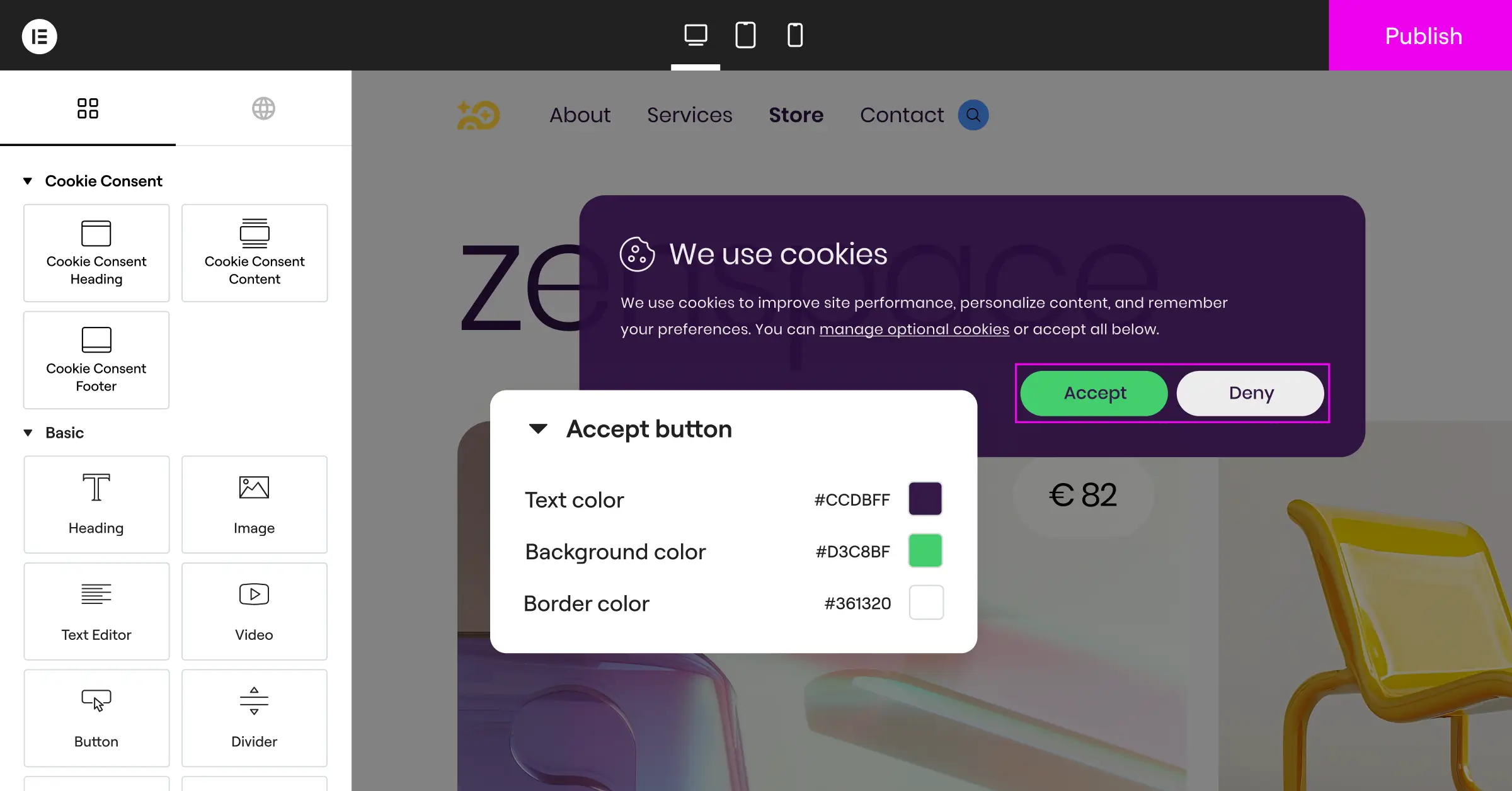
Follow these steps to activate your setup:
- Run an automatic scan. Let your chosen tool crawl your site to identify active tracking scripts and sort them into groups like analytics, marketing, and essential functions.
- Design your visual banner. Customize the color scheme, button shapes, and typography to match your theme, and keep the layout clean so visitors understand their options.
- Turn on Google Consent Mode v2. Head to your tool’s settings and toggle it on, keeping your Google tags behaving correctly while respecting privacy choices.
Best Practices for Maintaining Privacy Compliance
Compliance isn’t a one-time project. As you add features, switch marketing tools, or launch new content, your site’s tracking behavior can quietly shift. Keeping things in order long-term is simple once you build a few habits around it.
- Run quarterly script reviews. Every few months, check your dashboard for deactivated plugins still loading code, and remove anything you no longer need.
- Review your privacy document. Whenever you start using a new marketing service, update your policy to disclose how you collect and store that data.
- Verify your consent logs. Check your local consent database to confirm permissions are recording correctly, giving you a reliable audit trail if you’re ever asked for one.
Frequently Asked Questions
Do I really need a cookie consent banner on my small WordPress site?
Yes, you do. Privacy laws like GDPR protect visitors based on where they live, not where your business is based, so even one European visitor means you’re legally required to offer a choice about their data. It also builds visitor trust.
What happens if I don’t use Google Consent Mode v2?
If you use Google Analytics or Ads and serve European visitors without Consent Mode v2, Google will stop you from measuring user actions or tracking conversions, and your data reports will become unreliable.
Will a cookie banner slow down my website?
It depends on the tool. Heavy external services can add load time by fetching scripts from remote servers. A native capability like Cookie Consent runs locally, keeping your pages fast and clean.
Can I customize the banner to match my theme?
Absolutely. Most quality tools let you adjust the styling. With a native capability like Elementor’s, you can use a visual editor to change fonts, button colors, and layout to fit your site.
What’s the difference between essential and non-essential cookies?
Essential cookies are what your site needs to function, like keeping cart items or a user logged in, and you don’t need consent for those. Non-essential cookies include tracking pixels, analytics codes, and social buttons, which require explicit consent.
Is a free cookie consent tier enough for a basic website?
Yes, a free tier is often perfect for blogs, portfolio sites, and small local businesses, as long as it supports automatic script blocking, basic customization, and Google Consent Mode v2.
Do I need to keep a record of every visitor’s consent?
Yes. Privacy regulations like the GDPR require you to prove a visitor gave consent if you’re ever audited. A good consent tool records these choices in a secure, local log as an audit trail.

