
If you’re getting your WordPress site ready for modern privacy laws, you’ve probably run into the Termly vs Complianz debate. Both help manage trackers and consent, but in very different ways. One lives in your dashboard, the other’s a cloud service you connect to your site. Let’s walk through it together.
Key Takeaways
- Complianz is a strong WordPress-native tool, keeping your configuration and compliance data in your own database.
- Termly runs as a cloud-hosted software-as-a-service (SaaS), handy if you manage sites across different platforms.
- For users of Elementor, the native Cookie Consent capability gives you a smooth, unified alternative right in your editor.
- Google Consent Mode v2 is now standard, so pick a tool that supports it natively for your ad campaigns.
- Your choice comes down to a self-hosted wizard versus an external dashboard for your legal needs.
The Battle of Compliance: Termly vs Complianz in 2026
Privacy rules have tightened up fast. Regulators everywhere are watching how sites collect and use visitor data. If you get traffic from Europe, California, or other strict-privacy regions, a cookie banner isn’t optional anymore.
Termly and Complianz take different paths. Complianz is built for WordPress, walking you through a step-by-step wizard in your admin panel and generating legal documents from your actual settings. Termly is a centralized platform instead: you build policies on their site, then drop a code snippet onto yours.
Direct Comparison Table: Termly vs Complianz
Before the detailed reviews, here’s a direct look at how they compare on what matters most for compliance.

| Feature | Termly | Complianz | Elementor Cookie Consent |
|---|---|---|---|
| Platform Type | Cloud SaaS (External) | WordPress Native | WordPress Native (Built-in) |
| Setup Time | About 10-15 minutes | About 15-20 minutes | Under 5 minutes |
| Dashboard Location | External Termly Portal | WordPress Admin Dashboard | WordPress Admin Dashboard |
| Google Consent Mode v2 | Supported | Supported | Supported |
| Auto-Cookie Scanning | Yes (Cloud-based) | Yes (On-site) | Yes (Cloud-templates) |
| Consent Logs | Stored on Termly servers | Stored in site database | Stored in site dashboard |
| Best For | Multi-platform sites | Dedicated WordPress users | Elementor-built websites |
A Closer Look at Complianz
Complianz is one of the most thorough privacy tools built for WordPress. Since it’s made for this platform from the ground up, it feels native to your site. Install it, and a full wizard scans for cookies, social integrations, and third-party scripts.
Its strongest point is document generation. Instead of a generic template, it builds your Cookie Policy, Privacy Policy, and Terms of Service from what it actually detects on your site. Add a plugin that drops a cookie, and Complianz often catches it and prompts an update.

Banner styling is detailed: customize colors, buttons, and placement to match your branding. Complianz also handles geo-targeting, showing a GDPR banner to EU visitors, a CCPA banner to Californians, and none where it’s not required.
A Closer Look at Termly
Termly hosts your compliance tools on an external cloud platform. Create an account, add your domain, then use their clean interface to scan your site and set up your banner. Once you’re happy with it, you get a single script tag to paste into your header.
This SaaS setup pays off if you manage more than one site, especially across platforms like Shopify, Wix, or Squarespace. Manage every banner, policy, and consent record from one login.

Termly also leans on legal accuracy. A dedicated legal team keeps their policy generators current with global law changes. Answer a few simple questions, and they build a dynamic policy hosted on their servers, updated automatically when laws shift.
“When comparing cookie tools, the choice often comes down to control versus convenience. A native WordPress tool keeps your data close to home, while a cloud-based service takes the technical weight off your hosting server.”
– Itamar Haim, Web Compliance Specialist
The 10 Best Cookie Consent Tools for WordPress in 2026
Termly and Complianz are strong options, but they’re not the only ones. The market’s grown a lot, with tools for every budget and workflow. Here are the ten best cookie consent tools available today.
1. Cookie Consent (by Elementor)
If you build with Elementor, the native Cookie Consent capability is an efficient choice. Built into the platform, it handles GDPR and CCPA compliance without extra add-ons, keeping every setting right in your dashboard.
Setup takes under five minutes. The built-in scanner catalogs tools and scripts automatically, sorting them into clear categories. Since it’s part of the Elementor family, you get full design control using the editor you already know, no custom CSS needed.
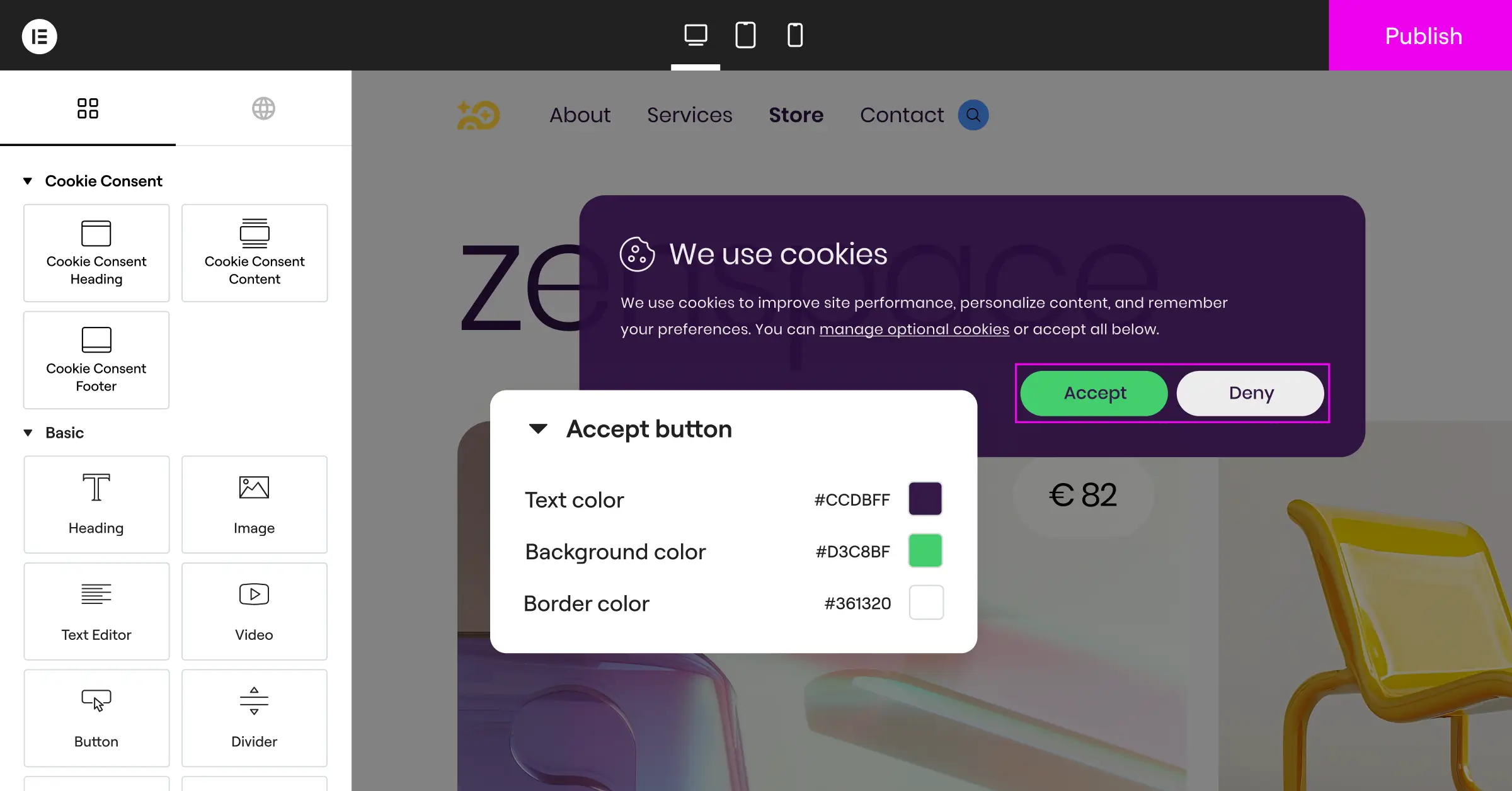
Features of this native capability include:
- Builds beautiful banners with native Elementor design tools and cloud templates.
- Saves consent logs locally for a secure, accessible audit trail.
- Controls script firing automatically based on visitor consent choices.
- Supports Google Consent Mode v2 natively for accurate tracking.
- Filters banners by location so visitors see only relevant notices.
- Generates compliant privacy and cookie policies with a built-in policy builder.
Verdict: A smart, lightweight option for creators who want professional compliance without third-party add-on costs. See Cookie Consent’s full feature set on the Elementor site.
2. Complianz
Complianz remains a top pick for WordPress users who want a self-hosted, wizard-driven setup. It’s structured and thorough, walking you through detailed questions so you don’t miss quiet trackers or background scripts.
The entry-level plan is generous, with basic cookie blocking and banner customization. Geo-targeting, consent stats, and automated policy updates need the premium version. Since it runs locally, your data stays on your own server.
Features of Complianz include:
- Scans your WordPress database and theme files for hidden cookies.
- Generates legally validated documents customized to your setup.
- Integrates cleanly with translation plugins like WPML and Polylang.
- Blocks third-party frames like YouTube and Google Maps until consent.
- Syncs with your tag managers to keep marketing data clean.
Verdict: A solid option for an on-site, wizard-guided setup that builds personalized legal documents inside WordPress.
3. Termly
Termly suits anyone who wants a hands-off, cloud-hosted approach. Processing off your server keeps WordPress running smoothly, with a polished interface and policy generators built for complex businesses.
The entry-level plan gives you a basic banner, with Termly branding and a monthly pageview limit. Premium plans add automatic scans and updates whenever privacy laws shift.
Features of Termly include:
- Hosts your policies on secure, cloud-based servers with automatic updates.
- Classifies cookies automatically using a global tracker database.
- Updates your banner styling through a visual dashboard outside WordPress.
- Delivers a complete compliance suite, including Terms and Disclaimer generators.
- Maintains secure consent logs on their servers for audits.
Verdict: A practical choice if you run multiple sites on different platforms and want one dashboard for compliance.
4. Cookiebot
Cookiebot is well-established for automated cookie scanning. Every month it crawls your site for new trackers or scripts added by content or plugins, then updates your cookie declaration page automatically.
It’s reliable, though the interface leans toward developers more than casual bloggers. Banner styling can feel clinical and may need CSS work, but its accuracy and Consent Mode v2 support make it popular for e-commerce.

Features of Cookiebot include:
- Performs deep monthly scans to identify hidden trackers.
- Displays a transparent cookie declaration list on your policy page.
- Supports complex tags through a dedicated Google Tag Manager template.
- Saves anonymized consent data securely for up to five years.
- Adapts banner options based on the visitor’s country or state.
Verdict: A strong technical option for businesses that want thorough scanning and full regulatory transparency.
5. CookieYes
CookieYes has grown fast into one of the most popular consent tools around. It bridges a simple WordPress tool and a full SaaS platform, with a clean web portal and a dedicated WordPress integration.
The dashboard is intuitive, letting you change colors, toggle consent types, and view real-time stats. A generous entry-level plan covers up to 25,000 pageviews a month.
Features of CookieYes include:
- Connects your site to a lightweight compliance dashboard.
- Categorizes trackers into necessary, functional, analytics, and advertisement buckets.
- Translates your banner into over 30 languages automatically.
- Includes custom layouts like banners, boxes, or corner widgets.
- Records user consent choices instantly for strict audit logs.
Verdict: A balanced, cost-effective tool for small-to-medium sites needing clean designs and simple analytics.
6. iubenda
iubenda is a full compliance suite that goes beyond cookie banners, acting as an all-in-one legal partner with privacy policy generators and terms written by actual lawyers.
Setup takes a bit longer given the options, but the legal protection is substantial, ideal if your business operates internationally across complex privacy laws.
Features of iubenda include:
- Builds professional, lawyer-drafted privacy policies linked to your cookie banner.
- Configures detailed consent preferences with fine-grained toggles.
- Saves audit-ready consent records securely in the cloud.
- Integrates with major advertising systems to protect your marketing pipelines.
- Bundles custom templates for specific industries and business models.
Verdict: The go-to choice for complex, multi-national businesses needing lawyer-drafted policies and advanced setups.
7. OneTrust
OneTrust is a well-known name in enterprise privacy management, built for large corporations and e-commerce networks managing privacy across many domains, with deep database integration and vendor risk assessments.
For a small WordPress blog, it’s likely more than you need. But for a large corporate site with strict security needs, its enterprise-grade features are worth exploring.
Features of OneTrust include:
- Manages large website networks from one corporate privacy portal.
- Integrates directly with enterprise data platforms and CRM systems.
- Runs deep compliance audits across your organization.
- Customizes preference centers down to the individual channel level.
- Delivers legal support backed by a global network of privacy experts.
Verdict: The enterprise-level choice for large organizations that need deep integration and corporate-scale compliance management.
8. Osano
Osano stands behind its compliance guarantees with substantial assurance policies on paid tiers, a reassuring choice for businesses wanting confidence around regulatory requirements.
The platform is clean and easy to use, blocking all third-party scripts automatically until consent is granted.
Features of Osano include:
- Guarantees compliance with global laws to help protect your business.
- Blocks unapproved trackers automatically without complex code changes.
- Rates the data privacy practices of thousands of popular vendors.
- Loads quickly via a highly optimized global content delivery network.
- Supports easy data access requests (DSAR) through a simple portal.
Verdict: A solid peace-of-mind choice for growing businesses that want clear, well-supported regulatory compliance.
9. Usercentrics
Usercentrics is a flexible consent management platform (CMP) well integrated with the advertising industry, built to help publishers keep strong opt-in rates while staying compliant. It’s modular, letting developers build custom interfaces via its API.
It works well with Google Consent Mode v2 as a certified partner, a reliable choice for sites that depend on paid search and social campaigns. The dashboard is modern, though it helps to be a bit technical.
Features of Usercentrics include:
- Connects directly with major ad networks to pass consent signals.
- Includes a developer API for building custom consent solutions.
- Tests different banner variations to find the highest opt-in design.
- Integrates with top tag managers to simplify script management.
- Delivers detailed analytics on how visitors interact with consent options.
Verdict: A developer-friendly, marketing-focused tool well suited for ad-heavy publishers and agencies looking to optimize opt-in rates.
10. GDPR Cookie Consent (by WebToffee)
If you want something straightforward with no monthly fees, GDPR Cookie Consent by WebToffee is worth a look. It’s popular in the WordPress repository because it’s easy to configure without an external cloud connection.
It lacks the advanced geo-targeting and automated policy updates of Complianz or Termly, but it handles banner display and script blocking well, a good fit for local businesses, portfolios, and simple blogs.
Features of GDPR Cookie Consent include:
- Installs in seconds from the free WordPress plugin repository.
- Generates a basic cookie table showing visitors what trackers are active.
- Closes the banner automatically based on scroll or click actions (where legally permitted).
- Includes simple settings to change banner colors, fonts, and button styles.
- Blocks scripts from firing before the visitor clicks accept.
Verdict: A reliable, cost-effective choice for simple sites that don’t need advanced, multi-regional compliance configurations.
Choosing the Right Option for Your WordPress Site
So how do you decide? Step back and look at how your business operates. You don’t need the priciest or most complex option, just something that matches your comfort level and your site’s needs.
Here’s a simple 3-step flow to help:
- Assess your platform. Running multiple sites across WordPress, Shopify, and custom platforms? A cloud-based tool like Termly or CookieYes saves you time. Strictly on WordPress? A native tool feels more integrated and easier to maintain.
- Look at your design tools. Built your whole site with Elementor? The native Cookie Consent capability is a natural fit, keeping your site fast and letting you design your banner inside the editor you already use.
- Consider your audience. Serving a global audience with complex compliance needs across states and countries? Look toward Complianz, iubenda, or Osano for deep geo-targeting and lawyer-backed policy updates.

Whichever tool you pick, the important part is getting started. Staying compliant builds trust with your audience, keeps your ad channels running, and protects your business from legal surprises. You’ve got this!
Frequently Asked Questions
Is a cookie consent banner legally required in 2026?
Yes. If your site gets visitors from regions covered by privacy laws like the GDPR in Europe or the CCPA/CPRA in California, you need a way to collect and record consent before setting non-essential cookies.
What is Google Consent Mode v2 and why do I need it?
It’s a system that passes your visitors’ consent choices directly to Google’s tag systems. Skipping a compatible tool blocks conversion tracking and remarketing lists if you run Google Ads or Analytics for European visitors.
Does Complianz store my consent logs on their servers?
No. Complianz is WordPress-native, so your consent logs and configuration data stay inside your own WordPress database, giving you full control without relying on external cloud hosting.
Can I use Termly for free on multiple sites?
Termly’s basic entry-level plan is limited to a single domain and includes Termly branding. Managing multiple sites with geo-targeting and automated scans needs a paid multi-site subscription.
How does Elementor’s Cookie Consent capability compare to standalone plugins?
It’s built as a native capability, so there’s no separate third-party plugin to install. That means fast setup, fewer system resources used, and a banner you design in the drag-and-drop editor you already use every day.
Do these tools slow down my WordPress site?
Cloud-based tools like Termly load quickly via global content delivery networks (CDNs) but add an external network request. Native tools like Complianz and Elementor’s Cookie Consent run directly on your server, keeping things fast.
What happens if a visitor declines my cookies?
Your compliance tool must block every non-essential script, including marketing pixels, social widgets, and analytics trackers. Essential scripts that keep your shopping cart or login working can still run without consent.

