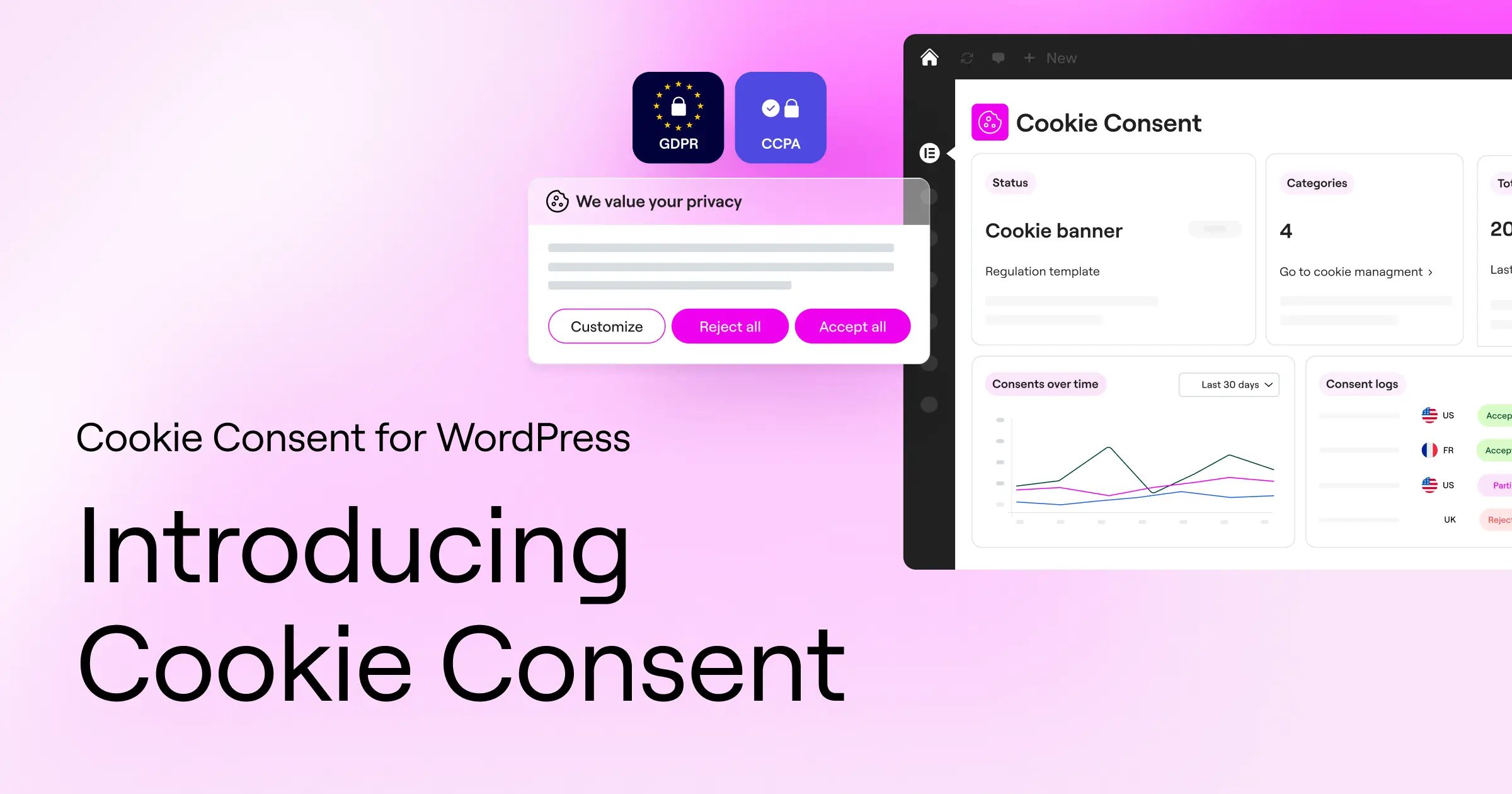
We’ve just launched Cookie Consent, Elementor’s new WordPress plugin built to make cookie consent simpler to set up, easier to design, and less painful to manage.
Let’s be honest: cookie consent has always been a chore. The setup is technical, the language is legal, and nobody ever woke up excited to configure a cookie banner.
And the banner is only half the problem. A notice that says “we use cookies” is easy enough to add. The harder part is making sure visitor choices are actually captured, applied, and respected behind the scenes.
Most tools don’t exactly help. They pull you into external dashboards, limit your design control, or make things harder once you’re managing more than one site.
So we built Cookie Consent to give web creators both sides of the equation: a banner they can design in Elementor and the consent logic to back it up.
Are we saying you’re going to wake up tomorrow excited to deal with GDPR and CCPA? Not quite. But we are saying it’s about to feel a lot less painful.
Why this matters now
Privacy regulations are no longer just a European concern. GDPR set the standard in 2018, CCPA brought it to California, and similar laws have spread across the US, Latin America, and Asia. The pace keeps accelerating, with stricter enforcement and bigger fines becoming the norm.
At the same time, Google has made consent signals a requirement for sites running ads or analytics in the EU.
Browsers like Safari and Firefox have killed passive tracking. Visitors are more aware of their privacy rights than ever, and they expect websites to respect those rights.
For web creators, the result is a moving target that’s getting harder to ignore. Cookie consent is a real responsibility now, and the tools you use to handle it should reflect that.
What we heard from web creators
Before building Cookie Consent, we talked to web creators about what makes cookie consent so frustrating.
For small business owners and DIY creators, the issue was confidence. They knew they probably needed a cookie banner, but weren’t sure if their setup actually did anything beyond showing a notice.
For agencies and freelancers, the issue was scale. Cookie consent mattered, but it pulled them away from building and became one more thing to configure, check, and worry about across client sites.
For analytics-focused teams, the fear was data loss. Misconfigured consent can break tracking, disrupt campaigns, and make performance harder to measure.
Different roles, same problem: cookie consent is important, but the tools often make it harder than it needs to be.
What you can do with Cookie Consent
- Set up your first banner with a guided 3-step flow
- Design your banner in the Elementor Editor with Elementor Pro Popups
- Choose GDPR or CCPA-ready consent templates
- Scan and categorize cookies automatically
- Apply the right consent behavior
- Keep exportable consent logs for your records
- Honor GPC and DNT browser privacy signals
- Run everything without external dashboards, CDNs, or third-party banner scripts
1. 3-step guided setup
Setting up cookie consent has always been one of the most dreaded parts of launching a site. Cookie Consent reduces it to three steps.
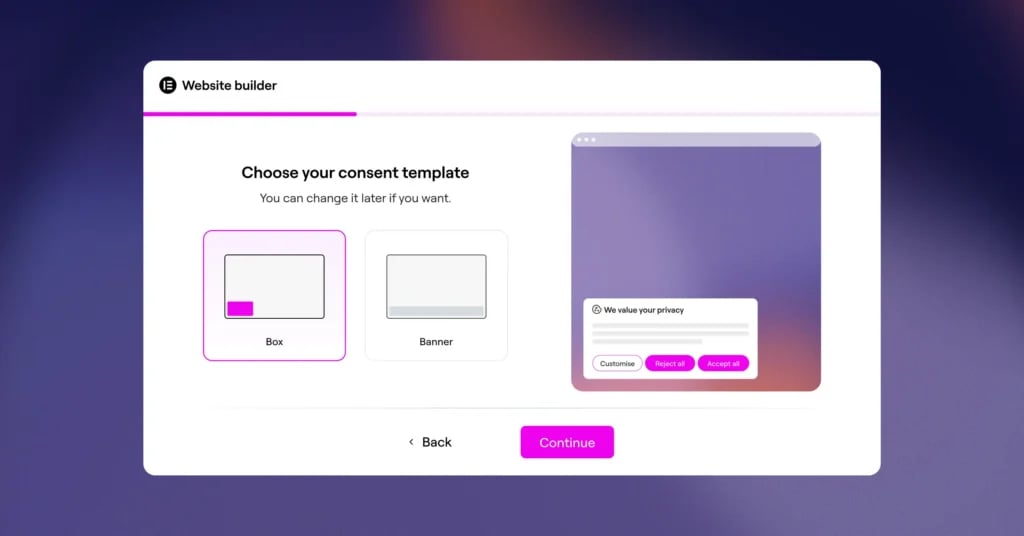
Choose your consent template (GDPR opt-in or CCPA opt-out), pick your banner layout, and run a scan to detect cookies on your site. From install to live banner in under five minutes, with no legal expertise required.
If you’re not sure which template to pick, start with the one that matches where most of your visitors live. You can change it later, or layer in geo-targeting (coming soon) to apply different rules per region automatically.
2. Design your banner in the Elementor Editor
Read that again. We’ll give you a second to let it sink in.
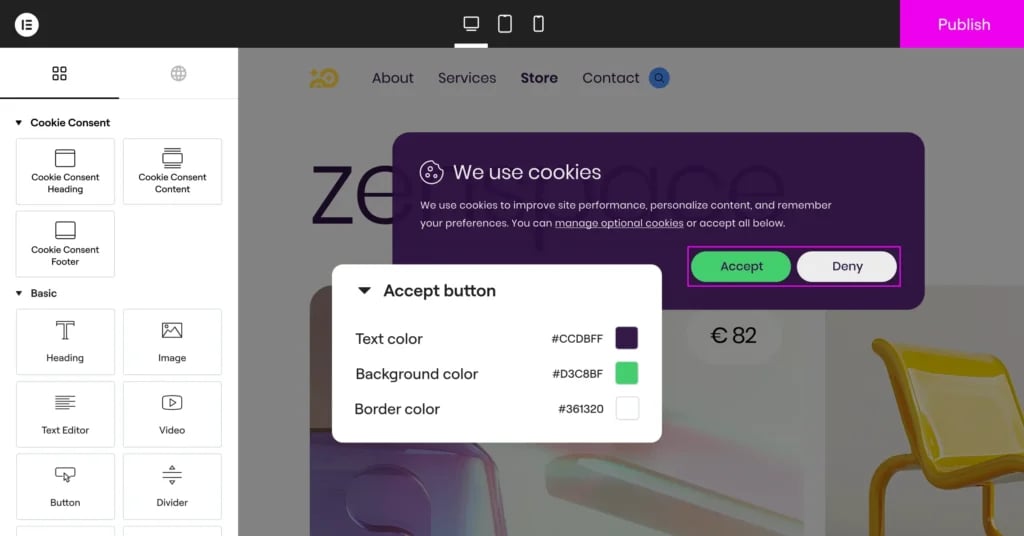
Yes, you can open your cookie consent banner in the Elementor Editor and design it like anything else on your site.
If you have Elementor Pro Popups, click “Design with Elementor” inside Cookie Consent and the plugin generates an Elementor template for your banner. Open it in the Editor and you’ll find dedicated widgets for the cookie banner and preferences banner alongside everything else Elementor offers. Drag, drop, restyle, adjust the layout, add images, add icons, change the copy. Build it the way you’d build any other piece of your site.
Set display conditions to show different banners on different pages, or exclude specific pages entirely. Preview how it looks without leaving the Editor. Save your design as a template and reuse it across every site you manage. Design once, deploy everywhere.
And if anything ever fails to load, the default Cookie Consent banner is always there so your consent experience has a fallback.
Design freedom that doesn’t get in the way of compliance.
3. GDPR & CCPA-ready templates
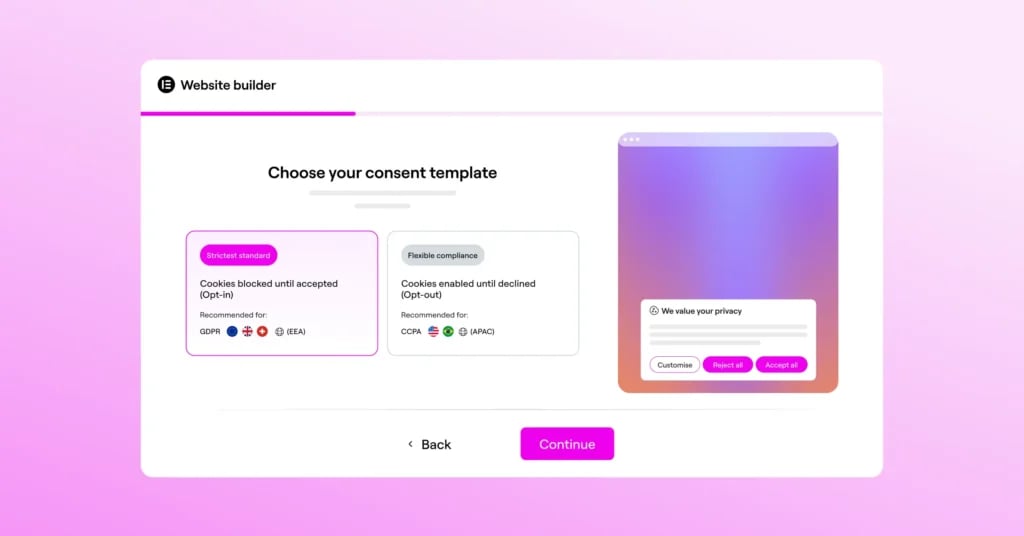
Two of the biggest privacy regulations in the world work in opposite directions. GDPR is opt-in, meaning nothing tracks until visitors say yes. CCPA is opt-out, meaning tracking runs by default with a clear way to decline.
Cookie Consent ships with templates for both. Pick the one that fits your audience and the right consent model gets applied automatically with script behavior, banner copy, button labels, the works. Less manual configuration and less second-guessing.
You can switch between them at any time. Or layer geo-targeting on top (coming soon) to apply the right rules to the right visitors automatically.
4. Cookie scanning and auto-categorization
Knowing what cookies are running on your site is the foundation of consent, but most people don’t actually know what their cookies do. (Be honest, do you?)
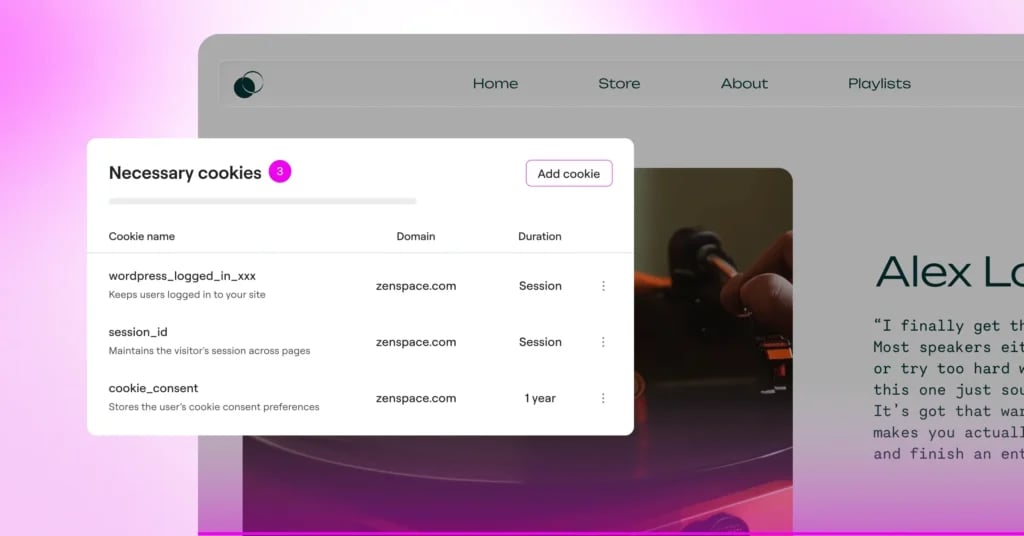
Cookie Consent handles that for you. It scans your site, detects every cookie, and sorts them automatically into the four standard categories: Necessary, Functional, Analytics, and Advertising.
You don’t need to dig through code or become an expert on what each cookie is doing in the background.
Your site changes over time. New plugins get added, integrations get swapped, old ones get removed. Just re-scan whenever something changes and the list stays accurate without any extra work from you.
5. Apply the right consent behavior
One of the biggest fears web creators have about cookie consent is breaking the tools they rely on: analytics traffic dropping, conversion tracking going dark, or marketing pixels firing at the wrong time.
Cookie Consent is built to help you apply the consent behavior that matches your setup.
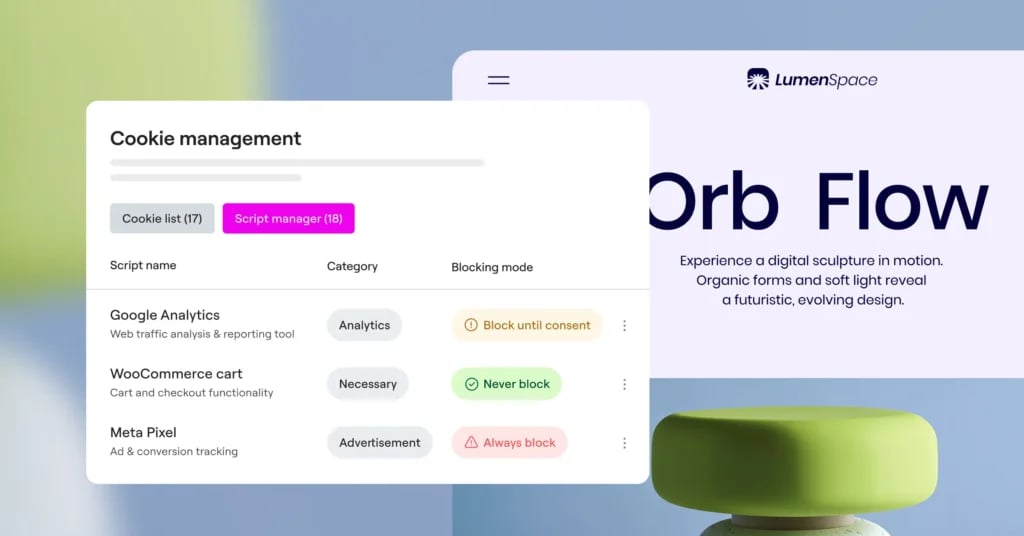
For GDPR opt-in experiences, non-essential scripts wait until a visitor gives consent. For CCPA opt-out experiences, visitors get a clear way to manage or decline certain data uses, and Cookie Consent applies those choices based on your configuration.
Essential cookies, like logins and shopping carts, keep working without interruption.
That means your banner does more than display a notice. It connects visitor choices to the behavior behind the scenes, so your site can respect consent preferences while keeping the tools you depend on working as expected.
A clear, well-designed banner also helps visitors understand what they’re choosing, instead of pushing them through a confusing or aggressive consent experience.
6. Audit-ready logs
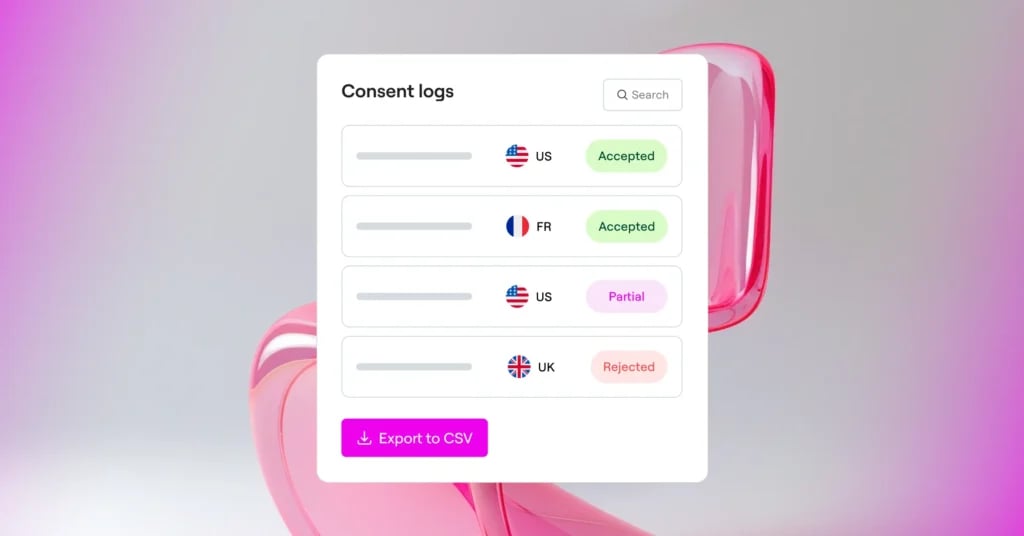
Every consent choice gets recorded automatically with a timestamp, the visitor’s country, the categories they selected, and a unique consent ID. You can filter, search, and export the logs as CSV files whenever you need them.
If anyone ever asks for proof, it’s already in your hands.
7. GPC/DNT signal support
Some visitors have already told their browser they don’t want to be tracked. Global Privacy Control (GPC) and Do Not Track (DNT) are browser-level signals that say: respect my privacy by default.
Cookie Consent honors those signals automatically. When a visitor’s browser sends GPC or DNT, the banner stays hidden and non-essential scripts stay paused. No extra setup, no manual configuration. Just respect for the choice they’ve already made.
It’s a small detail that says a lot about how seriously a site takes privacy.
8. No CDNs, no third-party scripts
Open the network tab on most cookie consent banners and you’ll see something strange: calls to external CDNs, scripts loaded from vendor servers, widgets pulled from third-party infrastructure. Every visitor to your site is also visiting whoever’s hosting the banner.
Cookie Consent works differently. The banner ships with your WordPress install and loads directly from your server. No CDNs, no third-party scripts running on your visitors’ browsers, no extra companies in the chain. Lighter on performance, lighter on dependencies.
Free to start, no commitment
The free version gives you everything you need to handle cookie consent on a single site: GDPR and CCPA templates, automatic script blocking, cookie scanning, audit-ready logs, and full access to the Elementor Editor for banner design (if you have Pro Popups).
You can install it today and have your first banner live in under five minutes.
When you’re ready to scale across multiple sites or unlock the premium features, everything is included in Elementor One. No per-site fees, no separate purchase. Just one subscription that grows with you.
Better together: Cookie Consent and the Elementor ecosystem
Cookie Consent wasn’t made to be a standalone plugin. It’s part of a bigger Elementor toolkit, which means it works seamlessly with everything else you already use.
Designed inside the Elementor Editor
Cookie Consent is the only WordPress cookie consent plugin where you can fully design your banner and preferences manager inside the Elementor Editor (with Elementor Pro Popups).
Your consent banner gets the same drag-and-drop control as the rest of your site, so it finally feels like part of the design instead of patched onto it.
Paired with Web Accessibility
Privacy and accessibility are two of the biggest responsibilities of running a website today. Cookie Consent handles visitor consent and data choices .Web Accessibility makes sure your site works for visitors with disabilities.
Both are built by Elementor, and together they cover the legal and ethical bases most compliance plugins don’t even touch.
Included in Elementor One
Cookie Consent is part of Elementor One, alongside Web Accessibility and every other tool you need to build, optimize, and manage your sites. One subscription, no per-site fees, no separate purchase.
The premium features of Cookie Consent come included, like white-label branding, multilingual translations, extended log retention, higher quotas, and access to upcoming features like geo-targeting.
For Elementor One subscribers, Cookie Consent is one more reason your subscription keeps getting better.

What’s coming next
Cookie Consent ships with the features you need to handle consent today, but the roadmap is already moving. Here’s a preview of what’s coming:
- Cookie policy generator: automatically generate a cookie policy page based on what’s actually running on your site. Available to all users, free and premium.
- GTM integration (Elementor One): connect Cookie Consent to Google Tag Manager so consent signals flow through your existing tag setup.
- Geo-targeting (Elementor One): show different consent experiences based on visitor location, with the right rules applied automatically.
- IAB TCF support (Elementor One): the industry-standard framework for sharing consent signals with advertising vendors. Required for display ads in the EU.
Try it free, see it in action
- New to Cookie Consent? Download Cookie Consent from the WordPress repository and connect it to your Elementor account. Your first banner can be live in minutes.
- Already on Elementor One? Cookie Consent’s premium features are already part of your subscription. Add it to your site from WP Admin to start using it.
- Not yet on Elementor One? Explore Elementor One to unlock white-label branding, multilingual translations, extended log retention, and higher usage quotas across all your sites. See full pricing for details on what’s included at each tier.
Final thoughts
Privacy laws may not be every creator’s favorite part of building websites, but they’re not going anywhere. (And when we’re the ones visiting other sites, that’s probably a good thing.)
But setting up cookie consent doesn’t have to feel so painful.
As regulations evolve, browsers crack down on passive tracking, and visitors expect more control over their data, site owners need a clearer way to manage consent without turning it into a separate project.
That’s what Cookie Consent is built for: fast setup, flexible design in Elementor, and real consent logic behind the banner to help apply visitor choices based on the setup you choose.
Install it, get your first banner live in minutes, and move on to the work you actually came here to do.
FAQ
What is Cookie Consent?
Cookie Consent is a WordPress plugin built by Elementor that helps web creators set up and manage cookie consent banners. It includes templates built to support GDPR and CCPA consent flows, scans your site to detect and categorize cookies automatically, and blocks non-essential scripts until visitors give consent.
Everything is managed from your WordPress dashboard, and the banner can be fully customized inside the Elementor Editor (with Elementor Pro Popups).
Who is Cookie Consent for?
Cookie Consent is built for any web creator who needs to handle cookie consent on their WordPress sites, whether you’re a freelancer managing client work, an agency running multiple sites, or a business owner running one.
It’s especially useful for creators serving visitors in regions with privacy regulations like GDPR (EU) and CCPA (US).
Will adding a cookie banner break my analytics?
No. Cookie Consent blocks non-essential scripts until visitors give consent, but the moment they opt in, your analytics, pixels, and marketing tools fire normally.
Visitors who opt in are tracked exactly as they would be without consent management. Visitors who decline aren’t tracked, which helps support privacy-first consent practices.
Does Cookie Consent make my site fully GDPR or CCPA compliant?
Cookie Consent is designed to help support your compliance efforts with GDPR, CCPA, and other applicable privacy regulations, but it cannot by itself ensure or guarantee full legal compliance.
Full compliance depends on additional factors specific to your site and operations. You are solely responsible for your site’s legal compliance.
What’s included in the free plan?
The free plan gives you access to a fully functional cookie banner, customizable styling, a cookie scanner, automatic script blocking, exportable consent logs, GDPR and CCPA templates, and up to 800 consents per month for one website. Consent logs are retained for 30 days.
What’s the difference between Cookie Consent and other cookie consent plugins?
Cookie Consent is the only WordPress cookie consent plugin built natively into the Elementor ecosystem.
You can design your banner directly in the Elementor Editor (with Pro Popups), everything is managed from your WordPress dashboard with no external platforms or CDN dependencies, and it’s included in Elementor One alongside every other tool you need to build, optimize, and manage your sites.
Do I need Elementor Pro to design the banner in the Editor?
Yes. Designing the banner inside the Elementor Editor requires Elementor Pro with Popups (available in the Advanced plan and above).
If you don’t have Elementor Pro, Cookie Consent still includes built-in design controls for layout, colors, buttons, and copy — you’ll just be using the default banner styling instead of designing in Elementor.
How do I get the premium features of Cookie Consent?
Cookie Consent’s premium features are available exclusively through Elementor One, which includes white-label branding, multilingual translations, extended log retention, higher consent and scan quotas, and access to upcoming features like geo-targeting and more.
Cookie Consent’s premium functionality is not sold separately. It’s included with Elementor One alongside the rest of your Elementor tools.

