
Managing a WordPress site brings plenty of satisfying moments, but cookie compliance rarely counts as one of them. If you’ve looked into keeping your site on the right side of privacy laws like GDPR or CCPA, you’ve probably met a couple of familiar names, an established standalone service versus a newer, dashboard-native option. The jargon feels like a lot at first, but this is simpler than it looks, and we’ll walk through it together.
Choosing between CookieYes and the native Cookie Consent capability from Elementor comes down to where you want to spend your time and how you like to run your site. Both keep you legal and your visitors informed, just in very different ways. Here’s how they stack up in 2026.
Key Takeaways
- Cookie Consent keeps your workflow completely inside WordPress, so you never need to log into an external cloud platform.
- CookieYes offers a centralized cloud dashboard that works across multiple content management systems.
- Both tools support essential modern requirements, including Google Consent Mode v2 and Global Privacy Control.
- Your choice really comes down to whether you prefer a dashboard-native experience or an external cloud-managed platform.
Managing the Privacy Rules of 2026
Web privacy rules have changed a lot over the last few years, and they’re still shifting. Gone are the days when a generic banner at the bottom of your homepage would do the job. Regulators now actively enforce strict rules, and if your site serves visitors in the EU, the UK, or states like California, you need a way to block tracking scripts before a visitor gives you permission.
Browsers also keep phasing out third-party cookies, so first-party data and consent signals matter more than ever. If you run ads or track marketing performance, Google Consent Mode v2 is now a strict requirement for sites serving European traffic, and without it, your measurement tools stop working correctly. That’s why a modern cookie consent capability is core to running a responsible site. You don’t need to be a legal expert either, modern tools scan your site, categorize cookies, and block scripts automatically, building genuine trust without slowing your site down.

What Is CookieYes?
CookieYes is a widely recognized cloud-based consent management platform that works across various website platforms, helping owners set up cookie banners and handle compliance through an external service. You configure most settings through their online portal rather than inside your WordPress dashboard, handy if you manage sites on different systems, though it adds another login to your routine.
For anyone who prefers one central hub to manage compliance across a portfolio of client sites, this cloud-first approach has real benefits, a structured place to adjust settings, review logs, and customize templates. It also means your site relies on external servers to deliver the banner and manage choices, worth keeping in mind as you plan.

Key Features of CookieYes
- Scans your website to discover and categorize active cookies automatically.
- Displays a customizable consent banner designed for your visitor’s location.
- Records consent preferences in a centralized cloud log for audit compliance.
- Integrates with major platforms, tag managers, and content management systems.
- Translates your privacy banner into dozens of languages based on browser settings.
- Respects Global Privacy Control signals sent by privacy-focused browsers.
For growing sites or agencies that need more, CookieYes offers paid monthly subscriptions unlocking features like geo-targeting, custom branding, and larger scan capacities. You can find their exact, up-to-date pricing on the CookieYes website.
Pros and Cons of CookieYes
On the plus side, CookieYes is genuinely flexible. Since it’s not tied to WordPress, you can use it on virtually any platform, its scanning is reliable, and it stays current with standards like Google Consent Mode v2.
On the other hand, setup can feel disconnected. You’ll copy and paste script codes between WordPress and the CookieYes cloud app (this one trips a lot of people up), and if traffic spikes past the monthly view limits on the entry-level plan, your banner may stop showing until you upgrade.
The Verdict on CookieYes
CookieYes is a solid pick if you run sites across different platforms, like Shopify, Webflow, and WordPress, and want one tool for all of them, as long as you don’t mind another external account and recurring fees as traffic grows.
What Is Cookie Consent?
On the other side, there’s Cookie Consent, Elementor’s native capability built specifically for WordPress. Instead of sending you to an external cloud platform, it operates entirely within your WordPress dashboard, built for creators who want to simplify setup, manage compliance where they build content, and skip extra third-party subscriptions.
Because it’s WordPress-native, it feels like a natural extension of your website builder, no external API keys, script insertions, or disconnected dashboards. It’s part of the Elementor ecosystem, so it integrates beautifully with your existing design tools. If you’re already using Elementor to build your site, cookie consent is a natural fit.

Key Features of Cookie Consent
- Manages all consent settings, scripts, and banners directly from the WordPress dashboard.
- Builds beautiful, custom-branded consent banners using your familiar design tools.
- Saves detailed consent logs on your server to keep you ready for audits.
- Enforces compliance with major standards, including GDPR, UK GDPR, and CCPA.
- Connects smoothly with Google Consent Mode v2 to protect your marketing data.
- Deploys targeted banners based on user location using built-in geo-targeting capabilities.
Cookie Consent includes a generous entry-level plan that lets you get started without financial commitment. For professional creators and agencies, it’s included as part of Elementor One, a complete suite of compliance and performance tools, and because it’s self-hosted, you don’t worry about monthly banner view limits or unexpected overage charges when your content takes off.
Pros and Cons of Cookie Consent
The biggest benefit is how much it simplifies your daily workflow. Since everything is native to WordPress, you configure your banner, categorize cookies, and check compliance logs without logging into an external app. It’s fast to set up too, under five minutes (simpler than it sounds), and the design customization matches your banner to your brand perfectly.
As for limitations, since it’s built specifically for WordPress, it can’t be used on platforms like Shopify or custom-coded HTML sites. If your whole digital presence runs on WordPress, that’s a perfect match, but a mixed network of platforms needs alternative methods for the rest.
The Verdict on Cookie Consent
For WordPress site owners and agencies who want a fast, affordable, deeply integrated compliance solution, Cookie Consent is a fantastic choice. It cuts out external accounts, offers unlimited views without extra fees, and fits naturally into your existing toolkit.
“Modern privacy compliance is no longer about slapping a simple banner on your site and hoping for the best. It requires clear logging, adaptive setups, and a commitment to visitor trust.”Itamar Haim, Web Compliance Specialist
Feature-by-Feature Comparison
Now you know both options, here’s how they compare on what matters most day-to-day, from design to data tracking.
Where Do You Manage Your Settings?
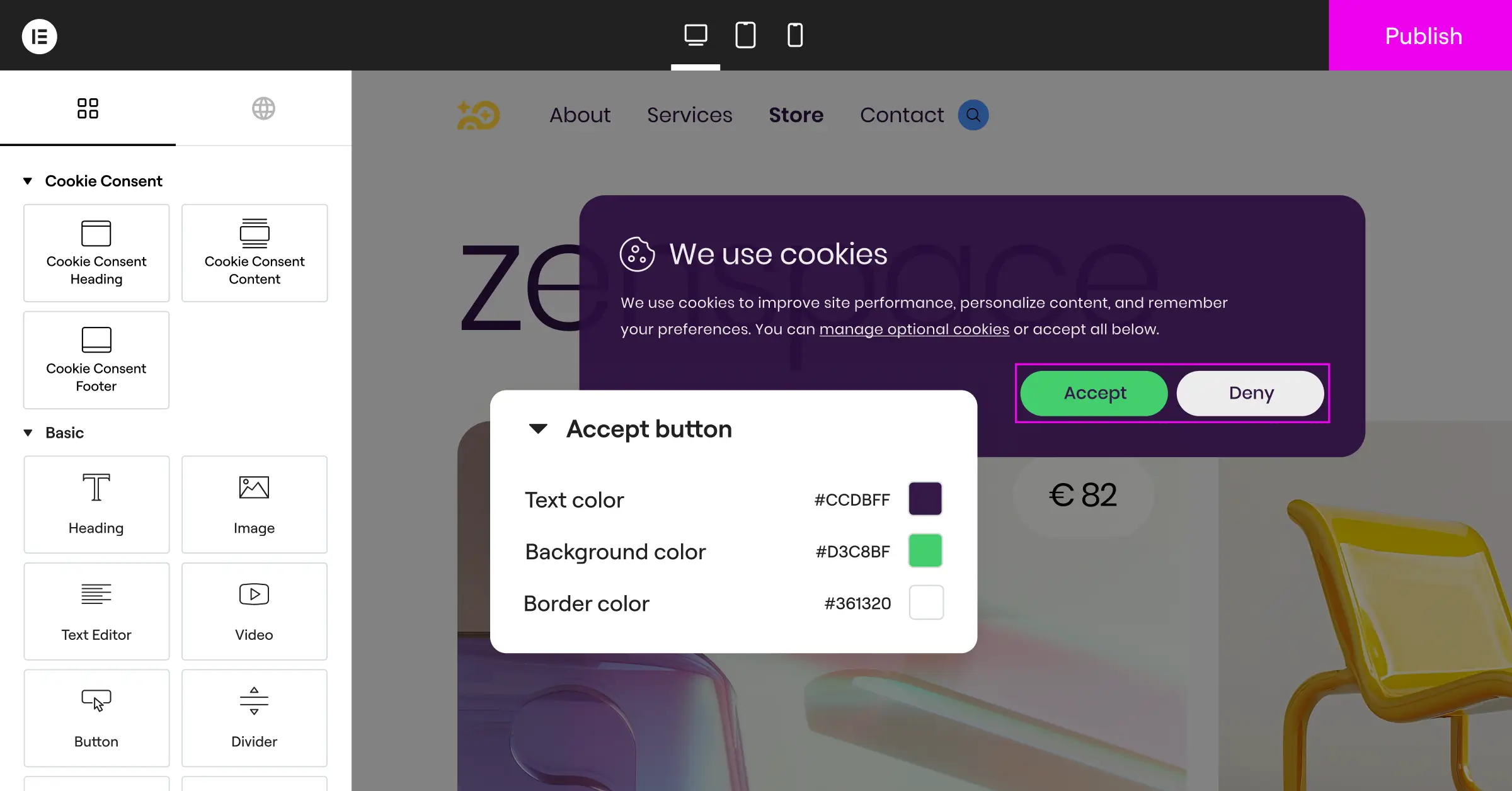
This is the most obvious difference. With CookieYes, you manage banners, cookie categorizations, and consent logs on their cloud platform, then use a WordPress connector or code snippet to display it, which works well but adds a layer to your workflow. With the native Cookie Consent capability, everything lives in your WordPress admin menu, scan scripts, adjust banner styles, and export logs without ever leaving your site.
How Does Script Scanning Work?
Both platforms scan and block cookies automatically. CookieYes scans from their cloud servers, sorting known trackers into standard categories like necessary, functional, analytics, and advertisement. The Cookie Consent tool does this directly within WordPress, scanning your active scripts and plugins and blocking them until visitors give their okay, so you see exactly what’s running on your server in real time.
Is Google Consent Mode v2 Supported?
If you run Google Ads or use Google Analytics 4, this matters a lot. Both CookieYes and the native Cookie Consent tool fully support Google Consent Mode v2, communicating your visitors’ choices directly to Google’s tags and collecting privacy-safe data even when users decline tracking, so measurements stay accurate while you stay compliant with European rules.
Can You Target Banners by User Location?
Not every visitor needs the same banner. A visitor from Germany needs a strict opt-in banner, while one from a less restrictive region might only need a simple notice. Both tools offer geo-targeting, CookieYes through cloud settings, the native Cookie Consent tool through built-in location detection that shows the right banner automatically.

Comparison Matrix
Here’s a quick side-by-side look at core features, setup workflow, and management model.
| Feature / Capability | CookieYes | Cookie Consent (Native) |
|---|---|---|
| Dashboard Location | External Cloud App | Native WordPress Dashboard |
| Setup Time | Moderate (Requires code/connector) | Very Fast (Under 5 minutes) |
| Google Consent Mode v2 | Supported | Supported |
| Design Customization | Cloud-based templates | Deep design integration |
| Consent Logging | Stored on cloud servers | Stored locally on your server |
| Monthly View Limits | Yes (Varies by plan) | No limits (Self-hosted) |
| Geo-Targeting | Available on paid tiers | Included in premium setups |
Other Notable Tools in the Compliance Space
CookieYes and the native Cookie Consent tool are both strong options, but they’re not the only ways to manage compliance. Depending on your business size and needs, a few other established alternatives are worth knowing about.
Cookiebot
Cookiebot is a well-known cloud-based consent management service recognized for detailed cookie scans and automated reports. Corporate sites that need detailed tracking documentation use it widely. It operates through an external cloud dashboard, similar to CookieYes, and pricing scales with your site’s traffic, worth checking as your audience grows.
Complianz
Complianz is a dedicated compliance tool built specifically for the WordPress ecosystem. It focuses on legal localization, helping generate customized privacy policies and legal documents based on your location and audience, a strong choice for European businesses that want a step-by-step legal wizard inside their admin area.
iubenda
iubenda provides a complete, professional suite of compliance tools covering privacy policies, terms and conditions, and cookie consent banners. Legal professionals regard it highly since its templates are regularly updated for changing global laws, a great option if you need a full legal framework beyond a cookie banner.
OneTrust
OneTrust is an enterprise-grade privacy and risk management platform for large corporations and global organizations. It goes far beyond simple cookie banners, with features for data mapping, vendor risk assessment, and detailed preference management, generally more than most WordPress owners need, but a recognized standard for enterprise compliance.
How to Choose the Best Solution for Your Site
Making your final call doesn’t have to be hard. It comes down to how you prefer to build and run your site. Here are three typical scenarios to help you see which path fits.
- The Dedicated WordPress Creator: If you build and manage all your sites on WordPress and love keeping admin tasks simple, the native Cookie Consent tool is the clear winner. It saves you from managing extra accounts, works beautifully with your design, has no traffic limits, and is part of the broader Elementor ecosystem, which includes tools like Web Accessibility for complete compliance.
- The Multi-Platform Agency: If you run an agency managing a mix of WordPress, Shopify, and custom-coded client sites, CookieYes might be more practical. It lets you monitor and update consent banners across your entire client portfolio from one centralized cloud dashboard, even when their sites run on different platforms.
- The Budget-Conscious Startup: If you’re just starting out and want to avoid recurring monthly fees, the entry-level plan of the native Cookie Consent capability is a genuinely smart pick. It gives you a modern consent setup with Google Consent Mode v2 support and no hidden traffic limits, so you grow your audience safely and legally.
Whichever option you choose, the important part is taking action. Setting up a reliable cookie consent system protects your business, helps your search performance, and shows visitors you respect their data, a small investment of time that pays real dividends in trust.
Frequently Asked Questions
Do I really need a cookie consent banner on my WordPress site?
Yes, absolutely, if you have visitors from the European Union, the United Kingdom, California, or other regions with active privacy laws. These laws apply based on where visitors live, even if your business is elsewhere, and if you use tracking tools, analytics, or run ads, a compliant banner keeps your data flowing legally.
What is Google Consent Mode v2 and why does it matter?
Google Consent Mode v2 lets your site communicate users’ privacy choices directly to Google Ads and Google Analytics. If a visitor declines cookies, those services automatically adjust, sending anonymous, privacy-safe signals instead of detailed tracking data. It’s now a strict requirement for effective ad campaigns in Europe.
Does a native cookie consent tool slow down my website?
Generally, no. A native tool like Cookie Consent runs directly within your WordPress environment and doesn’t need external requests to load your banner styles, keeping page speeds fast for both users and search performance.
What does “Cookie Consent” refer to in the Elementor ecosystem?
Cookie Consent is Elementor’s native compliance capability for WordPress. It handles everything from banner display to script blocking and consent logging, all from within your WordPress dashboard. It integrates naturally with your Elementor workflow and removes the need for any external consent management platform.
Can I customize the design of my cookie banner to match my brand?
Yes, both tools allow customization, but the native Cookie Consent tool has a distinct advantage. Since it’s built directly into your WordPress environment, you use familiar design controls to match your site’s typography, colors, and layout, so the banner feels like a natural part of it.
Is my website’s cookie consent data safe when stored locally?
Storing your consent logs on your WordPress server is a secure practice. It keeps you in full control of your compliance records without sharing visitor data with third-party platforms, and it makes exporting audit trails easy whenever you need to demonstrate compliance.
What happens if I exceed my monthly banner views on CookieYes?
On the CookieYes entry-level plan, there are limits on the page views and scans you can use each month. If your site sees a sudden traffic burst and goes over those limits, your banner may stop displaying, or you’ll be prompted to upgrade. That’s one reason growing sites prefer self-hosted, unlimited native solutions.
Does Cookie Consent support Global Privacy Control (GPC)?
Yes, modern cookie consent capabilities, including CookieYes and the native Cookie Consent tool, are designed to recognize and respect Global Privacy Control signals. When a visitor has GPC enabled, the system automatically honors their privacy preferences without a manual opt-out on your banner.

