
Keeping up with privacy law on your website can feel like a full-time job, but it doesn’t have to be. Regulators tighten the rules every year, so picking the right consent tool matters for your site’s long-term health. Many site owners weigh external cloud services against native tools built into their existing setup. On WordPress, the sweet spot is where design control, legal compliance, and site speed meet.
Key Takeaways
- Native integration saves time by letting you manage cookie consent settings without leaving your WordPress dashboard.
- Google Consent Mode v2 support is now required for any site serving visitors in the European Economic Area that uses Google analytics or advertising.
- External cloud platforms often charge based on your total page count, so costs can climb as your website grows.
- Local compliance tools keep visitor data secure and cut down on external script requests, helping your site load faster.
Understanding Your Web Compliance Needs in 2026
The rules keep changing, with no sign of slowing down. Regulators enforce privacy laws like the General Data Protection Regulation (GDPR) in Europe and the California Consumer Privacy Act (CCPA) in the US. Meeting these requirements means more than pasting a banner on your home page. Your site now has to actively block tracking cookies before a user consents, and if you serve EU visitors, you’ll also need Google Consent Mode v2 to keep analytics and ad campaigns running legally.
For WordPress site owners, compliance often comes down to one choice: an external SaaS tool running on an outside server, or a native solution living inside your dashboard. A built-in tool gives full design control, skips extra fees, and keeps your database private on your own server.
“True web compliance in the modern era isn’t just about avoiding regulatory penalties. It’s about building a foundation of trust with your visitors through clear, transparent, and respectful data practices that don’t disrupt their online experience.”
– Itamar Haim, Web Compliance Specialist
As major browsers phase out third-party cookies, first-party data collection and transparent consent management are becoming the gold standard. A trusted cookie consent system respects user privacy while collecting the clean, compliant data you need to grow.

Direct Comparison: Cookiebot vs Cookie Consent
Look at the top choices for privacy on a WordPress site, and Cookiebot and Elementor’s native Cookie Consent capability represent two different design philosophies. Cookiebot is an external, cloud-based platform that scans your site from its own servers. Cookie Consent is native to WordPress, letting you run compliance from your dashboard, no separate portal login needed.
The table below lays out the key differences.
| Feature / Metric | Cookiebot | Cookie Consent (Native) |
|---|---|---|
| Dashboard Location | External cloud platform portal | Native WordPress dashboard |
| Setup Time | About 15 to 30 minutes | Under 5 minutes (3-step process) |
| Google Consent Mode v2 | Supported | Supported natively |
| Design Customization | Script-based, CSS-reliant adjustments | Full visual editor control |
| Included With | Separate subscription required | Included in Elementor One |
| Local Consent Logs | Stored on external servers | Stored locally in your WordPress database |
| External Script Requests | Requires external JavaScript calls | Zero external calls for standard setup |
This shows cloud platforms work well for large, multi-platform enterprise sites, while a native tool keeps site speed high by cutting the extra external scripts entirely.
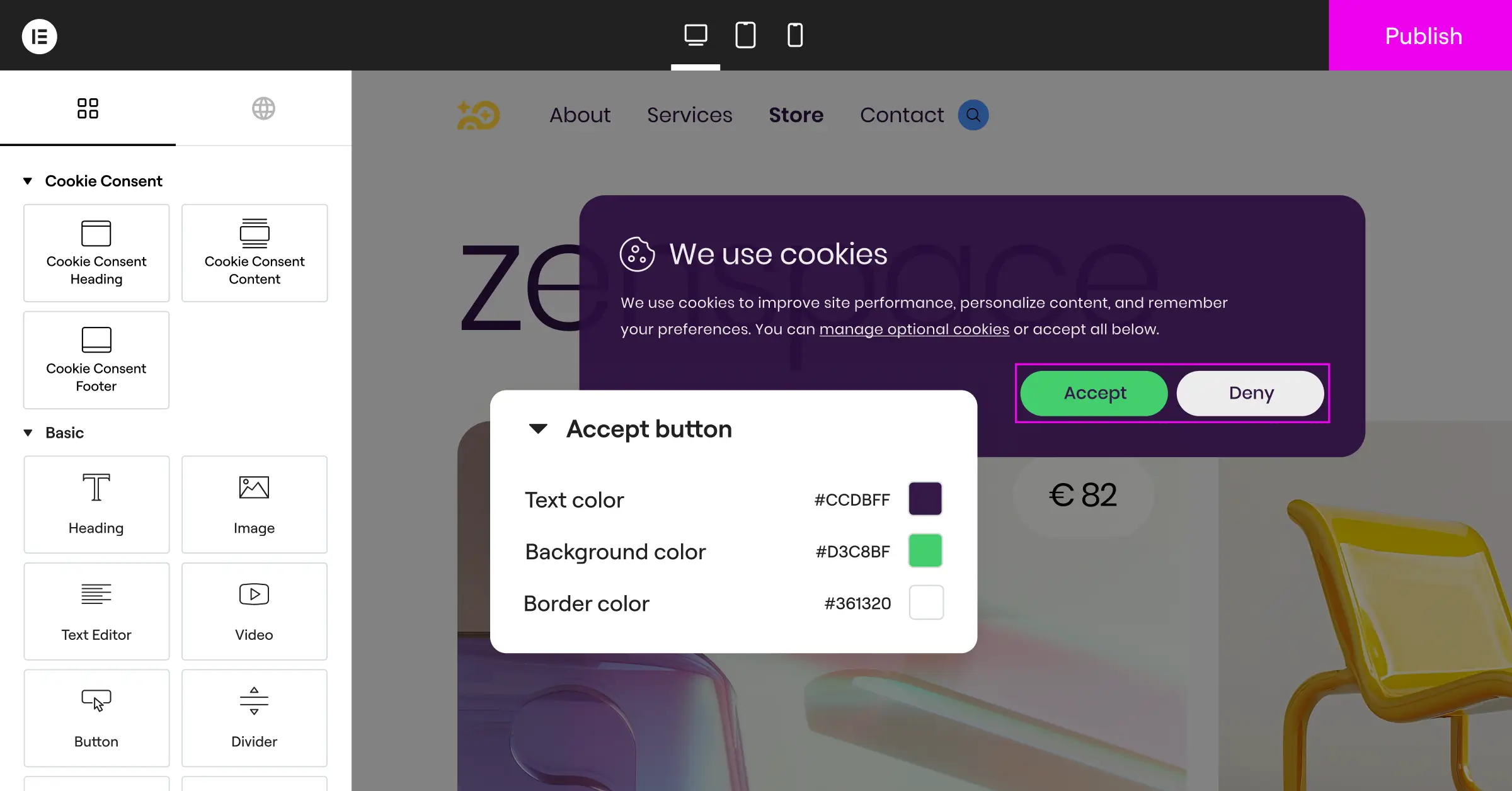
The 10 Best Cookie Consent Solutions for WordPress
To help you find the best fit, here are the ten best tools available in 2026, each chosen for reliability, design control, compliance support, and ease of use.
1. Cookie Consent by Elementor
This native Cookie Consent capability is built for creators who’d rather not jump between web services just to manage compliance. It integrates directly with Elementor, so matching your privacy banners to your brand is genuinely simple.
- Scans your website automatically to find and group active cookies by category.
- Builds custom-styled banners using your existing site fonts and colors.
- Keeps detailed, audit-ready compliance logs right inside your WordPress database.
- Controls cookie scripts based on geographical visitor locations automatically.
- Supports Google Consent Mode v2 and Global Privacy Control out of the box.
Pricing
Cookie Consent includes a free tier and is also included in the Elementor One compliance bundle, alongside Web Accessibility.
Pros & Cons
- Pro – Zero external dashboard logins required.
- Pro – No monthly price increases based on your website’s page view count.
- Con – Best suited for WordPress sites rather than static HTML sites.
Verdict
A great choice for WordPress site owners who want a fast, simple way to stay compliant without climbing subscription fees.

2. Cookiebot

Cookiebot is a widely recognized cloud-based compliance service managing cookie scanning and consent across a range of content management systems, using an automated scanner to find, catalog, and control tracking codes across your pages.
- Detects trackers through automated monthly website scans.
- Holds user consent records on secure external cloud servers.
- Translates your banner messaging into multiple languages automatically.
- Delivers targeted cookie banners based on regional visitor requirements.
Pricing
Cookiebot offers a free tier for smaller sites, with paid plans priced by page count that scale as your content library grows.
Pros & Cons
- Pro – Works on any website platform, not just WordPress.
- Pro – Automated script blocking handles a wide variety of third-party trackers.
- Con – Can become expensive for content-heavy blogs with thousands of pages.
Verdict
A solid, reliable choice for enterprise businesses running multiple websites, though smaller sites may find the page-based pricing less predictable.
3. CookieYes
CookieYes pairs a lightweight WordPress option with an active cloud-based portal, built to be approachable for non-technical users who still want solid compliance coverage.
- Saves visitor consent records securely to help you prove compliance during audits.
- Blocks script execution automatically until the user actively gives consent.
- Displays fully responsive banners that look clean on mobile devices.
- Generates a custom cookie policy document for your legal page.
Pricing
CookieYes offers a free plan for basic needs and paid tiers with more advanced features and higher traffic limits.
Pros & Cons
- Pro – Dashboard setup is clear and simple.
- Pro – Excellent customer support for paid subscribers.
- Con – Requires connecting your site to an external web application.
Verdict
A solid middle-ground tool for publishers who don’t mind an external app tracking their consent history.
4. Complianz
Complianz is a dedicated WordPress privacy solution that walks site owners through a step-by-step wizard to set up localized, legally minded banners. It’s more hands-on than other options, though plenty of users like that.
- Configures custom settings for GDPR, CCPA, and regional Canadian privacy laws.
- Integrates directly with popular WordPress translation tools.
- Blocks social media embeds and third-party scripts dynamically.
- Anonymizes IP addresses for Google Analytics tracking natively.
Pricing
Complianz offers a free version through wordpress.org. Premium single-site and multi-site licenses are sold on an annual subscription basis.
Pros & Cons
- Pro – The configuration wizard is highly detailed and legally minded.
- Pro – Runs entirely on your own hosting server.
- Con – The interface can feel slightly overwhelming for beginners.
Verdict
Great for site creators who like a legal-first approach and step-by-step guidance.
5. iubenda
iubenda offers a full suite of compliance tools, including privacy policy generators, cookie banners, and terms of service management, good for anyone needing more than a cookie banner.
- Generates auto-updating policy documents written by real lawyers.
- Adapts your cookie banner design to fit various style guidelines.
- Saves detailed consent records to meet strict European requirements.
- Controls script loading through an external cloud-based management platform.
Pricing
iubenda uses a credit-based pricing model. Plans vary based on the number of sites and features required.
Pros & Cons
- Pro – Provides a complete legal solution beyond just cookie banners.
- Pro – Automatic policy updates protect you when laws change.
- Con – The credit system can make costs less predictable for larger projects.
Verdict
Worth a look if you need one upgrade covering terms of service, privacy policies, and cookie consent together.
6. Termly
Termly targets small businesses and startups that need compliance sorted quickly and affordably, with a clean builder interface that’s genuinely easy to pick up.
- Scans your website for active tracking scripts once a week.
- Builds compliant privacy policies, cookie policies, and disclaimer pages.
- Arranges cookie preferences into clear categories for your visitors.
- Supports compliance with GDPR and CCPA standards.
Pricing
Termly offers a free plan for basic needs and paid plans with more advanced scanning and customization features.
Pros & Cons
- Pro – Very friendly user interface for non-developers.
- Pro – Good balance of policy generation and consent tools.
- Con – Limited custom style controls on the entry-level plans.
Verdict
A friendly option for straightforward business websites that want a quick setup without complex styling choices.
7. OneTrust
OneTrust is an enterprise-level privacy management platform for corporations that need strict risk management across thousands of digital properties. It’s powerful, but built for large teams, not a typical WordPress blog.
- Audits large networks of websites for hidden tracking technologies.
- Centralizes compliance across web, mobile apps, and internal company databases.
- Delivers detailed user preference centers for granular control.
- Monitors vendor compliance risk alongside your own website security.
Pricing
OneTrust uses enterprise pricing. Interested teams are asked to schedule a demo with their sales team.
Pros & Cons
- Pro – Deep feature coverage for corporate compliance teams.
- Pro – Highly customizable reporting tools.
- Con – Far too complex and costly for standard WordPress users.
Verdict
The standard for global corporations, but overkill for small WordPress publishers and agencies.
8. Osano
Osano focuses on simplicity and data privacy advocacy, with a consent platform covering global regulations, a strong reputation for reliability, and a premium price tag to match.
- Monitors compliance updates to protect your business from unexpected regulatory changes.
- Blocks non-compliant tracking scripts automatically before user agreement.
- Translates your privacy message into dozens of regional languages.
- Simplifies data subject access requests through a clean admin portal.
Pricing
Osano pricing scales with website traffic. Costs increase as your audience grows.
Pros & Cons
- Pro – Extremely reliable automatic script blocking.
- Pro – Clean visual dashboard for compliance auditing.
- Con – Costs increase rapidly as your website traffic scales up.
Verdict
A dependable, premium choice for high-traffic blogs and business sites that prioritize solid compliance and are willing to invest in it.
9. GDPR Cookie Consent by WebToffee
WebToffee’s solution is a widely-used WordPress option built to make banner customization straightforward and affordable, handling the basics well without extra complexity.
- Creates subtle cookie notice banners that match your website design.
- Categorizes cookies into necessary, functional, and analytical sections.
- Tracks user consent history locally inside your database.
- Generates custom shortcodes to display cookie lists on your policy page.
Pricing
WebToffee offers a free version on wordpress.org and a premium version with extended customization and compliance features.
Pros & Cons
- Pro – Very lightweight and fast to load.
- Pro – Easy to configure without any coding experience.
- Con – Lacks some of the deeper integration features of native builders.
Verdict
A reliable, budget-friendly option for simple blogs that don’t need complex, design-heavy setups.
10. Consent Manager
Consent Manager is a European-focused solution with a heavy emphasis on data protection, offering detailed optimization tools for publishers who care about compliance and conversion alike.
- Optimizes banner acceptance rates through continuous automatic testing.
- Integrates with popular tag management platforms.
- Keeps your website compliant with the latest European regulatory updates.
- Generates clean reports on visitor interaction and consent acceptance rates.
Pricing
Consent Manager pricing is based on monthly page views. A free tier is available for lower-traffic sites.
Pros & Cons
- Pro – Built-in optimization helps keep your marketing opt-in rates healthy.
- Pro – Strong emphasis on security and data privacy.
- Con – The administrative portal takes some time to learn.
Verdict
A strong tool for media publishers who want to optimize opt-in numbers without compromising compliance.
Key Factors to Consider When Selecting a Compliance Tool
Choosing the right compliance tool can feel overwhelming with so many good options out there, but focus on a few key priorities and the decision gets clearer.

- Native Integration – A tool living inside your WordPress environment means no juggling multiple logins, and your configuration data stays safely on your own server.
- Speed Impact – Every script you add can slow your site down. Native systems run local code, while external platforms rely on third-party network requests that add delay to page loading times.
- Cost and Page Scalability – Many cloud platforms charge based on the number of pages on your website. On a growing blog or content site, those costs can climb quickly. A flat-rate or native tool keeps your budget predictable. Learn more about how Elementor’s Cookie Consent handles this in their feature documentation.
- Design and Brand Consistency – Your cookie banner is often the first thing a new visitor sees. Total design control means it feels like part of your brand rather than a disconnected interruption.
Keep these priorities in mind, and narrowing your options gets a lot easier.
Frequently Asked Questions
What is Google Consent Mode v2 and why does it matter in 2026?
Google Consent Mode v2 lets your website pass users’ cookie choices directly to Google services like Google Analytics and Google Ads. Google now requires it for any site targeting visitors in the European Economic Area, or you’ll lose accurate analytics and targeted ad campaigns in those regions.
Does using a cookie consent tool slow down my website?
It depends how the tool is built. Cloud-based tools fetch external scripts from their servers, adding milliseconds to your load time. Native options keep all code local, which helps performance and loading speed stay strong.
Can I use the native Cookie Consent tool on non-WordPress sites?
No, this native capability is built specifically for WordPress and integrates directly with the dashboard. On a static HTML site or different CMS, you’d need an external service like Cookiebot or CookieYes instead.
Is a free cookie consent tier enough for a small business website?
Yes, for many small business sites and local blogs, a free tier works well. Just make sure your entry-level plan supports auto-blocking scripts, basic layout customization, and compliance logs before you go live.
How do automatic cookie scanners work?
Automatic scanners crawl your pages for active scripts, tracking pixels, and cookies left by third-party services, then group them into clear categories like essential, analytical, and marketing, so visitors can choose which ones they allow.
Do I need consent logs if my business is outside of Europe?
Yes, keeping consent logs is recommended regardless of location. Laws like the CCPA and other state-level US privacy acts require proof that you respect visitor choices, and local logs give you that audit trail.
What happens if a visitor ignores my cookie banner?
Under standards like the GDPR, ignoring a banner doesn’t count as consent. Your tool must block all non-essential scripts and cookies until the visitor clicks “Accept.” Scrolling or reading on isn’t valid consent.

