
Key Takeaways
- Dashboard Location: Cookie Consent runs entirely inside your WordPress dashboard, while Cookiebot relies on an external cloud portal.
- Design Workflow: Styling your banner is easier with Cookie Consent, since it uses native visual design tools instead of custom CSS coding.
- Google Consent Mode v2: Both tools fully support this essential Google ad tracking requirement.
- Workflow Speed: A native setup helps agencies and business owners manage multiple sites without switching between platform accounts.
Managing website privacy can feel like a moving target, with regulations shifting all the time. If you run a WordPress site, you’ve probably come across Cookiebot, one of the bigger names in the consent space. But you might also be looking at Cookie Consent, a modern, native capability built to simplify compliance right inside your WordPress dashboard. Here’s a clear breakdown of how the two handle cookie scanning, design, user experience, and legal requirements, so you can find the best fit for your workflow.
The Evolving Field of Consent Management in 2026
Web privacy rules have changed a lot in the last few years. A simple pop-up saying “we use cookies” isn’t enough anymore. Major privacy laws like the General Data Protection Regulation (GDPR) in Europe and the California Consumer Privacy Act (CCPA) in the US now require active, explicit consent before you load any non-essential tracking scripts. If you run ads, track user behavior, or use social share buttons, you’re likely collecting data that needs consent first.
Ad networks add another layer. If you serve visitors in the European Economic Area (EEA) and use Google services, you need Google Consent Mode v2. It sends signals to Google’s servers about what visitors have agreed to. Without it, your ad personalization and conversion tracking won’t work correctly. The good news: the right tool makes this far more manageable than it sounds.
Choosing between an external cloud service and a native WordPress capability also changes how you work with your site day to day. A cloud service keeps your configuration on their servers and injects scripts onto your pages. A native option, built by the creators of Elementor, keeps everything inside your own site database. It comes down to the management style that fits your routine.

Understanding Cookiebot: The Cloud-Based Consent Platform
Cookiebot is an established, cloud-based consent management platform that works across many website platforms. Since it’s a software-as-a-service (SaaS) product, it doesn’t live inside WordPress. Instead, you create an account on their site, configure your settings, and copy a script tag onto your pages. It’s built to manage privacy rules across complex digital setups.
Cookiebot’s core idea is automated cloud management. Once you install the script, their servers scan your site on a schedule, identify tracking cookies, and generate a categorized declaration page. It handles large-scale scanning well, which makes it a reliable pick for bigger sites with many pages. Here’s how its main features work:
- Scans your website automatically to identify all active tracking technologies on a monthly schedule.
- Categorizes discovered cookies into four classification groups: necessary, functional, statistical, and marketing.
- Blocks unauthorized scripts from running on your pages until users grant explicit permission.
- Stores user consent choices in a cloud-based registry for up to 12 months.
- Adapts banner languages dynamically based on the location of your visitor.
- Supports integrations with popular tag management systems.
This works well for what it’s built to do. That said, you’ll need to leave your WordPress dashboard for any configuration change. Updating a banner layout, checking consent logs, or adjusting cookie categories all mean logging in to the Cookiebot portal. It’s capable, but switching between systems adds friction over time.

Understanding Cookie Consent: The Native WordPress Solution
If you’d rather manage everything from one familiar hub, Cookie Consent is a genuinely attractive option. It’s Elementor’s cookie consent capability, built natively for WordPress, handling GDPR and CCPA compliance right from your admin panel. There’s no external dashboard to log into and no separate subscription just to edit a banner. It’s clear, focused, and built for a modern site-building workflow.
The native approach is all about removing friction. You can set up your banner, run cookie scans, group scripts, and review compliance logs without leaving your dashboard. If you already use Elementor for site building, this capability fits naturally into your setup, and it works well on any WordPress site. It’s built to make compliance accessible to any site owner, no technical background needed. Here’s what it lets you do:
- Integrates directly with your WordPress dashboard for a unified site management experience.
- Saves setup time with a simple three-step configuration wizard (it really does take under five minutes).
- Launches customized layouts using beautiful, pre-designed cloud templates.
- Logs user consent history locally to satisfy legal audit requirements.
- Applies precise geographical targeting to show banners only where legally required.
- Aligns your banner styles with your brand fonts and colors using code-free visual controls.
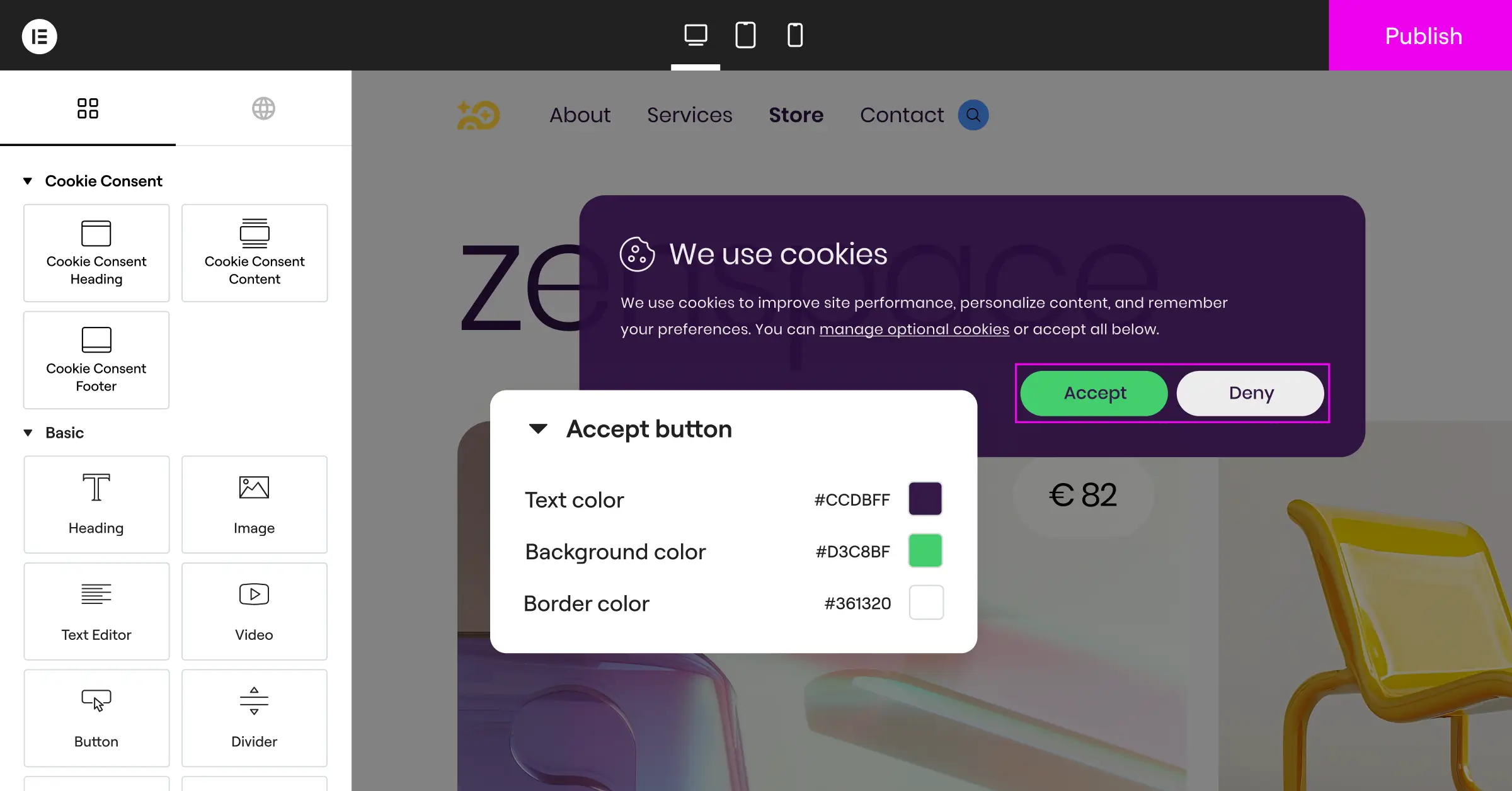
Because it’s native, it skips the extra external JavaScript calls that can slow your site down. Everything sits on your own server, which keeps your site loading fast and your experience clean. It’s a solid pick for anyone who wants their site management in one place.
Head-to-Head Comparison: Cookiebot vs Cookie Consent
Here’s a side-by-side look at how the two line up on the essentials. Both get you to compliance, but their execution models differ quite a bit.
| Feature or Metric | Cookiebot | Cookie Consent |
|---|---|---|
| Dashboard Location | External cloud-based portal (cookiebot.com) | Native WordPress admin panel |
| Setup Time | Moderate (requires account creation and code insertion) | Fast (under 5 minutes with a 3-step setup) |
| Design Customization | Basic options or custom CSS coding | Visual, code-free editing with cloud templates |
| Google Consent Mode v2 | Supported via cloud integration | Supported natively out of the box |
| Consent Logs | Stored on external Cookiebot servers | Stored locally in your WordPress database |
| Multilingual Banners | Supported | Supported natively |
| Free Tier | Limited free plan (single domain, page count cap) | Free tier available; included in Elementor One |
How easy is the initial setup?
Setting up Cookiebot takes a few extra steps since it’s an external SaaS product. You sign up for an account, enter your domain, and wait for their cloud crawler to scan your pages. Then you copy a JavaScript code block and paste it into your site header. If you’re comfortable editing theme files or using a tag manager, that’s manageable, though it can feel like a lot if you’re newer to WordPress.
With the native cookie consent capability, setup is noticeably smoother. You activate the feature, open the dashboard settings, and work through a simple three-step guide. It scans your local plugins, helps you categorize cookies, and generates your banner right away. No external scripts to copy, no waiting on a cloud crawler. Most people are up and running in under five minutes, which is genuinely nice.

Where do you manage your daily consent tasks?
Context switching is a quiet productivity drain. With Cookiebot, every edit means leaving WordPress, logging into the Cookiebot portal, making the change, saving it, and waiting for the cloud cache to update. If a client asks you to tweak button wording or block a new script, you’re managing two platforms for one website. That adds up fast when you’re juggling multiple client sites.
“Native WordPress integration is no longer just a convenience; it’s a critical component of site performance and administrative efficiency. Keeping your consent logs and configuration within your local database means you stay in complete control of your compliance data.”
– Itamar Haim, Web Compliance Specialist
With native cookie consent, everything lives in one place. Since it’s part of your WordPress admin area, you can adjust settings, review consent logs, and update layouts while editing posts or building pages. If you run an agency, that means training clients on one system instead of several external logins. It keeps your workflow organized without extra overhead.
Can you customize the banner design without code?
A generic, clunky cookie banner can undercut an otherwise polished site. Cookiebot offers basic templates, but matching your exact brand colors and typography can call for custom CSS. Adjusting button border radius or fine-tuning spacing usually means writing code or using developer tools to target specific class names.
Cookie Consent takes a different approach, with visual design control built in. It comes with customizable cloud templates you edit through a code-free interface, adjusting colors, uploading your logo, and changing typography and button styles with intuitive controls. Your banner ends up feeling like a natural part of your site, not something bolted on.
How do they handle Google Consent Mode v2?
If you run Google Ads or Google Analytics, Google Consent Mode v2 support is non-negotiable in 2026. Both Cookiebot and Cookie Consent support it, communicating directly with Google’s global site tag (gtag.js) to signal whether a user has agreed to ad storage or analytics storage.
The plumbing works differently behind the scenes. Cookiebot manages these signals through external script injection, which works well but adds an outside dependency. The native tool uses local WordPress functions to set those variables before your analytics scripts load, so your tracking signals are accurate from the moment a visitor lands on your page.
What is the impact on your page speed?
Site speed matters for both search rankings and user experience. With an external compliance service, visitors’ browsers need to download a script from an outside server before the banner can render, which can cause a brief delay or layout shift, especially on slower connections.
Because the native tool runs directly inside WordPress, it serves its scripts and styles from your own server, with no round-trip calls to third-party APIs just to show a banner. That keeps your core web vitals in good shape without giving up compliance, a win on both fronts.
The WordPress-Native Advantage: Why Dashboard Integration Matters
Choosing a native tool is about more than convenience. It’s about owning your data and keeping your workspace simple. When your cookie consent capability lives directly inside WordPress, you’re not depending on an outside service staying online.
Think about what happens when a cloud service goes down. If their servers hit an outage, your consent banner might stop loading entirely, which could leave your site non-compliant or break your analytics tracking. With a native tool, your banner lives on your own server. As long as your site is running, your compliance banner is too.
Managing client sites gets easier too. You don’t need separate email accounts or individual outside plans for every client. You control everything from the site you’ve already built, which simplifies handoffs and keeps maintenance simple. And if you’re on Elementor One, Cookie Consent is already included alongside Web Accessibility and other compliance tools, no separate subscription required.
Factual Profiles of Alternative Consent Solutions
Cookiebot and Cookie Consent cover the two main approaches, but it’s worth knowing what else is out there. Here’s a factual look at other popular consent tools for WordPress users:
- CookieYes: A web-based compliance service providing customizable banners and script integration across multiple platforms, with both a cloud dashboard and a dedicated WordPress connector.
- Complianz: A privacy tool built specifically for WordPress that guides users through a complete legal wizard to generate cookie consent banners and custom privacy policy pages.
- iubenda: A legal compliance suite that helps site owners generate privacy policies, terms and conditions, and cookie banners from a centralized, cloud-hosted platform.
- OneTrust: An enterprise-level privacy and data governance platform designed for compliance management across large, multi-brand organizations with complex regulatory needs.
Choosing the Right Solution for Your Specific Needs
To make your decision, think about the size of your website and how you prefer to work. There’s no single right answer, but a few clear patterns emerge.
If you’re managing an enterprise network with hundreds of domains across different platforms, Cookiebot is a strong option. Its external cloud console lets you watch multiple domains from one place, useful when those sites run on different systems like Shopify, Drupal, or custom code.
If you’re a WordPress designer, agency owner, or small business operator, Cookie Consent is likely the better fit. It keeps your workflow simple, skips extra SaaS costs, and gives you full design control without writing code. It lets you focus on building great sites and growing your business while compliance stays handled in the background. You’ve got this.
Frequently Asked Questions
Do I really need a cookie banner in 2026?
Yes. If your site has visitors from the European Union, the United Kingdom, California, or several other US states, you’re legally required to get consent before loading non-essential cookies. Skipping this can cost you ad tracking and lead to regulatory action.
Can I use Cookie Consent with any WordPress theme?
Yes. The native cookie consent tool works with any standard WordPress theme. It operates at the system level, handling cookie categorization and banner rendering regardless of your site’s visual layout.
Does Cookie Consent support Google Consent Mode v2?
Absolutely. It supports Google Consent Mode v2 natively, so your Google Ads and Google Analytics accounts keep collecting compliant data and tracking conversions accurately without interruption.
What happens if I don’t use Google Consent Mode v2?
If you skip Google Consent Mode v2 and target users in the EEA, Google will limit your ability to use personalized advertising. Your measurement and remarketing capabilities will drop as Google tightens its privacy enforcement.
Is Cookie Consent included with Elementor?
Yes. It’s built by the creators of Elementor and is part of their complete compliance package, included in Elementor One subscriptions, which makes it cost-effective for designers and agencies who want everything in one place.
Does Cookiebot offer an entry-level plan?
Cookiebot offers a basic entry-level plan, but it’s limited to a single domain and has a page count cap. If your site grows beyond that limit, you’ll move to a paid monthly plan based on domain size.
Do native cookie banners load faster than cloud banners?
In most cases, yes. Native tools serve their assets from your own server and database, so there are no external API requests, which helps keep your site fast and avoids layout shifts that can hurt user experience.
How does Cookie Consent handle translation for multilingual sites?
It supports multilingual banners natively. You can translate your consent banner text so visitors see a compliant message in their own language, which matters for sites serving multiple regions.
Can I customize the look of Cookie Consent to match my brand?
Yes. Cookie Consent gives you a visual design system, so you don’t need custom CSS. You can pick brand fonts, choose custom colors, and select layout styles to make your banner blend naturally into your site design.
Does Cookie Consent store user data on external servers?
No. All consent logs stay local in your WordPress database, so you keep full ownership of your data and a clean compliance process under laws like the GDPR.

