
If you run a WordPress site, you already know how much privacy regulations matter. You’ve probably come across Cookiebot, but maybe you’re after something that fits your workflow better, especially with 2026 around the corner. Good news: there are some solid options out there, and picking the right one doesn’t have to be stressful. Let’s walk through the best alternatives together, plain and simple.
Key Takeaways
- Native integration keeps your WordPress dashboard clean and centralized.
- Google Consent Mode v2 support matters if you’re running search ads in Europe.
- Customization tools let you design banners that match your brand.
- Zero-code setups save you hours of developer time and upkeep.
Why You Might Look for a Cookiebot Alternative in 2026
Cookiebot has been a popular pick for cookie consent for years, but plenty of site owners now look for something that fits their day-to-day workflow better. A common frustration: jumping between your WordPress dashboard and an outside platform just to change a banner color or check a log, and if you manage several client sites, those separate accounts add up fast.
Performance matters too. Loading scripts from third-party servers can slow your pages down, and since search engines care about user experience, keeping things local and lightweight helps. A tool running on your own server also makes costs more predictable.
Then there’s compliance. Privacy laws keep shifting, and Google Consent Mode v2 (this one trips up many people) is now required for sites serving EU traffic through Google’s services. A tool that connects natively with your tag manager and analytics, without wrestling with code, is a daily necessity if you’re running online ads.

Key Factors to Consider When Selecting Consent Tools
Before picking a new compliance tool, here are three things worth weighing:
- Dashboard Integration – Decide between a cloud-managed platform or a tool that lives entirely inside WordPress admin. Native tools keep your data in one place, no external logins needed.
- Compliance Features – Look for automated cookie scanning, geo-targeting, and multilingual support to stay compliant across regions like the EU and California.
- Design Control – Your consent banner is the first thing new visitors see, so strong visual design settings let you match your fonts, colors, and layout.
Comparison of the Best Alternatives in 2026
Here’s a quick overview of the top options by dashboard location, Google Consent Mode v2 readiness, and whether they offer a free or entry-level plan.
| Tool Name | Native WordPress Dashboard | Google Consent Mode v2 | Entry-Level Plan Available | Key Focus |
|---|---|---|---|---|
| Cookie Consent | Yes | Yes | Yes | Native integration and simple 5-minute setup |
| CookieYes | No (Cloud Managed) | Yes | Yes | Cross-platform cloud consent management |
| Complianz | Yes | Yes | Yes | Wizard-driven privacy settings |
| iubenda | No (Cloud Managed) | Yes | Yes | Complete legal compliance documents |
| Termly | No (Cloud Managed) | Yes | Yes | Small business legal generation |
| OneTrust | No (Cloud Managed) | Yes | No | Enterprise-level privacy coordination |
| Osano | No (Cloud Managed) | Yes | Yes | Data privacy compliance guarantees |
| Usercentrics | No (Cloud Managed) | Yes | No | Custom developer-focused deployments |
| Consentmanager | No (Cloud Managed) | Yes | Yes | Detailed compliance reporting and analytics |
| Securiti | No (Cloud Managed) | Yes | No | AI-driven data discovery and security |
Detailed Reviews of the 10 Best Cookiebot Alternatives in 2026
Here are objective reviews of each alternative, to help you find the right match for your site.
1. Cookie Consent
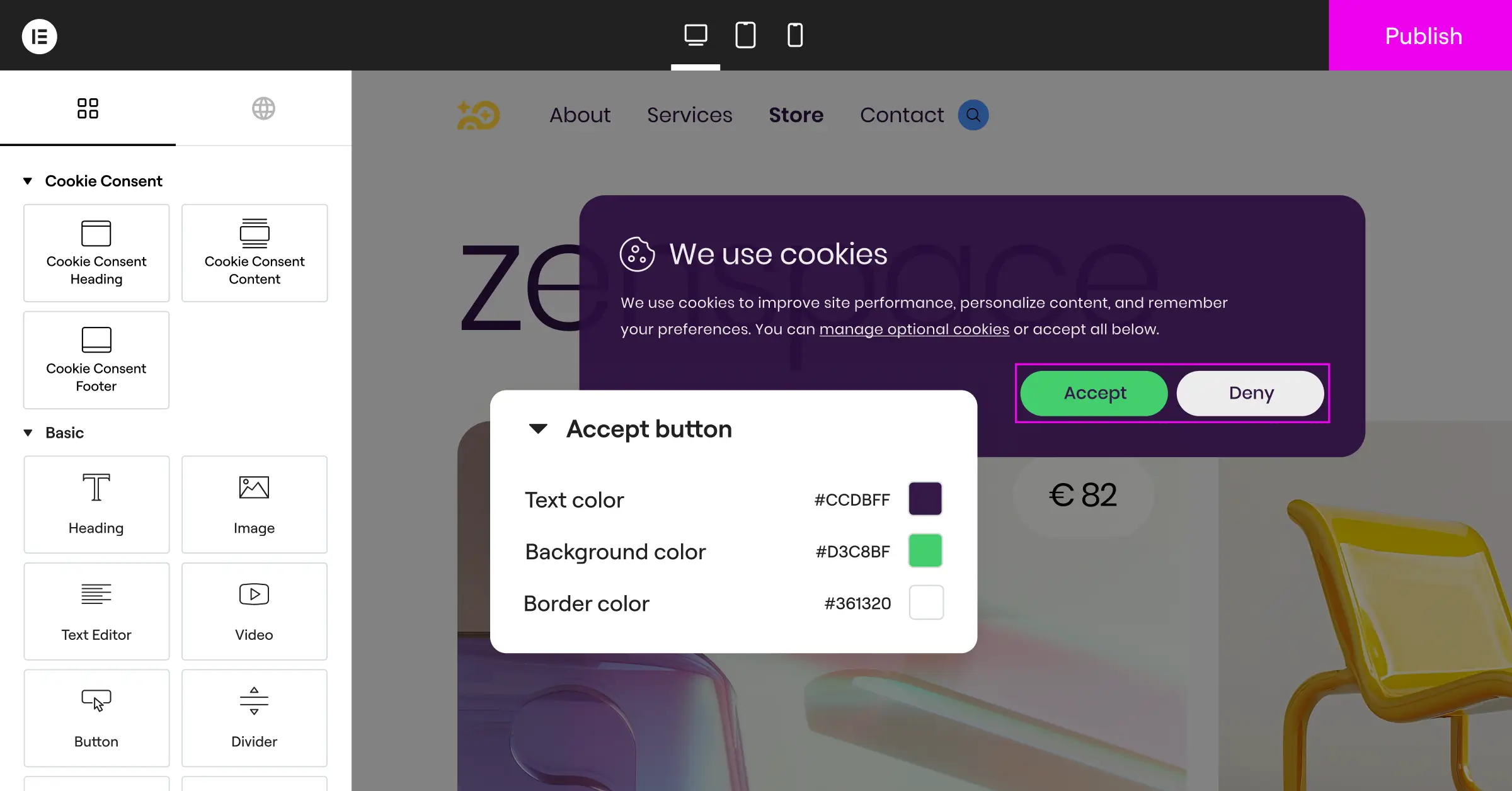
Cookie Consent is Elementor‘s cookie consent capability, built natively for WordPress. It handles GDPR and CCPA compliance right from your dashboard, so there’s no external platform and no separate account to juggle. Set up banners, scan and categorize cookies, manage scripts, and keep consent logs, all in one place (it’s simpler than it sounds).
It’s built for WordPress owners who want solid compliance without leaving their editor. It’s included in Elementor One, with a free tier if you’d rather try it first, and it’s part of a wider toolkit alongside Web Accessibility, a handy all-in-one option for keeping your site fast and compliant.
Core features include:
- Builds custom cookie banners from cloud-based templates that match your branding.
- Scans and categorizes cookies automatically to keep your compliance list accurate.
- Tracks consent history with built-in, easy-to-read logs.
- Connects with Google Consent Mode v2 for marketing and tracking.
- Targets users by location to show the right notices for local laws.
- Generates privacy policies right from the WordPress interface.
Pros:
- Runs completely inside WordPress, no external cloud account needed.
- Set up in under five minutes with a simple three-step process.
- Full design customization built in, matching your theme with no extra effort.
- Comes with a generous free tier alongside paid plans.
Cons:
- Built specifically for WordPress, so it’s not designed for non-WordPress platforms.
- Advanced cloud templates require an active license tier.
Pricing: A free tier is available, and full access is included with Elementor One subscriptions.
Verdict: The top pick for WordPress users who want to skip external SaaS dashboards and manage consent right where they build their site.
2. Cookiebot

Cookiebot is a well-established, cloud-based consent management platform. It scans your site for cookies and trackers, generates a consent banner, and manages consent records through an external dashboard, with a WordPress connector to simplify integration.
Pros:
- Supports a wide range of privacy regulations, including GDPR, CCPA, and LGPD.
- Automatic scanning runs on a schedule to catch new trackers as they appear.
- Detailed consent logs and reporting are accessible from the cloud dashboard.
Cons:
- Requires logging into an external dashboard to manage settings and view reports.
- Pricing scales with the number of pages scanned, which adds up on larger sites.
Pricing: Plans are tiered by pages and domains, with a limited free option for small sites.
Verdict: A well-known option for sites that need reliable automated scanning and cloud-managed consent records across regulatory frameworks.
3. CookieYes

CookieYes is a cloud-based consent platform that works across many website builders, including WordPress. Its dashboard handles banners, cookie scans, and consent stats, with a dedicated WordPress integration for easy setup.
Pros:
- Works across platforms, handy if you manage Shopify or custom sites alongside WordPress.
- The dashboard is clean and easy for non-technical users to navigate.
- Includes automatic scanning that categorizes common trackers with no extra configuration.
Cons:
- Requires logging into an external dashboard to change settings or view logs.
- Free plan limits are tied to monthly page views, which can run out on busier sites.
Pricing: Paid plans scale based on page views and the number of domains you manage.
Verdict: A solid cloud-hosted option if you manage a mix of WordPress and non-WordPress sites under one roof.
4. Complianz

Complianz is a privacy suite built for WordPress. A step-by-step wizard walks you through consent settings based on the privacy laws that apply to your visitors, and everything runs inside your own site’s database, a self-hosted solution.
Pros:
- The wizard-based setup makes compliance straightforward to work through step by step.
- Integrates well with popular WordPress translation tools.
- Includes automatic blocking for popular social media scripts before consent is given.
Cons:
- The interface can feel involved, with a lot of configuration questions during setup.
- Styling banners sometimes needs custom CSS if the default templates don’t match your theme.
Pricing: A free version is available on WordPress.org, with premium plans sold as yearly subscriptions per site.
Verdict: A strong self-hosted alternative if you prefer step-by-step wizards and want your consent data stored locally.
5. Termly

Termly is aimed at small businesses that need a straightforward way to stay compliant with evolving privacy laws, offering policy generators, terms of service builders, and a cookie consent manager through an external cloud dashboard.
Pros:
- User-friendly dashboard designed with small businesses in mind.
- Includes a compliance checker that scans your site for potential legal issues.
- Generates multiple policy types beyond just cookie consent banners.
Cons:
- The free plan is limited to a single domain and a capped number of page views.
- Fewer advanced developer customization settings than enterprise-level platforms.
Pricing: Pro plans are billed monthly or annually per site.
Verdict: A practical option for small businesses that want a simple compliance bundle alongside their consent banner.
6. OneTrust

OneTrust is an enterprise-grade trust intelligence platform for large organizations that need strict data governance, vendor risk assessments, and international privacy standards across many properties.
Pros:
- Detailed compliance reporting and auditing tools suited for complex organizations.
- Supports cookie compliance configurations across multiple global regions.
- Integrates with internal databases and customer relationship management systems.
Cons:
- Setup typically requires a dedicated compliance team or professional developers.
Pricing: Enterprise pricing is available on request.
Verdict: The standard choice for large corporations managing privacy at scale, though the complexity and cost are beyond what independent WordPress site owners need.
7. Iubenda

iubenda is a complete compliance platform helping site owners generate privacy policies, cookie policies, and consent banners, through a central cloud dashboard with a WordPress helper integration.
Pros:
- Provides auto-updating privacy and cookie policy documents prepared with legal expertise.
- Supports many languages and a range of global privacy frameworks.
- Can handle complex data mapping and privacy request workflows.
Cons:
- The cloud dashboard has a steeper learning curve than simpler consent-only tools.
Pricing: Paid plans are structured around the number of compliance documents and consent levels you configure.
Verdict: A good fit for owners who need legally backed document generation alongside their cookie consent setup.
8. Osano
Osano is a B-corp platform focused on data privacy simplicity and compliance guarantees, monitoring privacy laws globally and updating its systems automatically so you don’t have to track every shift.
Pros:
- Offers a financial compliance guarantee for added peace of mind.
- Maintains a database of third-party vendors to track and verify their privacy practices.
- Includes a clean, visitor-facing consent interface.
- Supports Google Consent Mode v2 out of the box.
Cons:
- All settings are managed in an external dashboard, one more platform to log into.
- The entry-level plan has limited monthly visitor allowances.
Pricing: Developer and Business tiers are billed monthly or annually.
Verdict: A reliable option for growing companies that want a platform backed by legal protection and built-in vendor tracking.
9. Usercentrics
Usercentrics is a consent technology built for developers and agencies who want precise control over data tracking, with deep integration through an advanced API.
Pros:
- Real flexibility in how banners render and how scripts execute.
- Built to handle high-traffic sites and agency-scale deployments.
- Strong focus on European regulatory standards.
Cons:
- Setup can be challenging without web development experience.
- Doesn’t offer a traditional free plan for standard website use.
Pricing: Custom pricing based on monthly active users and features required.
Verdict: A solid developer-first option for agencies building complex custom applications or advanced WordPress setups.
10. Consentmanager
Consentmanager is a European consent tool focused on compliance optimization, with detailed reporting to help you understand how banner designs affect visitor consent rates.
Pros:
- Built-in A/B testing to compare banner layouts and find what performs best.
- Provides highly detailed consent statistics and reports.
- Supports a wide range of languages out of the box.
Cons:
- The admin interface is technical and can feel busy for beginners.
- The optimization focus may be more than a simple content site needs.
Pricing: Premium plans are billed monthly.
Verdict: A useful analytical tool for marketing teams who want to improve consent rates while staying compliant.

What About Securiti?
Securiti is a modern data intelligence platform covering security, compliance, and privacy together, scanning website assets, databases, and APIs to map where user data travels across your organization.
Pros:
- Advanced AI-powered scanning detects hidden cookies and data trackers.
- Well-suited to businesses managing customer logins and complex data structures.
- Takes a high-security approach to consent storage and privacy workflows.
Cons:
- Too feature-heavy for simple content sites or small blogs.
- Requires dedicated admin setup and technical know-how to run well.
Pricing: Enterprise pricing available on request.
Verdict: A strong fit for tech-heavy organizations that want deep security insight alongside their consent management.
“With the introduction of Google Consent Mode v2, setting up a cookie banner is no longer just about showing a notification. It’s about running a clean, accurate connection between your website’s scripts and marketing tags without slowing down performance.”
Itamar Haim, Web Compliance Specialist

Step-by-Step Transition Guide
If you’re ready to switch from Cookiebot to a native WordPress tool like Cookie Consent, the move is refreshingly simple. Follow these steps and your compliance keeps running with no gaps:
- Back Up Your Current Setup – Export your Cookiebot configuration settings and note any custom cookie categorizations you’ve built up.
- Remove Cookiebot Scripts – Deactivate the Cookiebot helper tool on your site and remove any manual scripts from your theme files or tag managers.
- Install Cookie Consent – Turn on the Cookie Consent capability, run the built-in scanner to discover your active cookies, customize your banner design, and you’re good to go.
Compliance Checklist for Website Owners
Make sure your consent setup covers these bases:
- Prior Consent Block – All non-essential cookies and tracking scripts must be blocked before the visitor makes a choice. Under GDPR, this isn’t optional.
- Easy Opt-Out – Keep a visible link (like in your footer) letting users update their consent preferences any time.
- Consent Logging – Maintain a secure, accessible history of consent choices so you can demonstrate compliance if audited.
Frequently Asked Questions
Why should I consider an alternative to Cookiebot?
Cookiebot is a capable tool, but many users prefer solutions built into the WordPress admin panel: no external dashboard, no reliance on third-party servers, and more predictable pricing as your site grows.
What is Google Consent Mode v2?
Google Consent Mode v2 is a framework required by Google for sites using services like Google Ads or Google Analytics inside Europe. It communicates visitor consent choices directly to Google’s tags, letting you measure ad performance while respecting privacy.
Is a native WordPress consent capability better than a cloud-based SaaS tool?
For most WordPress sites, a native tool is more convenient. It keeps your data on your own server, loads faster, and lets you manage banners without logging into external platforms.
Can I customize the design of my consent banner?
Yes, tools like Cookie Consent give you full control over fonts, colors, layouts, and positioning, so instead of a generic pop-up, you get a banner that feels like part of your site.
What happens if a visitor rejects cookies?
Your compliance tool must prevent non-essential tracking scripts (like advertising and analytics scripts) from loading in their browser, keeping their session private.
Do I need consent logs to stay compliant?
Yes, regulations like GDPR require you to prove a visitor gave active consent before their data was processed. A built-in consent log is key to staying audit-ready.
Is Cookie Consent difficult to set up?
Not at all. It’s up and running in under five minutes, thanks to a simple three-step process built for site owners at every technical skill level.

