
Managing cookie consent can feel like one of those jobs always hovering at the back of your to-do list. The rules keep shifting, and you don’t want to spend hours hunting for the right tool.
Privacy laws like GDPR and CCPA have turned cookie consent into a non-negotiable, and Google Consent Mode v2 adds another layer for anyone running ads or analytics. Getting set up, though, is far simpler than it sounds.
Here’s a look at the ten best cookie consent solutions available today, starting with the one that fits most naturally into a WordPress workflow.

Key Takeaways
- Privacy compliance is no longer optional. Global laws require active consent before any tracking cookie loads.
- Google Consent Mode v2 support matters for sites running analytics or ads reaching European visitors.
- WordPress-native solutions keep compliance simple, managed without leaving your dashboard.
- Geo-targeting features show banners only to visitors who need them, keeping the experience clean.
Why Privacy Compliance Matters in 2026
Let’s be honest about compliance right now. It isn’t just about dodging fines from regulators. It’s about building trust with the readers, customers, and subscribers who hand over their data.
A simple “we use cookies, deal with it” notice used to be enough. Those days are gone. Rules like the General Data Protection Regulation (GDPR) in Europe and the California Consumer Privacy Act (CCPA) in the US require active, informed consent before tracking scripts load.
Browsers have also begun phasing out third-party cookies, and Google Consent Mode v2 is now required for EU-facing Google Ads or Analytics traffic. Without a proper consent system, your marketing data suffers and ad targeting gets unreliable.
What to Look for in a Cookie Consent Solution
Picking the right tool isn’t about grabbing the first banner widget you find. It’s about fitting your workflow, keeping your site fast, and staying current with the rules.
- Integration with your platform: Managing compliance from your dashboard saves time. Some tools stay within WordPress; others need a separate cloud interface.
- Automatic cookie scanning: Your tool should regularly scan for new tracking scripts and sort them correctly, saving you manual work.
- Geo-targeting: Visitors in different countries face different rules. A strict GDPR opt-in shown to someone who doesn’t need it adds needless friction.
- Google Consent Mode v2 support: Essential for Google Analytics or Ads users, telling Google’s tags how to behave based on visitor consent.
- Design flexibility: A banner that clashes with your site can undermine trust. Look for a tool that matches colors, fonts, and layout to your brand.
Comparison Table of the Top Cookie Consent Tools
Before the full reviews, here’s how these ten tools line up on the features that matter most.
| Solution | Platform Style | Google Consent Mode v2 | Geo-Targeting | Free Tier Available |
|---|---|---|---|---|
| Cookie Consent | WordPress-Native | Yes | Yes | Yes |
| Cookiebot | Cloud-Based | Yes | Yes | Yes |
| CookieYes | Cloud Hybrid | Yes | Yes | Yes |
| Complianz | WordPress-Native | Yes | Yes | Yes |
| iubenda | Cloud-Based | Yes | Yes | Yes |
| OneTrust | Enterprise Cloud | Yes | Yes | No |
| Osano | Cloud-Based | Yes | Yes | Yes |
| Termly | Cloud-Based | Yes | Yes | Yes |
| Usercentrics | Cloud-Based | Yes | Yes | No |
| Consent Manager | Cloud-Based | Yes | Yes | Yes |
The 10 Best Cookie Consent Solutions for 2026
Here’s a look at each tool: what it does, and who it’s really for.
1. Cookie Consent
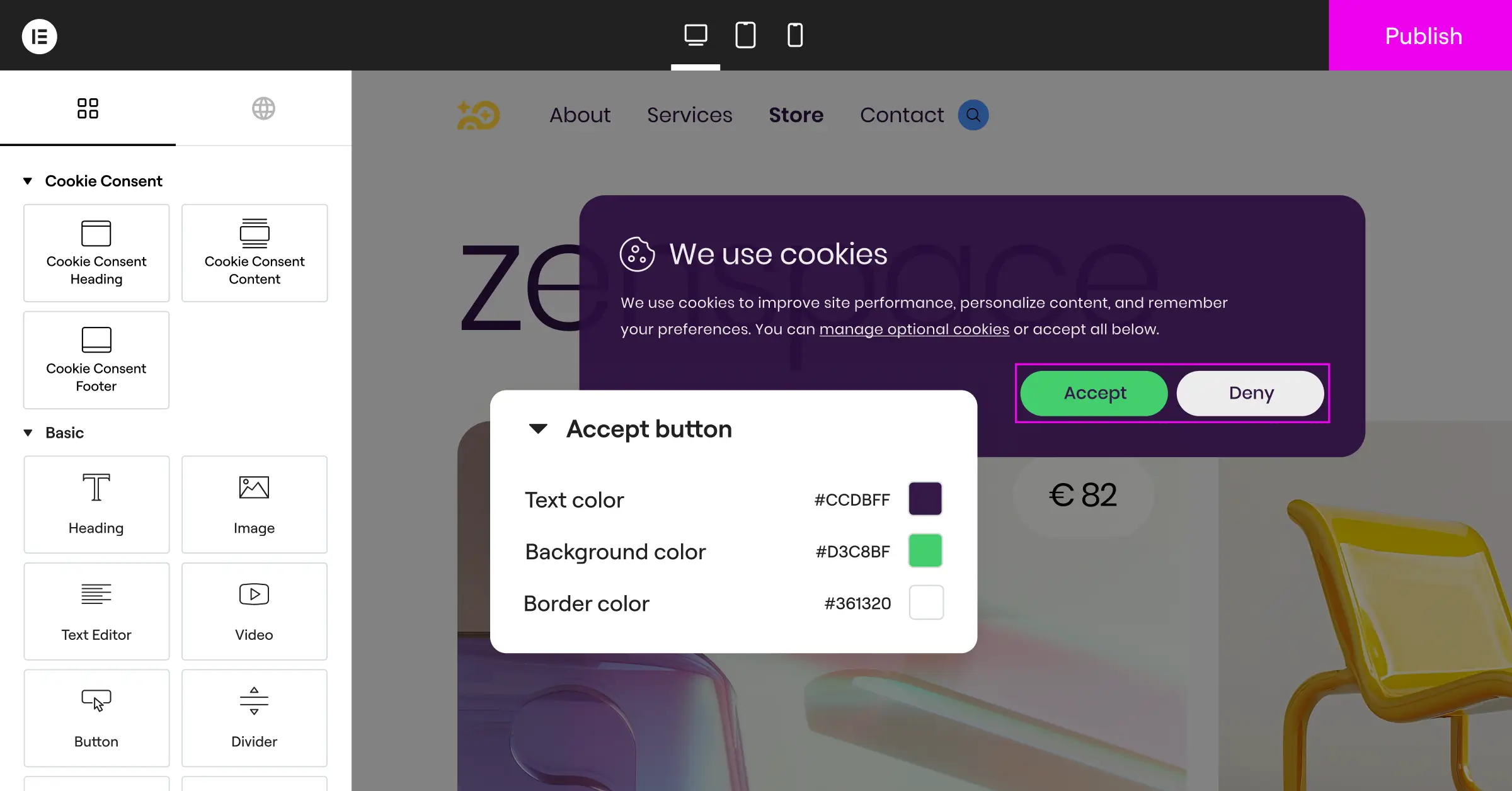
If you build your site with Elementor, you already have Cookie Consent, a native compliance capability built into WordPress, with no external sign-up and no third-party script to maintain.
Setup takes under five minutes with a clear three-step flow, about the time it takes to brew coffee. This cookie consent capability connects to your existing design controls, so your banner looks like it belongs on your site.

For design teams and agencies, white-label options and cloud templates make it practical across client sites. It’s included in Elementor One, ready to use.
- Tracks user choices from your dashboard.
- Builds custom banners with native styling.
- Scans your site for tracking cookies.
- Keeps complete consent logs for audits.
- Connects with Google Consent Mode v2.
- Sets up in minutes with guided onboarding.
- Translates consent forms with multilingual support.
- Filters banners by location with geo-targeting.
- Generates privacy policies with a built-in generator.
- Pulls layouts from cloud template libraries.
Pros: No external dashboards, light on performance, on-brand, and live in minutes.
Cons: Built mainly for the WordPress and Elementor ecosystem.
Verdict: The best pick for WordPress owners wanting a native, straightforward way to handle compliance.
2. Cookiebot

Cookiebot is an established cloud-based consent platform run through an external portal, known for thorough scanning and holding scripts in check until a visitor chooses. It works across almost any website, though you manage settings through their cloud panel, and setup means adding scripts to your header code.
- Scans your site regularly for new tracking scripts.
- Sorts cookies into clear functional categories.
- Displays consent banners based on visitor location.
- Stores consent logs securely on cloud servers.
- Supports Google Consent Mode v2 out of the box.
- Simplifies policy creation with a dynamic declaration page.
Pros: Thorough automated scans, strong international support, and reliable script blocking.
Cons: Free tier limited by page count, with scripts managed outside WordPress.
Verdict: A reliable, platform-agnostic pick for owners fine managing settings externally.
3. CookieYes

CookieYes is a hybrid cloud solution with a dedicated WordPress integration alongside a broader web app. It handles script blocking automatically and supports many languages, popular with global businesses. The interface is clean, though advanced tweaks need their web dashboard.
- Blocks tracking scripts automatically before user consent.
- Generates custom cookie banners that fit your layout.
- Logs user consents to help you stay audit-ready.
- Manages settings through an external web application.
- Supports multiple languages for international visitors.
- Connects with major analytics platforms to share consent status.
Pros: Excellent multilingual support, an easy interface, automatic script blocking.
Cons: Deep customization means their external web app, and the free tier caps usage.
Verdict: A solid pick for sites needing language support and automated blocking.
4. Complianz

Complianz is a compliance tool built for WordPress. Its interactive wizard asks about your business, audience, and cookies, then generates a matching policy and configures your banner for your region. It works well alongside other plugins, though custom design takes extra work.
- Configures privacy banners through a step-by-step wizard.
- Integrates directly with the WordPress dashboard.
- Blocks cookies from common third-party services.
- Generates legal documents like cookie policies dynamically.
- Adapts to local privacy laws with built-in geo-targeting rules.
- Works with popular translation tools for multilingual setups.
Pros: No external cloud accounts, an excellent wizard setup, and localized legal documents.
Cons: The interface can feel dense with legal questions, and design options stay structured.
Verdict: A strong option for owners wanting a guided, legally focused setup.
5. iubenda

iubenda is a full compliance suite handling cookie consent alongside privacy policies and terms of service, drafted with legal input and updated automatically as rules evolve. It’s versatile, though it can feel like a lot for a simple banner.

- Generates complete privacy and cookie policies for websites.
- Updates legal documents automatically when rules change.
- Customizes consent banners with a visual editing tool.
- Supports global regulations including GDPR, CCPA, and LGPD.
- Syncs consent preferences across multiple domains.
- Keeps historical consent records in a secure database.
Pros: Legally informed, self-updating documents, a professional feel, and broad coverage.
Cons: The dashboard can confuse beginners, and pricing scales up quickly for multi-domain use.
Verdict: A good fit for businesses wanting consent bundled with auto-updating legal policies.
6. OneTrust

OneTrust is built for large organizations, compliance officers, and enterprise networks needing deep reporting, data mapping, and vendor risk assessment. For a standard WordPress site, it’s more than needed, but for major organizations with strict auditing needs, its depth is significant.
- Manages compliance across large enterprise website portfolios.
- Scans sites thoroughly to discover hidden tracking technologies.
- Customizes consent banners with detailed preference centers.
- Integrates with advanced tag management systems.
- Tracks regulatory changes across hundreds of jurisdictions.
- Documents user consent with enterprise-grade security logs.
Pros: Extensive compliance features, enterprise security, and detailed reporting.
Cons: High price, a steep learning curve, and more than most small sites need.
Verdict: The standard pick for enterprises needing full data governance with consent management.
7. Osano

Osano focuses on simplicity and reliability. It runs as a cloud-hosted script intercepting cookies before they load, with a compliance guarantee for enterprise customers. The dashboard is clean, built for teams that skip the legal terminology.
- Blocks unauthorized trackers automatically to keep sites secure.
- Translates consent banners into dozens of languages.
- Monitors vendor compliance levels to flag potential risks.
- Stores consent records on a secure public ledger.
- Integrates with standard tag managers for cookie control.
- Manages consent rules for visitors from over forty countries.
Pros: Easy dashboard, solid script blocking, and compliance monitoring.
Cons: Free tier is restrictive on traffic, and premium plans cost a fair amount.
Verdict: A polished platform for teams wanting an elegant, low-maintenance consent setup.
8. Termly

Termly is built with small business owners and independent creators in mind, pairing a customizable banner with simple policy generators. The interface is friendly and walks you through setup step by step.
- Creates customized cookie consent banners with a clean builder.
- Scans websites to find and categorize tracking scripts.
- Generates legal agreements like terms of service.
- Hosts compliance policies on external secure servers.
- Supports regional compliance styles for global audiences.
- Customizes banner designs to blend with your theme.
Pros: Budget-friendly plans, simple setup, and policy generators for terms and conditions.
Cons: Limited reporting, and the free plan shows Termly branding on your banner.
Verdict: A budget-friendly pick for freelancers needing reliable banners.
9. Usercentrics
Usercentrics is a scalable consent platform popular with developers and mid-market companies, built to be highly customizable with a visual manager and a developer API. It supports major global regulations with strong Google Consent Mode v2 compatibility.
- Collects user consent across web applications and mobile apps.
- Integrates with major software platforms through clear API routes.
- Customizes user interfaces to match corporate brand guidelines.
- Adapts to evolving global privacy laws automatically.
- Synchronizes consent data with internal marketing databases.
- Supports Google Consent Mode v2 for accurate campaign tracking.
Pros: Excellent developer flexibility, strong API integration, and good mobile and web performance.
Cons: Can be over-engineered for a basic blog, with no free tier for general use.
Verdict: A developer-first pick for custom web apps needing full control via API.
10. Consent Manager
Consent Manager is aimed at publishers, advertisers, and high-traffic media sites wanting to maximize consent rates without breaking any rules, with advanced split-testing to find what converts. The dashboard is data-rich and analytical, a genuine asset for conversion-driven teams.
- Maximizes opt-in rates through smart banner optimization testing.
- Collects consent details to build reliable compliance archives.
- Adapts display rules to match the visitor’s specific country.
- Supports integration with key tag management platforms.
- Exports detailed compliance reports for auditors.
- Blocks third-party elements automatically until consent is given.
Pros: Excellent reporting and split-testing, well-suited for media publishers, and strongly compliant.
Cons: The backend is quite technical and analytical, a lot for casual users.
Verdict: A strong pick for publishers wanting to measure and optimize consent rates precisely.
How to Implement Cookie Consent Without Slowing Down Your Site
One common worry is that a cookie banner will hurt page load times. Heavy cloud-based scripts loading before your page renders can affect Core Web Vitals, with real implications for search rankings. The good news: you don’t have to choose between compliance and speed.
Here are three steps that make a real difference:
- Use a native dashboard tool: A tool built into WordPress (like Elementor’s Cookie Consent capability) skips the external calls that slow things down.
- Load scripts asynchronously: Configure your tool to load without blocking visual elements, so perceived speed stays fast while consent initializes in the background.
- Keep banner design assets lightweight: Skip heavy images or custom fonts. Simple CSS keeps the code footprint small.

“Managing user privacy is no longer just a legal box to check. It’s a foundational part of the user experience. Modern cookie consent solutions need to be easy to manage, gentle on site performance, and fully compliant with standards like Google Consent Mode v2 to keep your analytics clean.”
– Itamar Haim, Web Compliance Specialist
Frequently Asked Questions
What is Google Consent Mode v2 and why does it matter?
Google Consent Mode v2 lets your site tell Google’s tags what each visitor consented to. If someone declines tracking, the tags run without storing cookies, while still allowing anonymous conversion data through. It matters for Google Ads or Analytics reaching European visitors.
Can I use a free cookie consent tool?
Yes, several solid options offer free tiers. Elementor’s Cookie Consent capability includes one that works well for standard WordPress sites. Free plans are a great start, though you may need to upgrade for advanced features like audit logs or geo-targeting.
How does geo-targeting work in a cookie consent tool?
Geo-targeting uses a visitor’s IP address to estimate location, then shows a strict GDPR-style opt-in, a lighter CCPA opt-out, or no banner at all, based on local rules. It keeps things clean in relaxed regions while staying compliant everywhere it matters.
Do I need consent logs for GDPR compliance?
Yes, under GDPR the burden of proof sits with the website owner, who must show a visitor gave active, informed consent before any tracking script loaded. Consent logs, recording when and how consent was given without storing personal data, keep you audit-ready.
What happens if a website doesn’t have a cookie consent banner?
Operating without a compliant banner can expose your business to penalties from data protection authorities. Major ad networks, including Google, also restrict accounts that skip Google Consent Mode v2, costing you remarketing data.
How do I prevent my cookie banner from slowing down my site?
Look for native tools that run inside WordPress instead of slow external cloud connections. Skip heavy media in your banner layouts, and load scripts asynchronously so they don’t block your page’s rendering.
Is it difficult to set up a cookie consent solution?
Not at all. Native tools like Elementor’s Cookie Consent capability get your banner live and compliant in under five minutes, right from your WordPress dashboard, unlike enterprise platforms that need manual code integration.
What is Global Privacy Control (GPC)?
Global Privacy Control is a browser-level signal that lets users broadcast tracking preferences to every site they visit. Modern tools should treat these signals as an opt-out request, keeping your site compliant with state laws like the CCPA. Elementor’s Cookie Consent capability supports GPC out of the box.

