
Running a WordPress site pulls in visitors from every corner of the globe, and keeping up with their local privacy laws can feel like a lot to juggle. You’re not alone if you’re wondering how to stay compliant without turning your site into a chore. Here’s a rundown of the current cookie rules across ten major regions.
Key Takeaways
- Compliance is global. Privacy rules shift by region, so your site needs different opt-in and opt-out requirements.
- Consent Mode v2 isn’t optional anymore for European traffic if you run Google Analytics or ads.
- Geo-targeting is worth setting up. Location-based banners show each visitor the right notice without cluttering things.
- Native tools save real effort. Handling consent inside WordPress keeps your site fast and skips extra platforms.
Why Cookie Consent Matters More Than Ever in 2026
Online privacy has changed fast. Browsers keep tightening how they handle tracking, and regulators worldwide are enforcing stricter rules with real teeth. If your site runs analytics, ads, or a social share button, you’re probably placing cookies on visitor devices, and doing that without permission in some regions can bring real penalties.
Setting up cookie consent isn’t just a legal box to check anymore. An honest, clear banner that gives visitors genuine control over their data helps them feel safer on your site, and that trust pays off.

Simple notice banners aren’t enough anymore either. If you run ads targeting EU visitors, Google Consent Mode v2 requires your site to pass consent choices directly to Google’s ad systems, pausing scripts the moment someone declines.
Cookie Consent Requirements by Country and Region
Here’s a look at the rules across ten major markets your WordPress site is likely reaching.
1. European Union (GDPR & ePrivacy Directive)
The EU runs some of the strictest privacy rules anywhere, applying to any site targeting EU residents regardless of location. Under the General Data Protection Regulation (GDPR) and ePrivacy Directive, you need explicit, active consent before loading non-essential cookies. Pre-checked boxes and scroll-to-consent tricks don’t count.
- Consent Model: Strict opt-in is required before any tracking scripts run.
- Granular Choices: Visitors can accept some categories, like analytics, while declining others, like marketing.
- Easy Withdrawal: Pulling back consent has to be just as simple as giving it.
- No Paywalls: You generally can’t block access to your content just because someone declines cookies.
2. United Kingdom (UK GDPR & PECR)
Even after leaving the EU, the UK keeps a similar standard. The UK GDPR and Privacy and Electronic Communications Regulations (PECR) both call for a clear cookie banner, and the Information Commissioner’s Office (ICO) actively monitors compliance.
- Consent Model: Prior opt-in consent is required for non-essential cookies.
- Clear Messaging: Your banner needs to state plainly what cookies you use and why.
- Equal Buttons: “Reject All” must be just as visible and easy to find as “Accept All.”
- Audit Trail: Keep a secure record of when and how users made their choices.
3. United States (California CCPA/CPRA & State Laws)
The US has no single national cookie law, but states have stepped in. California leads with the California Consumer Privacy Act (CCPA) and its CPRA expansion, and Colorado, Virginia, and Connecticut have followed with similar rights (a fast-moving area worth watching).
- Consent Model: Opt-out, meaning you can load cookies first but must offer a clear way to stop tracking.
- Do Not Sell Link: Feature a prominent link, typically labeled “Do Not Sell or Share My Personal Information.”
- Global Privacy Control (GPC): Detect and honor browser-level privacy signals automatically.
- Notice at Collection: Tell users what data categories you collect at or before collection.
4. Canada (PIPEDA & Quebec Law 25)
Canada blends national and provincial laws. The federal PIPEDA framework historically allowed implied consent in some cases, but Quebec’s Law 25 raised the bar, with requirements closer to Europe’s approach. Quebec visitors deserve your attention here.
- Consent Model: Explicit opt-in is required for tracking and profiling technologies.
- Clear Purposes: State your tracking purposes clearly before the user agrees.
- Decline by Default: If a user ignores your banner and keeps browsing, treat that as a refusal.
- Right to Deletion: Users can request that any collected tracking data be erased.
5. Brazil (LGPD)
Brazil’s Lei Geral de Proteção de Dados (LGPD) lines up closely with the European model, applying to any business processing data belonging to individuals in Brazil, regardless of where that business is based.
- Consent Model: Free, informed, and unambiguous opt-in is required.
- Proof of Consent: Be ready to show that a visitor actively agreed to tracking.
- User Rights: Visitors can easily access, correct, or delete their collected data.
- No Forced Consent: Banners that block site access unless users accept cookies aren’t allowed.
6. Japan (APPI)
Japan’s Act on the Protection of Personal Information (APPI) takes a different angle, focusing on “personally referable information.” If your site combines tracked data with other data to identify someone, stricter rules kick in.
- Consent Model: Prior consent is required if cookie data is passed to a third party who can identify the user.
- Transparency: Outline your cookie use publicly in your privacy policy.
- Easy Opt-Out: Even without required opt-in, give users a straightforward way to opt out.
7. South Korea (PIPA)
South Korea runs some of the strictest data rules in Asia under the Personal Information Protection Act (PIPA), with careful enforcement, so it’s worth getting your setup right for South Korean audiences.
- Consent Model: Opt-in consent is required for collecting personal data through tracking cookies.
- Separate Consents: Data collected for multiple purposes, like analytics and behavioral ads, needs its own consent for each.
- Detailed Disclosures: Your banner or policy needs to explain the data retention period.
8. Australia (Privacy Act)
Australia works under the federal Privacy Act, historically more relaxed about cookies than Europe, but regulators are moving toward a stricter read, especially for companies building detailed ad profiles from tracking cookies.
- Consent Model: Clear disclosure is required, with a strong trend toward explicit opt-in for marketing cookies.
- Notice of Collection: Let users know why you’re collecting their data and who might receive it.
- Functional Opt-Out: Users need a clear, working way to opt out of direct marketing tracking.
9. India (DPDP Act)
India’s Digital Personal Data Protection (DPDP) Act builds a modern data privacy framework, requiring clear, specific, unambiguous consent before any personal data gets processed, which directly affects how you run cookies.
- Consent Model: Explicit, revocable opt-in consent is required.
- Multilingual Notices: Consent notices may need to be available in regional languages for real clarity.
- Consent Managers: Users can manage their consent choices through registered consent managers.
10. South Africa (POPIA)
South Africa’s Protection of Personal Information Act (POPIA) treats online identifiers, including IP addresses and cookie IDs, as personal data. A cookie banner isn’t optional once you have South African visitors.
- Consent Model: Active opt-in consent is required before processing user identifiers for tracking purposes.
- Direct Marketing Restrictions: Get explicit permission before tracking users for direct marketing.
- Security Safeguards: Data collected through your cookies needs secure storage.
Comparison of Global Cookie Consent Requirements
Here’s how these requirements stack up side by side.
| Region/Country | Primary Law | Default Consent Model | Requires Consent Mode v2 Support? | Requires GPC Support? |
|---|---|---|---|---|
| European Union | GDPR / ePrivacy | Strict Opt-In | Yes (for Google Services) | Recommended |
| United Kingdom | UK GDPR / PECR | Strict Opt-In | Yes (for Google Services) | Recommended |
| United States (California) | CCPA / CPRA | Opt-Out | No | Yes |
| Canada (Quebec) | Law 25 | Strict Opt-In | No | Recommended |
| Brazil | LGPD | Opt-In | No | Recommended |
| South Korea | PIPA | Opt-In | No | No |
| India | DPDP Act | Opt-In | No | No |
| South Africa | POPIA | Opt-In | No | No |
Introducing Cookie Consent: The Native WordPress Solution
Managing all these requirements at once can feel like a juggling act (this is the part that trips people up): a strict opt-in banner for an EU visitor, an opt-out notice for California, maybe nothing for a lighter-rule region. Custom code gets complex fast, and mistakes creep in.
That’s where Cookie Consent comes in. Built as a native WordPress capability by Elementor, it lets you handle global privacy compliance right from your dashboard, no separate platforms, no extra SaaS logins, no copy-pasting script snippets.

A look at the key capabilities that make it a great fit for WordPress site owners:
- Runs a native dashboard, so you manage banners, scans, and logs without leaving your admin area.
- Gets you live in under five minutes with a guided three-step setup.
- Serves different banners by visitor location, keeping your site compliant everywhere at once.
- Supports Google Consent Mode v2, so your Analytics and Ads keep working automatically.
- Detects and honors Global Privacy Control (GPC) signals to meet US state requirements.
- Scans your site, identifies your cookies, and sorts them into categories for you.
- Keeps a secure, private audit trail so you can prove compliance if asked.
- Gives you full design control to match every banner to your brand.
- Supports multilingual banners, so international visitors understand their choices.
- Includes a built-in policy generator for a cookie policy page linked from your footer.
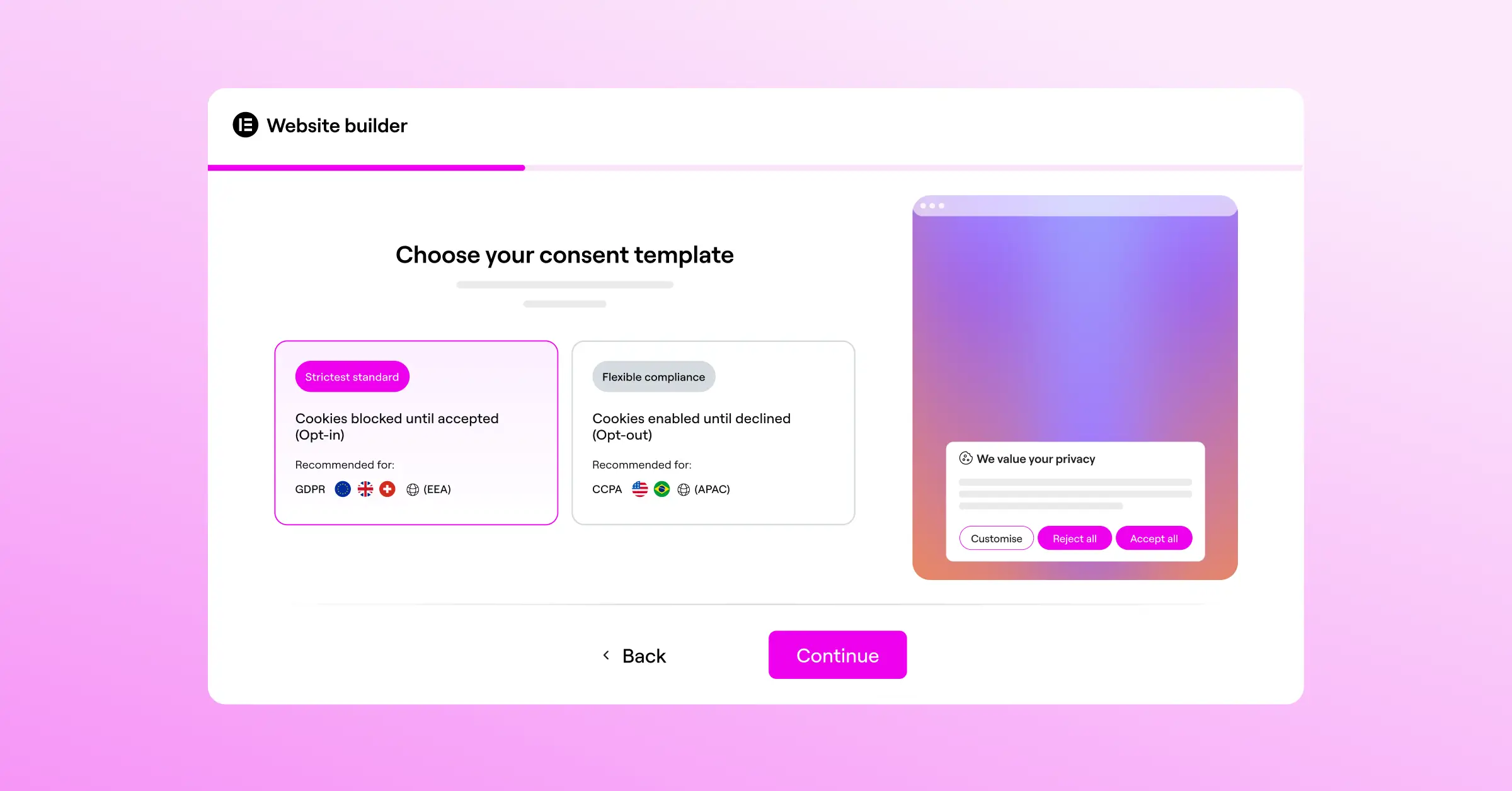
Built into the Elementor ecosystem, it’s designed to load fast. Heavy external scripts can drag down your Core Web Vitals, but a native capability keeps consent code on your own server, out of the way. Cookie Consent comes with a free tier and is also included in Elementor One alongside Web Accessibility.
“Managing cookie consent globally is no longer about displaying a single banner to everyone. Website owners must dynamically adjust to local requirements if they want to build real trust while avoiding regulatory friction.”
– Itamar Haim, Web Compliance Specialist
Step-by-Step Compliance Checklist for WordPress Site Owners
Here’s how to set up cookie consent the right way, step by step.

- Run a cookie audit. Scan for every cookie your site drops, including ones from your theme, tools, Google Analytics, Facebook Pixels, and embedded videos.
- Categorize your scripts into standard buckets: Necessary, Functional, Analytics, and Marketing.
- Install a native consent capability, like Cookie Consent from Elementor, that lives inside your site and manages scripts before they load.
- Enable geo-targeting rules. Set EU and UK visitors up for strict opt-in, California visitors for opt-out with a “Do Not Sell” link, and everyone else for a lighter notice.
- Turn on Google Consent Mode v2 if you use Google services, so you still collect basic modeling data when users decline.
- Link your privacy and cookie policies directly from your banner.
- Test your setup. Open your site in a private window or VPN to check your banner by location, and confirm no scripts fire before someone accepts.
Common Pitfalls in Cookie Consent Compliance
Even with good intentions, it’s easy to misconfigure cookie consent. Avoiding these mistakes keeps you protected and visitors happy.
Using Pre-Checked Selection Boxes
One common mistake is a settings panel where “Marketing” or “Analytics” are already checked by default. Under the GDPR, that’s not valid consent. Non-essential categories need to stay unchecked until the user turns them on (a good native tool handles this automatically).
Hiding the Decline Button
Some sites make “Decline” smaller, lighter, or buried in a menu while “Accept” stays big and obvious. Regulators call this a dark pattern and take it seriously. Rejecting tracking needs to be just as easy as accepting it, so keep your buttons balanced.
Relying on External SaaS Dashboards That Slow Your Site
Many traditional cookie tools need large external scripts to load before anything else on your page can render, which can hurt your Core Web Vitals and search rankings. A native capability keeps your consent code on your own server, loading fast without costing you performance points.
Alternative Cookie Consent Tools for WordPress
A native capability is practical for most sites, but established third-party tools exist too:
- Cookiebot: A cloud-based consent platform that scans your site and displays banners by visitor location, configured through an external dashboard.
- CookieYes: A web-based consent manager that integrates with multiple content systems and offers a dashboard for banner templates.
- Complianz: A privacy suite built for WordPress that helps generate legal documents and handles banner configurations.
- iubenda: A compliance suite offering cookie banners alongside automated privacy policy and terms-of-service generation.
- OneTrust: An enterprise-grade privacy and risk management platform for larger organizations needing deep compliance auditing.

These tools all serve a purpose, but often mean managing settings externally or paying subscriptions that add up. Keeping your workflow inside WordPress stays simpler and leaner.
Frequently Asked Questions
What is Google Consent Mode v2 and do I need it?
Google Consent Mode v2 lets websites pass consent choices directly to Google platforms like Analytics 4 and Ads. If you serve EU visitors through those services, you’ll need a consent tool that supports it to keep your tracking working.
Can I use a single cookie banner for every country?
You can, but it’s probably not your best move. One banner for everyone needs to match the strictest rules anywhere, meaning EU-level opt-in even for visitors in lighter-rule regions, which can hurt conversion needlessly. A tool with geo-targeting shows the right banner based on where each visitor is.
What happens if I don’t comply with global cookie laws?
Non-compliance can lead to warnings, reputational damage, and financial penalties. Frameworks like the GDPR and CCPA have enforcement agencies that can issue significant fines to businesses of any size, so a reliable setup is a cost-effective way to protect your business.
Is there a free way to set up cookie consent on WordPress?
Yes, and it’s easier than you’d expect. The native Cookie Consent capability by Elementor includes a free tier for setting up essential banners and managing scripts at no upfront cost.
What is the difference between opt-in and opt-out consent?
Opt-in means no non-essential cookies run until a visitor clicks “Accept,” the standard in the EU, UK, Brazil, and South Africa. Opt-out means tracking runs by default, but you must give users a clear way to stop it, the model in the United States.
Why is a WordPress-native cookie consent tool better than external ones?
A native tool runs directly on your site’s server, so it loads faster, doesn’t depend on external cloud connections, and keeps all your settings inside your dashboard, no copying code or juggling accounts across platforms.
Do I need to keep logs of user consent?
Yes. Under laws like the GDPR and LGPD, you need to be able to prove a user gave you permission to track them if a regulator audits your site. A compliant tool should include automated logging of when and how users made their choices.
What is Global Privacy Control (GPC) and why does it matter?
GPC is a browser-level setting that lets users set a universal privacy preference once, across every site they visit. When enabled, the browser sends an automatic signal telling sites the user wants to opt out of tracking. Modern consent tools detect this signal and block tracking scripts automatically, exactly what several US state laws now require.






