
Keeping your WordPress site compliant with privacy laws like GDPR and CCPA can feel like a lot, but you’re not alone. The right tool takes the guesswork out, so let’s walk through the best options for 2026.
Key Takeaways
- Native integration keeps everything inside your WordPress dashboard.
- Google Consent Mode v2 support matters if you run Google ads or analytics.
- Geo-targeting shows banners only to visitors who legally need them.
- Automated scanning keeps your cookie list accurate and categorized.
- Consent logs give you a clear audit trail.
Why Privacy Compliance Matters in 2026
Privacy rules aren’t a small detail anymore. Regulators have raised the bar, and search engines now favor sites that protect user data, so a compliant consent setup matters for every site, not just big companies. A dedicated compliance tool does the heavy lifting instead of you writing custom code or guessing which scripts to block, so you can focus on your content and your business.

“Managing consent is no longer just about placing a simple banner at the bottom of a web page. Modern compliance requires accurate cookie scanning, strict categorization, and active support for frameworks like Google Consent Mode v2 to keep your analytics running while respecting user choice.”
Itamar Haim, Web Compliance Specialist
Look for a tool that fits your setup, gives you real design flexibility, and won’t slow your pages down. Here’s a look at the best options this year.
1. Cookie Consent
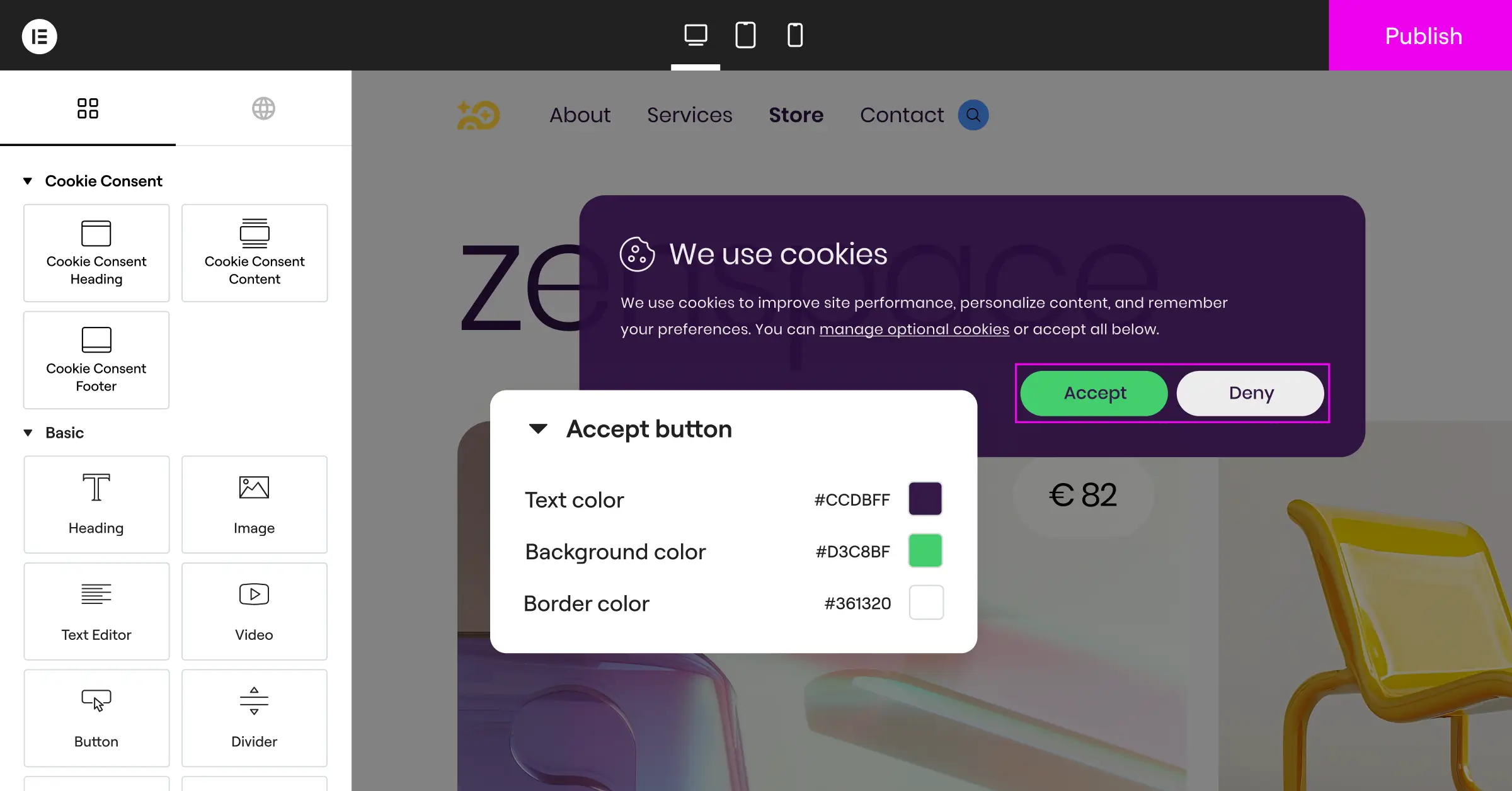
We’re kicking things off with Cookie Consent, Elementor‘s native cookie consent capability, built right into WordPress. It handles GDPR and CCPA compliance directly from your dashboard, no external platform needed. You can set up banners, scan and categorize cookies, manage scripts, and keep consent logs, all in one place. Built directly into the Elementor ecosystem, it offers real design flexibility with no code snippets to paste.

Key Features of Cookie Consent
- Manages every setting inside your WordPress dashboard.
- Launches your banner in under five minutes with a three-step setup.
- Matches your brand look with a design customizer.
- Shows the right language to each visitor automatically.
- Scans and categorizes scripts running on your site.
- Logs consent clearly for your audit trail.
What Makes Cookie Consent Stand Out?
The biggest benefit is how deeply it’s integrated. No new interface, no separate site to adjust your rules. It comes with built-in templates and supports Google Consent Mode v2, matters if you use Google analytics, and it’s included with Elementor One, plus a free tier at no upfront cost.
Geo-targeting, a policy generator, multilingual banners, and cloud-based templates add up to a complete setup without leaving WordPress. Running natively means no extra requests slowing your pages, and it supports Global Privacy Control (GPC), respecting browser-level privacy signals automatically.
Things to Keep in Mind
This capability is built specifically for the WordPress ecosystem, not for non-WordPress platforms. If you need a cross-platform manager for static HTML sites, look elsewhere on this list.
Verdict
If you want a clean dashboard and no third-party subscriptions, Cookie Consent is a great fit, keeping compliance simple and your site design cohesive. Learn more at Elementor Cookie Consent.
2. Cookiebot
Cookiebot is a well-known, cloud-based tool that scans your site for cookies and tracks scripts automatically, managed from an external dashboard that feeds data to your WordPress site. Its large database keeps classification accurate.

Key Features of Cookiebot
- Updates your cookie list with automated monthly scans.
- Manages multiple websites from one account.
- Embeds consent banner widgets on any platform.
- Lists active trackers on your privacy page.
Pros of Cookiebot
Accurate with little manual input, and handy for managing several sites at once.
Cons of Cookiebot
The entry-level plan covers under 100 pages, and settings live outside WordPress.
Verdict
Solid and accurate for managing multiple platforms from one cloud dashboard.
3. CookieYes
CookieYes is another cloud-based tool that connects to WordPress through a lightweight connector, with a customizable banner builder for any size site. Logging happens on its own servers, keeping your database lean, and it covers GDPR, CCPA, RGPD, plus geo-targeting.

Key Features of CookieYes
- Targets EU or California visitors with specific banners.
- Stores consent logs securely in the cloud.
- Refines styling with custom CSS support.
- Translates banner text to the visitor’s language.
Pros of CookieYes
Cloud-stored logs keep your WordPress database clean and fast.
Cons of CookieYes
Advanced customization and geo-targeting sit behind higher paid tiers.
Verdict
A strong pick for growing sites that want cloud-based consent management.
4. Complianz
Complianz is a privacy suite built for WordPress that runs on your own server. Its wizard asks about your business, your data, and the legal frameworks you need, then builds a custom policy and banner without deep legal knowledge, and works with plenty of popular WordPress tools out of the box.

Key Features of Complianz
- Guides you through legal questions step by step.
- Scans cookies locally from your web server.
- Detects and blocks popular analytics and social scripts.
- Generates a custom policy and disclaimer pages.
Pros of Complianz
Direct WordPress integration makes script blocking reliable, and it’s fully self-contained on your server.
Cons of Complianz
The wizard is thorough but can feel long for a simple banner.
Verdict
Ideal for owners who want a self-hosted setup that handles document creation too.
5. iubenda
iubenda is a full compliance suite for websites, apps, and stores, going beyond cookie consent with policy generators, terms documentation, and consent databases. Its cloud system keeps policies current as laws change, connecting your WordPress site to the iubenda cloud for banners and script blocking.

Key Features of iubenda
- Covers policies, terms, and consent banners in one suite.
- Updates legal documents automatically as regulations change.
- Stores proof of consent through its database API.
- Adapts styling to complex layouts.
Pros of iubenda
Thorough for businesses needing legally binding documents alongside consent banners.
Cons of iubenda
It may offer more than a simple blog or portfolio site needs.
Verdict
A great fit for stores and businesses needing a broader compliance package.
6. Termly
Termly is a cloud compliance platform built for small businesses, pairing a simplified policy generator with a consent manager that scans your site, builds a cookie policy, and delivers a clean banner, approachable enough for startups and small agencies.

Key Features of Termly
- Creates privacy policies, terms, and refund guidelines.
- Blocks scripts until visitors give consent.
- Adjusts colors and fonts with a style editor.
- Refreshes your cookie list with regular scans.
Pros of Termly
Clean and easy to navigate, simplifying legal jargon into settings you understand.
Cons of Termly
The entry plan limits page views and keeps Termly branding unless you upgrade.
Verdict
A user-friendly tool for small business owners without a steep learning curve.
7. OneTrust
OneTrust is an enterprise-grade privacy and data governance platform, built for large organizations and global brands needing strict data mapping, vendor risk assessments, and compliance across many properties. Its consent tool is feature-rich, with detailed analytics, geo-targeting, and deep marketing integrations.

Key Features of OneTrust
- Secures consent logs with enterprise-grade auditability.
- Applies legal frameworks per user location.
- Connects with major marketing automation systems.
- Tracks opt-in rates and banner performance.
Pros of OneTrust
Substantial compliance depth, built to scale across millions of visitors and domains.
Cons of OneTrust
Complex enough to need a dedicated administrator, with pricing geared toward enterprise budgets.
Verdict
The go-to choice for enterprises needing deep control over global compliance data.
8. Osano
Osano is a cloud-based data privacy platform focused on simplicity. It monitors privacy laws worldwide and updates scripts automatically to keep your site compliant, and paid plans add a financial pledge against certain compliance fines, using a lightweight wrapper to manage scripts by preference.

Key Features of Osano
- Protects eligible plans financially against fines.
- Blocks known tracking pixels automatically.
- Supports compliance across regions via a representative network.
- Deploys legal updates through the cloud.
Pros of Osano
Straightforward and reliable, with a guarantee that reflects confidence in its script blocking.
Cons of Osano
Premium features and the pledge sit behind higher-tier plans.
Verdict
An excellent option for mid-sized businesses wanting legal security built into their tool.
9. GDPR Cookie Consent (by WebToffee)
GDPR Cookie Consent by WebToffee is a dedicated WordPress plugin that runs on your site, built to help you create a customizable banner quickly. The interface lets you configure categories, adjust layouts, and manage scripts from your dashboard, supporting opt-in and opt-out models for GDPR and CCPA.
Key Features of GDPR Cookie Consent
- Displays flexible layouts: headers, footers, popups.
- Lets visitors toggle cookie types on or off.
- Places cookie lists anywhere via shortcode.
- Saves consent records locally in your database.
Pros of GDPR Cookie Consent
A clean, familiar interface, easy to adjust even if you’re not very technical.
Cons of GDPR Cookie Consent
Storing logs locally can grow your database quickly on high-traffic sites.
Verdict
A reliable, self-contained option for straightforward, localized control inside WordPress.
10. Real Cookie Banner
Real Cookie Banner is a specialized WordPress tool built with technical accuracy in mind, a complete manager for your cookies and script services, with a guided checklist for setting up compliance correctly. It includes templates for tools like Google Analytics, Facebook Pixel, and YouTube embeds, so you skip hunting down scripts yourself.
Key Features of Real Cookie Banner
- Walks you through setup with a guided checklist.
- Simplifies blocking with ready-made service templates.
- Stops video embeds and maps from loading before consent.
- Shows real-time changes in the visual customizer.
Pros of Real Cookie Banner
Built-in templates save you from manually pasting tracking scripts, and the content blocker stops external media effectively.
Cons of Real Cookie Banner
Setup can get quite technical, so a quick, click-and-forget experience isn’t guaranteed at first.
Verdict
A great choice for developers who want precise control over scripts and media blocking.
WordPress Cookie Tools Comparison Table
Here’s a quick side-by-side look at how these tools stack up on the details that matter most.
| Tool Name | WordPress Native | GCM v2 Support | Geo-Targeting | Setup Speed | Primary Dashboard |
|---|---|---|---|---|---|
| Cookie Consent | Yes | Yes | Yes | Under 5 Mins | WordPress |
| Cookiebot | No | Yes | Yes | Medium | Cloud Platform |
| CookieYes | No | Yes | Yes | Medium | Cloud Platform |
| Complianz | Yes | Yes | Yes (Paid) | Slow (Wizard) | WordPress |
| iubenda | No | Yes | Yes | Medium | Cloud Platform |
| Termly | No | Yes | Yes | Fast | Cloud Platform |
| OneTrust | No | Yes | Yes | Slow | Enterprise Cloud |
| Osano | No | Yes | Yes | Medium | Cloud Platform |
| GDPR Cookie Consent | Yes | Yes | Yes (Paid) | Medium | WordPress |
| Real Cookie Banner | Yes | Yes | Yes | Medium | WordPress |
How to Choose the Right Consent Tool
Finding the right fit comes down to balancing design flexibility, setup speed, and ongoing management. Three things worth weighing:
- Dashboard fatigue – If you’re tired of logging into separate sites to tweak banner text, a native option like Cookie Consent saves real time.
- Design control – Make sure you can customize the banner style without breaking your site’s look.
- Regulatory needs – If you serve a global audience, geo-targeting shows banners only to visitors who legally need them.
Choosing the right tool simplifies your daily routine, so you can focus on what you love about running your site.

Step-by-Step Compliance Checklist
Getting compliant doesn’t have to be complicated. Follow these steps to keep things running smoothly:
- Scan your site – Run an initial scan to catalog every active cookie and script running in the background.
- Categorize cookies – Sort scripts into clear groups like strictly necessary, analytics, and marketing.
- Configure Google Consent Mode v2 – Turn this on if you rely on Google analytics or ads to measure performance.
- Customize banner text – Write clear, honest copy explaining why you use cookies.
- Activate geo-targeting – Set rules so banners appear only to visitors under relevant jurisdictions.
- Review consent logs – Confirm your tool saves user choices, so you have proof if you’re ever audited.
Testing Your Implementation
Once your tool is set up, take a few minutes to confirm it works. This part’s easier than it sounds:
- Open an incognito window – Load your site in private browsing to see the banner as a new visitor would.
- Inspect active cookies – Check your browser’s developer tools and confirm non-essential scripts don’t load before consent.
- Test rejection paths – Reject the cookies and verify marketing and analytics trackers stay blocked.
Testing your banner regularly keeps compliance active and builds real trust with your audience.

Frequently Asked Questions
What is Google Consent Mode v2 and do I need it?
Google Consent Mode v2 communicates your visitors’ consent choices to Google platforms. If you serve traffic in the European Economic Area (EEA) and use Google Analytics or Ads, you need it. It keeps tracking aligned with user choices while still allowing basic measurement when cookies are declined.
Can I use a free cookie consent tool on my WordPress site?
Yes, plenty of tools offer entry-level plans for basic sites. Cookie Consent has a free tier covering standard needs at no upfront cost. If your site grows larger or needs complex geo-targeting, premium options are worth exploring.
Do cookie banners slow down my website load speed?
Some heavy, external cloud banners add extra requests that slightly affect load performance. A native capability like Cookie Consent keeps scripts running locally, cutting external calls to keep pages fast.
What is the difference between GDPR and CCPA cookie compliance?
GDPR is a European regulation requiring prior consent (opt-in), so you can’t load tracking cookies until a user agrees. CCPA, a Californian regulation, focuses on opt-out, so you can load cookies but must give visitors a clear way to stop the sale or sharing of their data, often through a “Do Not Sell My Info” link.
How often should my website scan for cookies?
Aim for at least once a month, so new scripts or tools you’ve added get properly identified and categorized. Automated scanners handle this in the background.
What are consent logs and why are they necessary?
Consent logs record when and how a visitor made their choices. They don’t store personal details, but capture a timestamped record, proof that consent was actually given if you’re ever audited under rules like GDPR.
Can I customize my cookie banner to match my brand?
Yes, most modern tools let you adjust colors, fonts, layouts, and buttons. Native tools make this simple since they work with your active theme, so your banner stays consistent with your branding.
What is Global Privacy Control (GPC)?
Global Privacy Control is a browser setting that lets visitors signal their privacy preferences automatically. If a visitor has GPC enabled, compliant tools respect that signal without banner interaction.

