
Key Takeaways
- Native tools: A WordPress-native option keeps everything inside your dashboard, no separate external account to manage.
- Compliance requirements: If you serve EU visitors and use Google services, your banner needs Google Consent Mode v2.
- Performance impact: Cloud-based banners load external scripts that can slow things down; native tools run on your server.
- Design matching: A banner styled to match your brand builds trust with visitors right away.
- Logs matter: Local consent logs give you a clean audit trail if regulators come asking.
If you run a WordPress site and you’ve been putting off the cookie consent conversation, you’re not alone. Privacy compliance can feel like a maze, especially with rules tightening across the EU, California, and beyond. The good news: getting a proper banner running in 2026 is genuinely straightforward once you know which tool fits your workflow.
Whether you’re building your first site or managing a whole portfolio, the options below run the full spectrum, from native WordPress solutions to enterprise platforms. We’ll walk through each so you can pick what fits your situation.
And just so you know what you’re getting into: most sites can have a fully compliant banner running in under ten minutes. That’s a realistic benchmark, not a marketing claim.

“Managing consent doesn’t have to break your workflow. A WordPress-native system keeps everything under one roof, reducing script bloat and simplifying compliance.” – Itamar Haim, Web Compliance Specialist
Why Privacy Compliance Matters on WordPress
Building a great website means creating a safe space for your audience. Back in the early days of the web, dropping tracking scripts onto pages was standard practice and nobody thought much about it. Today, things look different: visitors care about their data, and regulators actively enforce rules like GDPR in Europe and CCPA in California. Skipping a clear consent banner can mean financial penalties, and it chips away at the trust you’ve worked hard to build.
When you use tools like Elementor to design polished pages, you want your compliance banner to look just as considered as the rest of your site. A clunky, slow-loading banner that feels like an afterthought will only push visitors away. Modern web tools now make it easy to add beautiful, legally compliant cookie consent right into your WordPress setup.
Here are the best approaches available in 2026, starting with the most integrated option out there.
10 Best Ways to Install a Cookie Banner on WordPress
1. Cookie Consent
If you want a native solution right inside your WordPress dashboard, Elementor’s Cookie Consent is built exactly for that. This native capability lets you build, customize, and manage consent banners without ever leaving your backend. No external platform to log into, no integration bridge to configure, just a simple, fast tool that stays in sync with your design workflow.
With it built right in, you can run a quick site scan, sort your cookies into clear categories, and design a banner that matches your branding. It sits alongside compliance capabilities like Web Accessibility, a cohesive choice for modern WordPress builders. Cookie Consent is included in Elementor One and also available on a free tier.

- Configures consent banners right from your existing WordPress workspace.
- Scans and categorizes scripts automatically, no manual tracking needed.
- Maintains local consent logs for compliance audits and peace of mind.
- Integrates with Google Consent Mode v2 out of the box.
- Saves styling preferences directly to your active WordPress theme.
- Filters visibility by visitor location using built-in geo-targeting.
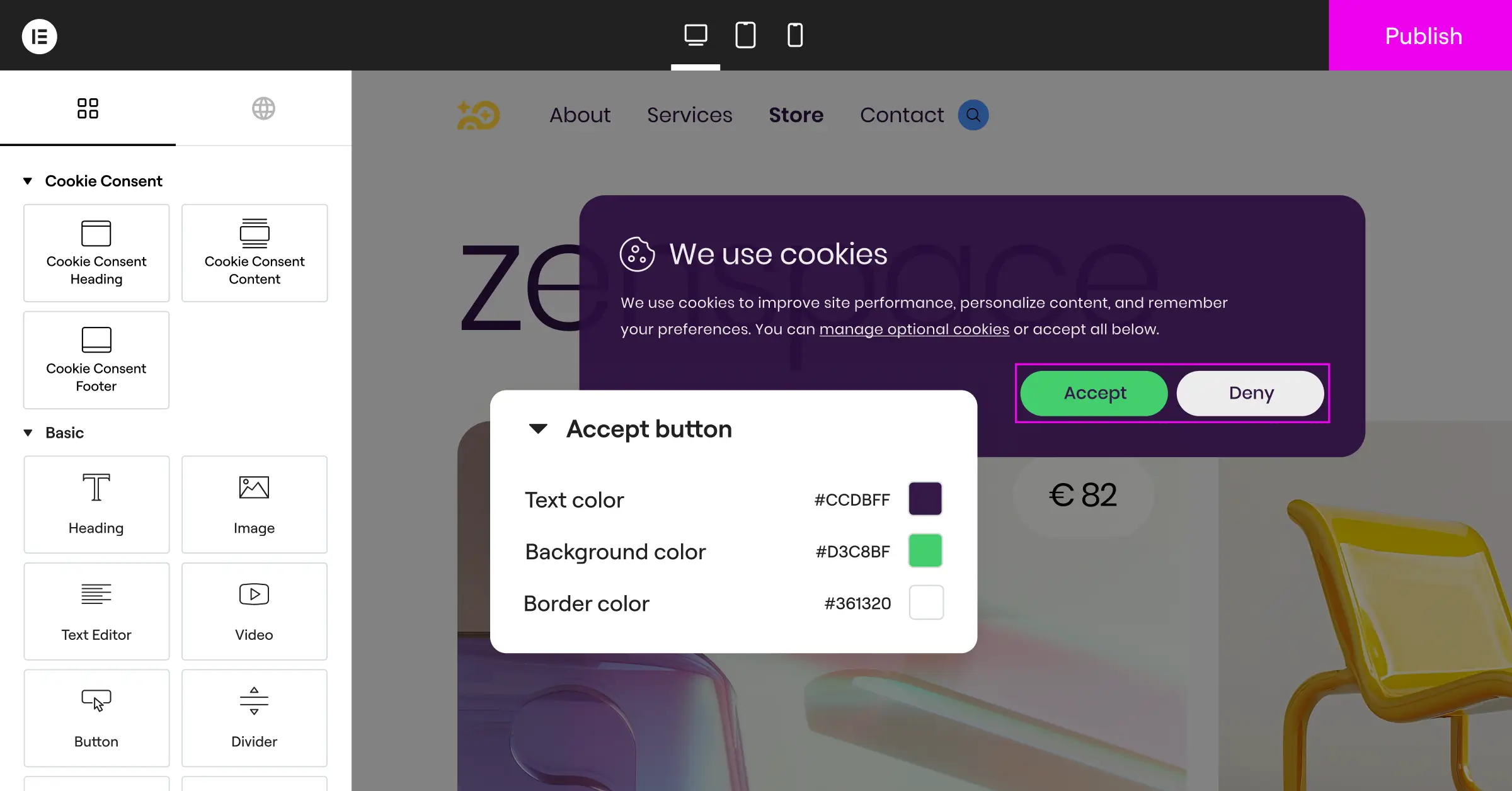
Pros: No external dashboards, under five-minute setup, tight design integration, and ready for Google Consent Mode v2.
Cons: Best suited for sites already in the broader Elementor ecosystem.
Verdict: The best choice for a fast, native way to handle compliance without extra subscription costs or third-party bloat.
2. Cookiebot

Cookiebot is a widely recognized cloud-based platform that brings automated scanning to your WordPress site. It scans monthly to find active trackers, then generates an updated cookie policy and dynamic banner. Since it’s a cloud service, you’ll manage settings in Cookiebot’s external dashboard and use a connector to pull the banner into WordPress.
- Automates monthly cookie scanning on a recurring cloud schedule.
- Generates cookie declarations automatically for your privacy policy page.
- Holds records of user consent securely in the cloud.
- Supports dozens of languages with automated translations based on visitor location.
Pros: Highly automated scanning, reliable documentation, and strong international language support.
Cons: Premium pricing for high-traffic sites, and management happens outside WordPress.
Verdict: Solid for corporate sites that want automated external compliance reports.
3. CookieYes

CookieYes is a cloud-managed consent solution with a visual external dashboard where you customize your banner, track consent ratios, and organize script-blocking rules. It connects through a simple script integration, and it’s popular with marketing teams who want detailed opt-in analytics.
- Blocks third-party scripts before the user gives active consent.
- Logs consent choices securely on external cloud servers.
- Permits custom CSS modifications inside its cloud portal.
- Applies regional rules based on user IP detection.
Pros: Friendly interface, detailed consent analytics, and easy banner configuration.
Cons: The entry-level plan limits page views, so high-traffic sites move up quickly.
Verdict: Good for marketing teams who want deep opt-in insight and a SaaS subscription.
4. Complianz

Complianz is a privacy suite built for WordPress. Its step-by-step wizard asks targeted questions about your business, the data you collect, and your audience, then configures a customized banner and generates legal documents for regional laws.
- Asks conditional questions to pin down specific local requirements.
- Generates legally focused documents for different global regions.
- Works with popular contact form builders to block tracking.
- Responds to Global Privacy Control signals sent by browsers.
Pros: Step-by-step wizard, integration with native WordPress elements, strong regulatory focus.
Cons: Can feel technical for beginners, and multiple legal documents need the premium tier.
Verdict: Solid for owners who want a wizard-driven compliance experience built right into WordPress.
5. iubenda

iubenda takes a broad approach, bundling cookie banners, privacy policy generators, and terms of service templates in one suite. You manage it through an external cloud editor, generate your scripts there, then paste them into WordPress via their connector.
- Syncs your privacy policy and cookie banner smoothly.
- Updates legal text automatically when regulations change.
- Keeps records of consent via a dedicated API.
- Adapts style elements to match your brand requirements.
Pros: Complete legal coverage beyond cookie banners, with automatic legal text updates.
Cons: Dashboard setup can feel complex, and costs add up across multiple sites.
Verdict: Good for businesses wanting one subscription covering policies, terms, and banners together.
6. OneTrust

OneTrust is an enterprise privacy management platform for large corporations, global brands, and multi-site networks with complex data needs. To use it on WordPress, you build your consent flow inside their enterprise software, then embed the output scripts in your header template.
- Scans large websites with thousands of deep nested pages.
- Tracks vendor risk profiles across your entire software stack.
- Organizes cross-domain consent setups across multiple web assets.
- Displays detailed visual dashboards of compliance status.
Pros: Deep compliance tracking, powerful reporting, trusted by global legal teams.
Cons: Complex setup and cost beyond what most small-to-medium sites need.
Verdict: A strong fit for enterprises with dedicated legal departments, overkill for standard blogs or stores.
7. Termly

Termly focuses on accessible, affordable tools for small businesses, combining policy generators with a cookie banner. You configure it inside their web app, run a basic scan, and copy a script block into your header to display it.
- Generates policy documents from template menus.
- Identifies common tracking scripts during site scans.
- Displays customizable consent widgets on your frontend.
- Maintains simple audit logs of visitor actions.
Pros: Easy-to-read templates, clean interface, beginner-friendly setup.
Cons: Limited customization on the entry plan, and scanning caps at once a month.
Verdict: Friendly, straightforward for solo owners who need basic legal policies plus a simple banner.
8. Osano

Osano positions itself as a reliable, low-friction compliance platform. Its standout feature is a legal representation guarantee, promising to defend customers facing fines when the tool’s used correctly. It manages scripts through a cloud dashboard, blocks data collection automatically, and serves the banner via a fast CDN.
- Guarantees legally reviewed templates to reduce regulatory risk.
- Blocks unregistered trackers automatically at the script level.
- Monitors vendor privacy policies for changes.
- Supports localized banner variations across global markets.
Pros: Legal guarantee, automated script blocking, solid global localization.
Cons: Pricing is on the higher end, geared toward established compliance workflows.
Verdict: Good for mid-sized businesses wanting legal guarantees and automated blocking built in.
9. WP DSGVO Tools
WP DSGVO Tools is a localized cookie solution built for the European market, with a particular focus on Germany’s strict privacy rules. It runs entirely on your local server, managing script integrations and blocking cookies until the user gives explicit consent.
- Manages local script integration for external services.
- Generates cookie information sheets for local authorities.
- Allows rapid customization of basic consent colors.
- Controls dynamic content loading for YouTube and Google Maps.
Pros: Strong alignment with German privacy rules, local data processing, simple integration.
Cons: The interface can feel dated, and support leans heavily toward German speakers.
Verdict: Reliable if your audience is mainly Central European and you need strict regional handling.
10. Manual Custom Code Integration
For developers who want complete control over performance and script execution, coding your own banner is a viable approach. You write HTML, CSS, and vanilla JavaScript inside your child theme or a custom helper file, with no dependency on third-party frameworks or external connections.
- Loads lightweight HTML and CSS without any overhead.
- Gives you full control over every line of script logic.
- Requires manual updates whenever new cookies are added to your site.
- Eliminates dependence on external server connections.
Pros: Fast loading, zero third-party bloat, total design control.
Cons: No automated scanning, requires coding experience, regulatory updates handled manually.
Verdict: Good for experienced developers who want top performance and have time to maintain compliance by hand.
Feature Comparison of Top Cookie Banner Solutions
Picking the right path depends on your workflow, budget, and how much time you want to spend on compliance. Here’s a side-by-side look at how the top tools compare for your WordPress site.
| Solution | Integration Style | Google Consent Mode v2 | Free Tier | Dashboard Location | Geo-targeting |
|---|---|---|---|---|---|
| Cookie Consent (Elementor) | Native WordPress | Yes | Yes | WordPress dashboard | Yes |
| Cookiebot | Cloud + connector | Yes | Limited | External | Yes |
| CookieYes | Cloud + script | Yes | Yes (page view limits) | External | Yes |
| Complianz | Native WordPress | Yes | Yes | WordPress dashboard | Yes |
| iubenda | Cloud + script | Yes | Limited | External | Yes |
| OneTrust | Enterprise embed | Yes | No | External | Yes |
| Termly | Cloud + script | Yes | Yes | External | Limited |
| Osano | Cloud + CDN | Yes | No | External | Yes |
| WP DSGVO Tools | Native WordPress | Partial | Yes | WordPress dashboard | Limited |
| Custom Code | Manual | Manual | Free | Your codebase | Manual |
How to Choose the Right Cookie Banner Tool
Work through this quick checklist before you decide:
- Dashboard Location: Decide if you want a tool that lives entirely inside WordPress, or if you’re fine logging into an external cloud portal.
- Site Performance: Make sure the tool uses lightweight scripts that won’t block rendering or hurt your core web vitals.
- Compliance Features: Confirm the banner supports Google Consent Mode v2 if you run analytics or marketing campaigns targeting EU visitors.
- Styling Controls: Look for visual design controls so you can match the banner to your brand without extra workarounds.
Choosing a tool that fits your tech stack saves hours of troubleshooting. If you’re already building with Elementor, keeping consent native is almost always the smoothest path.

How to Set Up Your Cookie Banner Correctly
Once you’ve picked your tool, getting it running is a straightforward process. Here’s the typical flow.
- Run an initial scan: Let your tool scan your site to discover what cookies and tracking scripts are currently active.
- Categorize your cookies: Organize them into clear groups, usually Essential, Analytical, Marketing, and Functional.
- Design the banner layout: Customize colors, text, and button styles to match your brand identity.
- Enable Consent Mode: Turn on Google Consent Mode v2 if you’re running Google Tag Manager, Analytics, or Ads.
- Publish and test: Set the banner live, then open your site in an incognito window to verify scripts don’t fire until a visitor clicks “Accept.”
Taking a few minutes to test with a private window is worth it. It confirms your setup works as intended and keeps your site properly compliant.

Frequently Asked Questions
Is a cookie consent banner required for WordPress sites in 2026?
Yes. If your site serves visitors from regions with active privacy laws, like the EU (GDPR) or California (CCPA), you need a compliant banner. That’s true even if your business is based elsewhere, since these laws protect users based on their location.
What happens if I don’t install a cookie banner on my site?
Skipping a proper consent mechanism can lead to legal warnings, reduced advertising capabilities, and fines from regulators. It also affects visitor trust, which can hurt your brand reputation and conversions over time.
Will adding a cookie banner slow down my WordPress site?
It depends on the tool. Cloud-based platforms that load multiple external scripts can add to render times. A native tool like Cookie Consent keeps execution local to your server, which helps performance and load speed.
Can I customize the design of my cookie banner to match my brand?
Yes, most modern solutions include styling controls. Native capabilities let you adjust colors, fonts, margins, and button shapes right in your design workspace, so your banner looks like a natural part of your site.
What is Google Consent Mode v2 and do I need to support it?
Google Consent Mode v2 communicates your visitors’ consent choices to Google services like Analytics and Ads. If you serve traffic in the European Economic Area and use Google marketing products, supporting it is required for proper data tracking.
Do I need to keep logs of user consent choices?
Yes, keeping consent logs is strongly recommended. Many regulations require you to prove a visitor gave active consent before non-essential cookies were set. Native tools often store these logs in your database, giving you a ready audit trail.
Is it possible to show the cookie banner only to visitors from specific countries?
Yes, that’s what geo-targeting is for. Tools with this feature detect a visitor’s location and show the banner only to users in regions with active compliance laws, keeping things clean for everyone else.
What is the difference between a third-party plugin and a native WordPress capability?
A native capability is built directly into your editing ecosystem, so you’re not adding separate, uncoordinated third-party elements. That usually means cleaner code, fewer conflicts, easier updates, and better performance site-wide.

