
You already know privacy matters more than ever. Meeting rules like GDPR and CCPA means giving visitors an easy way to change their minds, through a clear cookie preferences button. Here are the best tools for 2026.
Key Takeaways
- Native tools win on speed, a built-in capability keeps your site fast.
- Google Consent Mode v2 matters if you run Analytics or ads.
- User control builds trust, a visible button satisfies regulators.
- Custom styling counts, pick a tool that matches your brand.
Why Does Your Site Need a Cookie Preferences Button?
It’s easy to think of cookie banners as a one-time pop-up. But privacy law says otherwise, users must be able to withdraw consent as easily as they gave it. That means a persistent button visible on every page, usually in the footer or a corner.
Skip it, and your site may not be compliant. Privacy authorities are checking, and visitors expect to see it. Adding it doesn’t take coding skills anymore, today’s tools handle the heavy lifting for you.

1. Cookie Consent by Elementor
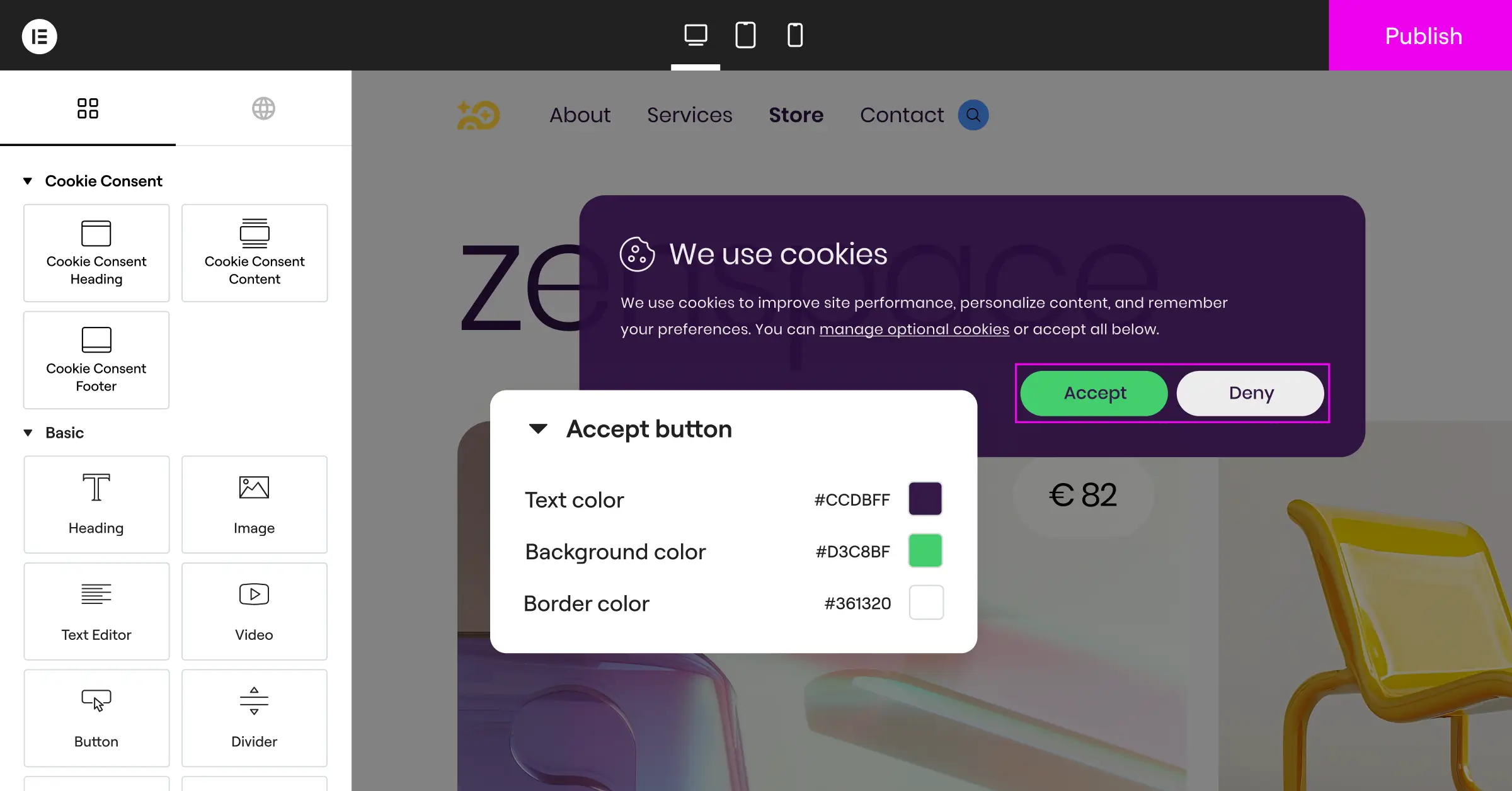
For WordPress creators who want something straightforward and native, Cookie Consent stands out. Built directly into Elementor, this capability handles privacy requirements inside your WordPress dashboard, no external accounts, no script tags in your header. You design your preferences button and consent banners in the same visual editor you already use. Setup takes under five minutes, and once a visitor gives consent, the widget lets them revisit their choices anytime.

Core Capabilities
- Manages cookie scanning and categorization from your dashboard.
- Saves setup time with a quick three-step process.
- Maintains visual control with native styling that matches your brand.
- Supports Google Consent Mode v2 for accurate analytics and ads.
- Keeps detailed, secure consent logs for compliance audits.
- Targets specific regions with built-in geo-targeting.
Pros & Cons
- Pro, Native to WordPress, no external dashboards or subscriptions needed.
- Pro, Strong design flexibility from the native styling engine.
- Pro, Optimized for performance, keeping page speed fast.
- Con, Best suited for sites already using the companion builder.
Verdict: The best pick for WordPress users who want a clean, fast dashboard without SaaS subscriptions.
2. Cookiebot

Cookiebot is an established, cloud-based consent platform used across many content management systems, known for automated scanning that finds and categorizes tracking scripts monthly. It generates a dynamic preferences button for your footer or a floating widget, configured in an external cloud manager.
Core Capabilities
- Scans your website every month to detect new tracking scripts.
- Blocks third-party cookies automatically until visitors give consent.
- Generates a dynamic cookie declaration page that updates after every scan.
- Integrates with Google Tag Manager to coordinate script firing.
Pros & Cons
- Pro, Automated scanning means you rarely categorize scripts by hand.
- Pro, Strong multi-language support translates your banners.
- Con, Requires managing setup on an external cloud dashboard.
- Con, Pricing can rise as page views scale up.
Verdict: A solid, automated choice for larger or multi-platform sites.
3. CookieYes

CookieYes is a widely used consent solution with a clean interface for managing preferences. It works with WordPress and non-WordPress sites alike. Setup is straightforward, with a customizable widget in a corner of your pages and clear analytics on consent rates.
Core Capabilities
- Tracks user consent selections in real time with clean charts.
- Displays a floating cookie preferences icon visitors can click anytime.
- Translates your consent banners into more than 30 languages.
- Builds custom layouts that blend into your site’s color scheme.
Pros & Cons
- Pro, Intuitive interface makes setup fast for beginners.
- Pro, Excellent documentation and setup guides.
- Con, Entry-level plan limits can be restrictive if traffic spikes.
- Con, Visual customization needs CSS on some plans.
Verdict: A reliable, user-friendly SaaS platform for cross-platform consent management.
4. Complianz

Complianz is a privacy-focused tool built for WordPress. Its wizard walks you through a questionnaire about your business, audience, and data collected, then generates legal documents and configures your preferences button to meet local rules, a strong fit for Germany or California.
Core Capabilities
- Configures your privacy settings from a step-by-step legal questionnaire.
- Integrates with popular WordPress translation tools.
- Generates legally validated cookie policy documents.
- Detects localized requirements to show banners based on user location.
Pros & Cons
- Pro, Wizard-driven setup makes it hard to miss legal steps.
- Pro, Excellent integration with native WordPress features.
- Con, The interface can feel technical.
- Con, Design customization is rigid.
Verdict: Best for site owners who want a guided legal questionnaire for regional compliance.
5. iubenda

iubenda takes a broader view of compliance, offering legal documents, privacy policies, and cookie consent tools, built for agencies and developers handling compliance for multiple clients. The cookie solution is customizable and updates automatically as privacy laws change.
Core Capabilities
- Generates complete privacy policies, terms of service, and cookie scripts.
- Updates your legal documents automatically as regulations change.
- Adds highly detailed customization tools for consent banners.
- Syncs consent preferences smoothly across multiple subdomains.
Pros & Cons
- Pro, A complete compliance suite beyond simple cookie banners.
- Pro, Legal documents drafted and kept current by an active team.
- Con, Pricing can add up managing many client sites.
- Con, Setup takes longer given the legal options.
Verdict: A good fit for agencies who want client compliance and legal policies in one dashboard.
6. OneTrust

OneTrust is an enterprise-grade trust intelligence platform, built for large corporations needing complex consent workflows, security certifications, and compliance audits. It’s far more than a script blocker, a full-scale data privacy system, likely too much for smaller sites but standard for enterprises with hundreds of digital properties.
Core Capabilities
- Deploys advanced cookie scanning across complex, dynamic web applications.
- Displays detailed analytics dashboards showing consent rates across regions.
- Coordinates preferences across mobile apps, websites, and connected TV portals.
- Integrates directly with major enterprise CRM and marketing platforms.
Pros & Cons
- Pro, Deep features for enterprise compliance and audit readiness.
- Pro, Highly secure and trusted by major financial and healthcare institutions.
- Con, Steep learning curve and complex setup.
- Con, Too heavy and expensive for typical small-to-medium sites.
Verdict: The industry standard for enterprises that need rigorous compliance and dedicated privacy teams.
7. Termly

Termly is built with small businesses in mind, offering affordable compliance generators and cookie consent tools. It helps you create privacy policies, terms of use, and a compliant preferences button with minimal effort, no lawyer needed. The banner is easy to style, and the button drops into your footer with a simple code snippet.
Core Capabilities
- Builds customized legal policies through a step-by-step generator.
- Scans your website to automatically categorize tracking scripts.
- Displays a clean, modern cookie button visitors can click to change preferences.
- Covers major compliance frameworks including GDPR, CCPA, and UK-GDPR.
Pros & Cons
- Pro, Accessible pricing for small businesses and freelancers.
- Pro, Simple policy generators included alongside the consent tool.
- Con, Limited advanced developer features for custom setups.
- Con, The entry-level plan shows prominent Termly branding.
Verdict: A budget-friendly option for small businesses that want policies and cookie consent together.
8. Osano

Osano is a data privacy platform focused on simplicity and ease of use. Its “No-Fine Pledge” gives customers financial reassurance if they use the tool correctly and still face regulatory issues. It’s built for mid-market businesses that want a reliable, legally backed consent solution.
Core Capabilities
- Guarantees compliance through a unique regulatory legal pledge.
- Blocks unknown scripts automatically before they place cookies on user devices.
- Manages subject rights requests (DSAR) through an integrated portal.
- Translates your privacy language into dozens of dialects.
Pros & Cons
- Pro, Legal backing and a “No-Fine Pledge” reassure business owners.
- Pro, Reliable automatic script blocking keeps you compliant.
- Con, Paid plans cost more for small blogs or hobby sites.
- Con, Design customization stays structured for compliance.
Verdict: A premium, reliable option for mid-sized businesses that prioritize legal safety.
9. Usercentrics
Usercentrics is a consent management platform well known in Europe, built to help companies meet strict GDPR and ePrivacy rules. It offers both a managed implementation and an API-first approach, a favorite among developers who want custom consent designs.
Core Capabilities
- Gives developers a powerful API for building fully custom consent designs.
- Integrates with leading advertising platforms to coordinate user choices.
- Includes detailed testing tools to verify scripts block correctly.
- Optimizes opt-in rates using built-in A/B testing.
Pros & Cons
- Pro, Excellent developer tools and API access for custom apps.
- Pro, Built-in optimization tools help improve consent rates.
- Con, Setup can feel complex without development experience.
- Con, The admin dashboard leans on technical terms.
Verdict: The top choice for developers and agencies who want to customize every detail via APIs.
10. Custom GTM Setup
If you’d rather skip a dedicated platform, you can build your own preferences button using Google Tag Manager (GTM) with a custom modal. It’s free of subscription costs and gives full control over your code, but takes a solid grasp of web development, with the button firing a GTM event that reopens your popup so visitors can toggle preferences.
Core Capabilities
- Saves platform costs by using your existing, free GTM container.
- Avoids third-party script bloat with minimal, hand-crafted code.
- Fires your tracking tags precisely based on custom GTM variables.
- Gives you complete freedom over layout, design, and button behavior.
Pros & Cons
- Pro, No monthly fees or third-party branding on your site.
- Pro, Maximum performance since you control how much code loads.
- Con, Requires real technical knowledge to set up and maintain.
- Con, You’re responsible for keeping up with changing privacy laws.
Verdict: Best for experienced developers who want full control without monthly fees.

Comparison of the Best Cookie Preference Solutions
Here’s a quick look at how these top solutions compare across key features:
| Solution | Setup Location | Native WordPress Integration | Google Consent Mode v2 | Best For |
|---|---|---|---|---|
| Cookie Consent | WordPress Dashboard | Excellent (Built-In) | Yes | WordPress creators wanting speed and simplicity |
| Cookiebot | External Cloud | Good (Via integration helper) | Yes | Automated scanning on multi-platform sites |
| CookieYes | External Cloud | Good | Yes | Simple cross-platform consent management |
| Complianz | WordPress Dashboard | Excellent | Yes | Sites needing a legal wizard approach |
| iubenda | External Cloud | Moderate | Yes | Agencies needing complete legal policy suites |
| OneTrust | External Cloud | Complex | Yes | Enterprise organizations with legal teams |
| Termly | External Cloud | Moderate | Yes | Small businesses wanting bundled policies |
| Osano | External Cloud | Moderate | Yes | Mid-market companies wanting legal protection |
| Usercentrics | External Cloud | Moderate | Yes | Developers wanting custom API solutions |
| Custom GTM | Google Tag Manager | Manual Code | Manual Setup | Advanced developers wanting total code control |
How to Choose the Right Method for Your Website
The best tool for your button depends on your comfort with tech, budget, and how your site was built. Three approaches cover most situations:
- The Native WordPress Approach, If your site runs on WordPress with a visual editor, a native tool like Cookie Consent is almost always your best bet, keeping everything in one dashboard and pages loading fast.
- The Automated SaaS Approach, If you run multiple sites on different platforms (say, WordPress, Shopify, and Webflow), a cloud-based service like CookieYes or Cookiebot manages consent from one dashboard.
- The Custom Developer Approach, If you’re comfortable writing code and managing variables in Google Tag Manager, a custom button gives you total control over performance and styling, with zero monthly costs.
“Adding a cookie preferences button is no longer optional for businesses aiming for compliance. The key is to implement a solution that offers clear visibility to your users without introducing unnecessary technical hurdles or slowing down your page speed.”
– Itamar Haim, Web Compliance Specialist
Step-by-Step: Adding a Cookie Preferences Button
Ready to get your button up and running? Here’s a quick workflow that’ll have you compliant in no time.
Step 1: Scan Your Website for Tracking Cookies
Before you can show a preferences button, you need to know what cookies your site sets. Run an automated scan with your chosen tool, it’ll identify scripts like Google Analytics or Facebook Pixel and sort them by category.
Step 2: Configure Your Consent Banner and Button
Open your consent manager dashboard and customize the colors, fonts, and layout to match your brand. Then enable the floating widget or footer button, the element that lets users reopen settings anytime (often skipped, so keep it visible).
Step 3: Connect Google Consent Mode v2
If you use Google products for analytics or marketing, check that your tool has Google Consent Mode v2 enabled. This keeps tracking compliant by sending consent signals to Google’s servers.
Step 4: Test Your Button and Publish
Before going live, open your site in an incognito window. Click your new button, confirm the settings panel opens, try accepting only essential cookies, then verify marketing scripts don’t load. Then publish and you’re set.
Frequently Asked Questions
Why is a cookie preferences button required on a website?
Under privacy laws like GDPR, visitors must be able to withdraw or modify cookie consent anytime. A persistent button gives them an easy way to do that.
What happens if I don’t have a cookie preferences button?
Without a clear way for visitors to change consent, your site may get flagged as non-compliant, risking warnings, trust issues, and in serious cases, financial penalties.
Does a cookie consent tool slow down my website load speed?
It depends on the tool. Some SaaS widgets add extra scripts that delay loading. A native capability like Cookie Consent keeps your site fast, running inside your existing dashboard.
What is Google Consent Mode v2, and do I need it?
It’s a framework required for sites serving EU and UK visitors using Google Analytics or Ads. It communicates consent choices to Google to adjust tag behavior automatically.
Can I build my own cookie preferences button for free?
Yes, if you have coding experience, you can create a custom HTML modal and link it to Google Tag Manager. That avoids subscription costs but takes manual setup as laws change.
Do I need to show the cookie preferences button to every visitor globally?
Not necessarily. Some tools offer geo-targeting that shows detailed banners to visitors from strict-law regions (like the EU or California), while keeping things simpler elsewhere.
What is the difference between essential and non-essential cookies?
Essential cookies are necessary for your site to function, like keeping items in a cart or securing logins. Non-essential cookies cover tracking, analytics, and marketing scripts, and need consent first.
Can I style my cookie preferences button to match my branding?
Yes. Most modern consent tools let you customize colors, fonts, shapes, and positions. With a native capability like Cookie Consent, you design it using your existing styling rules.

