
Privacy law can feel like a moving target. Whether you run a web agency or handle compliance for a busy brand, one mistake can carry a heavy penalty. But finding the right tool doesn’t have to be a headache. You don’t need to overpay for enterprise software if a nimble, WordPress-native option can do the job, and you shouldn’t cut corners on a basic script if your business needs global legal coverage.
Here’s a look at the real differences between heavy-duty enterprise platforms and lighter small-business alternatives, so you’ll know which tool fits your site, workflow, and budget. It’s simpler than it looks, and you’ve got this.
Key Takeaways
- Scale shapes your choice: enterprise tools focus on multi-domain management and deep legal mapping; small business tools focus on fast setup and simplicity.
- WordPress integration matters: a native tool keeps site speed high and skips external accounts.
- Google Consent Mode v2 matters in 2026: your tool needs to support it for accurate advertising analytics on European traffic.
- Geo-targeting protects conversions: banners only for visitors in strict privacy regions keep things clean for everyone else.
- Audits need proof: keep secure, organized consent logs so you can show compliance if a regulator asks.
The Core Differences: Enterprise vs. Small Business Consent Tools
Consent solutions can look deceptively similar at first. Almost every tool promises a clean banner and automated scanning. But look past the surface, and the differences between enterprise systems and small business tools stand out fast.
Enterprise platforms handle organizations with complex security needs, deep legal teams, and hundreds of web properties, connecting with data privacy software for data subject access requests, mobile app consent, and internal data warehouses. That fits massive operations, but usually needs a developer to run.
Small business solutions focus on speed, clarity, and ease of use, built for teams who want compliance set up in under five minutes so they can get back to business. These tools stick to the essentials: scanning pages, sorting trackers, and showing a compliant banner. If you run your sites on a platform like Elementor, native capabilities like the built-in Cookie Consent feature manage everything right from your editor, with no external scripts weighing down your dashboard.
| Feature Category | Enterprise Solutions (e.g., OneTrust, Osano) | Small Business Solutions (e.g., Cookie Consent, Complianz) |
|---|---|---|
| Dashboard Setup | External, highly complex, requires training | Native to CMS or simple visual wizard |
| Multi-Domain Control | Centralized cross-domain and cross-app tracking | Domain-by-domain or simple group setups |
| Consent Mode v2 | Deep integration with enterprise ad managers | Simple toggle switch for standard analytics |
| Implementation Speed | Weeks to months of setup and testing | Under five minutes (it’s simpler than it sounds) |
| Data Localization | Global hosting options with strict residency | Standard secure cloud hosting or local storage |
Knowing these differences helps you dodge two mistakes: buying an enterprise suite you’ll never fully use, or a basic script that falls short under today’s privacy laws.
10 Best Cookie Consent Solutions for 2026
Here are the top ten systems on the market, organized by audience, from native tools through mid-market and enterprise platforms.
1. Cookie Consent (by Elementor)
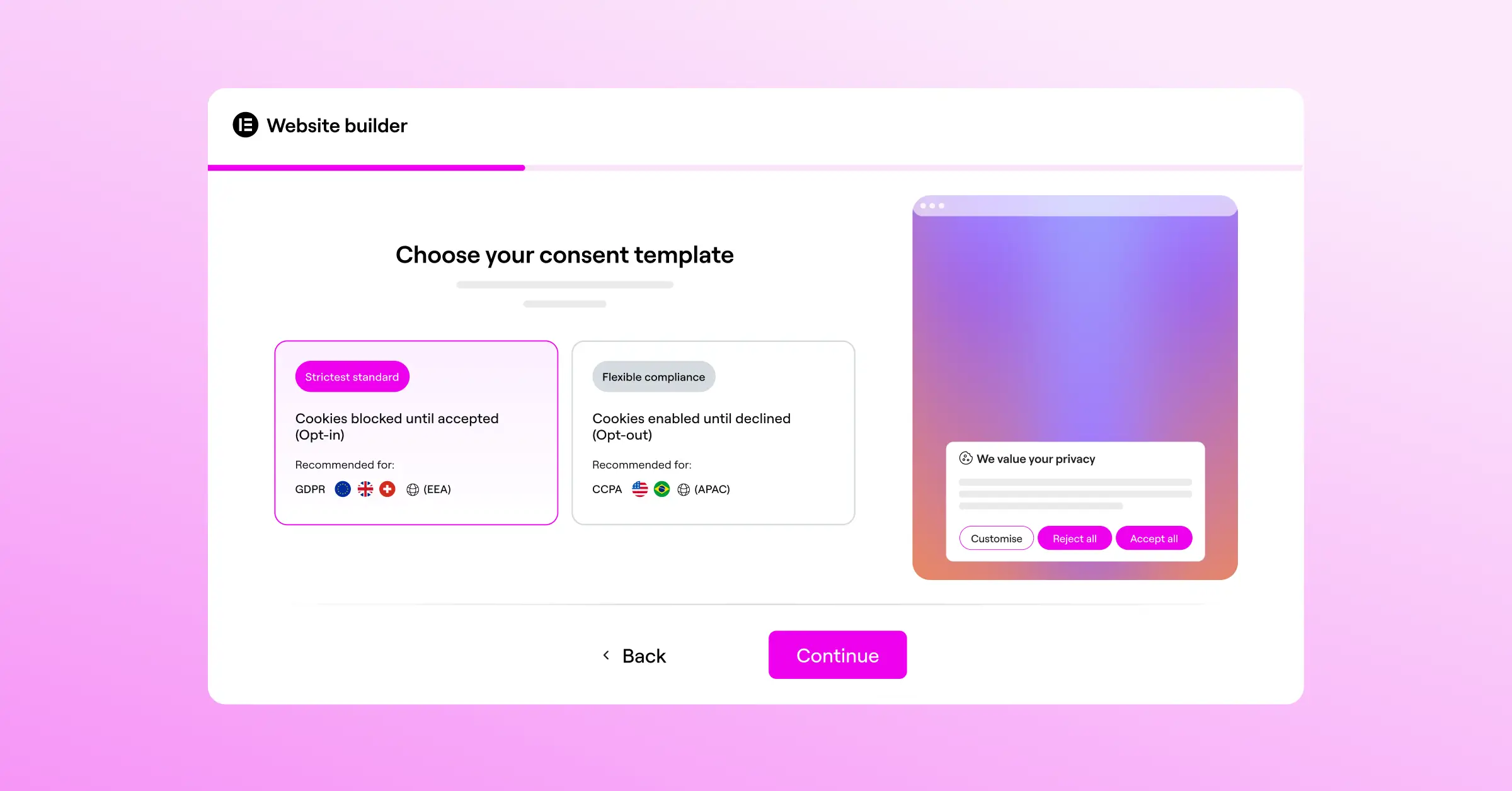
Built as a core compliance capability inside the Elementor ecosystem, Cookie Consent lets WordPress users manage privacy rules without leaving their website builder, with no external accounts or scripts.

- Builds responsive, branded consent banners using native styling controls.
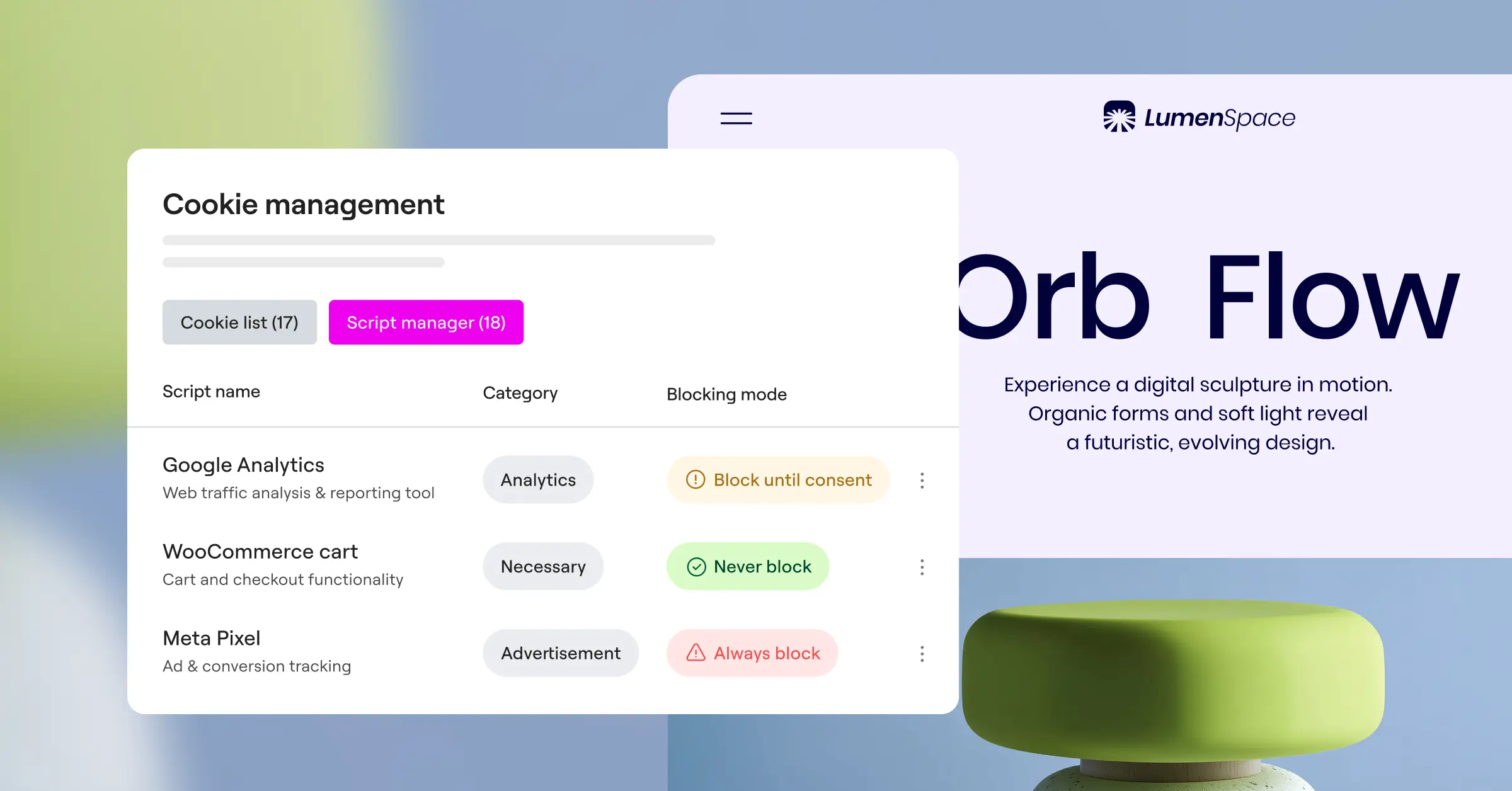
- Scans your pages to find active scripts and sort trackers automatically.
- Supports Google Consent Mode v2 out of the box for accurate analytics.
- Maintains clear consent logs so you have records ready for an audit.
- Applies geo-targeting to show banners only where laws require them.
- Generates basic privacy policy text with a built-in assistant.
Pros & Cons
- Pro: Fully native to WordPress, no external accounts or third-party code slowdowns.
- Pro: Setup takes under five minutes, a big win for busy agencies.
- Pro: Keeps your design aligned with your theme, no custom CSS needed.
- Con: Built for WordPress only, so it won’t work on other platforms.
- Con: No enterprise cross-app tracking for native iOS or Android apps.
The Verdict
For WordPress owners and agencies, this native capability balances speed, performance, and compliance without enterprise complexity. It’s included in Elementor One alongside tools like Web Accessibility.
“When sites add third-party compliance scripts, they often sacrifice critical page-load speed. Keeping your compliance tools native to your website builder is a smart way to protect user experience while meeting modern legal standards.”
– Itamar Haim, Web Compliance Specialist
2. OneTrust
OneTrust is an established enterprise platform for deep compliance management, built for companies managing vendor risk, environmental goals, and privacy requests across thousands of properties.

- Maps complex data flows across web domains, mobile apps, and internal databases.
- Integrates with internal security systems to verify identities during data requests.
- Provides legal updates that automatically adjust banners for regional changes.
- Automates vendor assessment workflows to track third-party data use.
- Maintains audit-ready records across global regions.
Pros & Cons
- Pro: A thorough suite covering a wide range of global privacy laws.
- Pro: Well suited for multinational organizations with thousands of touchpoints.
- Con: Complex dashboard that usually needs dedicated training or an admin.
- Con: Implementation can take weeks or months with your legal team.
The Verdict
OneTrust suits large enterprises needing full compliance monitoring. It’s usually too much for typical small businesses or independent publishers.
3. Cookiebot
Cookiebot sits between mid-market businesses and growing enterprises, an external cloud dashboard with an automated scanner that finds and blocks tracking cookies.

- Scans your entire site every month to catch new tracking scripts.
- Generates a cookie declaration list that updates on your privacy page.
- Controls cookie blocking before consent, keeping tracking legally compliant.
- Supports multi-language configurations for global audiences.
- Saves encrypted consent choices to secure cloud storage.
Pros & Cons
- Pro: Automated scanning that needs very little manual sorting.
- Pro: Easy to add the main script into almost any CMS.
- Con: Pricing scales with page views, so costs climb with traffic.
- Con: Matching the banner to exact branding can call for custom CSS.
The Verdict
Cookiebot suits content-heavy sites that want automated scanning and don’t mind an external cloud dashboard.
4. CookieYes
CookieYes is a popular choice for small to medium businesses. Its clean, web-based dashboard lets you manage banners, track choices, and record consent logs without much technical know-how.

- Builds custom consent banners with a visual preview panel.
- Logs user consent actions securely for GDPR audit trails.
- Detects the visitor’s location to show the correct legal banner.
- Blocks third-party scripts automatically until consent is granted.
- Connects easily with major tag management tools.
Pros & Cons
- Pro: A straightforward interface that’s easy for beginners.
- Pro: Includes an entry-level plan for small blogs and personal sites.
- Con: Advanced customization is limited to higher-tier plans.
- Con: Managing several client sites means flipping between dashboards.
The Verdict
CookieYes is a friendly option for creators who want a simple external service to stay compliant without much fuss.
5. Complianz
Complianz is a privacy suite built for WordPress. Its step-by-step wizard walks you through local configuration, so you only ask for the consent each visitor’s location requires.

- Configures consent parameters using a localized questionnaire style.
- Integrates with popular WordPress translation tools.
- Blocks tracking cookies from major social and video platforms.
- Generates legal documents linked directly to your site menu.
- Syncs with native systems to keep processing fast and light.
Pros & Cons
- Pro: Highly targeted legal logic that adapts to your country of business.
- Pro: Runs directly within WordPress, no external dependency.
- Con: The setup wizard is detailed and can feel long for a quick config.
- Con: Styling controls are less intuitive than modern page builders.
The Verdict
Complianz suits European businesses needing document-focused compliance entirely within WordPress.

6. iubenda
iubenda provides auto-updating privacy policies, terms, and cookie consent management in one place, helping small businesses stay compliant across channels.

- Generates legally verified privacy and cookie policy documents in several languages.
- Updates policy text automatically when compliance laws change.
- Saves consent preferences with an easy-to-use developer API.
- Optimizes banner appearance to limit impact on site design.
- Handles complex legal requirements for shops and mobile apps.
Pros & Cons
- Pro: A complete legal solution beyond basic cookie banners.
- Pro: Written and maintained by a team of international lawyers.
- Con: The credit-based pricing can be confusing to budget for.
- Con: Configuring complex policies can take time given the options.
The Verdict
If you need full legal documentation alongside your banner, iubenda is a solid, professional choice.
7. Osano
Osano is an easy-to-use enterprise compliance platform. Its financial pledge against class-action lawsuits gives legal teams added confidence.

- Monitors and rates the data practices of thousands of software vendors.
- Blocks unknown trackers automatically to stop unauthorized scripts.
- Simplifies data subject access requests through a secure portal.
- Translates consent banners into dozens of languages.
- Restricts data transfers to high-risk vendors based on assessments.
Pros & Cons
- Pro: Script-blocking technology that stops unapproved tracking.
- Pro: The compliance guarantee reassures large corporate legal teams.
- Con: Enterprise plans need a significant budget commitment.
- Con: Styling is functional but can feel rigid for creative sites.
The Verdict
Osano suits corporations wanting a secure, verified partner with budget for premium enterprise licensing.
8. Termly
Termly is a cost-effective compliance suite for small businesses, startups, and solo creators, helping you quickly create policies and banners without legal training.

- Builds custom privacy policies, terms of service, and disclaimers.
- Scans your site to identify cookies and organize them into tables.
- Assembles simple consent banners matching basic brand colors.
- Translates basic banners into several European languages.
- Saves simple user selections for data preferences.
Pros & Cons
- Pro: A very affordable option for testing first compliance strategies.
- Pro: The dashboard is intuitive and skips confusing jargon.
- Con: Lacks deep geo-targeting for advanced multi-region setups.
- Con: Not built for complex enterprise integrations or custom code.
The Verdict
Termly is a great pick for startups and solo operators wanting a quick, affordable way to publish terms and banners.
9. Ketch
Ketch is a programmatic data management platform for enterprises treating compliance as a data asset, automating privacy operations across regions and datasets.
- Syncs customer consent choices directly with internal CRM and analytics systems.
- Automates complex data deletion tasks across connected cloud databases.
- Provides a customizable compliance engine that adapts to global rules.
- Delivers lightweight tracking scripts to keep pages fast.
- Evaluates data risk metrics to help legal teams avoid exposure.
Pros & Cons
- Pro: Powerful integration for modern cloud-based architectures.
- Pro: Fast script delivery that doesn’t hurt web performance.
- Con: Needs professional development resources to configure.
- Con: Far too advanced for simple sites needing basic cookie blocking.
The Verdict
Ketch is ideal for tech-forward enterprises syncing compliance preferences deep across their application ecosystem.
10. Usercentrics
Usercentrics is a flexible consent platform for mid-sized to enterprise organizations, valued for its developer-friendly API and integration options across websites and native apps.
- Delivers a fully customizable programmatic API for complete layout control.
- Integrates with leading ad networks to control data flow at the source.
- Aggregates cross-device consent selections for a consistent experience.
- Supports gaming platforms, smart TVs, and mobile app frameworks.
- Maintains localized setting rules that adjust as laws evolve.
Pros & Cons
- Pro: A flexible code structure developers appreciate for custom builds.
- Pro: Excellent documentation and developer support.
- Con: Needs technical familiarity to implement advanced features.
- Con: Visual setup is less intuitive than native site-builder tools.
The Verdict
Usercentrics is a strong option for software companies and mid-market brands building a custom, deep compliance experience.
Choosing Your Best Compliance Fit
Picking the right tool comes down to where your website lives and how you manage your workflow. Here are three scenarios where different solutions genuinely shine.
The Agency and WordPress Creator Scenario
If you run a creative web agency or manage a portfolio of WordPress sites, efficiency is your top priority, without juggling dashboards or explaining systems to clients. The native Elementor Cookie Consent capability fits naturally here: customize the banner, set up regional targeting, and manage scripts right inside your editor.
The Corporate Multi-Domain Scenario
If you’re a compliance manager at a company with hundreds of domains, several mobile apps, and an in-house legal team, you need global centralization. A platform like OneTrust or Osano fits best, giving your legal team a hub to manage vendor risk, run audits, and maintain compliance across departments.
The Custom App and Developer Scenario
If you’re building a custom web or mobile app, you need a developer-focused API. Solutions like Usercentrics or Ketch are built for these environments, letting your engineering team wire consent preferences directly into your databases.
The best compliance tool is the one that actually gets used. Start with your platform, check your resources, and pick the solution that keeps visitors safe without adding to your daily work.
Frequently Asked Questions
Why do I need a cookie consent banner on my website?
GDPR in Europe and CCPA in California require you to tell visitors how you collect their data. A banner lets users decide whether to allow tracking cookies before scripts load, helping you avoid penalties and build trust.
What is Google Consent Mode v2 and is it required?
Google Consent Mode v2 passes your visitors’ consent choices directly to Google ad and analytics tags. If you serve EU visitors and use Google Analytics or Ads, a tool that supports it keeps your advertising and measurement accurate.
Can I use a free cookie consent tool for my business?
Yes, many quality tools offer generous entry-level plans. Elementor’s Cookie Consent capability includes a tier well suited for smaller sites, though you may need to upgrade as traffic grows or you need features like geo-targeting.
Does a cookie consent banner slow down my website load speed?
It can, if you use heavy, poorly optimized third-party scripts. A native tool is often the better option: it runs directly from your server alongside your site assets, keeping your page speed high and protecting your rankings.
What is geo-targeting in cookie consent?
Geo-targeting detects where a visitor is located and shows a consent banner built for their local laws. Visitors in strict regions see the required banners; visitors elsewhere get a cleaner layout without pop-ups (it’s simpler than it sounds).
How often does my website need to be scanned for cookies?
Scan your site at least once a month, or whenever you add a new marketing tool, tracking pixel, or media asset. Regular scans keep your cookie declaration list accurate and stop new scripts loading without consent.
Is a privacy policy generator included in consent tools?
Many compliance systems include a built-in policy generator to help draft initial legal documents. It’s a fast starting point, but it’s worth having legal counsel review the final text.

