Typically, a static site can’t use Gravity Forms because it requires interaction with a database. However, Elementor Static Hosting websites has support for Gravity Forms built in. Below are the Gravity Forms features supported by Elementor Static Hosting websites.
Standard Fields
| Single line text ✔️ Dropdown ✔️ Number ✔️ Radio Buttons ✔️ HTML ✔️ Page ???? (not supported) Paragraph Text ✔️ Multi Select ✔️ Checkboxes ✔️ Hidden ✔️ Section ✔️ |
Advanced Fields
| Name ✔️ Time ✔️ Address ✔️ Email ✔️ CAPTCHA (learn more) Consent ✔️ Date ✔️ Phone ✔️ Website ✔️ File Upload ✔️ (single file only, multi-file upload is not supported) List ✔️ |
Required Fields
You can make any field required!
Appearance settings:
| Placeholder ✔️ Field Label Visibility ✔️ Description Placement ✔️ Custom validation message ✔️ Custom CSS Class ✔️ Field Size ✔️ |
Advanced settings:
| Admin Field Label ✔️ Default Value ✔️ Enable Password Input ✔️ Visibility ✔️ Allow field to be populated dynamically (text fields only) ✔️ Conditional Logic ✔️ |
Conditional logic for confirmations and notifications
You can use conditional logic for notifications and confirmations to show or send different messages based on data selected in a form. Learn more about conditional logic for confirmations and notifications.
Confirmations
After a user fills out a form, you can display a thank you message or redirect to a page or URL.
Notifications
Send an email notification upon submission.
Supported features:
- Send to field ✔️
- Reply to field ✔️
- BCC field ✔️
- Standard Merge tags (e.g. {admin_email}, {form_title}, {all_fields}) ✔️
All emails sent from Elementor Static Hosting’s server will be sent from [email protected], in order to send from your own custom domain, you need to configure your own SMTP server.
Form Settings
| Supported features: Form title ✔️ Form description ✔️ Label placement ✔️ Description placement ✔️ Sub-label placement ✔️ CSS class name ✔️ Input Type ✔️ Button Text ✔️ Button conditional logic ✔️ Animated transitions ✔️ Form settings not supported by Static Hosting at this time: Save and Continue ???? Limit number of entries ???? Schedule form ???? Require user to be logged in ???? Anti-spam honeypot ???? (not supported but general Anti-Spam support coming soon) |
Other supported features
- Zapier integration
- Send notifications using merge tags – send notifications to a field filled out in the submission
- Signature Add-on
- Google reCaptcha
View Form Submissions
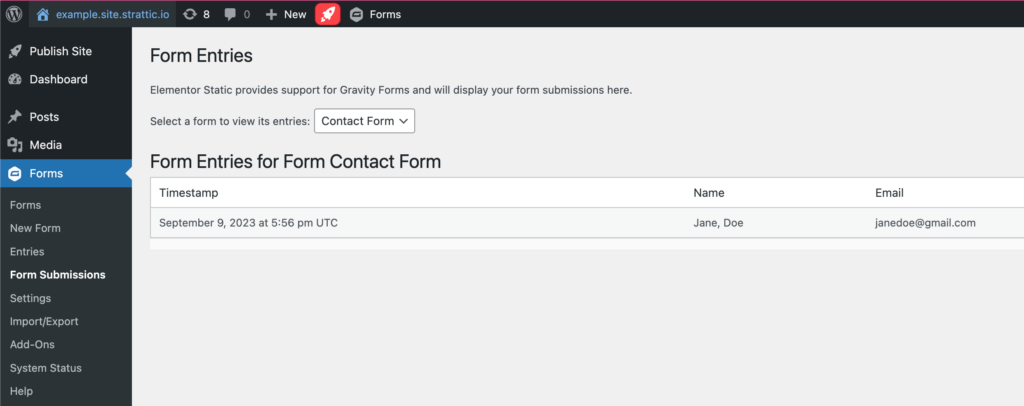
1. Navigate to Forms > Form Submissions.
2. From the drop down menu, select the one of your forms.