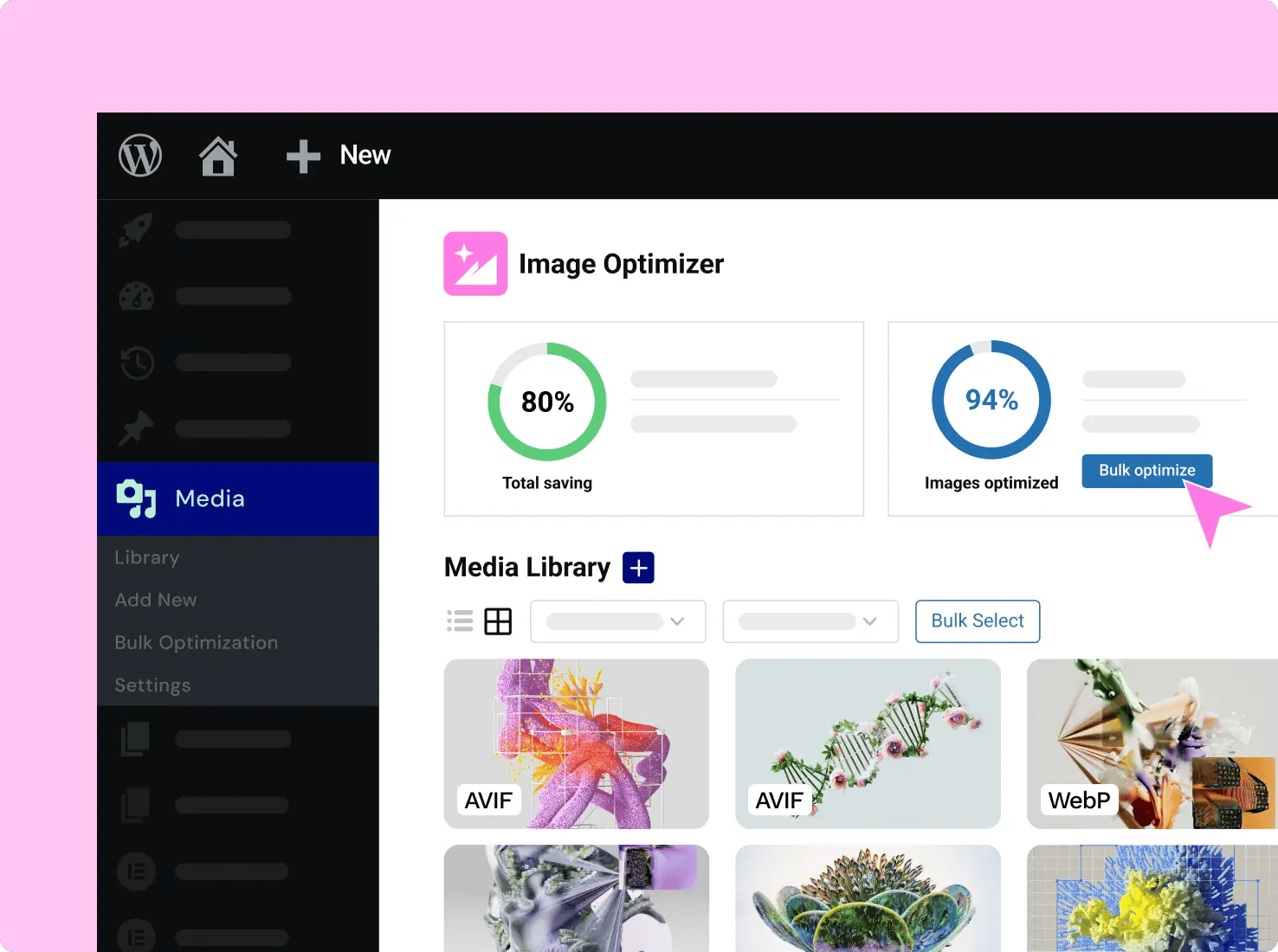
Speed Up Your Website with Image Optimizer
How We Crush Image Bloat
”We’ve seen significant improvements in load times—up to 40% faster in some cases. As an agency focused on SEO, marketing performance and user experience, Image Optimizer has become an essential part of our toolkit.

Strachi Nikolic
DLM digital
Set It, Forget It!
- Convert Images to WebP or AVIF Format
- Choose Lossless or Lossy Compression
- Resize Large Images
- Remove Unnecessary EXIF Metadata
- Optimize Upon Upload or in Bulk
- Backup and Restore Original Image Files
How Image Optimizer Boosts Your Business
Choose Your Image Optimizer Plan
Image Optimizer Free trial
- Up to 200 images total
- Features
- Unlimited websites (included)
- Bulk optimization (included)
- WebP & AVIF conversion (included)
- Max upload size: 10MB/image (included)
- No credit card required at checkout
Image Optimizer Pro
- Up to 5,000 images annually
- Features
- Unlimited websites (included)
- Bulk optimization (included)
- WebP & AVIF conversion (included)
- Max upload size: 10MB/image (included)
One
/Mo
/Mo
- All features in , plus:
- 25,000 monthly One credits Credits can be used flexibly across AI features, image optimization, accessibility scans & fixes, emails and additional features as they're added.
- 1 site
- Create
- 86 Editor Pro widgets(included)
- Theme Builder(included)
- Dynamic Content (included)Connect your design to your WordPress content. Use custom fields and post types to display dynamic data nywhere on your site.
- Form Builder (included)Collect leads with professional forms you can integrate with your favorite marketing tools. Then manage and analyze from one central dashboard in WordPress.
- Popup Builder(included)
- Custom code & CSS(included)
- eCommerce features(included)
- AI generated code, copy, images, & layouts (included)Boost your workflow with powerful AI tools including custom code generation, layout building, image creation, and content writing.
- Optimize
- Image optimization (Valued at /yr)(included) Optimize site performance with bulk image processing for WebP & AVIF conversion.
- Accessibility fixes (Valued at /yr)(included) Enhance your site’s accessibility with scans, AI-powered fixes, and site-wide improvements, plus a customizable usability widget featuring 15+ tools, screen-reader support, language options, white-labeling, and usage analytics.
- Manage
- Priority Support (included)Access high-priority support from dedicated Elementor experts.
- 20 Cloud Templates (included)Store sections, containers, and other design elements in the cloud, making them accessible across all your connected sites for a more flexible and scalable workflow.
- Collaborative Notes(included)
- Site Mailer (Valued at /yr)(included) Send reliable, transactional emails with built-in tracking, troubleshooting tools, and advanced authentication, no SMTP plugin required. Enjoy custom domains, detailed logs, resend/testing options, and smart suppression management for smoother, more professional email performance.
- Manage (Coming soon)(included)
Image Optimizer Pro is non-refundable, try it free on any Elementor Website.
All subscriptions renew based on your billing cycle at list price.
Prices are rounded for display. Your final price at checkout may be slightly lower.
The final price will be displayed on the checkout page. All subscriptions renew based on your billing cycle at list price.
Prices are rounded for display. Your final price at checkout may be slightly lower.
All subscriptions renew based on your billing cycle at list price.
How image optimization works
Your plan includes an annual image optimization allowance.
Each image you upload is optimized across all required sizes.
What counts as an image optimization
When you upload an image, WordPress automatically creates multiple versions of that image (such as different sizes for desktop, tablet, and mobile). Each version is optimized individually.
For example, uploading 1 image will result in multiple optimized image versions, depending on your site settings and the image sizes WordPress generates.
Widget List
Here's an example of how to use your credits in one year
- One
- One Agency
- Editor
- Unlimited use for a single site
- Unlimited use
- Image optimizations
- 2,400
- 69,000
- AI text prompts
- 1,200
- 12,000
- AI code prompts
- 1,080
- 4,980
- AI image prompts
- 120
- 2,040
- AI container prompts
- 120
- 2,400
- URLs to scan for accessbility
- 25
- 5,000
- Accessibility fixes
- 960
- 3,600
- Site Mailer emails
- 4,800
- 48,240
Don’t Take Our Word For it
Spread Agency
FAQ
Image optimization can significantly improve your website’s loading time, which is crucial for user experience and SEO. It reduces the size of your images without compromising their quality, leading to faster page load times and better performance scores.
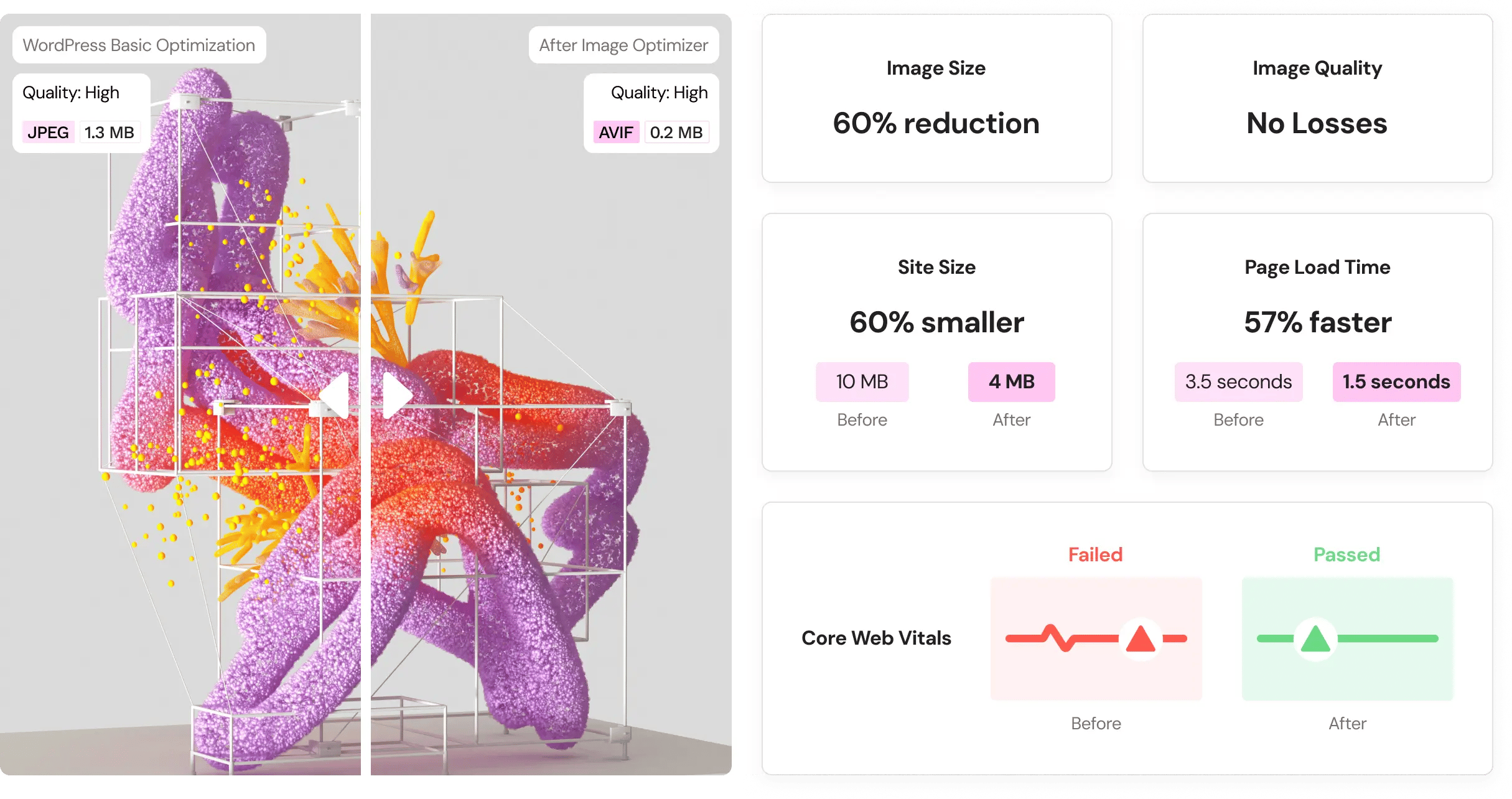
Lossless compression retains the original quality of the image while reducing its file size. On the other hand, lossy compression reduces the file size by eliminating some image data, which can slightly reduce image quality. The choice between the two depends on your needs: if image quality is paramount, go for lossless; if file size is more critical, consider lossy.
No, Elementor Image Optimizer will save both the original and the compressed versions of your images. You can always restore the original image if needed.
The free trial gives you credits that you can use towards optimizing any images. Since WordPress uses, on average, 5 basic image sizes, you can expect to be able to generate about 50 images, free of charge. Once you’ve had a chance to test this tool and you’re ready to optimize the rest of your media library – you can upgrade to any one of our 3 paid plans to meet your needs.
If you cancel your subscription, all your previously compressed images remain available on your website. However, you won’t be able to compress new images unless you renew your subscription or stay within the free trial limit.
WebP and AVIF are the latest image formats that significantly reduce the file size of images with lossless and lossy compression for faster website load times. Most web browsers today support these formats, and if they don’t, the original backup will be used.
This plugin is a modern approach that is designed to do all the “heavy lifting” of converting and compressing images on a dedicated server, so your own server won’t suffer from any downtime or the need to keep the tab open. It offers on-the-fly optimization, WebP conversion, and other features tailored to Elementor users’ needs.
Absolutely. Image Optimizer by Elementor is a stand-alone WordPress plugin that can be used to optimize images for any or all of your WordPress websites.
The settings screen of the plugin provides comprehensive compression information, including the number of images that can benefit from optimization.
Absolutely! You can either compress images in bulk, compress specific image files individually, or automatically compress upon image upload.
When using lossy compression, there’s a slight reduction in image quality which is usually invisible to the naked eye. However, this plugin provides options for both lossless and lossy compression, allowing you to choose your compression mode based on your preferences. Your website is valuable to you, and as with any significant changes you make, we recommend backing up your website beforehand.
Each Image Optimizer plan gives you an annual amount of credits to spend on images you want to compress. One image compression usually requires 5 credits, on average, since each image usually has 5 associated basic WordPress sizes that will also be compressed. In some cases, 2 or 3 more additional default sizes will be needed, depending on your WordPress image settings. If you want to make changes to which sizes are optimized, you can do so in the Image Optimizer settings screen.
Credits cannot be rolled over to the next year. Any leftover credits at the end of the year will automatically reset.
You can view your subscription status at all times within the Image Optimizer settings dashboard. In addition, you will be notified when you’ve reached 80% of your plan’s consumption.
Have more questions? Try the Elementor Help Center or Contact Us.